All How to Remove Extraction Errors with Data Quality Management Software
October 18, 202610 min read


Your extraction software can read every digit on an invoice and still put the total in the tax field.
A scanned CV can lose employment data and a safety data sheet can end up linked to the wrong product. But the workflow keeps moving, carrying errors into the systems that depend on it.
Data quality management software helps you catch those mistakes before they spread. It works with extraction software to apply validation rules and reference checks, routing questionable records to review queues.
The goal is simple: let valid data proceed and flag what needs a person’s attention.
The stakes grow when that data feeds AI. In Informatica’s 2025 survey of 600 data leaders, 43% identified data quality, completeness, and readiness as obstacles to moving more generative AI projects into production. Addressing those problems starts where documents become data.
Let’s take a look at the importance of data quality management software and how businesses use it to improve their workflows. This article is prepared by SapientPro’s engineer Dmytro Kulyk and head of project management Ilya Vorobets.
What Is Data Quality Management and Why Does Accuracy Matter
Data quality management means checking and correcting data so it is reliable for the task at hand. It covers six dimensions:
- Accuracy;
- Completeness;
- Consistency;
- Validity;
- Uniqueness;
- Timeliness.
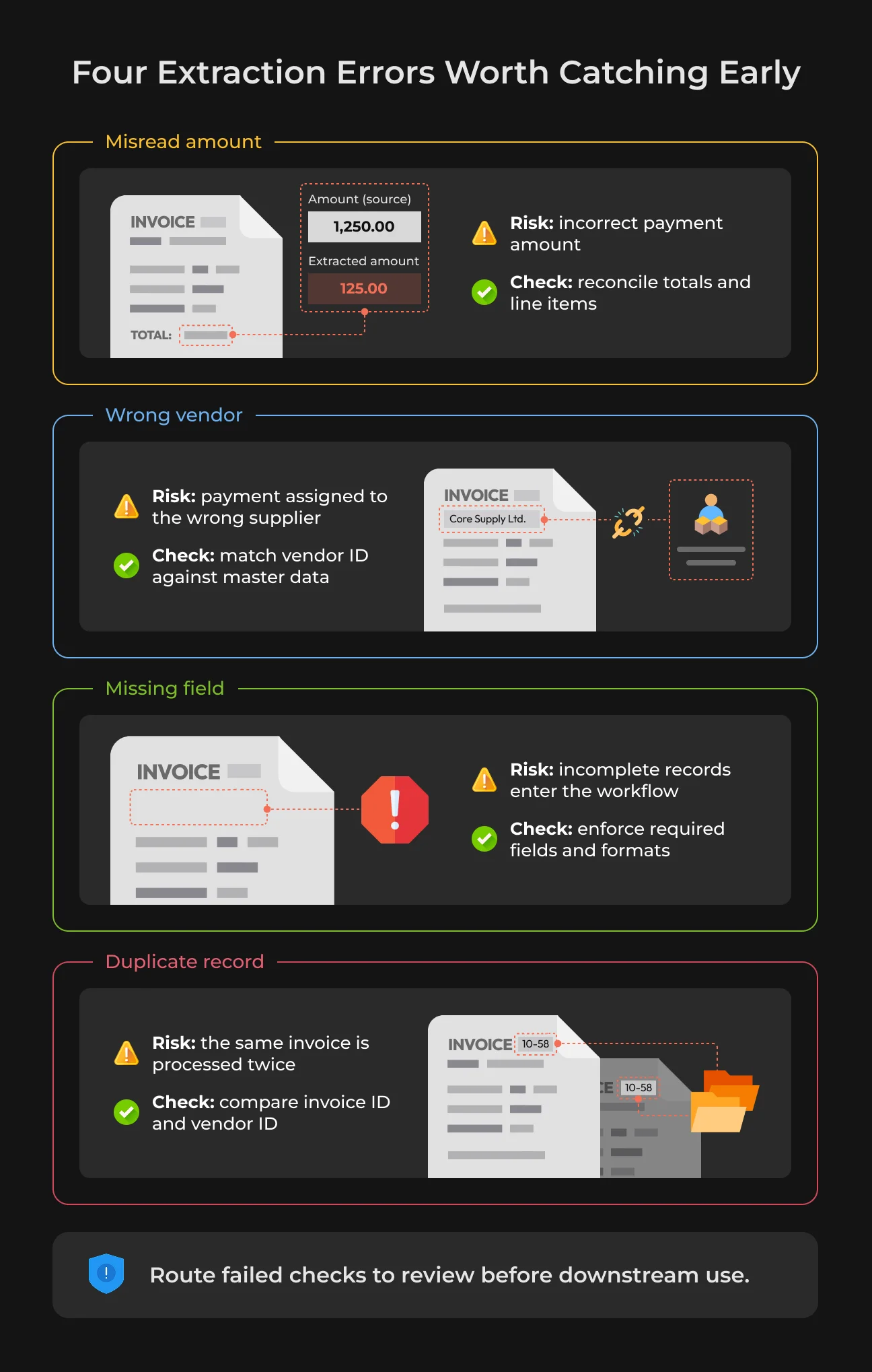
These checks pinpoint different problems. An invoice number may follow the correct format but still belong to the wrong supplier. Errors matter because people and systems act on the data they receive.
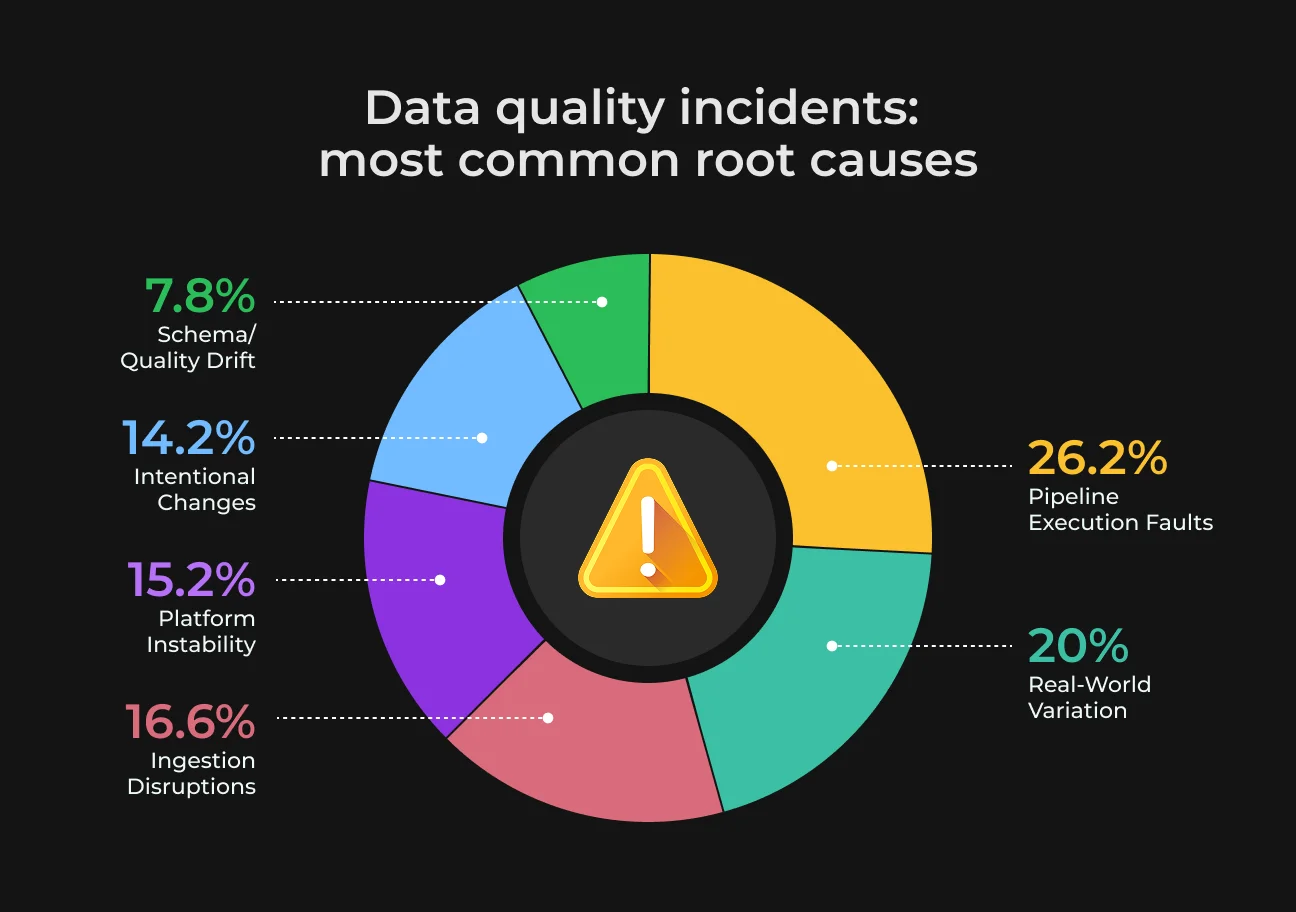
An incorrect amount can delay a payment. A missing qualification can exclude a suitable candidate from a recruiter’s search results. Poor source data can also lead to misleading AI responses, though accurate inputs alone cannot prevent every model error.
Data quality tools apply checks, flag problems, and track corrections. Teams define the rules: which fields are required, what values are acceptable, and which errors need human review. Clear ownership gives each flagged issue someone responsible for resolving it.
Why Data Extraction Errors Reach Business Systems
Many business systems have one big flaw: they accept readable text without checking whether the resulting records are complete, correctly labeled, and ready to use.
Let’s take a closer look at these issues.
OCR Accuracy Does Not Equal Record Accuracy
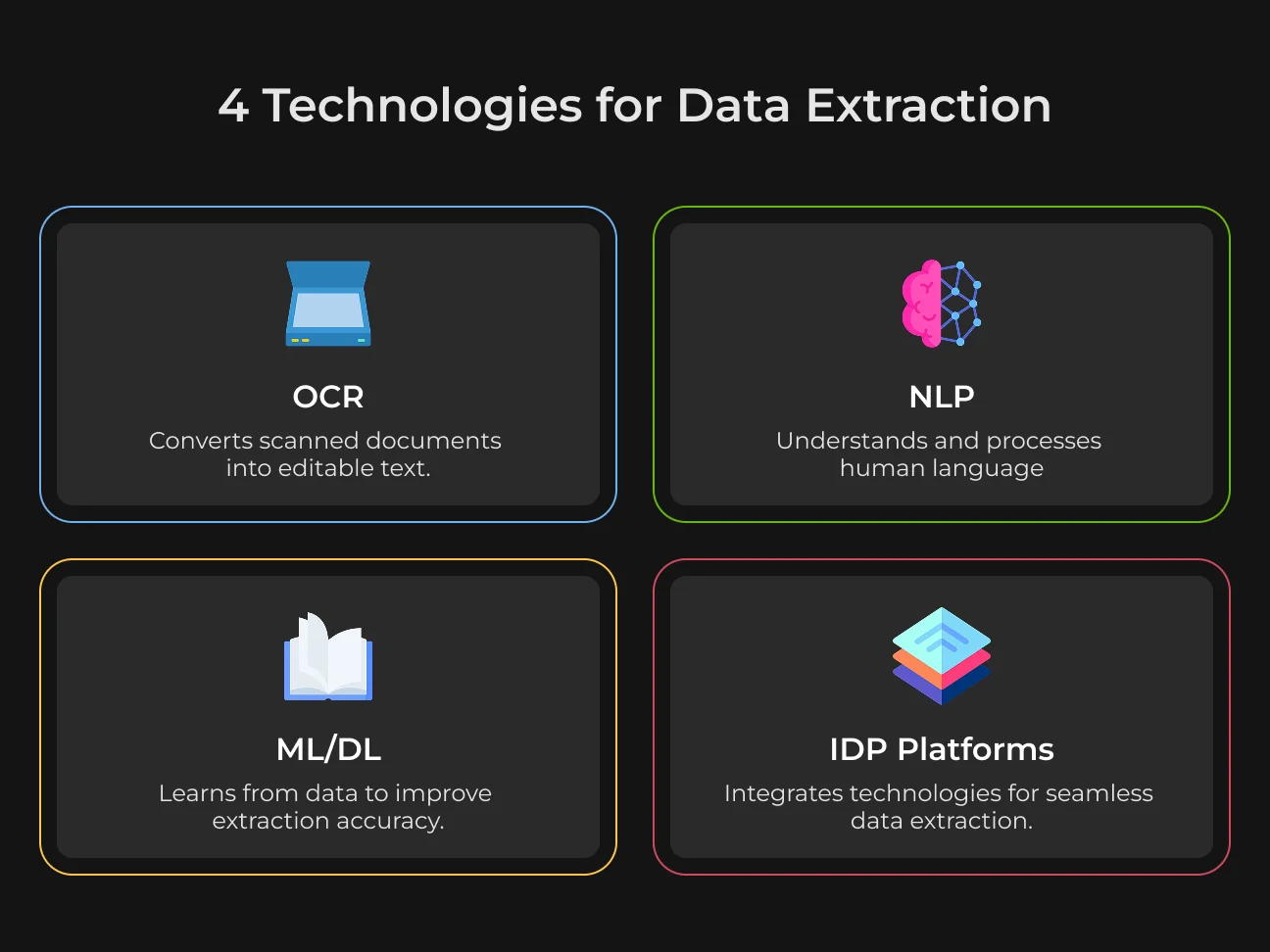
Optical character recognition converts text from images into machine-readable content. You need to have extra logic in the system to assign that text to the correct business field. The system may read every digit correctly and still mistake a subtotal for the amount due.
Document structure adds another challenge. In an OmniDocBench benchmark test, the tested GOT-OCR model scored 80.2 out of 100 on tables without merged cells, compared with 65.0 on tables with merged cells.
These scores measure how closely extracted tables match the reference tables, rather than the percentage of fully correct business records. That’s why simply recognizing text isn’t enough.
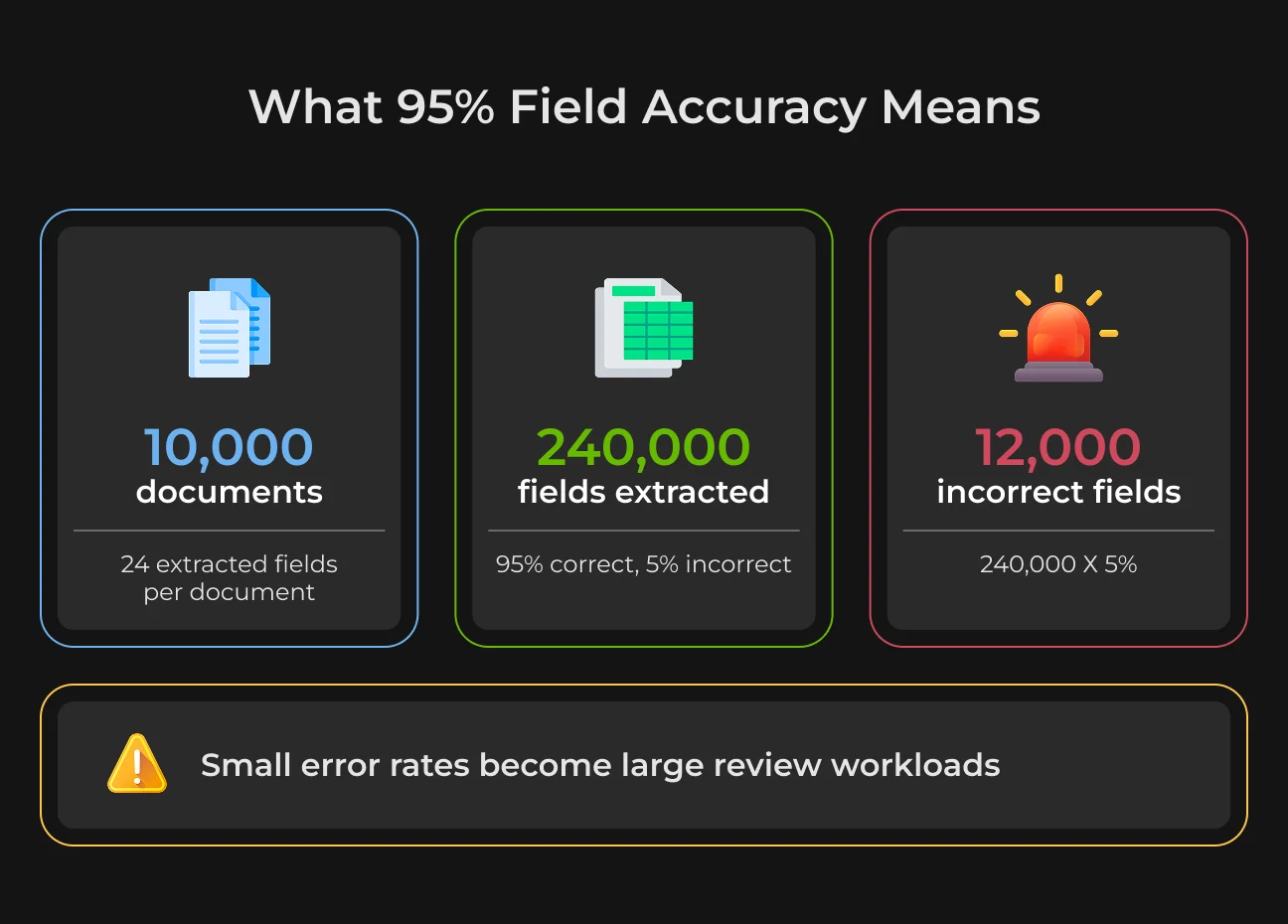
According to a recent analysis of OCR limitations, which draws on TDWI and industry benchmarks, field-level extraction accuracy routinely drops to 95%–97% under real-world operational conditions. A 95% field-level accuracy rate means that 1 out of every 20 critical data fields is incorrectly parsed.
Traditional OCR without enhanced parsing can miss up to 36% of key data points, while invoice-processing studies report that standard OCR engines fail to accurately lift up to 1 out of every 10 characters from complex layouts.
Extraction Vector | Coordinate-Based OCR | Intelligent Document Processing (IDP) |
| Output Target | Raw, unstructured machine-readable text blocks | Contextual, validated database schemas |
| Layout Adaptability | Extremely brittle; fails on layout variations | Highly dynamic; ignores positional coordinate shifts |
| Parsing Logic | Positional coordinates and static templates | Semantic and visual contextual grounding |
| Error Handling | None; outputs invalid strings without alerting | Built-in reconciliation, balancing, and routing |
| Medium Support | Struggles with low-res scans, skew, and handwriting | Robust preprocessing and intelligent character recognition |
A custom workflow can compare invoice totals with line items, verify supplier details against your ERP, and send conflicting records for review. SapientPro can build these checks into your extraction pipeline and connect it to the systems that use the data.
Undetected Errors Create Work Elsewhere
A duplicate invoice may reach accounts payable, and a missing currency can distort a report. When staff discover the problem later, they must trace the source, correct the record, and check which systems received it. All this leads to extra work that could have been prevented.
Gartner’s February 2025 outlook predicted that organizations would abandon 60% of AI projects unsupported by AI-ready data through 2026. This is a forecast about that subset of projects, not a measured failure rate for all AI initiatives or a statistic about extraction alone.
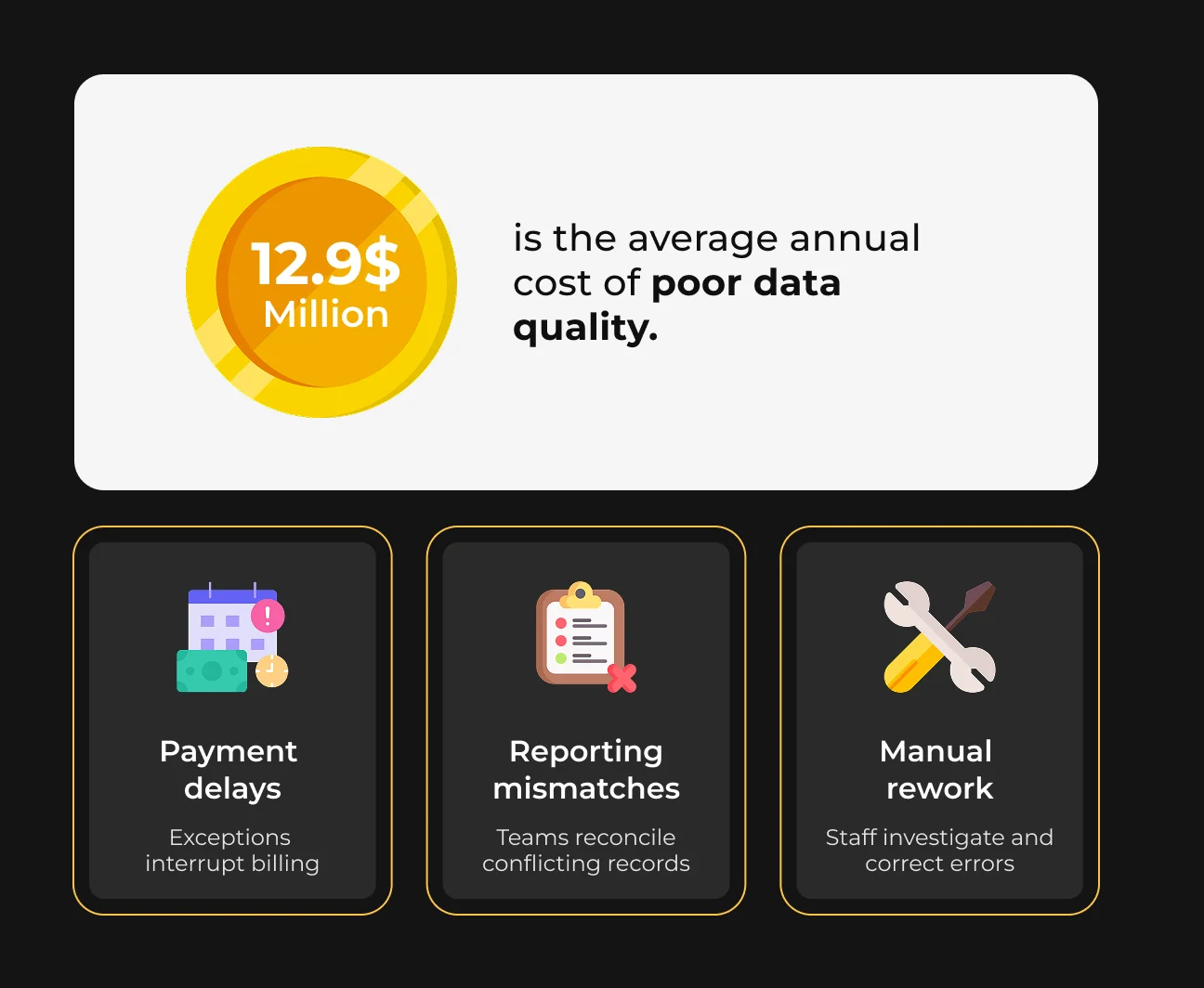
You should measure your own losses before making a decision:
- Correction hours;
- Delayed transactions;
- Errors found after release.
Automating data quality management can help you prevent these losses and save time for more important tasks. Instead of checking everything manually, an AI tool can do it for you. It will ask for a manual revision only when it isn’t sure or finds something wrong.
Spend Less Time Fixing Extracted Data
Discuss your documents with our engineers and identify where automation can reduce rework.

How Data Quality Management Software Reduces Extraction Errors
Let’s take a look at the benefits of data quality management software for your business.
Combine Document Extraction With Validation
Intelligent document processing combines document classification, OCR, and field extraction. Data quality management checks whether the resulting records meet your requirements. Some platforms offer both, while others need integration.
Stage | What It Does | What Still Needs Checking |
|---|---|---|
| OCR | Reads text from an image | Whether characters were read correctly |
| Field extraction | Maps content to fields such as supplier and total | Whether each value belongs to the right field |
| Data validation | Tests formats, totals, and reference matches | Whether the rules cover the relevant business risks |
| Human review | Resolves uncertain or conflicting records | Whether corrections reach downstream systems |
Context-aware models can map labels such as “Total Due” and “Amount Outstanding” to the same field. They still require checks for currency, missing values, and conflicting amounts.
SapientPro’s guide to converting unstructured data into structured records explains the stages between document intake and database output.
Apply Rules Before Exporting Records
Automated data quality management can check required fields, identify duplicates, and compare extracted values with approved reference data. An invoice workflow might match the supplier ID against the vendor register and reconcile the total with line items, tax, and discounts.
Statistical checks can flag unusual amounts, but an unusual transaction is not necessarily wrong. Route it for investigation rather than silently replacing it. Changes to validation rules should be reviewed and versioned so teams can explain why a record passed or failed.
Keep Source Evidence and Monitor Changes
Store the source document, extracted value, rule results, and any reviewer correction together. Where supported, a link to the relevant page region helps reviewers inspect the evidence quickly.
Monitoring should also catch changes in incoming data: new layouts, missing fields, or a rise in rejected records. Data contracts can define expected formats and quality requirements between systems, but teams must implement checks and agree what happens when a contract is broken.
How to Build a Data Quality Management Process
Now let’s see how to set up your data quality management process.
Profile the Documents and Define Acceptance Criteria
Start with one workflow like invoice processing to review a representative sample of documents. Include low-quality scans, unusual layouts, and every language your team regularly uses. Then record which fields are missing or frequently corrected – this will give you an initial look.
Now you should agree on the acceptance criteria with the people using the output.
An invoice amount may require reconciliation before release, while a missing optional description may only need a warning. Turn these requirements into validation rules to test them on a separate test of labeled documents.
Standardize and Validate the Extracted Data
Normalize dates, units, and identifiers before comparing records. Preserve the original values so reviewers can trace each change. SapientPro’s data transformation guide covers how these operations fit into a wider pipeline.
For a bank statement, a useful check is whether the opening balance plus net posted transactions equals the closing balance. The calculation must account for the statement’s sign conventions and included fees.
A matching balance is one check, not proof that every transaction was extracted correctly.
Hold failed records in a review queue. Once corrected, release them through a controlled export process that prevents duplicate submissions.
Assign Ownership and Follow Errors Downstream
Assign an owner to each dataset and a reviewer to unresolved exceptions. Log the failed check, the correction, and any applications that received the incorrect value. This gives teams a clear path for updating affected records.
Build validation into later processing stages as well.
Combining datasets, converting values, or making manual edits can introduce new errors after extraction. So connecting these checks across your systems makes data quality management part of the workflow, with a traceable route from detection to correction.
Data Quality Management Best Practices for AI Workflows
AI extraction needs checks that reflect how your business uses the data. These practices help you catch costly mistakes, focus human review, and measure whether automation is reducing rework.
Use Business Rules Alongside Model Scores
A model can confidently extract a value that is wrong for the transaction.
You should verify supplier identities, purchase-order references, and permitted currencies against your ERP or other governing records. Account for legitimate variations like seasonal price changes or regional formats, so valid records do not trigger unnecessary reviews.
Finance and operations teams should specify acceptable values and exceptions. Then SapientPro’s developers can then turn those requirements into automated checks, with clear reasons for flagging or blocking a record – all to minimize delays and manual work.
Keep Human Review Focused on Risk
Reviewers need to see which records require attention and why.
SapientPro’s engineers can build review pipelines that prioritize failed checks, uncertain values, and errors that could affect payments or customer decisions. Each flagged record can show the original document with the extracted fields, so staff can verify and correct it without switching systems.
Your finance or operations team defines which mistakes carry the greatest risk. Our engineers translate those requirements into review rules and test confidence thresholds against your documents.
Then the approved corrections can then set future improvements, with model and rule changes tested before release.
Measure Errors That Escape Validation
A faster workflow has limited value if another team spends hours fixing its output.
SapientPro’s engineers can add tracking for field accuracy, review time, documents processed without intervention, and errors discovered after validation.
This helps your team assess whether automation reduces the total workload.
Results should show where problems occur, down to the document type and critical field. Recurring errors in invoice totals or product identifiers give engineers a specific target for improving extraction and validation. Your team can then decide where to expand automation based on measured results.
How to Choose Data Quality Management Tools
The right data quality management tools address the errors creating work for your team.
Start by locating where those errors occur: during extraction, within stored records, or as data moves between applications. That determines whether you need an existing product, custom development, or a combination of both.
Your Main Problem | Capability to Prioritize | Where Custom Development Helps |
|---|---|---|
| Varied scans and document layouts | Document extraction and human review | Configure extraction for your documents and build review queues for uncertain fields |
| Inconsistent database records | Profiling, standardization, and duplicate detection | Apply business-specific rules and reconcile records across sources |
| Errors between applications | Integration checks and recovery controls | Validate data transfers and retry failed exports without creating duplicates |
| Frequent document or schema changes | Monitoring and versioned rules | Detect changes, update mappings, and reprocess affected records safely |
Test the complete workflow during a pilot. You should measure the cost per accepted record with all parameters like reviewer time, software usage, and support. This shows whether a low extraction price leads to lower operating costs.
An existing product may cover standard documents and supported integrations.
Custom development can help when your approval rules, data structures, or legacy systems require capabilities the product cannot provide. It can also extend software you already use with new features and integrations.
SapientPro’s engineers can assess those gaps and build the parsing, validation, review, and integration components your workflow needs. Our data transformation services connect that work to the systems your teams rely on, with a pilot to test accuracy and review effort before a wider rollout.
How SapientPro Builds Document and Data Processing Systems
Our engineers have 8+ years of experience working with data processing systems.
Take a look at our previous projects and see what we can build for you.
Safety Data Sheet Automation
SapientPro built a safety data sheet automation platform for documents with inconsistent structures and multiple language versions. It extracts and organizes safety information, matches related documents, and supports hazard labels and product lookup.
The platform also includes access permissions and activity logs. Its existing extraction and matching modules can be adapted to other workflows, subject to the client’s requirements. These features support document management; they do not establish compliance on their own.
CV Data Processing
For an HR agency, SapientPro combined OCR and Azure OpenAI extraction with structured candidate records and Azure AI Search. Recruiters could review the extracted information and export it in their corporate format.
The published case reports a reduction from up to two hours to around five minutes per CV, including review, confirmation, and export, with more than 320 hours saved monthly. These are project-specific results, not a forecast for every recruitment workflow.
Produce Inspection Reporting
An AgTech client needed to capture inspection records where internet access was unreliable. SapientPro built an application with offline data capture, photo and voice inputs, and structured reporting.
The published case reports an 87.5% reduction in inspection time. This example extends beyond document extraction: collecting information in a consistent format can reduce the work needed to assemble reports later.
Reduce Manual Work in Document Processing
Book a call with SapientPro to assess extraction errors, validation rules, and integration needs.
Frequently Asked Questions
Can Data Quality Software Eliminate Extraction Errors
No system can guarantee error-free extraction across every document. The practical goal is to reduce mistakes, detect failures before release, and give reviewers enough evidence to resolve exceptions.
How Much Does Implementation Cost
The budget depends on document variety, processing volume, integrations, and review requirements. A pilot should establish extraction performance and manual effort before you commit to a wider rollout. Include recurring software usage and support in the estimate.
Can Existing Extraction Software Be Kept
Often, yes. If its output is usable, validation and review can be added around it. Replacement makes more sense when testing shows that extraction quality or integration limitations cause most of the rework.