
All Data Pipeline Architecture: How to Build Reliable Flows from Scraping to Business Intelligence
November 2, 202610 min read


A dashboard can refresh on schedule and still show the wrong numbers. Duplicate records, missing API responses, or changes to a scraped website can pass unnoticed into reports. All this guides pricing, budgets, and sales forecasts – sensitive data that needs to be verified.
The cost is alarming: IBM reports that 25%+ of organizations estimate annual losses exceeding $5 million from poor data quality. A reliable data pipeline architecture helps you catch these problems before they reach decision-makers. However, it should be implemented from the start.
A proper architecture defines how data from websites, third-party APIs, and internal databases is collected, validated, transformed, and delivered to business intelligence tools. Each stage needs clear checks, monitoring, and a way to recover when something fails.
In this guide, SapientPro’s team explains the engineering decisions behind data pipeline automation, from separating scraping from processing to validating the metrics your business relies on.
We address the practical question of how to build data pipeline infrastructure that stays reliable as volumes grow, and compare ETL pipeline vs data pipeline approaches to clarify where each fits.
What Is a Data Pipeline?
A data pipeline is an automated system that extracts records from source systems, applies transformations, and delivers structured datasets to target systems for analysis, applications, or machine learning models.
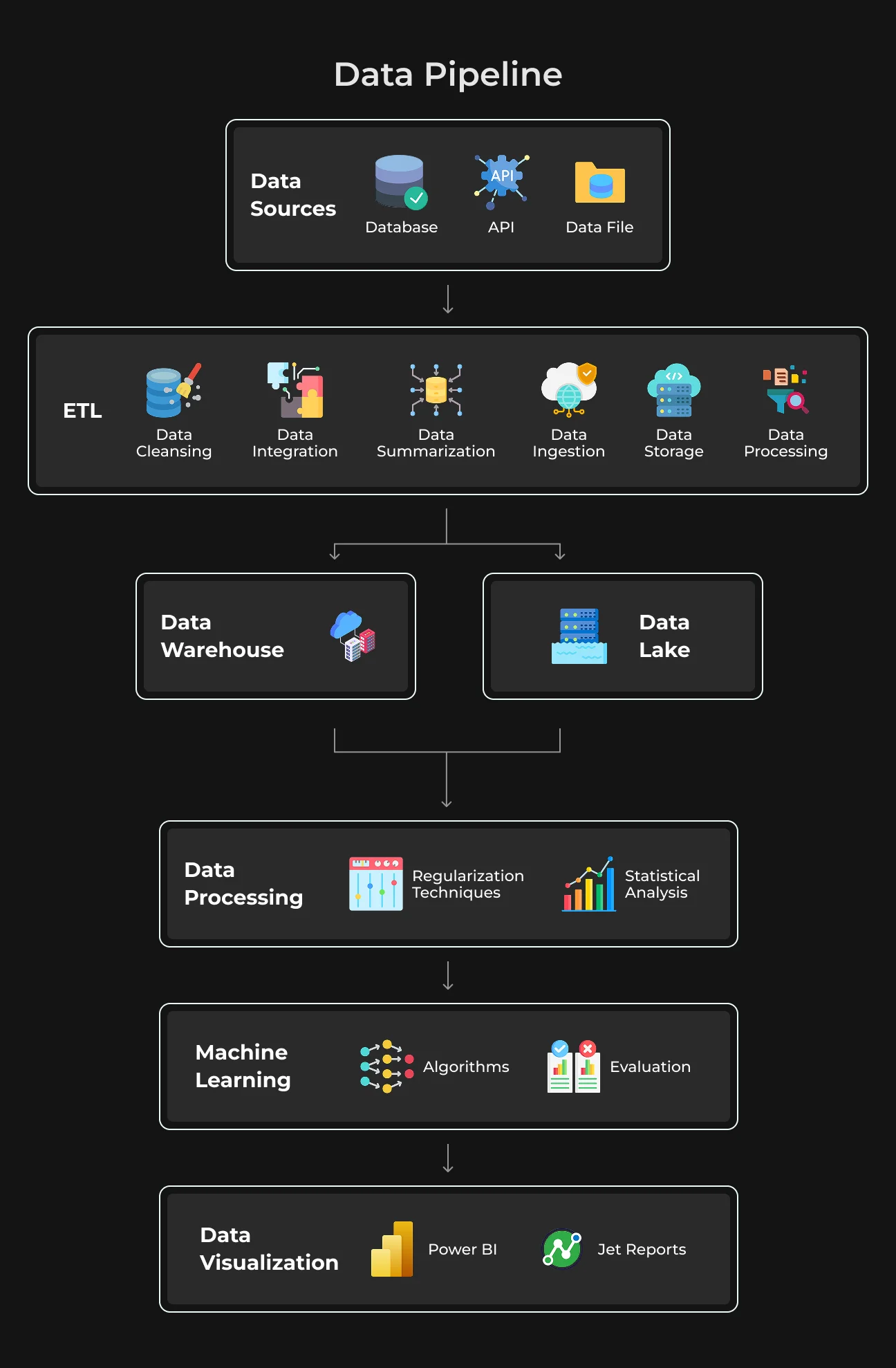
Enterprise systems use cloud infrastructure to process large volumes of data and adapt to changing workloads. A cloud data pipeline combines distributed storage with elastic computing resources on AWS, GCP, or Azure. This lets companies scale processing as demand grows.
It is also used extensively in predictive analytics. Your AI data pipeline prepares training datasets and transforms raw data into model features. All this supplies production models with the required inputs that let them generate reliable predictions.
ETL Pipeline vs. Data Pipeline
Extract, Transform, Load (ETL) describes a process for moving and preparing data.
An ETL data pipeline follows several steps with its records:
- Extracting records from source systems;
- Cleaning and transforming records in a processing environment;
- Loading records into a destination (like a data warehouse).
This helps you validate and structure data before sending it to analytical systems.
Cloud-based analytical platforms also support Extract, Load, Transform (ELT). This approach is a bit different, as it loads data into the destination first – and only then uses computing resources to transform it. It’s better if you need to retain the raw data and adapt it for various reporting needs.
Comparing an ETL pipeline vs data pipeline means distinguishing a specific processing approach from a broader category. ETL is one type of data pipeline, commonly used for batch processing. A modern data pipeline can also support:
- Continuous streaming ingestion;
- Automated scheduling and coordination;
- Data quality checks;
- Monitoring and failure alerts;
- Web scraping connectors;
- Delivery to multiple destinations.
Applying ETL process optimization and data transformation best practices helps your business improve processing efficiency and keep raw source data separate from validated datasets used in production analytics.
Where Web Scraping Fits in Your Pipeline
Web scraping is used to gather and send external data into your company’s pipeline. It is then used for market intelligence, competitor price tracking, and public records analysis. However, the reliability of web scraping depends on websites that you do not control.
Many things can interrupt data collection:
- Changes to page layouts;
- Access rules;
- Rate limits;
- Rendering scripts, and more.
If your web scraper lacks validation checks, it could bring errors into your systems. This leads to mistakes in business reports that might lead to wrong decisions. SapientPro’s team knows how to build a web scraper that works with dynamic content – a reliable solution for competitor tracking.
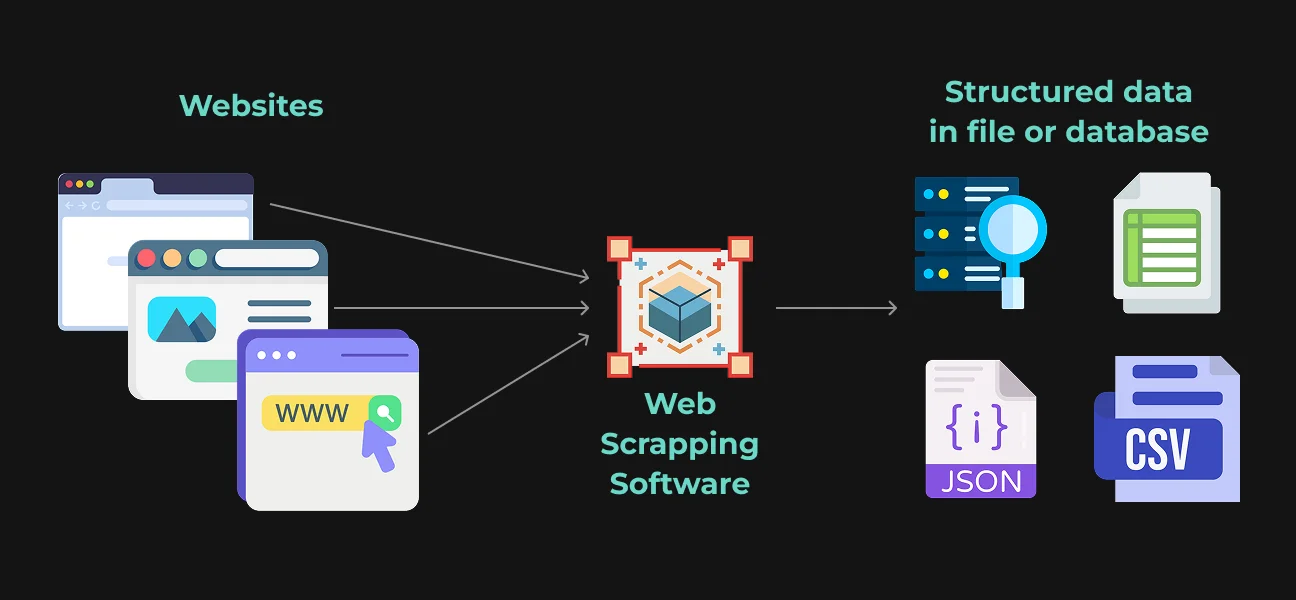
When a target website changes its HTML structure, extraction scripts may return empty fields or incorrectly formatted records. Running web scraping tasks in a separate, containerized ingestion layer helps contain failures. Validation checks then prevent faulty records from reaching production reporting tables.
SapientPro can help you build scrapers with raw-response storage, validation, and error handling. Our guide explains how to create a web scraper and covers the foundations of reliable data collection.
Build a Pipeline You Can Trust
Work with SapientPro to deliver validated data from your sources to business dashboards. We help you get a system that works and brings results.

Data Pipeline Architecture Explained
Scalable data pipeline architecture separates ingestion, transformation, storage, and orchestration into distinct components. This data pipeline design lets teams update, troubleshoot, and scale each component independently.
Clear interfaces, validation checks, and recovery procedures help contain failures before they affect downstream systems. Choose data pipeline software based on your data sources, processing needs, and maintenance capacity.
1. Data Sources
Data sources represent the origin points of raw data across an enterprise system. Origins include:
- Relational SQL databases;
- Transactional NoSQL stores;
- Third-party REST APIs;
- Server log files;
- Web scrapers;
- Event-driven IoT sensor streams.
To understand this topic better, we recommend you read our article on how to automate data extraction.
2. Data Ingestion Layer
Your data ingestion pipeline extracts data from sources and pushes it into processing environments. A well-designed data ingestion pipeline architecture can support scheduled batch pulls and event-driven ingestions. These are both solutions needed in small businesses and large enterprises.
For example, if you’re in e-commerce, a scheduled batch can pull extract data weekly – letting you see new competitor products. Change Data Capture (CDC) monitors database transactional logs to extract modified records continuously without overloading production source databases.
3. Raw Data Storage
Raw data storage is where all information lands – and nothing changes here.
You can store raw data in cloud object storage like:
- Amazon S3;
- Google Cloud Storage;
- Azure Blob Storage.
All these solutions preserve original data before sending it to processing.
It is also possible to use open storage formats like Apache Iceberg or Delta Lake to ensure ACID transaction compliance. These solutions let your team’s engineers execute historical replays or roll back failed write operations safely.
4. Data Processing and Transformation
The processing layer cleans, structures, standardizes, and enriches raw records. Tasks include:
- Data type validation;
- Schema enforcement;
- Record deduplication;
- Null filtering;
- Relational joins.
A high-throughput big data pipeline distributes compute workloads across multi-node clusters using engines like Apache Spark or Databricks.
5. Analytics and Serving Layer
The analytics layer presents structured datasets to downstream decision-making applications. Refined tables land in analytical data warehouses or lakehouses optimized for low-latency SQL execution. Broad data pipeline use cases rely on this layer, including:
- Financial reporting;
- Executive dashboards;
- Predictive churn modeling;
- Operational decision support engines.
This layer is extremely important to build reliable data pipeline automation.
6. Data Pipeline Orchestration
Complex multi-step workloads demand structured dependency management. Dedicated data pipeline orchestration platforms map execution steps as Directed Acyclic Graphs (DAGs). Orchestration tools:
- Manage execution timing;
- Resolve upstream file dependencies;
- Trigger parallel processing jobs;
- Execute automated retry logic when transient errors occur.
It is very important to take data pipeline orchestration seriously.
7. Data Quality and Observability
Data quality tools monitor metrics across every stage of the pipeline. Observability platforms validate record counts, verify null ratios, check schema drift, and alert data teams immediately when anomaly limits are breached.
Architecture requiring sub-second updates relies on specialized real-time data processing components. Deploying a streaming data pipeline architecture combines continuous stream brokers with real-time processing engines to evaluate metrics over sliding temporal windows.
How to Build a Data Pipeline That Works
Mastering how to build data pipeline systems that maintain high reliability requires disciplined engineering practices throughout the development lifecycle. Teams focused on building a data pipeline must prioritize:
- Modular code structure;
- Complete idempotency;
- Automated validation.
Businesses generally use automated data pipelines because they reduce manual interventions. According to McKinsey, AI-driven automation can reduce operational errors by 20-50% compared with traditional manual and spreadsheet-based processes. This also improves operational stability and cost control.
So if you need a reliable solution that works without errors, it’s important to choose the right data pipeline technologies from the start. This will let you implement best practices, compliance, and all needed solutions without massive rebuilds in the future. That’s what SapientPro can help with.
Step 1. Build the Data Ingestion Layer
Start by defining how data will enter the pipeline. Give each source its own connector: a web scraper for websites, an API connector for external services, or a database reader for internal systems. Keep these connectors separate from transformation logic so changes to one source are easier to fix.
For reliable collection, configure:
- Timeouts to stop requests that take too long;
- Retry limits to handle temporary failures without retrying indefinitely;
- Rate limits to keep requests within the source’s allowed capacity.
For frequently updated databases, think of using log-based change data capture. It captures changed records without repeatedly scanning entire tables, helping reduce the load on production systems.
Step 2. Store Raw Data Before Processing
Save incoming data before transforming it. Keeping the original API responses, scraped content, and log files lets your team rerun processing when requirements change or a bug needs fixing. You can also trace incorrect results back to their source.
Organize raw files by source and collection date, using a structure such as source/year/month/day. Preserve the originals and store processed outputs separately.
If you also maintain structured tables in a data lake, formats such as Apache Iceberg or Delta Lake can support transactional updates and historical snapshots. These complement raw-file storage and make table changes easier to manage.
Step 3. Clean, Validate, and Transform the Data
With raw data safely stored, check that it meets the requirements of your reports and business workflows. Start with required fields and data types, then apply business rules.
Typical processing tasks include:
- Converting dates and timestamps to a consistent format and time zone;
- Standardizing identifiers, units, and numerical values;
- Turning nested JSON fields into clearly defined columns;
- Removing duplicates and calculating reporting metrics.
Send invalid records to a separate quarantine table with the original values and an explanation of each error. Engineers can then investigate while valid records continue through the pipeline. If errors make the overall dataset unreliable, pause publication and alert the team.
Step 4. Make Pipeline Processing Retry-Safe
Failures will happen, so design each step to run again safely. This property is called idempotency: processing the same input more than once should produce the same result without creating duplicates.
Choose the write method that fits your data. Replace affected partitions atomically when rebuilding a batch, or use stable record identifiers to update existing rows and insert new ones.
Don't forget to save checkpoints after successfully completed work. They let interrupted jobs resume from a known position, reducing unnecessary reprocessing and helping restore fresh data sooner.
Step 5. Orchestrate Pipeline Dependencies
Configure execution graphs within an orchestration framework. You must:
- Enforce execution rules so downstream analytical tables or predictive ML models run only after upstream data validation steps report success;
- Define explicit task dependencies inside Directed Acyclic Graphs (DAGs), ensuring parallel execution branches execute concurrently where hardware resources allow;
- Set up automated alert hooks to trigger instant Slack or email notifications when task retries exceed maximum thresholds.
This step is very important for your pipeline data management success.
Step 6. Prepare Analytics-Ready Data for BI
Organize processed data into dimensional models, star schemas, or materialized views inside the data warehouse. It is nice to optimize table partitioning, indexing, and data clustering to support fast analytical SQL queries for executive dashboards. By pre-aggregating common financial and operational metrics into summary tables, you can eliminate redundant on-the-fly calculations when business analysts open reporting dashboards.
Step 7. Monitor Data Quality and Pipeline Health
Embed automated quality tests that check on every run:
- Row volume;
- Null percentages;
- Schema consistency;
- Metric distributions.
We recommend you set up instant alert notifications to inform engineering teams before invalid data reaches executive BI reporting. Define threshold limits for key data indicators so that sudden drops in row volume or unexpected field nulls halt downstream updates automatically.
Most importantly, establish end-to-end data lineage tracking to audit the flow of records from raw extraction through final analytical presentation.
Data Pipeline Tools by Architecture Layer
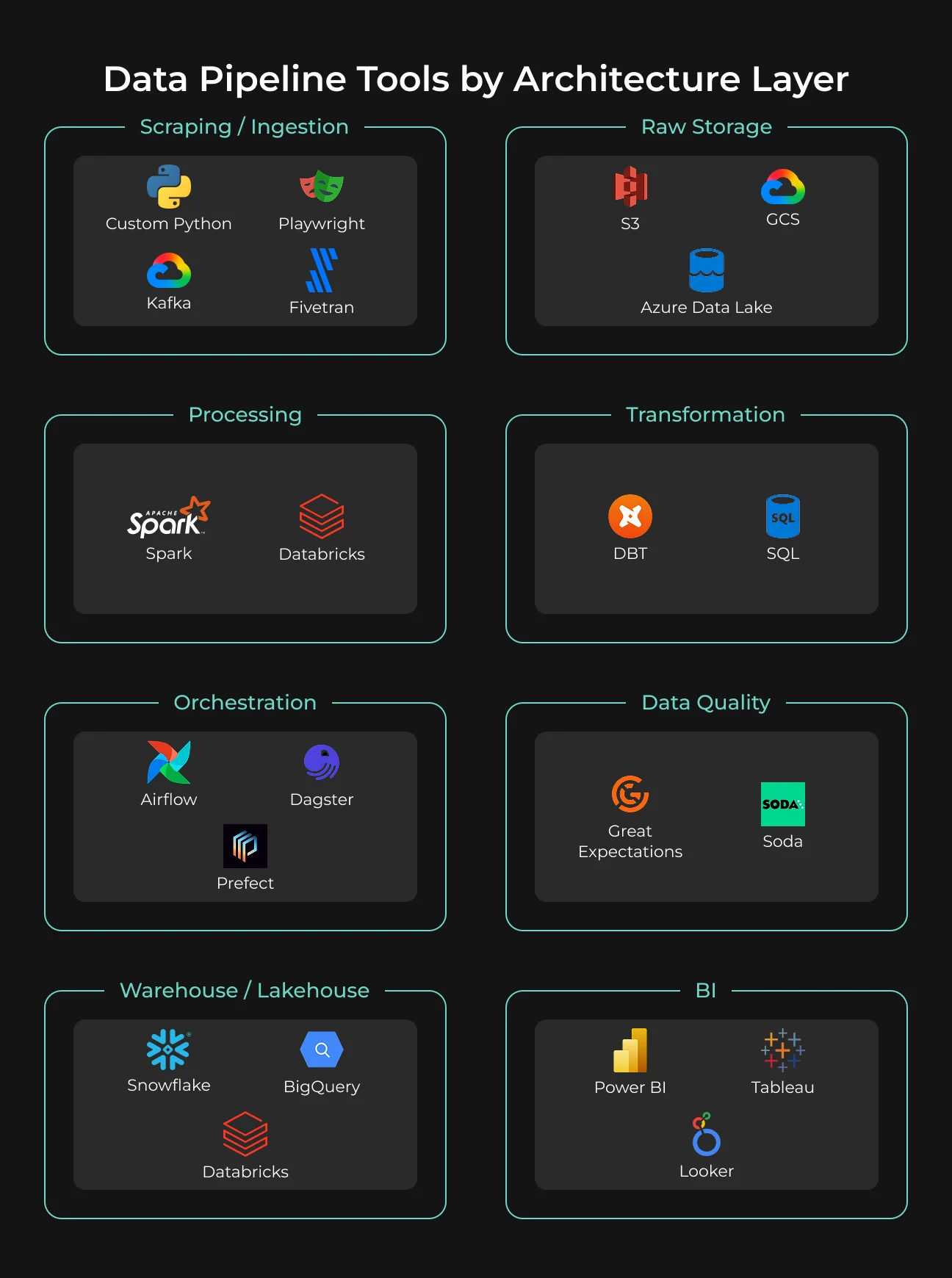
Selecting effective data pipeline tools depends on performance SLAs, payload volume, and team expertise. The table below outlines standard tech stack components across each layer.
| Pipeline layer | Example technologies |
| Scraping / ingestion | custom Python, Playwright, Kafka, Fivetran |
| Raw storage | S3, GCS, Azure Data Lake |
| Processing | Spark, Databricks |
| Transformation | dbt, SQL |
| Orchestration | Airflow, Dagster, Prefect |
| Data quality | Great Expectations, Soda |
| Warehouse / lakehouse | Snowflake, BigQuery, Databricks |
| BI | Power BI, Tableau, Looker |
Common Data Pipeline Architecture Mistakes
From project to project, we frequently see that teams repeat common data pipeline architecture mistakes when scaling data flows. Avoiding the following mistakes preserves data integrity and lowers infrastructure overhead.
Mixing ingestion and transformation in one script
Coupling network data collection directly with business transformation logic creates fragile software.
When third-party API endpoints adjust response schemas or web scrapers encounter structural site changes, processing scripts crash midway. Decoupling extraction tasks into isolated scripts simplifies replay operations and strengthens overall pipeline data management.
Loading scraped data directly into BI tables
Web pages alter DOM structures unexpectedly. Feeding raw web scraping scripts straight into business intelligence tables corrupts reporting metrics and damages executive trust in analytics. Raw landing zones must capture payloads independently to validate schemas before records move downstream.
Relying on full reloads
Running full table extracts across growing enterprise datasets:
- Causes heavy source database locks;
- Inflates cloud compute bills;
- Breaches performance SLAs.
Modern infrastructure demands incremental loads or Change Data Capture (CDC) to keep execution windows efficient.
Treating job success as data quality
Standard data pipeline orchestration frameworks execute tasks based on script completion codes.
An orchestrator showing a green status code only confirms that tasks ran without throwing unhandled exceptions. A successful job can still write empty tables, null values, or bad calculations to target destinations unless explicit data assertion tests execute.
Building retry logic without idempotency
Retrying non-idempotent transformation tasks leads to:
- Duplicated records;
- Distorted financial totals;
- Inconsistent metrics.
Automated retries require atomic partition rewrites or deduplication keys to maintain consistency across system runs.
Over-relying on fragmented data pipeline tools without governance
Deploying multiple disconnected data pipeline tools across separate departments leads to fragmented execution schedules and unmonitored upstream dependencies. Without central administrative oversight, end-to-end data pipeline automation breaks down.
It produces isolated shadow pipelines that obscure operational lineage and increase security risks.
How SapientPro Helps You Build Your Data Pipeline
SapientPro helps businesses collect, structure, and prepare data for analytics and operational workflows. Our big data and web scraping services cover web data extraction, ETL development, data transformation, and data warehousing.
For example, we built an SDS automation platform that extracts information from safety data sheets and organizes it into a searchable database. The system also matches documents across languages and tracks versions, helping users find the right records and follow updates. This work brings together several core pipeline tasks: ingestion, transformation, storage, and traceability.
We can apply that expertise to help you:
- Collect data from websites, APIs, and internal systems;
- Prepare reliable datasets through validation, standardization, and transformation;
- Organize data for use in reporting, analytics, and business applications.
Need reliable data for business decisions? Contact SapientPro to discuss your data sources, identify pipeline bottlenecks, and plan the next steps for your build or upgrade.
Turn Scraped Data Into Business Insights
Ask SapientPro to connect web scraping, data validation, and reporting in one pipeline. Our engineers will help you get the best solution for your business.