All
What is Optical Character Recognition: Use Cases & Benefits in 2026
Updated:October 21, 202610 min read


Optical character recognition became the loop-closing foundational technology between electronic and paper-based information. It instantly converts written & printed characters into an electronic format, allowing companies to capture and process documents faster than ever before.
In this article, SapientPro’s experts explain the OCR definition, what is OCR scanning and how it works, the different types of OCR, key benefits and OCR use cases, as well as challenges to keep in mind. Read on now!
Key Takeaways
- OCR software "reads" the image, reading characters and words so that the contents becomes editable and searchable digital text;
- OCR saves staff and the effort of retyping paper document information by hand;
- OCR is used in almost all industries: finance, healthcare, logistics, law, government, and so on;
- OCR results in faster processing speed, lower labor cost, less error, and better information availability for decision-making;
- Machine learning is used by advanced OCR systems to deal with handwriting recognition software (ICR to read written or dirty text) and for layout-analysis in complex documents.
What is Optical Character Recognition (OCR)?
Optical Character Recognition (OCR) is a powerful technology that uses automatic pattern-matching and machine learning algorithms to identify text characters within images and convert them into machine-readable text.
Simply put, OCR takes a scanned document or an image of text (like a photo of a receipt or a roadside sign) and transforms it into editable digital text like a TXT file, a Word document, or a searchable PDF.
The OCR software processes an image by analyzing its dark and light areas:
- Identification: dark areas shaped like letters and numbers are identified as characters, while lighter areas are treated as the background;
- Structuring: the program then segments these characters, groups them into words, and organizes them into sentences, essentially “reading” the image;
- Output: the outcome is editable digital text that you can easily search, index, or import into other software and databases.
Modern OCR engines like the open-source Tesseract or commercial tools like ABBYY FineReader are highly sophisticated. They rely on neural networks and trained models to accurately recognize text in different fonts, languages, and complex layouts.
The integration of AI continues to enhance OCR's capabilities, making the future of this technology exceptionally promising for businesses relying on document digitization.
Importance of OCR
Why is OCR so important?
The simple answer is that OCR is an enabler of digital transformation. It allows organizations to efficiently take stacks of paper and image-based documents and convert them into structured, searchable data. Without OCR, businesses would still be relying on costly and time-consuming manual data entry.
A key driver of OCR's importance is its scalability.
Once set up, a machine learning OCR system can handle thousands of pages or images in a fraction of the time it would take a team of people. For instance, a modern server-based OCR solution can convert a whole filing cabinet full of documents in a matter of minutes.
This scaling of automated document processing with OCR assists businesses in handling increasing information quantities without inflated labor expenses.
OCR is also central to critical projects like big data analytics.
Much of the world's valuable information remains trapped in unstructured formats (PDFs and paper scans). OCR provides the crucial step towards freeing this information, making it instantly available for analysis, reporting, and strategic decision-making.
How OCR Works: Technological Principles and Components
An OCR system typically proceeds through several key stages.
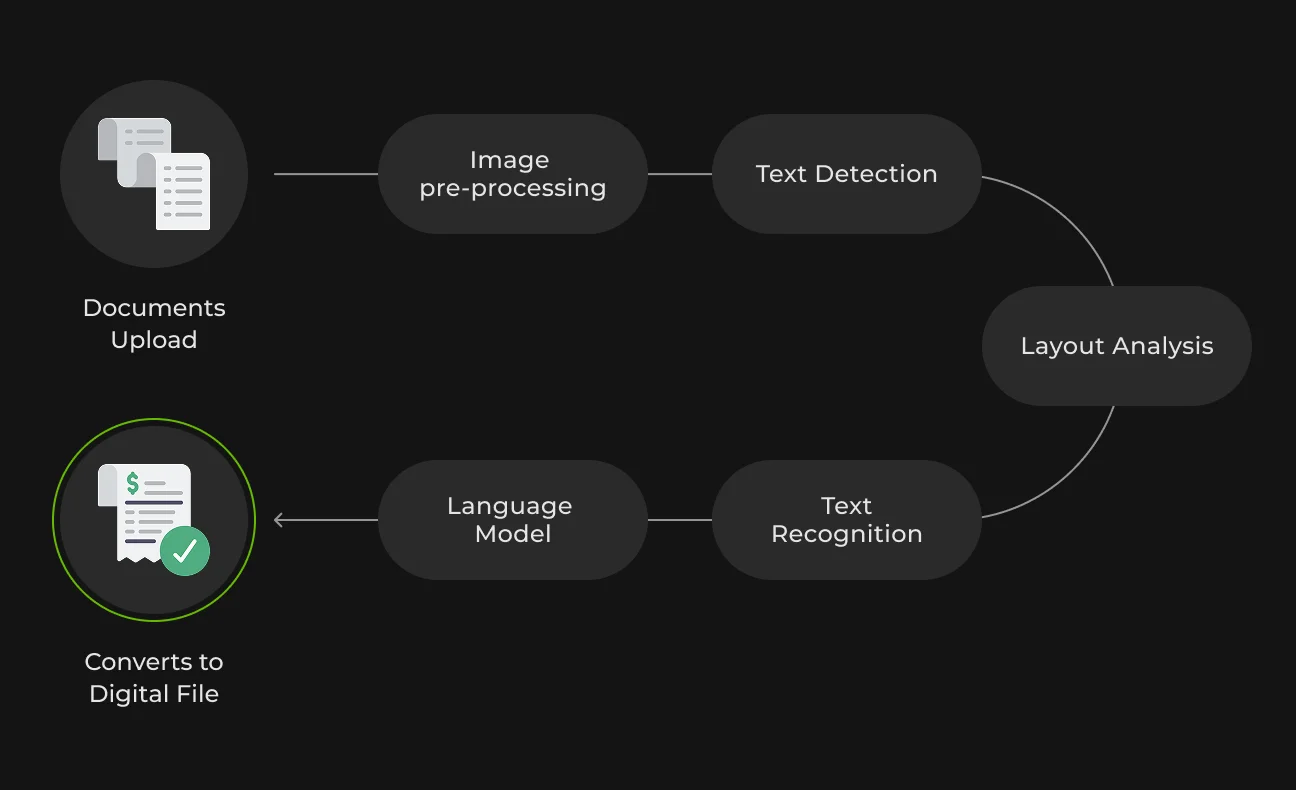
1. Image Acquisition (Upload Image/Document)
The process begins when a page is photographed or scanned to create an electronic image (such as a PDF or JPEG). The image is often converted to grayscale or black-and-white to simplify subsequent processing and analysis.
2. OCR Preprocessing
The OCR software then cleans up the image to significantly improve recognition accuracy.
This essential stage can include:
- Deskewing: straightening slanted or misaligned pages;
- Noise removal: eliminating stray spots, smudges, or pixel noise;
- Text area detection: segmenting the image into blocks, columns, and paragraphs.
3. Text Recognition
This is the primary step where the text is extracted. The intelligent recognition software scans each word or character using one of two main techniques:
- Pattern matching: comparing the character's shape directly to templates stored in memory;
- Feature extraction: separating characters into component lines and curves, typically using machine learning methods.
Modern OCR engines leverage feature-based recognition powered by trained AI models for high accuracy across various fonts and layouts.
4. Post-Processing
The final digital text is cleaned up and refined:
- Error correction: the output is passed through spell-check or compared with dictionaries to correct errors;
- Layout preservation: advanced systems can maintain the original document layout, creating outputs like searchable PDFs that are true-to-original documents;
- Contextual analysis: using context (like expected formats for invoices or receipts) is also employed by advanced systems for higher accuracy.
Types of OCR Technology
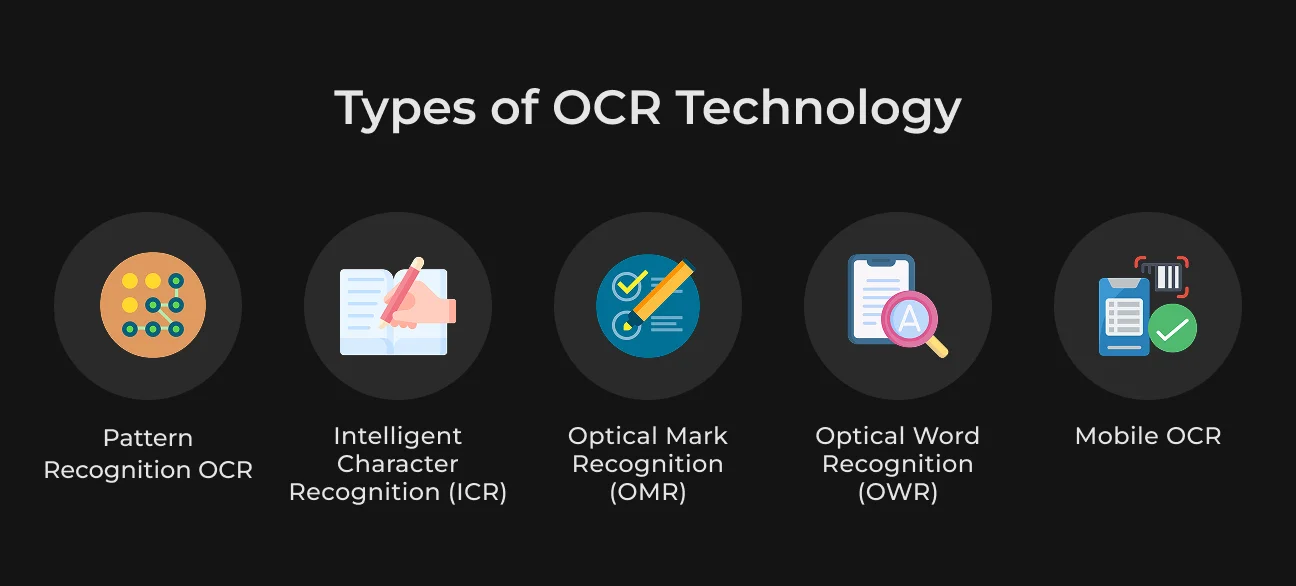
There are many different configurations of OCR solutions, including:
Pattern Recognition OCR
This is the most basic form, relying on simple pixel-by-pixel template matching. It works best for clean, regular, and pre-defined fonts (like those found in older documents). It is generally unreliable for noisy images, new fonts, or complex layouts.
Intelligent Character Recognition (ICR)
ICR is an advanced form of OCR specifically designed for handwritten text (both printed block letters and cursive). It leverages machine learning to adapt and read various handwriting styles. ICR improves with training and is widely used for processing hand-written forms and applications.
Optical Mark Recognition (OMR)
OMR is designed to recognize and interpret marks or checkboxes on forms (like survey bubbles or scantron sheets). Unlike standard OCR, which reads characters, OMR reads filled-in regions on a form rather than actual text.
Optical Word Recognition (OWR)
OWR is similar to standard OCR but operates at a word-level context rather than character-by-character. It recognizes entire words at once (typically for printed text). This method can significantly improve speed and accuracy, especially for languages with clear word boundaries.
Mobile OCR
These are device-optimized and mobile OCR applications. Mobile OCR powers apps to scan receipts, business cards, or read text in the field. Typically, these use on-device neural networks to detect text in real-time through the camera.
Benefits of Optical Character Recognition
OCR use has numerous advantages by virtue of the fact that text is automatically extracted from images. Some of the key advantages are enumerated below:
1. Searchable Text in Images & Documents
For businesses, OCR transforms previously static documents like contracts, invoices, reports, or archived emails saved as images into fully searchable text comparable to a standard Word document.
This leads to two benefits:
- Business efficiency: an OCR-scanned repository of contracts makes it simple for legal departments to quickly recall all documents that contain a specific clause or term;
- Archiving: libraries, for example, use OCR to digitize old newspapers and books, allowing researchers to search their content effortlessly.
2. Faster Document Processing Workflow
OCR drastically reduces the time required for data handling. What might take an individual 5 minutes to read and type data from a single form can be done by OCR software in seconds. When scaled up to hundreds or thousands of documents, the time savings are huge.
This speed improvement is essential for:
- Customer service: in banking, new accounts or loan applications can be accelerated by recognizing submitted documents (forms, IDs) in real-time, rather than requiring a back-office data entry wait;
- Healthcare: physicians get patient information sooner;
- Logistics: OCR means parcels keep moving through depots faster instead of waiting in a queue for manual entry.
3. Accuracy and Error Reduction
Manual data keying is slow and highly prone to human error, resulting in typos, transcription mistakes, and missing fields. That’s why OCR helps with:
- Consistent replication: OCR technology, given a clean input, will always replicate exactly what it “sees” without tiring or rushing end-of-day tasks. This makes OCR efficient enough to significantly reduce errors that plague databases and records;
- Life-saving accuracy: in industries like healthcare, reducing errors in data can literally save lives (avoiding errors in medication based on misread handwritten prescriptions through the use of ICR);
- Financial & compliance: fewer errors lead to more accurate financial decisions and fewer downstream problems. Financially, greater accuracy means fewer payment errors or compliance issues, often providing a cleaner point of departure than entry by hand alone.
OCR Use Cases by Industry
Modern OCR is rarely “just OCR.” In production, it runs as part of an intelligent document processing (IDP) pipeline: capture → enhance → classify → extract → validate → route. Below are high-signal OCR use cases by industry.
Education
OCR plays a critical role in preserving and making accessible vast historical records, manuscripts, and educational materials.
Common Documents
- Historical records: historic newspapers, manuscripts, census forms, registers, and books.
Pipeline & ML Components
The digitization pipeline uses advanced techniques to handle fragile and varied source material:
- Preprocessing: requires high-resolution scanning (300–400+ PPI), dewarping (straightening curved pages from bound books), binarization, and layout analysis to correctly segment columns, articles, and figures.
- Recognition: uses OCR engines designed for printed text and often specialized models for challenging text like early typefaces. This is coupled with language models for post-correction and named-entity recognition to identify people, places, and dates.
- Quality control: progressive re-OCR is often leveraged, running documents through newer OCR engines (benchmarked against a sample set) to correct previous errors and continually improve quality.
What OCR Unlocks
OCR transforms these static images into valuable research assets:
- Accessibility: enables full-text search across massive archives.
- Research: facilitates text mining for humanities research.
- AI training: creates high-quality training corpora for language models.
Example: The Library of Congress provides bulk OCR for its “Chronicling America” project and is actively reprocessing early pages to improve search quality. Similarly, the British Library emphasizes scan settings to raise OCR accuracy for older newspapers. OCR data extraction from scanned historical documents helps agencies digitize and access historical records efficiently.
Legal
In the legal sector, OCR is indispensable for managing the massive volumes of documents involved in litigation and corporate compliance.
Common Documents
- Image-only PDFs in discovery, scanned productions (TIFF/PDF), contracts, exhibits, forms, and hand-annotated pages.
Pipeline & ML Components
The legal pipeline is highly focused on classification and security:
- Extraction flow: OCR (for printed text and selective handwritten notes) → document classification (contract, brief, exhibit, etc.) → clause/term extraction (NER + pattern libs) → PII detection/redaction → review tooling;
- Quality assurance: confidence scoring plus human-in-the-loop QA for low-confidence spans ensures data integrity and accuracy.
What OCR Unlocks
OCR provides the foundation for modern eDiscovery and legal document management:
- Searchability across scanned productions;
- Automated issue tagging;
- Faster privilege/PII review;
- Downstream LLM summarization on OCR'd text.
Government
Government agencies rely on OCR to handle large-scale form processing, regulatory compliance, and constituent services.
Common Documents
- Returns (1040/941/940), information returns, schedules, correspondence.
Pipeline & ML Components
The government pipeline is geared towards high-volume form processing and validation:
- Processing flow: scanning at lockbox or intake centers → OCR (SCRIPS/modern equivalents) → form classification → key-field extraction → business rule validation → posting.
What OCR Unlocks
OCR drives efficiencies and improves accountability within government services:
- Faster processing/refunds;
- Fewer manual keystrokes;
- Audit trail of images + extracted data.
Example: OCR in government agencies is widely used. The IRS, for instance, uses OCR in the SCRIPS system and has launched a paperless processing initiative and digital intake pilots to expand the scanning of returns. Treasury and TIGTA reports document progress and intent regarding these digital initiatives.
Others
Domain | Typical docs & fields | Downstream systems | Primary benefits |
| Finance & Banking | Invoices (supplier, dates, totals, line items), receipts, tax forms | ERP/AP, GL, expense tools | Faster close; fewer keying errors; audit-ready trails |
| Healthcare | Intake forms, insurance cards (member/plan IDs), claims; de-identified notes | EHR (FHIR/HL7), payer systems | Shorter onboarding; cleaner claims; research datasets |
| Retail & e-com | Receipts, shelf labels (price/SKU), returns labels | POS, PIM, ERP, loyalty | Price compliance; faster returns; better shelf availability |
| Logistics | BOL, AWB, packing lists; labels (carrier, tracking) | TMS, WMS, customs | Lower intake time; fewer misroutes; visibility |
| Manufacturing | Serial/date/lot codes, GS1 HRI text | MES, QMS, PLM | End-to-end traceability; recall readiness |
Challenges and Limitations of OCR Technology
Despite all its benefits, OCR technology has several disadvantages and limitations. Here, we want to discuss OCR challenges and solutions.
Image/Scan Quality Issues
Poor image quality or resolution can very much lower OCR accuracy. In case of a faded, damaged, or low-contrast document, the OCR engine will struggle to detect text.
Solution. Use high-resolution scans (300 DPI or above recommended) and apply preprocessing (deskewing, noise removal) to enhance the image.
Font, Handwriting, and Language Limitations
Handwritten text or unusual fonts remain challenging for OCR. Handwritten letters or elaborate fonts can be interpreted incorrectly. Multilingual documents become problematic for the system if the system is not configured appropriately.
Solution. Use ICR models for handwriting or train OCR for particular fonts/languages. You can also have a human verify important fields when accuracy matters inside your handwritten text recognition software.
Complex Layouts and Special Characters
Multi-column layouts, tables, and dense symbols can confuse OCR. Text is read out of order, and esoteric symbols (e.g., mathematical notation) are misread.
Solution. Apply layout analysis to ensure reading order, or use expert OCR packages for equations or vertical text. Manual zoning or template OCR may, in some cases, be applied to complicated forms.
Colored Backgrounds or Pages & Images/Graphs Interference
Text on colored or textured backgrounds (or laid over images, watermarks, etc.) can generate poor OCR on the basis of insufficient contrast or interference.
Solution. Preprocess images to raise contrast or remove background colors (some types use drop-out colors for this purpose). Using sophisticated image filters or going to a dedicated scene text OCR model will improve outcomes on non-standard documents.
Be mindful that while OCR extracts text, it does not inherently guarantee the material is interpreted or categorized. Achieving full understanding often requires additional AI steps (like NLP or business rule application) and Intelligent Document Processing (IDP), which goes beyond OCR.
How SapientPro Built an AI-Powered CV Processing Tool with OCR
An example of OCR usage is SapientPro’s AI-powered CV processing software, which was developed for a recruitment agency. The client required our engineers to automate the extraction of candidate resume data from job applications and significantly reduce the reliance on manual labor in recruitment.
Applications came in all shapes and sizes – Word files, PDFs, even scanned prints. The agency’s older software struggled to read them. We integrated a robust OCR engine into our machine learning process so that even image-based and scanned CVs would be read automatically.
The system then uses AI to organize and classify the pulled-out text (sectioning out categories such as Personal Info, Education, Work Experience, Skills, etc.) into a template and formatted database.
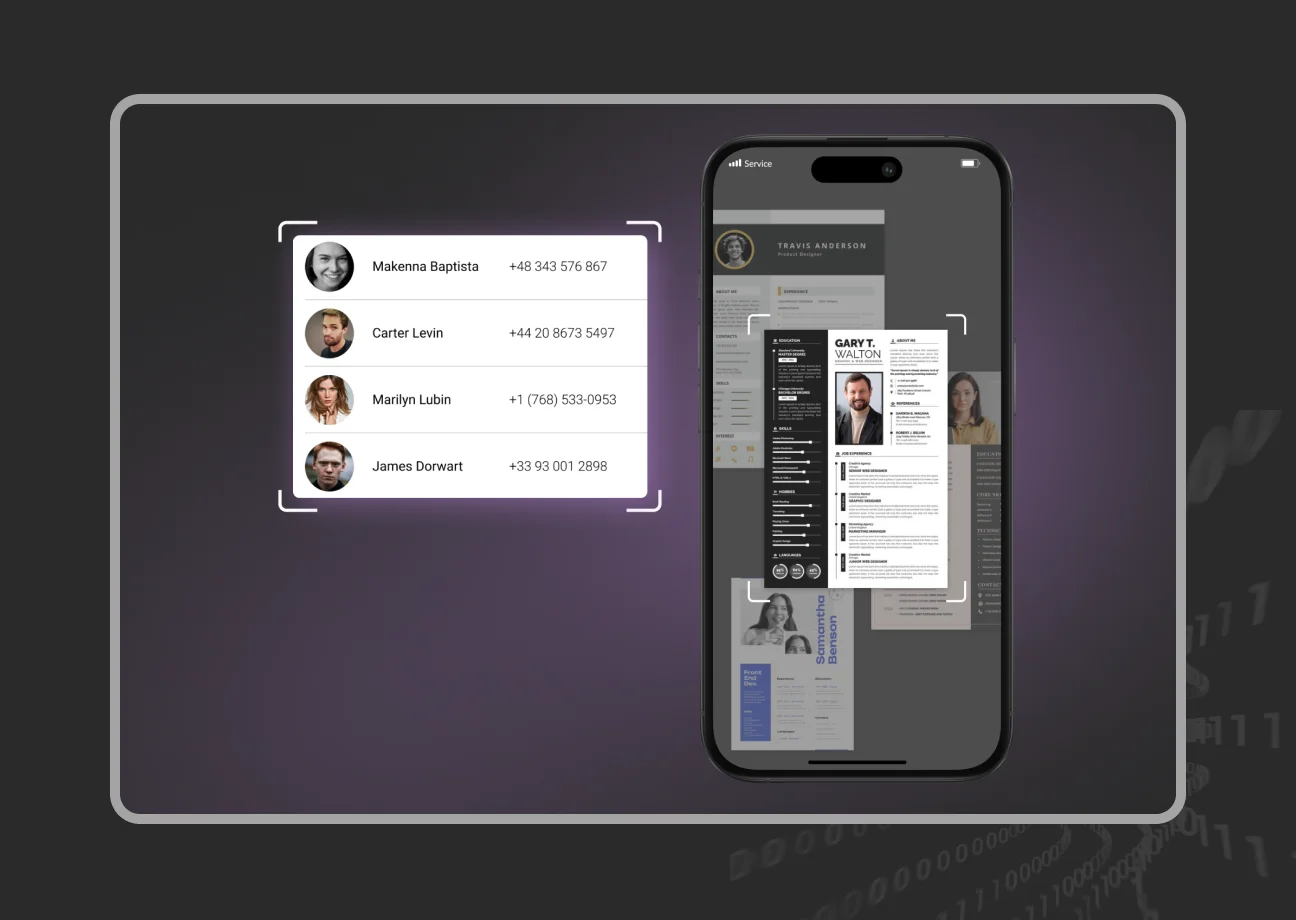
The impact was incredible: the tool now does over 320 hours of manual effort every month and reduced processing time per CV from 2 hours to 5 minutes (with an immediate human verification). What once could occupy a recruiter for an entire afternoon is now done near-automatically.
Partner with SapientPro to Create Your Machine Learning Solution
SapientPro can help you use OCR and other AI technologies to build end-to-end intelligent systems for data analysis, predictive modeling, and many other use cases. You’ll get a maintainable and scalable solution with all the features needed for your business.
Ready to implement the functionality of OCR and AI for your company?
Get in touch with SapientPro and get a free consultation!
Build Your OCR Solution with SapientPro