All
How to Make an AI Image Generator Like Midjourney and Better: Full Guide
November 15, 202510 min read


Modern AI creates paintings and sculptures, often bringing immense profits to its users. Many people started wondering whether this would lead to AI diminishing human creativity or simply enhance artistic skills. The real answer is simple: artificial intelligence is a fresh way to create art.
In the 1800s, when photography just emerged, many believed it would replace traditional art. But instead of pushing art aside, it supported the modern art movement. Artists began turning from photorealism and exploring the dynamic world of abstraction. A computer can now make art in seconds — tasks that once kept artists busy for hours.
This article from SapientPro's engineers will walk you through creating your own AI art generator to kickstart your business. You'll also find tips on how to choose the right features and solve tech glitches.
Key Takeaways
- AI art generators are tech tools that blend art with advanced AI skills. They've become skilled at creating images in various styles and formats;
- AI art generators learn from large datasets, which is essential for their training;
- In an AI image generator, look for features that improve your experience, like high resolution, style customization, and diverse artistic filters;
- AI image generation can be costly because of the costs of hardware, energy, and maintenance (especially when deployed on a large scale).
How Does an AI Art Generator Work?
AI image generators are tech tools that blend art with advanced AI skills. They've become really professional at creating images in different styles and formats. Let’s dive into the main components and how these art generators work.
Datasets
AI art generation relies heavily on datasets, which are essential for training. These datasets can be massive and drawn from various sources using methods like data scraping. That's where people gather images from the internet, collecting pictures from public spaces or targeted themes. Some artists even handpick their images to train models that capture their own artistic flair.
Models use these datasets to learn image features, patterns, and styles. Here's how it works:
- Public datasets. These have a large set of image collections, which helps models create a wide range of outputs for different needs;
- Specific datasets. These are special, custom collections for those niche projects or distinct styles. Specific datasets are perfect for artists who aim to mimic a particular look.
Architectures
AI art generators use various machine learning setups, each with its own pros and cons.
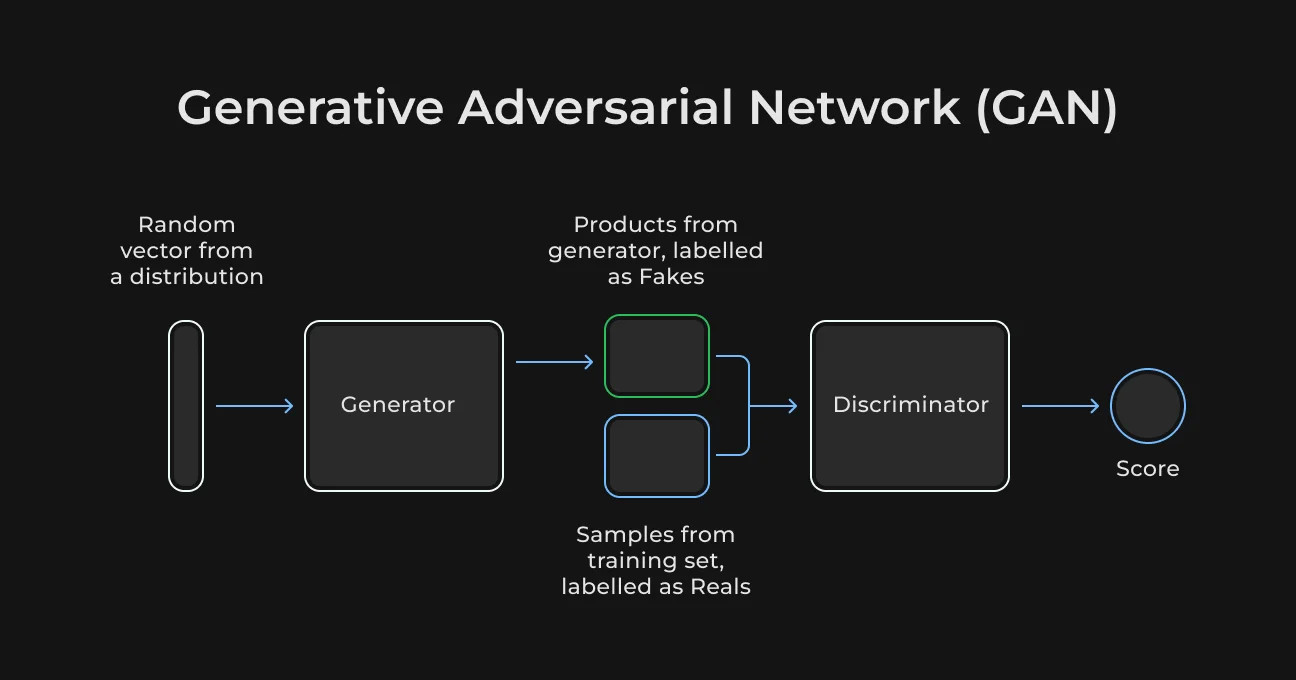
- Generative adversarial networks (GANs) are famous for creating super-realistic images by using two neural networks: one that makes images (the generator) and another that checks them (the discriminator). They make stunning pictures but can be tricky to train;
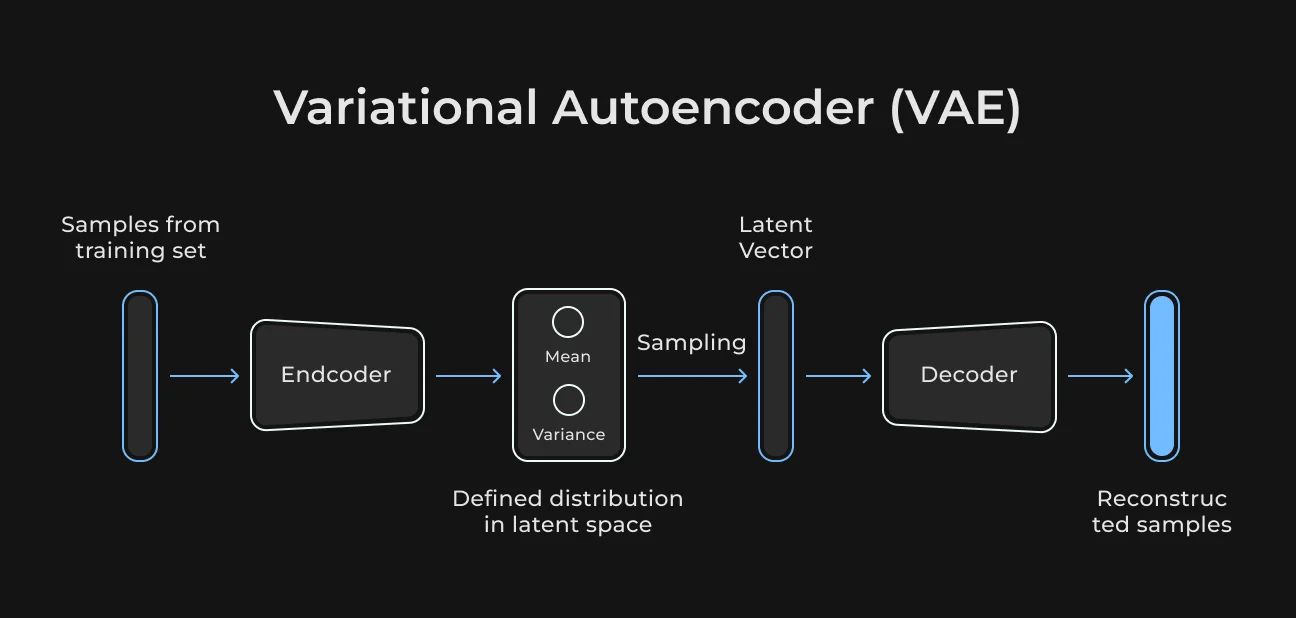
- Variational autoencoders (VAEs), on the other hand, are more stable and consistent, using probability to generate images. Their results might not be as sharp as GANs, but they’re much easier to manage;
- Diffusion models are the go-to choice now, powering tools like Stable Diffusion and DALL·E. They start with a noisy mess and slowly turn it into clear, impressive images that work well in various situations;
- Transfer learning is a technique that tweaks already-trained models for specific datasets. This makes it easier to train and customize them for specialized data without starting from zero.
Technologies
Making art with AI involves some advanced tech:
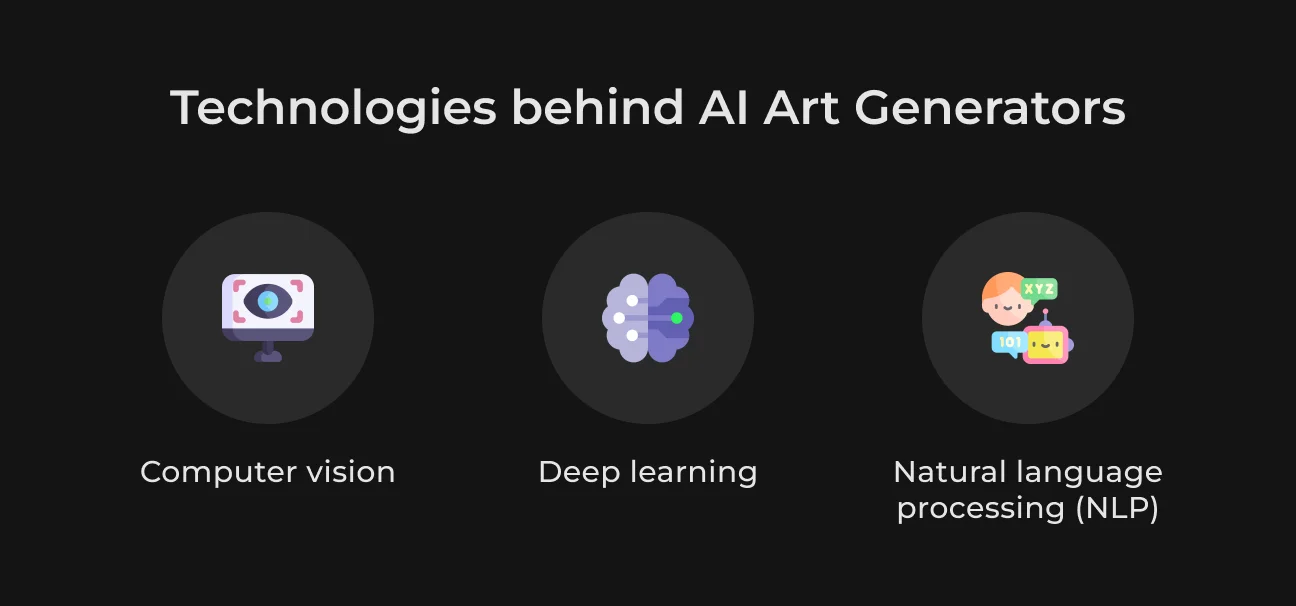
- Computer vision helps machines see and understand images, paving the way for analyzing and creating pictures;
- Deep learning uses multi-layered neural networks to see complex patterns. It can then create sophisticated art by understanding different parts of images;
- Natural language processing (NLP) basically works with text. However, its techniques can also improve text-to-image systems.
Types of Models
AI art generators vary based on their inputs and the transformations you want. For example:
- Text-to-image models. AI art generator from text turns text descriptions into images and brings ideas to life (e.g., DALL·E);
- Image-to-image models. They change one picture's style to another, something like turning a photo into a painting.
Training and Evaluation
Training an AI art generator requires several steps to improve its creations. You need:
- Infrastructure. Strong computational resources, like powerful GPUs and servers. They are needed for heavy data processing and training models;
- Evaluation. It's needed to carefully check results, adjust settings, and repeat the process to improve the art generator's precision and creativity.
Interfaces
The last step is to create user-friendly interfaces so artists and developers can work easily with AI models. These interfaces (like GUIs or APIs) make complex technologies simpler. They let people explore and create without needing to be tech experts.
Best AI Art Generator Features
When you check out AI art generators, look for features that boost your experience and unlock creativity. Here's a list of the top features that make an AI art generator more attractive.
High-Resolution Output
High-resolution output makes artwork sharp and ready for professional use or printing. It's especially necessary for artists who want to sell or display their digital work.
Style Customization
Users can change styles to make the AI work match their artistic view. This way, artists can maintain their unique style while still using the advanced features the AI offers.
Simple Interface
A simple and intuitive design serves everyone. No matter the level of tech skills, they can quickly learn to use the tool effectively. Such simplicity can inspire more creative analysis.
Diverse Artistic Filters
A number of different filters, from impressionism to modern abstract, give users the freedom to release their creativity and mix up their art styles.
Collaborative Features
Collaboration tools like shared workspaces or art remixing can boost community spirit and spark new ideas. They're extremely handy for teams that run creative projects together.
Feature Comparison Sheet
Feature Type | Must-Have Features | Nice-to-Have Feature |
| Core functionality | High-resolution output | 3D art capabilities |
| Customization | Style customization | Custom brush compatibility |
| User experience | Intuitive user interface | Multi-language support |
| Artistic tools | Diverse artistic filters | Augmented reality integration |
| Collaboration | Collaborative features | Social media sharing options |
See more
Explore how generative AI is used in real estate, including its applications and future trends.
Read nowCommon Issues with AI Image Generation Software
It sounds appealing and simple when you can just go to an AI platform like OpenAI, type an idea, and see it come to life almost instantly. While this seems great, there are many drawbacks that people don’t talk about. Here is what you should know.
Low Image Quality
AI-generated images often appear pixelated, blurry, or just plain strange. This occurs because of troubles with the dataset, model setup, or how the AI model was trained.
These actions can help you solve the following issues:
- Upgrade data. Use a bigger, more diverse set of high-res images;
- Change model. Try tech like GANs or VAEs that focus on attention for better-looking images;
- Post-snap polishing. Use sharpening tricks and super-resolution methods to improve image quality after generation.
Legal Risks
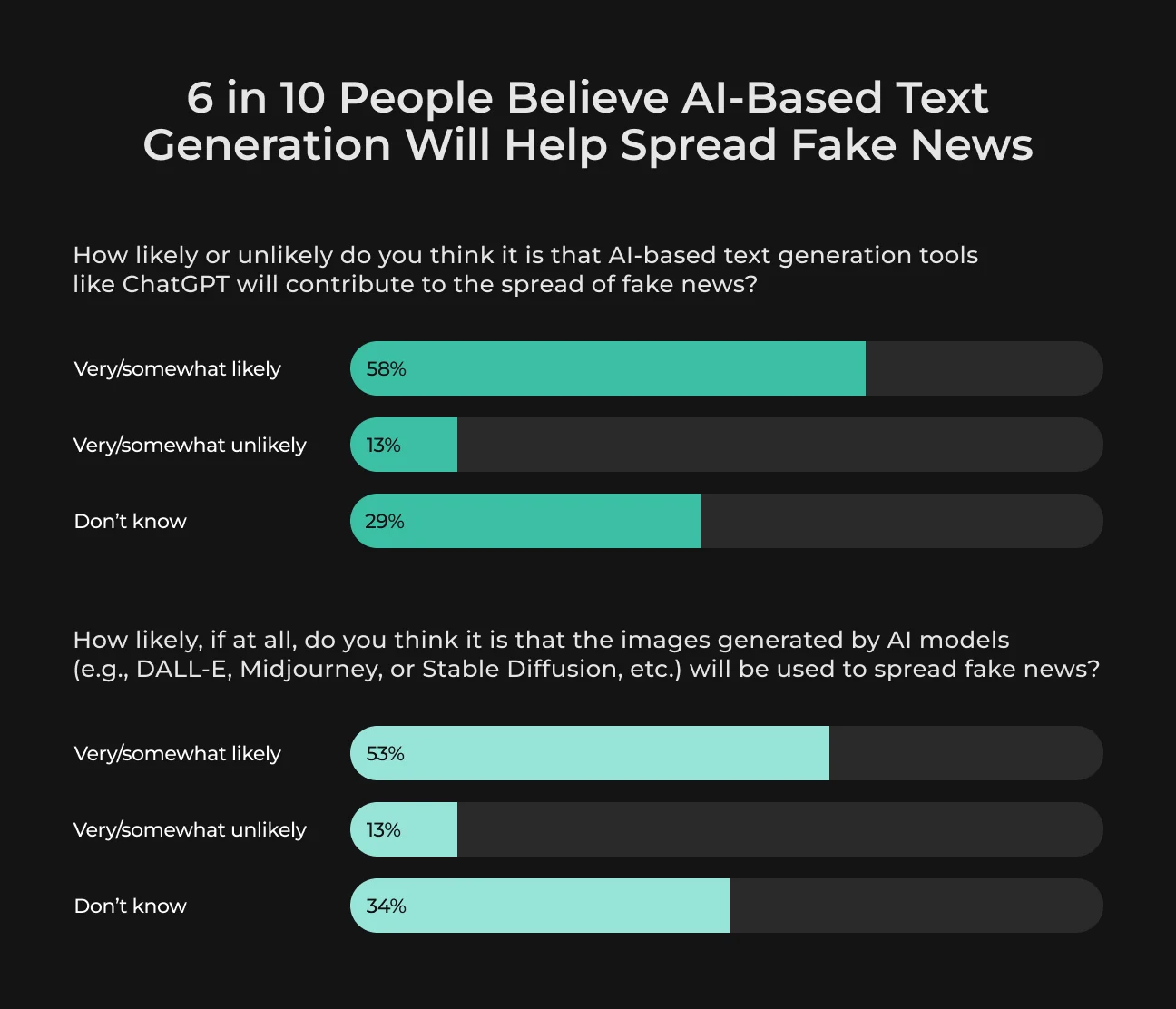
74% of artists feel that using AI for art is completely unethical. And more than half of them also worry that AI tools like Midjourney or Stable Diffusion could begin spreading fake news. Legal issues arise when AI uses copyrighted images without consent. This can potentially result in lawsuits.
What can we do in this situation?
- Proper rights management. Stick to public domain images or get the needed licenses. Maybe even team up with stock photo agencies.
- Transparency and compliance. Keep track of where you get your data and follow copyright laws.
High Operational Costs
AI image generation can make quite a bill because of hardware, energy, and upkeep costs, especially when done on a large scale. To reduce your operational costs, we recommend using:
- Optimization strategies. Make models more efficient to lower resource use while keeping quality intact;
- Cloud solutions. Find cloud services with budget-friendly plans and serverless setups so you just pay for what you use;
- Open-source tools. Choose open-source frameworks and tools for cost-effective and customizable solutions.
High Latency
Waiting for images to load can be frustrating, especially when you need them right away. This happens because the computer is quite busy doing complex math or waiting around for resources. Here’s how to speed things up:
- Try to do more at once. Use parallel processing to cover several tasks simultaneously. This helps cut down on the waiting time;
- Expand with hardware. Use GPUs or TPUs, which are like performance-enhancing tools for your computer, specifically for deep learning;
- Make it simpler. Simplify models to make them run faster without sacrificing quality too much.
How Much Does it Cost to Make AI Art Generator Software
The price to build an AI art generator depends on multiple factors like your project’s size, architecture approach, technologies involved, and many others. If you already have an idea how to make an AI art generator, let’s take a look at the approximate costs based on the industry’s average.
Development Phase | Approximate Cost |
| Research | The cost of research and planning can be anywhere from $25,000 to $75,000. It basically depends on how complex you want it to be. |
| Data collection and management | A solid dataset is a must for any AI project. Costs for purchasing image datasets can be between $10,000 and $75,000. |
| Technical infrastructure | Using high-performance computing (like GPUs for deep learning) can lead to costs from about $20,000 annually. Besides, these costs can rise as usage increases. |
| Software development and integration | To make a user-friendly interface, connect APIs, and keep everything updated, you may need to spend between $20,000 and $100,000. |
| Legal compliance and licensing | Getting the proper image licenses could cost you between $5,000 and $15,000. |
| Testing | Testing to guarantee quality and reliability usually costs between $5,000 and $25,000. |
| Marketing and deployment | Delivering the app to users could cost about $10,000 to $50,000. |
| Total estimated cost | $150,000 to $450,000 |
If you’re looking for a precise estimate for your specific idea, SapientPro’s engineers can provide a free consultation and create a development roadmap. Book a call with our team today to get started.
Create Your AI Solution with SapientPro
How to Make an AI Image Generator: Roadmap
Let’s take a look at the key steps involved in creating an AI image generator. You can use this sheet as a practical checklist for your business when you start bringing your idea to life.
Step | Description | Approximate timeline |
| Define your goals |
| 1-2 weeks |
| Plan |
| 2-4 weeks |
| Prepare data |
| 4-6 weeks |
| Train the model |
| 6-8 weeks |
| Develop |
| 6-8 weeks |
| Test |
| 3-4 weeks |
| Launch |
| 2-4 weeks |
| Improve |
| Ongoing |
Best AI Art Generator Examples
You've probably used an AI art generator or at least heard a lot about them. Whatever your attitude to these tools, they're now everywhere and getting more popular. Let's take a closer look at some of the best AI image generators.
DALL-E 2
DALL-E 2 is an AI art tool by OpenAI that creates images from text descriptions. It can make anything from unusual landscapes to highly realistic portraits. Using transformers and diffusion models, it takes text prompts and creates detailed visuals.
Here’s how the pricing model works:
- Based on a credit system;
- $15 gets you 115 credits;
- Each credit generates four images.
Midjourney
Midjourney turns your ideas into stunning, detailed art, making them look like hand-drawn illustrations or digital paintings. The platform uses a special generative model designed specifically for artistic creativity.
Midjourney offers three subscription plans:
- Basic plan: $10 per month, or $8 per month if billed annually;
- Standard plan: $30 per month, or $24 per month with an annual payment;
- Pro plan: $60 per month, or $48 per month if billed annually.
DeepArt
DeepArt turns ordinary photos into artwork inspired by famous painters like Van Gogh or Picasso. It's ideal for users wanting to create AI art in classic styles. DeepArt uses convolutional neural networks (CNNs) to apply these artistic styles to images.
DeepArt has different subscription options:
- $9.90 per month;
- $25 for three months;
- $80 per year.
Alternatively, you can make a one-time purchase for $129 for unlimited access. Pricing may also differ depending on where you use it. For example, DeepArt.io offers free smaller outputs, and the mobile app has separate weekly and yearly plans.
Other famous brands include:
- Artbreeder. It allows users to mix and modify images using genetic algorithms and create new variations together;
- RunwayML. This AI art generator has a basic interface with AI tools for art generation, video editing, and other creative tasks;
- NightCafe Studio. This easy-to-use platform has affordable pricing and many customization options. NightCafe Studio is suitable for both beginners and experienced artists;
- StarryAI. It provides customizable AI models that focus on diverse art styles, enabling users to closely align with their vision.
How SapientPro Automated Photo Analysis for 87.5% Faster Results
An AgTech company wanted to speed up produce inspections, cut down on manual work, and minimize repetitive tasks. SapientPro’s team created an AI-powered system that uses voice and photo analysis to reduce inspection time by 87.5%.
These are the key features that were included:
- Quick login. Fast sign-ins for inspectors to avoid delays;
- Offline-first data capture. Create records without internet, which is perfect for those on the go;
- Real-time report generation. Pop out inspection reports instantly, no tedious typing or formatting required;
- Unified inspection overview. All media under one inspection name for hassle-free sorting and finding;
SapientPro's solution was developed based on in-depth research, real-world business insights, and custom-built tools. Its focus is on streamlining inspections to be faster, more intelligent, and significantly less burdensome.
Features were designed based on real challenges faced by the client, including offline records and instant produce classification.
Partner with SapientPro to Manage Your Technical Debt
SapientPro is a reliable tech partner that can help with artificial intelligence and machine learning. Our expert team provides strategic AI development services designed for your business goals. With over 8+ years of AI engineering, we know the industry inside-out and can help you with extensive experience.
Let’s integrate AI into your workflow and help you increase revenue.
Contact us for a free consultation.
Team up with SapientPro to Build Modern AI Solutions