All
How to Make an AI Scheduling Assistant
June 15, 202620 min read


Unproductive meetings now cost US businesses an estimated $37 billion annually, a figure driven by a 192% increase in the total volume of digital meetings since early 2020.
The phenomenon described as the "infinite workday" has effectively replaced informal hallway conversations with formal, synchronous sessions that require complex coordination — and 78% of workers say meeting overload prevents them from completing their primary work.
Deploying an AI scheduling assistant has become a critical response.
By automating the coordination work that consumes an average of 8 to 10 hours per week for executives and knowledge workers, these systems redirect human capital toward strategic priorities rather than calendar management.
Economic Impact Category | Statistical Metric | Implications for Enterprise Strategy |
| Annual Meeting Cost (U.S.) | $532 Billion | Inefficient coordination is a primary driver of EBITDA erosion. |
| Productivity Gain from Meeting Reduction | 71% Improvement | Reducing meeting load by 40% results in nearly double output. |
| Time Spent in Communications | 57% of Workday | Only 43% of the day is left for focused, value-generating tasks. |
| Unproductive Meeting Rate | 67% to 72% | Most synchronous time fails to result in actionable decisions. |
| Salary Wasted per Employee | $25,000 / year | Direct financial loss due to ineffective meeting participation. |
Read on to learn more about how to build an AI scheduling assistant from SapientPro’s team.
What Is an AI Scheduling Assistant and How It Works
An AI scheduling assistant is an autonomous or semi-autonomous software agent that uses natural language understanding (NLU), machine learning (ML), and constraint-based optimization to manage time.
Unlike a static booking link that asks users to pick a slot manually, an AI scheduler acts as a proxy: it negotiates times across multiple parties and platforms.
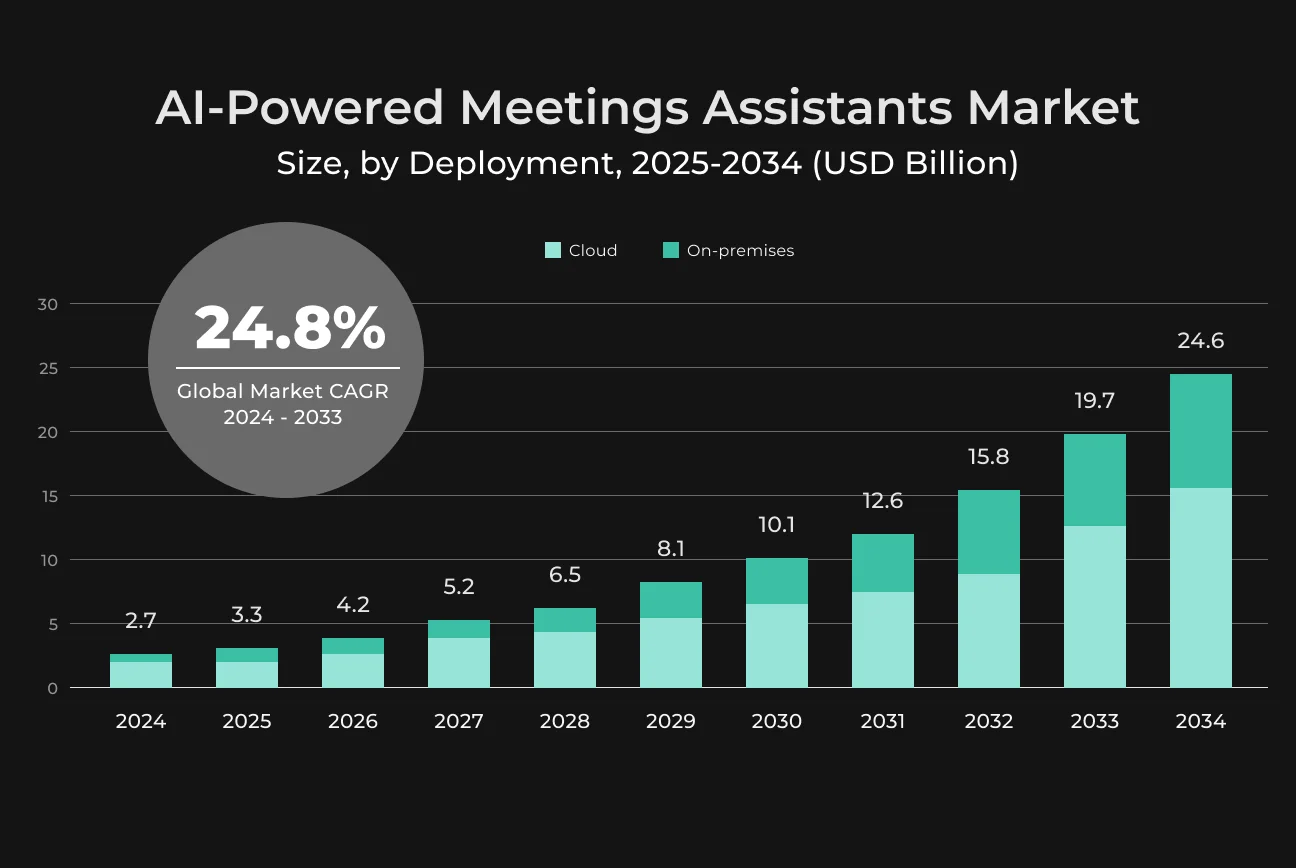
The shift from manual to automated scheduling means moving from rule-based logic to context-aware intelligence. A standard automated scheduling system in 2026 does not simply look for white space on a calendar.
It analyzes focus time preferences, travel requirements, and cognitive energy patterns to propose meetings during peak performance windows. This level of orchestration works because the scheduler integrates directly with organizational systems of record like CRMs, HRIS platforms, and project management tools.
Types of AI Scheduling Assistants
The current market is characterized by 3 primary tiers of scheduling technology:
- The first tier consists of personal assistants designed to optimize the individual workflow. They ensure that deep-work blocks are protected from fragmentation.
- The second tier involves enterprise-wide systems that manage complex multi-participant internal meetings. They handle hundreds of calendars simultaneously to find the least disruptive time for cross-functional syncs.
- The third tier involves industry-specific solutions that address niche requirements. For example, in the healthcare sector, AI appointment scheduling tools manage patient triage and clinician utilization. In the recruitment sector, AI manages the high-volume coordination of candidate interviews.
Tier | Primary User | Core Objective | Key Feature |
| Personal AI | Executives, ICs | Cognitive Focus | Deep Work Protection |
| Enterprise AI | Global Teams | Operational Sync | Conflict Resolution at Scale |
| Industrial AI | Health, Sales, HR | Resource Throughput | Specialized Workflow Integration |
Business Benefits of AI-Powered Scheduling
For COOs and CFOs, an AI scheduler is a direct investment in operational efficiency. When 92% of professionals admit to multitasking during meetings, the current model of engagement has clearly broken down.
Organizations that move to automated scheduling report a 75% reduction in back-and-forth coordination for meeting setup, reclaiming hours that can go toward revenue-generating work.
Productivity and Cognitive Load Reduction
The hidden cost of manual scheduling is the switching cost — the mental energy required to stop a task, check a calendar, send an email, and wait for a reply. After an interruption like this, it can take up to 23 minutes for an employee to return to deep focus. Delegating this work to an AI scheduling assistant typically produces a 35% to 40% reduction in routine administrative load.
In high-stress environments like software engineering, this matters particularly. AI-assisted workflows help developers complete complex tasks up to 126% faster.
Revenue Protection through No-Show Mitigation
In client-facing sectors like healthcare and field service, a missed appointment is a perishable asset — a time slot that can never be recovered.
AI appointment scheduling systems use predictive analytics to flag at-risk bookings based on historical behavior, traffic patterns, and weather conditions, then send intelligent multi-channel reminders via SMS, WhatsApp, and voice to confirm or reschedule.
This typically reduces no-show rates by 67% or more.
Strategic Resource Allocation and Load Balancing
Effective scheduling means optimizing human and physical assets.
A solid automated scheduling system treats staff as a dynamic resource pool and uses multi-objective reinforcement learning to balance total task completion time against utilization rates. This prevents the common failure where 20% of staff absorbs 80% of the meetings, leading to burnout and turnover.
Improving the Customer and Investor Experience
For an investor or a potential B2B client, booking a demo or consultation in under a second via an AI agent sets a level of professionalism that static contact forms simply cannot.
These agents handle full customer interactions across multiple channels simultaneously, including complex problem-solving and transactions, while staying on brand.
Key Challenges in Building AI Scheduling Systems
Building an AI schedule maker means managing high-dimensional constraints. Time is not a simple linear variable — it is shaped by social norms, organizational policies, and physical realities.
Natural Language Understanding and Intent Extraction
The system must parse genuinely ambiguous requests.
A phrase like "Let's sync for an hour sometime before the board meeting but not during my gym time" requires the NLU engine to identify:
- Intent: Scheduling a meeting.
- Duration: 60 minutes.
- Boundary Constraint: Must end before the "Board Meeting" event.
- Exclusion Constraint: Must not overlap with "Gym Time".
- Implicit Context: The "Board Meeting" and "Gym Time" must be retrieved from the user's calendar.
Modern NLU architectures use Transformer models like BERT or RoBERTa for these text classification and sequence labeling tasks. These models understand word relationships in context, which is critical for distinguishing "next Tuesday" from "a Tuesday next month."
Global Temporal Coordination and Time Zones
Time zones are the hardest scheduling engineering problem to get right.
The system must handle over 140 regions with varying Daylight Saving Time (DST) rules, many of which shift on different dates. An AI schedule maker must store all events in Coordinated Universal Time (UTC) but display them in each participant's local format.
Failing to handle the DST transition window correctly is a leading cause of double-bookings in global firms. Advanced systems now use smart time slot translation to identify core overlap hours where all participants can meet without requiring someone to join at 3:00 AM.
API Orchestration and Latency
Integrating with major calendar providers like Google and Microsoft requires complex OAuth 2.0 flows and strict rate limit management. The AI scheduling assistant must maintain a persistent sync with these providers via webhooks.If a user manually deletes an event, the AI must be notified within milliseconds to update its availability model.
Privacy, Security, and the EU AI Act
Scheduling data contains sensitive PII, including:
- Names;
- Email addresses;
- Phone numbers;
- Location;
- Subject of confidential meetings.
Under the General Data Protection Regulation (GDPR), especially Article 25 (Data Protection by Design) and Article 32 (Security of Processing), systems must implement robust encryption and pseudonymization.
Furthermore, the EU AI Act, which becomes fully enforceable by August 2026, classifies high-risk AI systems with strict transparency and human oversight requirements. Any AI task scheduler that affects employment decisions must be auditable and explainable.
Core Components of an AI Scheduling Assistant
A modern AI scheduling assistant is structured into five layers, each handling a specific part of the coordination chain.
User Interface Layer
This layer handles incoming requests. It may be a chat window on a corporate intranet, a voice agent on a phone line, or an administrative dashboard. Two elements matter most here:
- Speech processing. For voice-driven systems, Automatic Speech Recognition (ASR) converts audio to text, while Text-to-Speech (TTS) synthesizes the agent's response.
- Contextual memory. The interface must remember that "from New York" in turn three of a conversation refers to the flight booking intent from turn one.
Integration Layer
The system must connect to the broader enterprise stack:
- Calendar connectors: Microsoft Graph for Office 365 and Google Calendar API for Workspace;
- CRM/ERP bridge: linking with Salesforce or HubSpot ensures that when a demo is scheduled, the lead's record is updated automatically;
- Normalization engine: converting fragmented data from multiple providers into a single, unified JSON schema for the decision engine.
When dealing with unstructured data, it is important to use the best data transformation practices.
AI Engine
To be intelligent, an AI scheduling tool requires:
- NLU pipeline: tokenization, part-of-speech tagging, and intent classification to map raw input to machine-understandable goals;
- Entity extraction: identifying the "who, what, and where" of the request—names, dates, locations, and meeting types;
- Preference learning: analyzing historical data to learn that a specific executive prefers meetings between 2:00 PM and 4:00 PM on Tuesdays.
Decision Engine
The decision engine applies the temporal math to the gathered data:
- Conflict resolver: identifying overlapping events and proposing alternative slots;
- Constraint logic: ensuring that focus blocks are not interrupted and that meetings have sufficient buffer time for travel or preparation.
- Prioritization algorithm: if two meetings conflict, the engine must decide which one is more critical based on participant hierarchy or project deadlines.
Automation Layer
Once a decision is made, this layer carries it out. It requires:
- Invite dispatcher: sending calendar invites and handling the "Accept/Decline" lifecycle;
- Notification queue: using a system like Kafka to manage thousands of simultaneous reminders and SMS alerts;
- Rescheduling workflow: if a participant declines, the system automatically triggers a new negotiation loop to find a replacement time.
Step-by-Step: How to Build an AI Scheduling Assistant
For CTOs planning an internal build or a SaaS product, here is the recommended implementation roadmap:
Step | Action Item | Technical Requirement |
| 1 | Define Niche & Compliance | HIPAA for Health, SOC2 for Finance. |
| 2 | Map UI/UX Conversational Flow | Define slots for intent extraction. |
| 3 | Select Tech Stack | Python (FastAPI) or Node.js (NestJS). |
| 4 | Integrate Calendar APIs | Setup OAuth 2.0 and Webhook listeners. |
| 5 | Implement NLU Layer | Use Rasa or OpenAI LLM chains. |
| 6 | Build Decision Engine | Google OR-Tools for constraint solving. |
| 7 | Orchestrate Notifications | Kafka or RabbitMQ for message queuing. |
| 8 | Deploy & Monitor | Setup CI/CD with automated red-teaming. |
Build Your AI Scheduling Assistant with SapientPro
From architecture to deployment — we handle it all.

Tech Stack for AI Scheduling Software
Building a production-grade scheduling system requires a specific combination of cognitive and operational technologies.
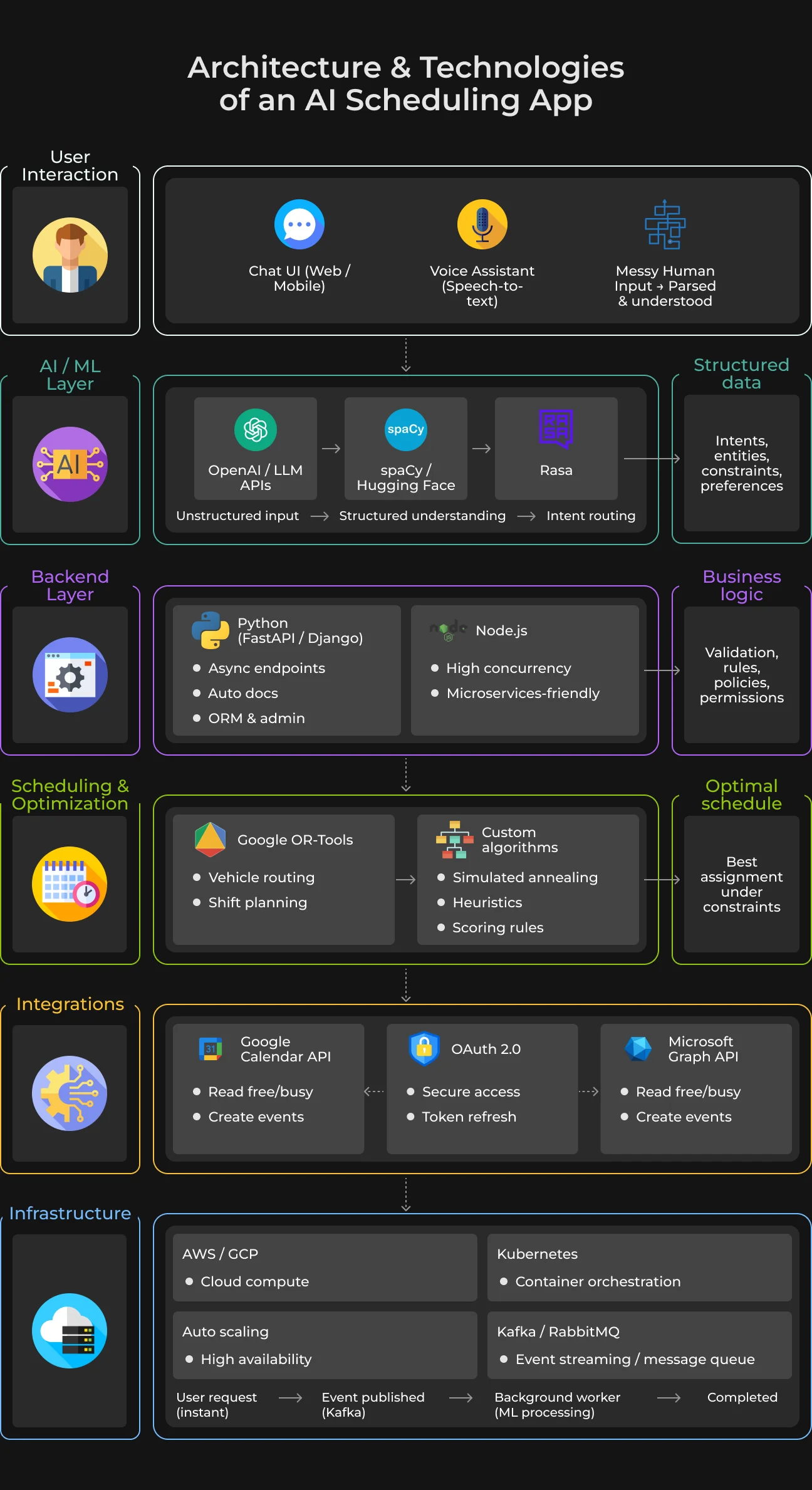
AI/ML tools
Building a proper AI scheduler requires serious intelligence under the hood.
Start with OpenAI or a comparable LLM API for natural language understanding. Users type partial, misspelled, and half-formed requests — these models parse that noise into structured data. For specialized NLP tasks where API costs are a constraint, spaCy or models from Hugging Face handle entity recognition locally.
Rasa remains a strong choice for conversational workflows that need strict dialogue management rather than open-ended generation. The conversational routing logic is similar to what you would use when building an AI voice chatbot for customer support.
Backend
Python dominates because the ML ecosystem in automated scheduling software demands it.
FastAPI is a strong fit: asynchronous endpoints, automatic documentation, and a lightweight footprint. Teams that prefer a heavier ORM and built-in admin panels often choose Django. Node.js still has a place, particularly in microservice architectures that lean on concurrent I/O.
Scheduling & optimization
Finding who goes where and when is a constraint satisfaction problem.
Google's OR-Tools provides a strict mathematical solver for routing and shift planning — you feed it constraints, it returns the optimal solution. That said, out-of-the-box solvers break on edge cases.
Your AI task scheduler will likely need custom algorithms, such as simulated annealing scripts, to handle company-specific rules like non-standard lunch breaks.
Integrations
An isolated system is useless. Any AI calendar assistant must connect to the outside world:
- Google Calendar API lets you read free/busy times and create events directly in a user's workspace;
- Microsoft Graph API does the exact same heavy lifting for the Office 365 crowd.
Handling OAuth tokens for these platforms is notoriously painful. Build bulletproof token refresh logic from the start.
Infrastructure
AWS and GCP provide the compute needed to keep an AI schedule maker online during Wednesday morning traffic spikes. Containerized deployments on Kubernetes handle load distribution.
Event streaming is mandatory. Kafka or RabbitMQ decouples the slower machine learning processing from fast web requests. When a user books a meeting, the web server responds immediately and Kafka passes the background processing to a worker node.
Types of AI Scheduling Techniques
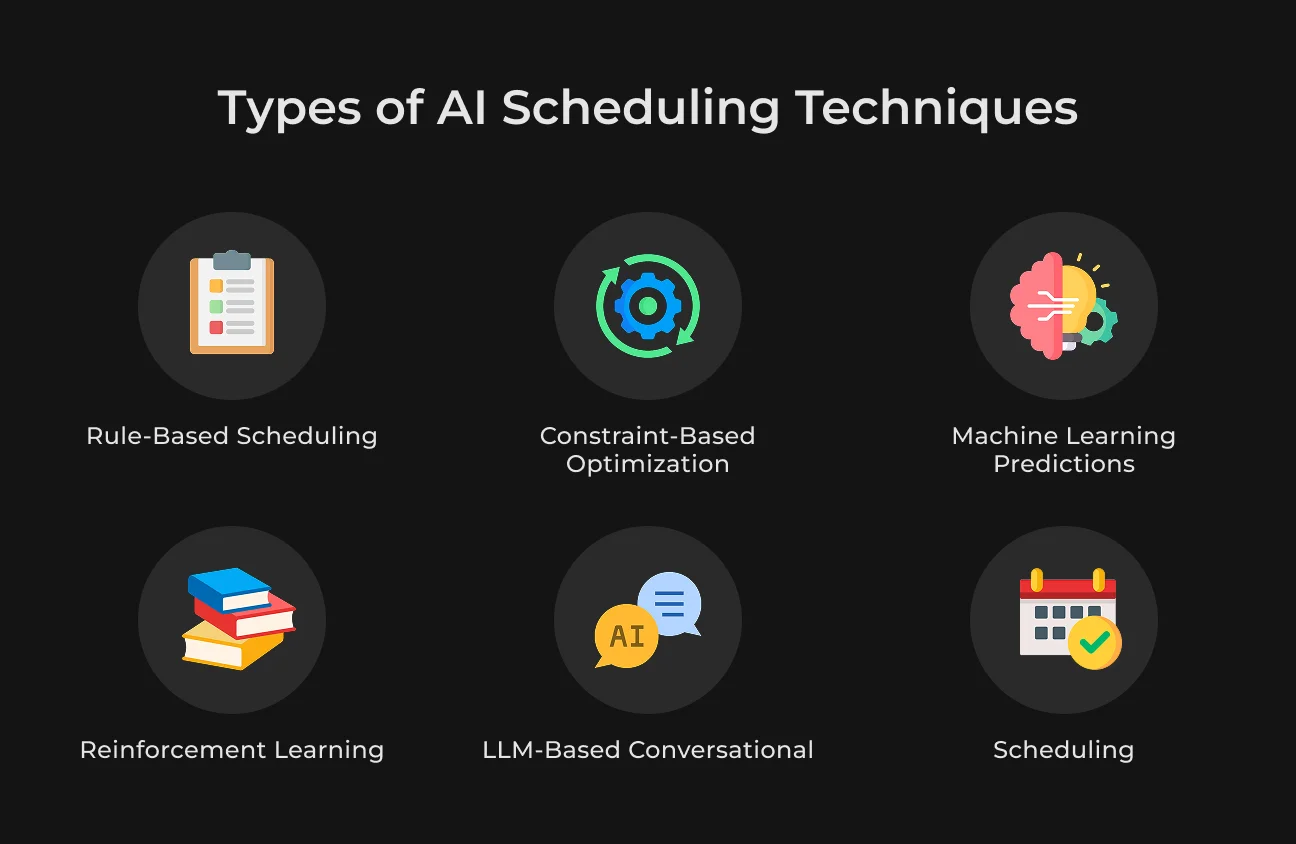
To build an AI calendar assistant, you can draw on four main scheduling approaches.
Rule-Based Scheduling
Basic AI schedule makers use if-then logic for simple appointments and availability management. These systems are predictable and easy to debug, but they struggle at scale and break down quickly when facing the combinatorial complexity of real scheduling problems.
Constraint-Based Optimization
Advanced automated scheduling software uses solvers like Google OR-Tools or Timefold to satisfy hard and soft constraints simultaneously. Hard constraints — required room capacity, non-overlapping meetings — must be met for a solution to be valid. Soft constraints represent optimization targets: schedule meetings as early as possible, minimize room switches, preserve breaks between sessions.
Machine Learning Predictions
By analyzing historical attendance and duration data, an AI scheduler learns behavioral patterns and can predict meeting outcomes with meaningful accuracy. Models like Random Forest, Support Vector Machines (SVM), and XGBoost forecast attendance, flag at-risk no-shows, and surface early signals of absenteeism so staffing needs can be addressed proactively.
Reinforcement Learning (Advanced)
Sophisticated AI scheduling software models the environment as a Markov Decision Process (MDP), letting agents learn optimal policies through continuous interaction. Algorithms like Proximal Policy Optimization (PPO), Deep Q-Network (DQN), and 3DQN allow the scheduler to respond to dynamic disruptions — machine failures, urgent order insertions — without requiring a system restart.
LLM-Based Conversational Scheduling
Modern AI calendar assistants use Transformer-based NLU (BERT, RoBERTa) to interpret ambiguous requests and engage in adaptive slot-filling dialogues, gathering the data points needed (origin, destination, date, participants) to trigger specific services. This architecture supports more explainable and manageable conversational interactions, often integrated directly into AI-based CRM systems.
AI Scheduling Best Practices
To ensure long-term adoption and ROI, you must adhere to several industry best practices.
Maintaining Human Agency
No matter how capable the AI scheduling tool becomes, users must retain final veto power. A two-step verification process for high-stakes actions — canceling a meeting with a major client, for example — prevents runaway agent errors from causing real damage.
UX Simplicity and Cognitive Ease
The system should disappear into the workflow. If users need to learn a special syntax to request a meeting, the interface has already failed. It should feel like a natural extension of how each person already works, learning preferences over time rather than forcing users to adapt to rigid rules.
Explicit Edge Case Handling
The "Happy Path" of scheduling is easy. The value is in handling the exceptions:
- What happens when a conference room is double-booked?
- What if an agent is in transit and loses connectivity?
Building robust fallback logic is what separates professional AI for scheduling from prototypes. An example of a fallback logic is proposing the three next-best times or asking for clarification.
Security and Data Masking
GDPR requires data minimization. An AI scheduling app should collect only what is strictly necessary for the booking. For non-production environments (QA and dev), use static data masking to replace real PII with realistic but non-identifiable alternatives.
This lets you test scheduling logic without exposing executive calendars to the development team.
Common Mistakes to Avoid
Here are the 3 main mistakes from our experience that you need to avoid when developing AI scheduling software.
Overengineering the MVP
Many teams spend months trying to train a custom LLM from scratch when a pre-trained model and a simple rules engine would have been enough to validate initial business assumptions.
Build the unique AI layer that provides real differentiation — a specific industry workflow, for example — and use off-the-shelf components for everything else.
Ignoring Timezone Complexity
Mishandling Daylight Saving Time changes is the most common technical error in scheduling software. Systems must calculate availability based on the future date of the appointment, not the current state of the clocks. Getting this wrong is the fastest way to produce double-bookings in global firms.
Lack of Monitoring and Feedback Loops
An AI scheduling app is a living system.
Without event tracking, latency monitoring, and user feedback mechanisms, it is impossible to understand why an agent is making poor decisions. A retraining loop ensures the AI continues to improve its model of user preferences over time.
SapientPro Case Studies: Intelligent Automation in Action
SapientPro developed a personal AI assistant to improve e-commerce experiences by combining LLMs with hybrid search technology. The assistant interprets natural language queries and delivers context-aware product recommendations in real time.
Integrated into a ShopWare-based platform, the solution required minimal disruption to existing workflows while improving product discovery, decision-making, and overall UX.
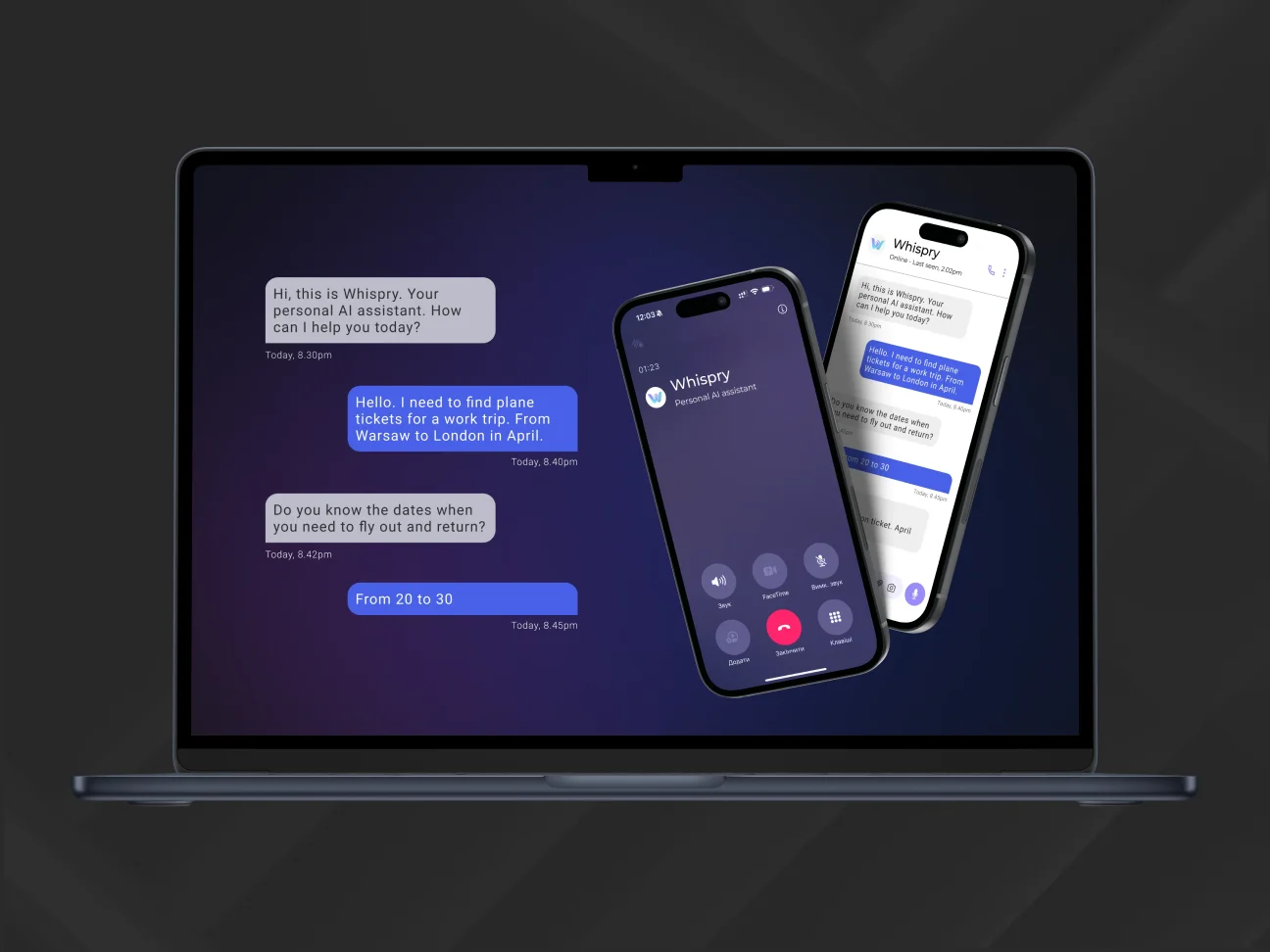
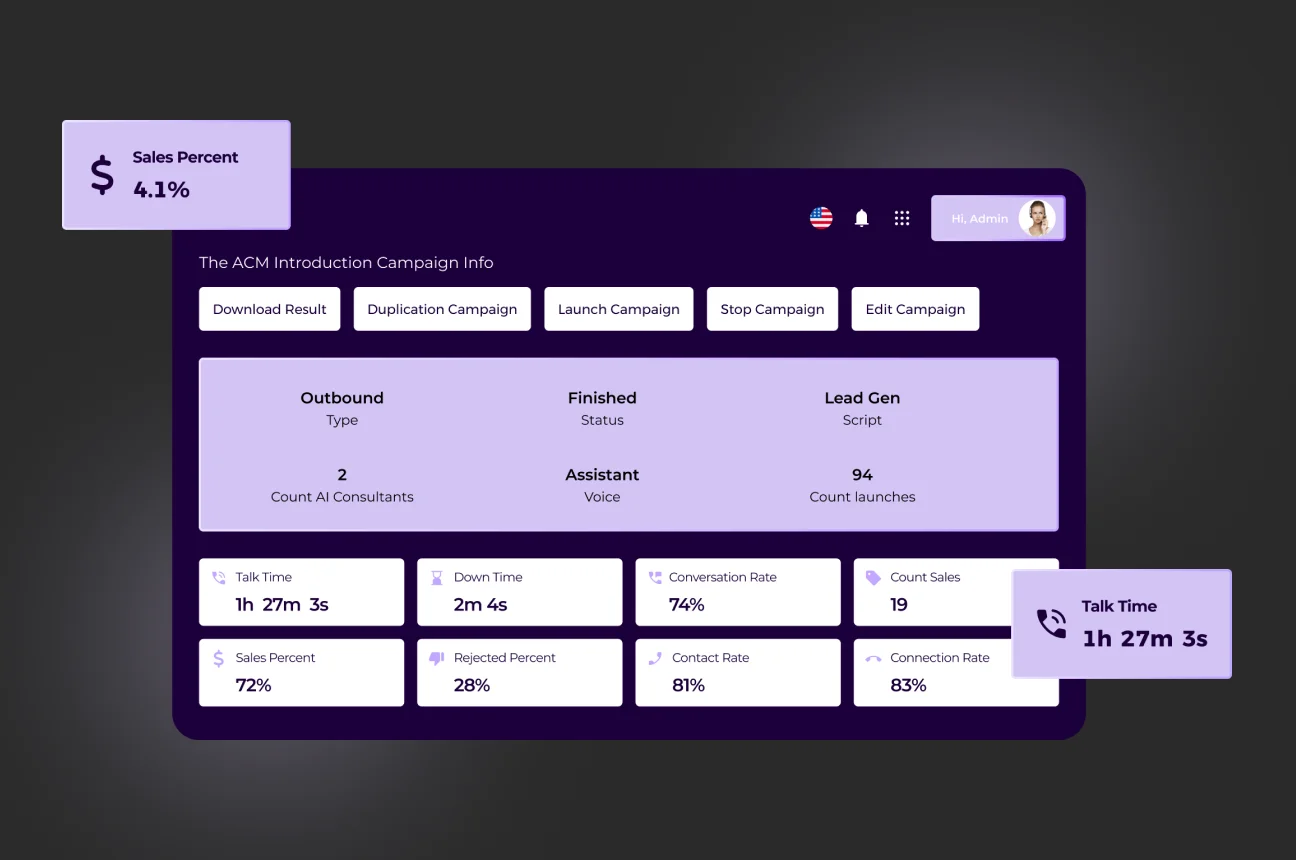
SapientPro also built a custom AI-powered call center that achieved a 93.3% reduction in agent costs, bringing expenses down to as low as $1 per hour.
The solution uses natural language understanding to identify a caller's goal within seconds, then triggers the right workflow to book meetings or resolve issues without human intervention.
In a another project, SapientPro engineered an AI tool for scalable CV data processing that saves HR teams over 320 hours monthly. By integrating a custom RAG database with an advanced NLU engine, the assistant extracts, structures, and indexes information with near-human accuracy.
Future Trends in AI Scheduling
As we look toward 2026 and beyond, the AI for scheduling market is shifting to proactive intelligence.
Predictive and Autonomous Agents
The shift from chatbots to agents with actual agency is the defining trend of 2026.
These autonomous agents do not just respond to requests — they proactively spot disruptions like port strikes, supply chain delays, or internal bottlenecks and act on them without waiting to be asked. The global AI agent market is forecast to grow from $5.4 billion in 2024 to $236 billion by 2034.
Multimodal and Hyper-Personalized Systems
Future systems will let users interact via voice, text, or 3D visual avatars.
By 2028, 68% of customer interactions are expected to be handled by autonomous tools. These assistants will learn not just work habits but communication tone, energy patterns, and personal preferences — functioning as a true digital twin.
Generative AI Planners
The next generation of AI scheduling tools will generate entire months of project workflows from a single prompt, synthesizing historical data and current market conditions to suggest next-best-action strategies for sales teams and project managers alike.
Why Choose SapientPro for AI Development
SapientPro builds custom AI scheduling solutions that go beyond basic availability management, incorporating intent-aware logic and industry-specific guardrails.
Our team develops scalable backend systems on AWS and GCP capable of managing thousands of concurrent operations with minimal latency.
What we can develop for you:
- Intelligent process automation (IPA): convert unstructured documents into structured databases using LLMs, as in our SDS Automation solution;
- Multilingual voice agents: human-grade interactions with under 700ms latency, fluent in 30+ languages, capable of handling full transactions without human involvement;
- Predictive analytics and lead scoring: AI models that cluster users by behavioral data to prioritize high-value segments directly within your CRM;
- Computer vision and IDP: high-precision models for object detection and automated quality inspection that reduce processing time by up to 87.5%;
- Proof of Concept (POC): we cut POC development from the traditional 500 hours down to 40–60 hours, delivering functional prototypes ready for investor review.
We connect your AI scheduler to Microsoft Graph, Google Workspace, and major CRMs like Salesforce, and build on a security-first framework that includes PII masking for GDPR compliance.
Partner with us to deploy an automated scheduling system!
Ready to Automate Your Scheduling Workflow?
SapientPro delivers production-grade AI with all your requirements included.