All
How to Build an MCP Server and Implement it in Business
June 10, 202610 min read


Almost every company is investing in AI, but many run into the same problem — their tools don't have access to live business data.
These systems can answer questions, but they can't read internal databases, check Jira tickets, or interact with company systems without a complex, expensive setup. That leaves even advanced AI assistants working on outdated and incomplete context.
IBM estimates that roughly 90% of enterprise data is unstructured and siloed, and 60% of AI projects frequently fail not because of the models themselves but because the underlying data infrastructure isn't ready for them.
Model context protocol (MCP) was introduced to solve this challenge. Often described as the "USB-C port for AI," MCP is an open standard that creates a universal connection layer between AI models and external tools, APIs, and data sources.
This guide from SapientPro's AI experts covers how to build an MCP server that integrates with your business systems.
What Is an MCP Server?
An MCP server is a well-defined interface that AI models use to interact with the outside world. It connects securely to external systems, tools, APIs, and data sources — creating a controlled line of communication between AI models and your business infrastructure.
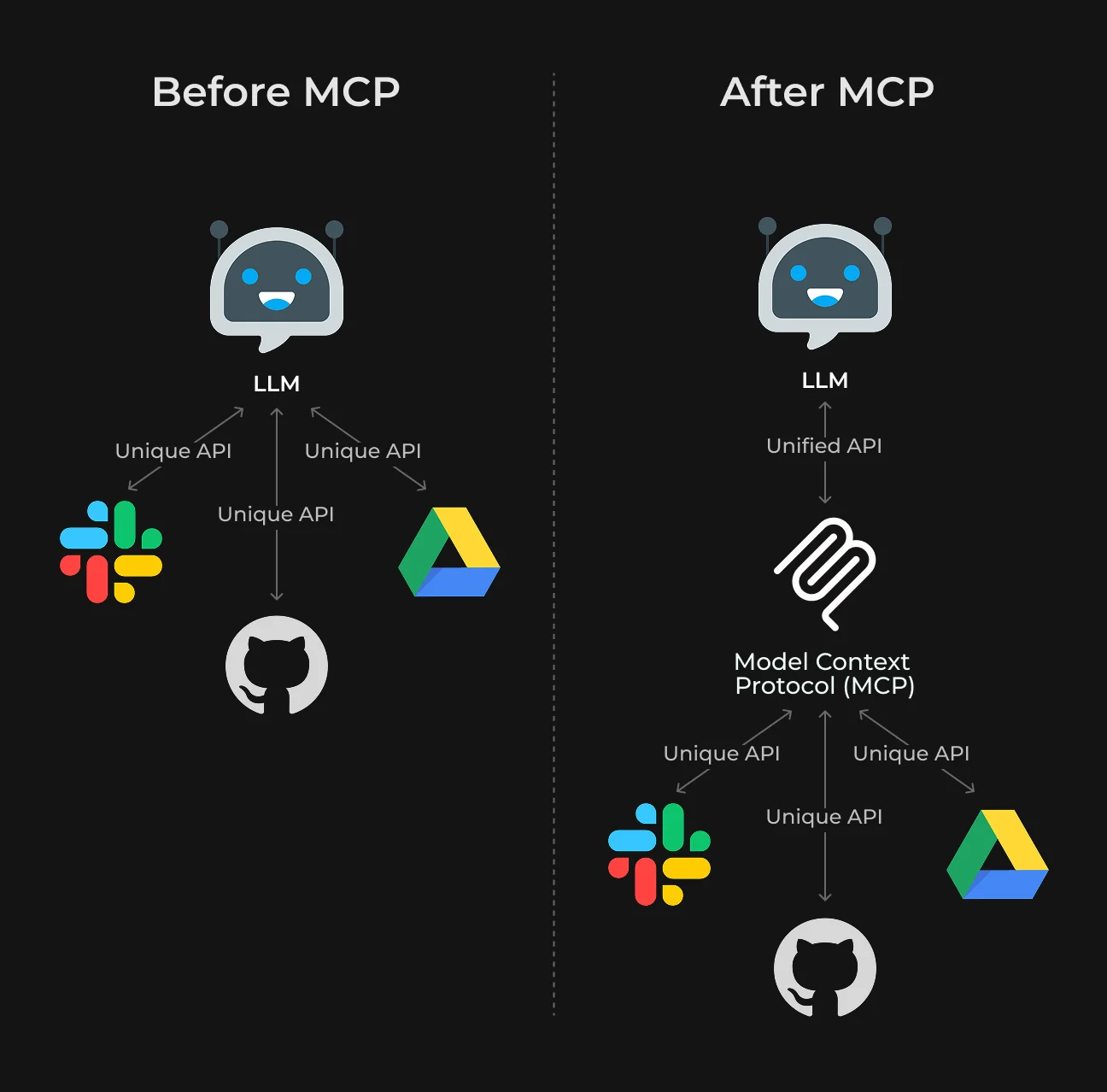
MCP server implementation lets models query live data, access internal documentation, interact with databases, perform actions, and communicate with enterprise tools through a standard protocol.
Structured communication is central to this architecture.
MCP defines how AI models discover available tools, request information, issue commands, and receive responses. This reduces integration complexity, improves reliability, and keeps technical debt manageable as AI deployments scale.
What Problem Does MCP Solve?
One of the persistent problems in enterprise AI is integration. Most companies already operate across a large set of tools: CRMs, databases, internal dashboards, ticketing systems, cloud platforms, analytics tools, and custom software.
When AI needs to interact with these systems, the complexity compounds fast. This is known as the M×N integration problem.
Each AI model requires a separate integration with each external system it connects to. With 10 AI applications and 15 internal tools, that's up to 150 individual integrations to build and maintain.
The problem grows as companies add AI tools or switch model providers. Teams rebuild the same integrations, often in slightly different formats, accumulating technical debt and slowing AI adoption.
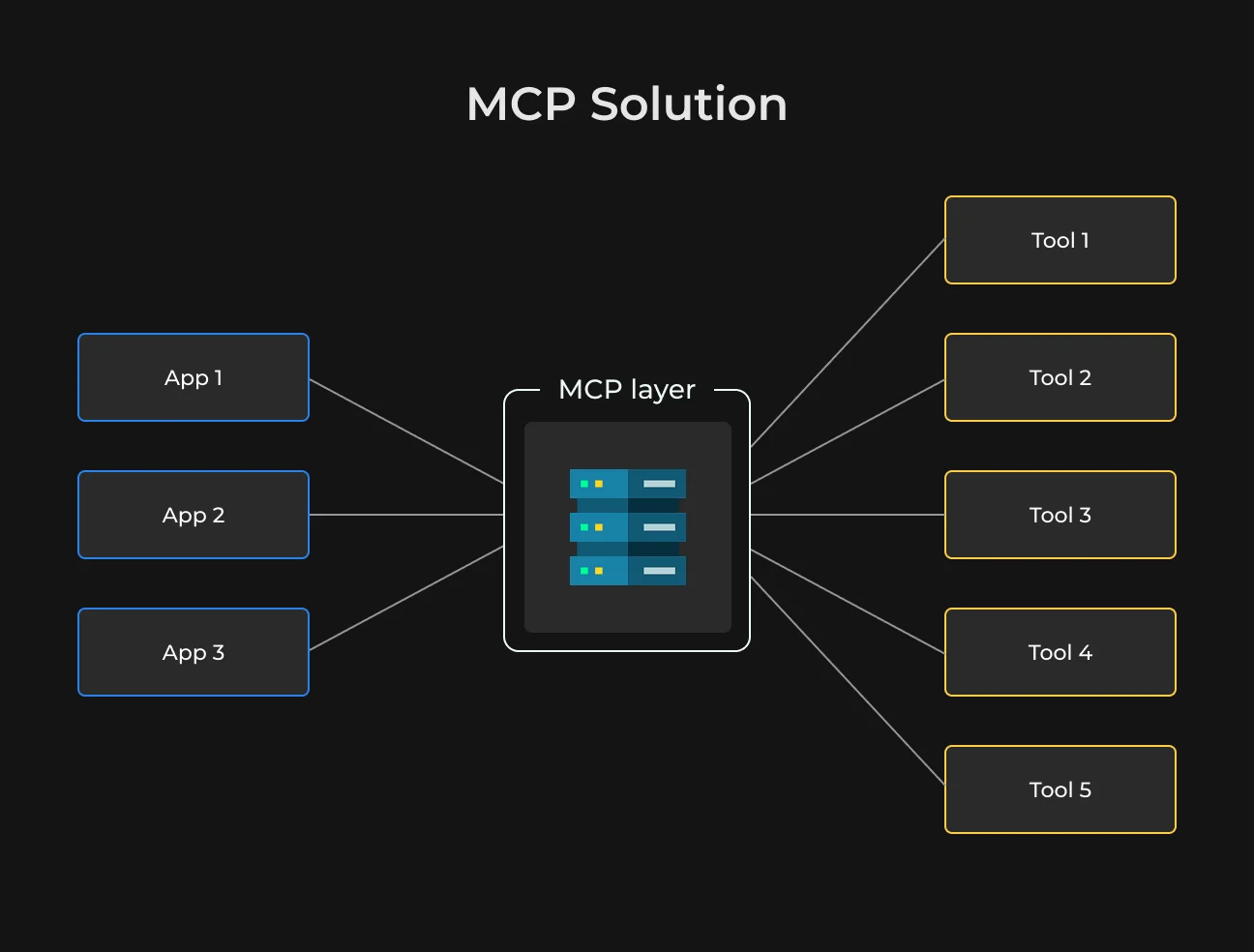
MCP simplifies this by introducing a shared communication layer between AI applications and external services. AI tools connect to MCP-compatible servers; enterprise systems expose their capabilities through the same standard.
This shifts the integration model from M×N to M+N:
- New AI assistants can access existing systems without new integrations;
- Internal tools become reusable across multiple AI platforms;
- Engineering teams spend less time maintaining connectors.
MCP Server Architecture: How Does It Work?
An MCP server sits between an AI system and the tools or data your company uses.
Rather than letting AI models connect directly to databases, APIs, or business software, MCP handles those interactions through its own integration layer. The AI does the reasoning; the MCP server controls access to external systems.
A typical MCP server setup has three components:
- AI application or assistant;
- MCP server;
- Connected services — databases, CRMs, internal dashboards, cloud platforms, documentation systems.
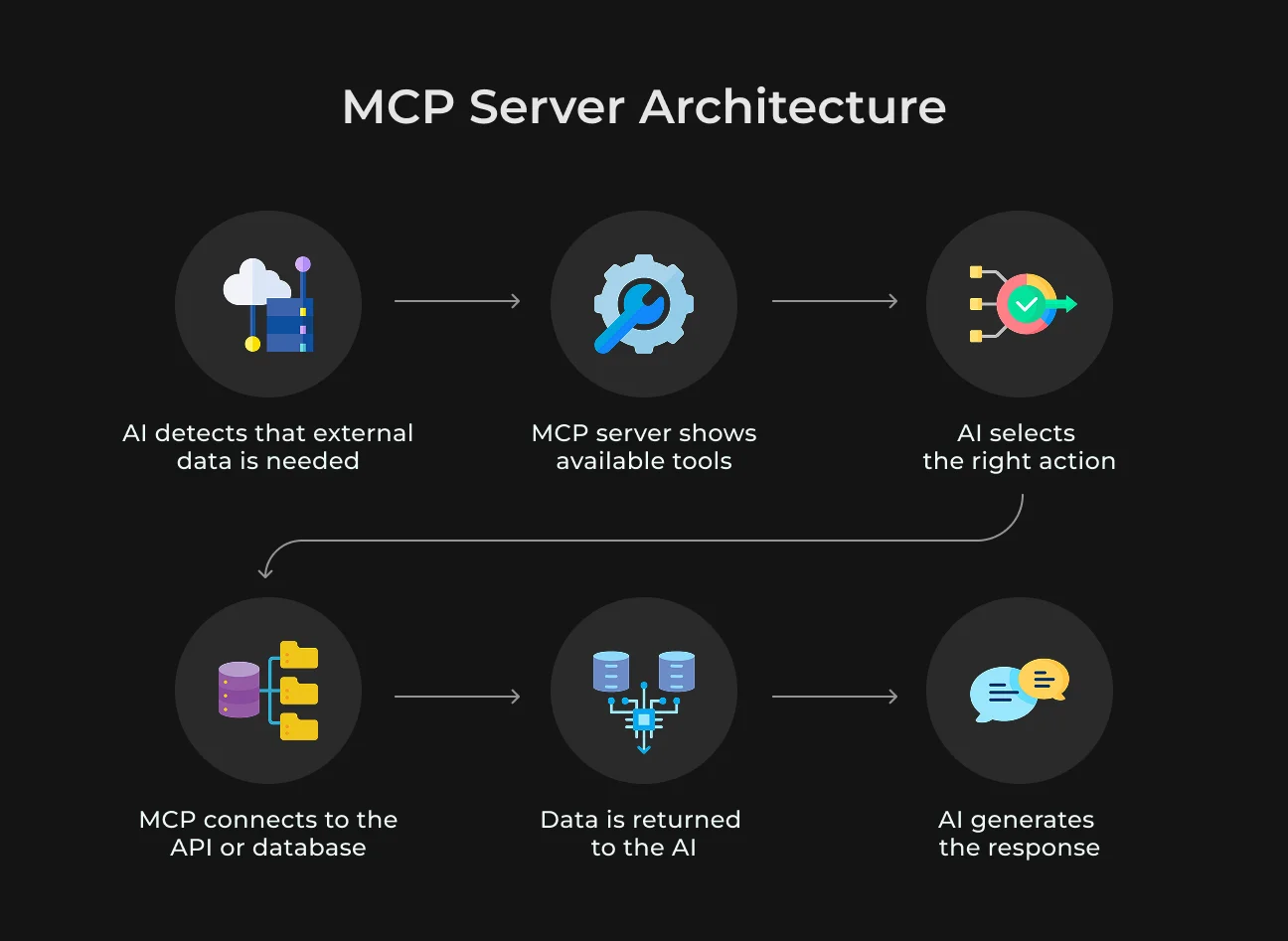
When someone asks the AI a question that requires live company data, the model sends a request to the MCP server.
Say a manager asks to pull today's unresolved support tickets. The AI understands the request, but the MCP server provides the actual connection to the ticketing platform. It exposes predefined tools or actions the AI can use safely.
The workflow follows these steps:
- AI detects that external information is needed.
- MCP server shares a list of available tools or actions.
- AI selects the appropriate function.
- MCP communicates with the required API, database, or service.
- The retrieved data is formatted and returned to the AI.
- AI generates a readable response.
A single MCP server can handle multiple integrations at once — project management tools, cloud infrastructure, analytics platforms, internal documents, monitoring systems — through one protocol. This removes the need to build custom integrations for each AI assistant separately.
This architecture also supports security and governance. Companies can define exactly which actions are available, restrict sensitive systems, log activity, and require approval before certain operations run.
Local vs Remote MCP Servers
MCP servers come in two deployment models: local and remote. The right choice depends on where the AI runs, which systems you need access to, and how many users the infrastructure needs to support.
Local MCP Servers (stdio Transport)
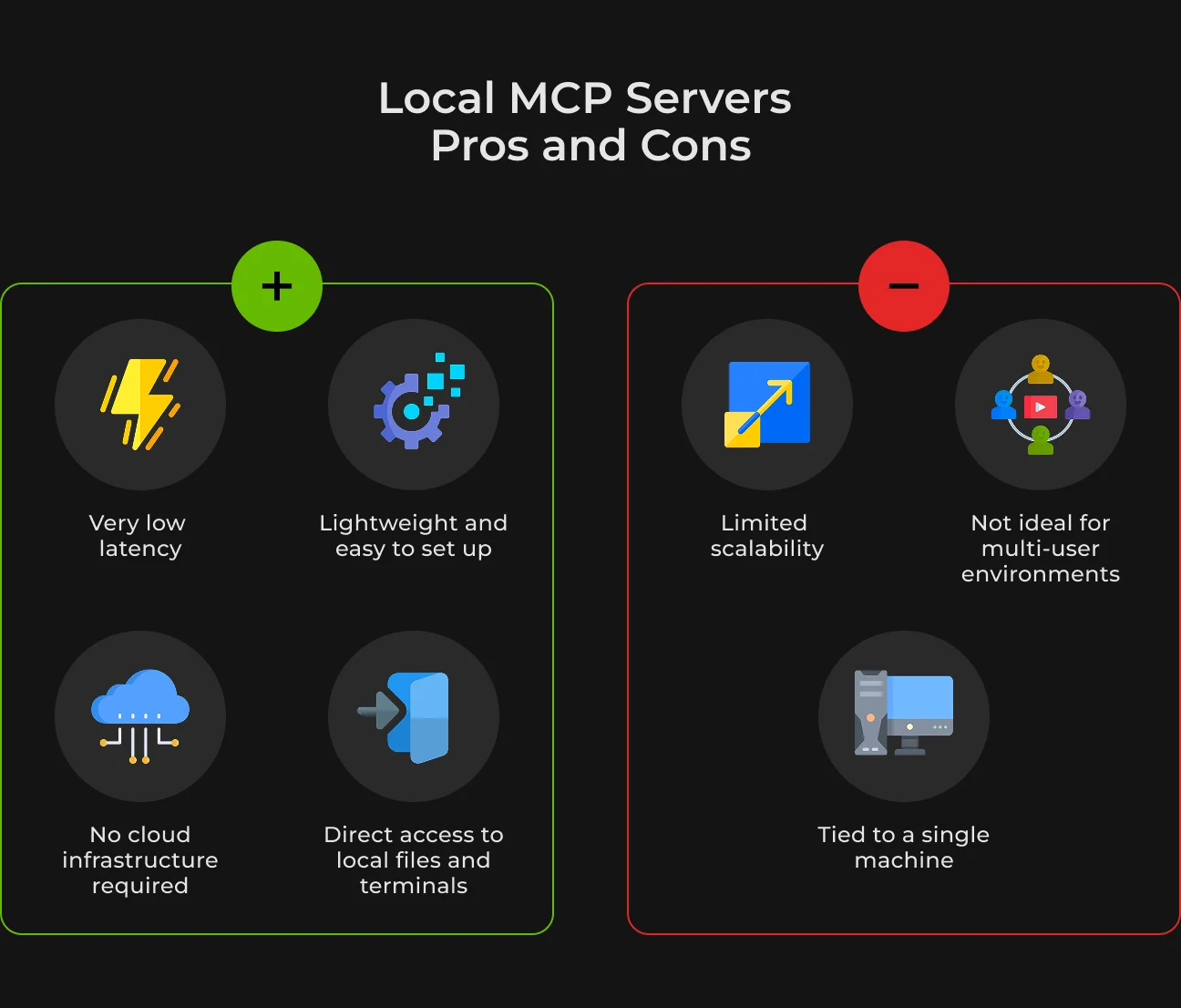
A local MCP server runs on the same machine as the AI application. The two processes communicate directly over stdio, within the same environment. This setup is fast, lightweight, and easy to configure. Infrastructure dependencies are minimal and latency is negligible.
Local MCP servers are typically used by developers building or testing AI tools. They let models connect safely to files, terminals, or local databases — all on a single machine.
Common use cases include:
- AI coding assistants inside IDEs;
- Local automation scripts;
- Development and testing workflows;
- Document search on a personal workstation;
- Terminal and file system access.
For example, a developer can connect an AI assistant to a local MCP server that reads project files, runs shell commands, or retrieves technical documents on that machine.
The limitation is scale. Local deployments work well for a single user or isolated environment but aren't suitable for systems where multiple users or services need shared access.
Remote MCP Servers (HTTP/SSE Transport)
Remote MCP servers are hosted separately, typically on cloud infrastructure or enterprise servers. AI applications connect to them over HTTP or Server-Sent Events (SSE).
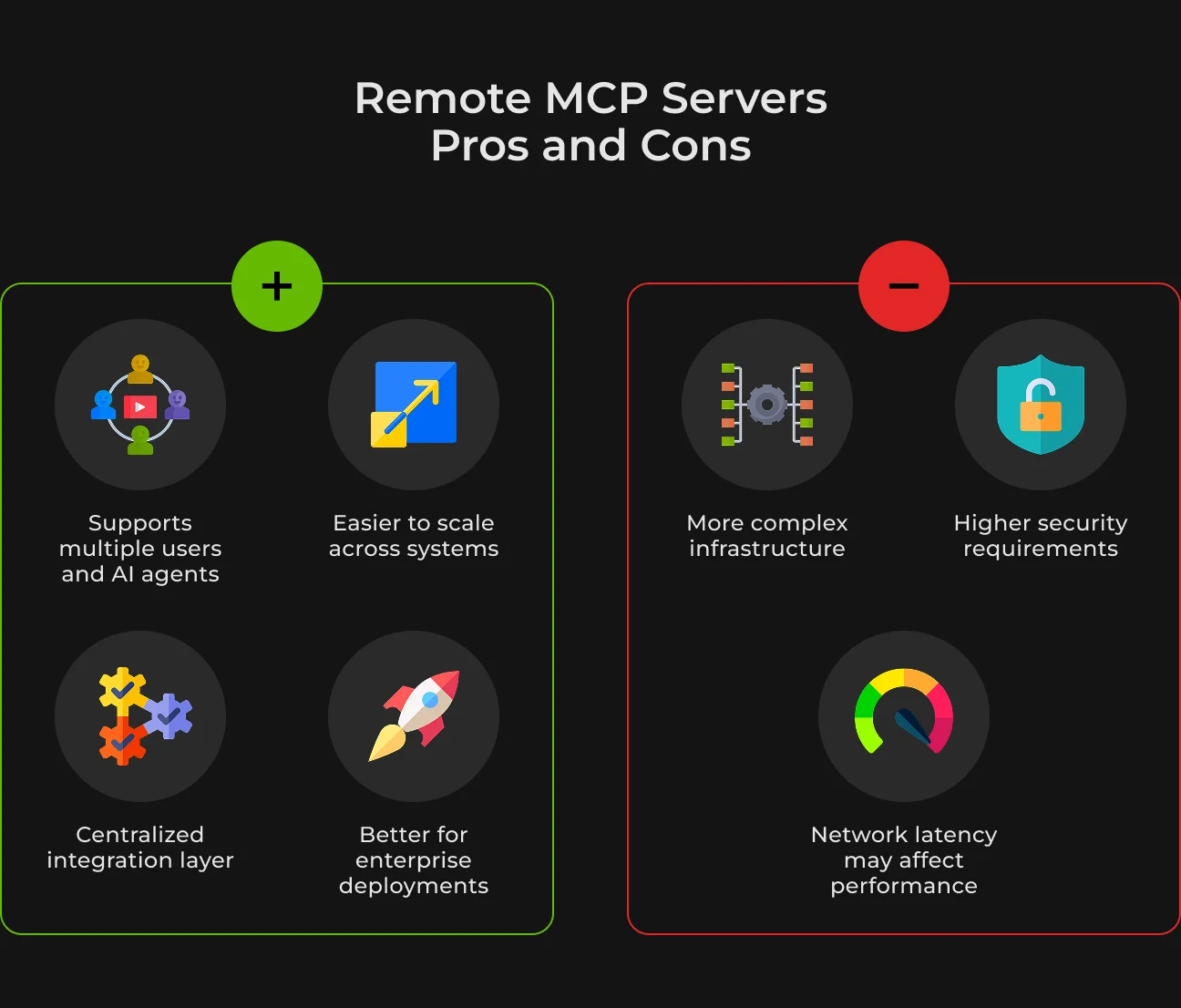
Remote servers scale where local ones cannot. Multiple users, agents, or applications can connect to a single server simultaneously — which makes this architecture practical for larger organizations.
The trade-off is added infrastructure requirements: authentication, access control, encryption, API security, and system monitoring all need explicit attention.
Build Your MCP Server With SapientPro
Connect your AI to live business data — reliably.
MCP Server Use Cases for Your Business
MCP servers solve a specific operational problem: they give AI secure, structured access to live business tools and data. Here are the main use cases.
Enterprise Data Access
Many organizations still rely on analytics teams or database specialists to retrieve operational information. Simple business questions require SQL queries, dashboard configuration, or manual report generation — which slows down decision-making, especially for non-technical teams.
MCP enables AI assistants to query authorized databases and analytics systems directly.
An employee can ask in natural language "show me last quarter's top-selling products in Spain," and the MCP server translates that into a structured database query and returns the result safely.
Teams keep control over which datasets are exposed and can restrict query types that might surface sensitive data. The practical result: fewer requests routed to analytics teams for routine lookups, faster access to operational data.
Customer Support Automation
Standard support chatbots lack context. They can answer FAQs, but they have no view of a customer's actual history unless they're connected to current tickets, CRM data, and account records. When a conversation transfers to a human agent, customers repeat themselves.
MCP-connected AI support agents can retrieve data from ticketing systems, CRMs, knowledge bases, and internal documentation in real time.
The AI responds based on the customer's actual situation. Human agents get more context upfront and spend less time gathering it manually. Gartner projected in 2022 that conversational AI could reduce contact center labor costs by up to $80 billion globally as these capabilities mature.
AI-Powered MCP Server Development Workflows
AI coding assistants become substantially more useful when they can access real development environments rather than working purely from prompts. MCP servers let AI tools inside IDEs like Cursor, Windsurf, or VS Code interact with repositories, internal documentation, CI/CD logs, and monitoring systems in a controlled way.
An MCP-connected development assistant can:
- Search internal technical documentation;
- Analyze deployment logs;
- Inspect project architecture;
- Retrieve pull request discussions;
- Explain internal frameworks to new developers.
This reduces context switching. Developers spend less time moving between dashboards, wikis, and pipelines while debugging or reviewing deployments.
GitHub's own study of Copilot usage found that AI coding assistance helped developers complete certain tasks 55% faster, with many reporting fewer interruptions from repetitive work.
Webflow and Content Operations
Content and marketing teams often spend significant time on repetitive tasks: updating metadata, publishing into the CMS, checking SEO settings.
MCP can connect AI systems directly to CMS platforms like Webflow and automate many of these tasks. Teams can use AI to:
- Generate and update metadata;
- Review missing SEO elements;
- Optimize internal linking suggestions;
- Organize CMS content;
- Validate publishing workflows.
For example, an AI assistant connected through MCP can scan Webflow CMS collections and identify pages missing meta descriptions, duplicate titles, or incomplete schema markup, then prepare suggested fixes for review. The time savings come from removing the manual audit step.
RAG and AI Memory Systems
Retrieval-augmented generation (RAG) is one of the most important AI infrastructure patterns today, especially for companies working with large volumes of internal knowledge. MCP servers help standardize how AI models access these knowledge sources.
This often includes:
- Vector databases;
- Semantic search systems;
- Internal documentation;
- Meeting transcripts;
- Operational records;
- Historical conversations.
Without structured retrieval, models lose context between interactions or generate inconsistent responses. MCP lets AI systems retrieve historical information dynamically rather than depending entirely on the model's limited context window.
This directly reduces hallucinations, which remain one of the biggest reliability concerns in enterprise AI.
A customer support AI can recall previous interactions. An internal research assistant can retrieve earlier reports or meeting notes. The AI becomes connected to the organization's operational memory rather than isolated from it.
Multi-System Workflow Automation
Most business processes span multiple systems. A complete workflow might touch Slack, Jira, GitHub, cloud infrastructure, and internal documentation. Coordinating across these systems has traditionally required manual effort or custom automation pipelines.
MCP makes cross-platform orchestration more manageable because AI systems interact with multiple tools through one standardized layer.
For example, an AI assistant could:
- Detect an infrastructure incident;
- Create a Jira ticket;
- Notify the engineering team in Slack;
- Retrieve deployment logs;
- Summarize the issue;
- Assign the incident to the correct team.
And the business impact here is not so much about optimizing human resources but about diminishing coordination delays. Teams have less need to switch between systems, collect context, or manually forward information across departments.
How to Create an MCP Server: Step-by-Step
Building an MCP server starts with deciding what you want it to do: which external systems the AI should access, how it queries data, and which actions it can take.
A well-built MCP server defines permissions, exposes only the tools that are actually needed, handles requests reliably, and returns clean data the AI can work with.
Step | What to do | Why it matters |
| 1. Define your use case | Decide what the AI should access (database, CRM, CMS, files, tickets, internal API, etc.) | Keeps the server focused without complexity. |
| 2. Choose the transport type | Use stdio for local tools or HTTP/SSE for remote deployments. | The transport affects latency and scalability. |
| 3. Set up the MCP server project | Create the server structure using your preferred language and MCP SDK.
| Gives you the base for tools, resources, and communication logic. |
| 4. Connect the external system | Add the API, database, file system, or service the server will work with. | Gives AI access to real business data.
|
| 5. Define tools | Create specific functions, like get_ticket, query_database, or update_meta_title. | Limits what the AI can do. |
| 6. Add authentication and permissions | Use API keys, OAuth, role-based access, or scoped credentials. | Protects sensitive data and prevents unauthorized actions. |
| 7. Validate inputs | Check parameters before running any command. | Reduces errors and unsafe queries. |
| 8. Format the response | Return structured data that the AI can process. | Helps the model generate accurate answers. |
| 9. Test with real scenarios | Run typical prompts before production use. | Ensures the server works reliably in everyday workflows. |
| 10. Monitor and improve | Track errors, usage, latency, and failed requests. | Keeps the MCP server stable and secure. |
MCP Server Security Best Practices
Follow these best practices while building and deploying MCP servers’ security.
Secure Authentication and Authorization Flows
Every MCP server should use modern authentication standards to verify users and connected applications. PKCE (Proof Key for Code Exchange) is one standard approach that prevents token interception during OAuth flows.
Authentication confirms identity, and authorization defines what an AI system can view or do. Permissions should be scoped tightly. An AI assistant might be allowed to read support tickets but not delete records or access billing data.
Apply Least-Privilege Access Rules
AI systems should only have access to the data and actions they actually need. If credentials are compromised or a workflow behaves unexpectedly, a smaller permission scope limits the damage.
A reporting assistant that only needs to read from a few analytics tables shouldn't have write access to the full database.
Validate and Sanitize Every Input
Incoming MCP requests should never be trusted automatically — even requests from internal AI systems. Validate all parameters, prompts, and commands before executing.
Prepared statements prevent SQL injection at the database layer. The same validation logic applies to file operations and API calls.
Use JSON Schema Validation
MCP relies on structured data exchange between AI models and external systems. JSON schema validation ensures that requests and responses follow a defined structure:
- Required parameters are present;
- Data types remain consistent;
- Malformed requests are rejected early;
- Tools behave predictably across workflows.
This also makes tool behavior more predictable across workflows.
Require Explicit User Consent for Sensitive Actions
Some actions — deleting records, modifying infrastructure, approving payments — should always require confirmation. MCP servers can enforce approval checkpoints before these operations run, keeping a human in the loop between AI reasoning and irreversible execution.
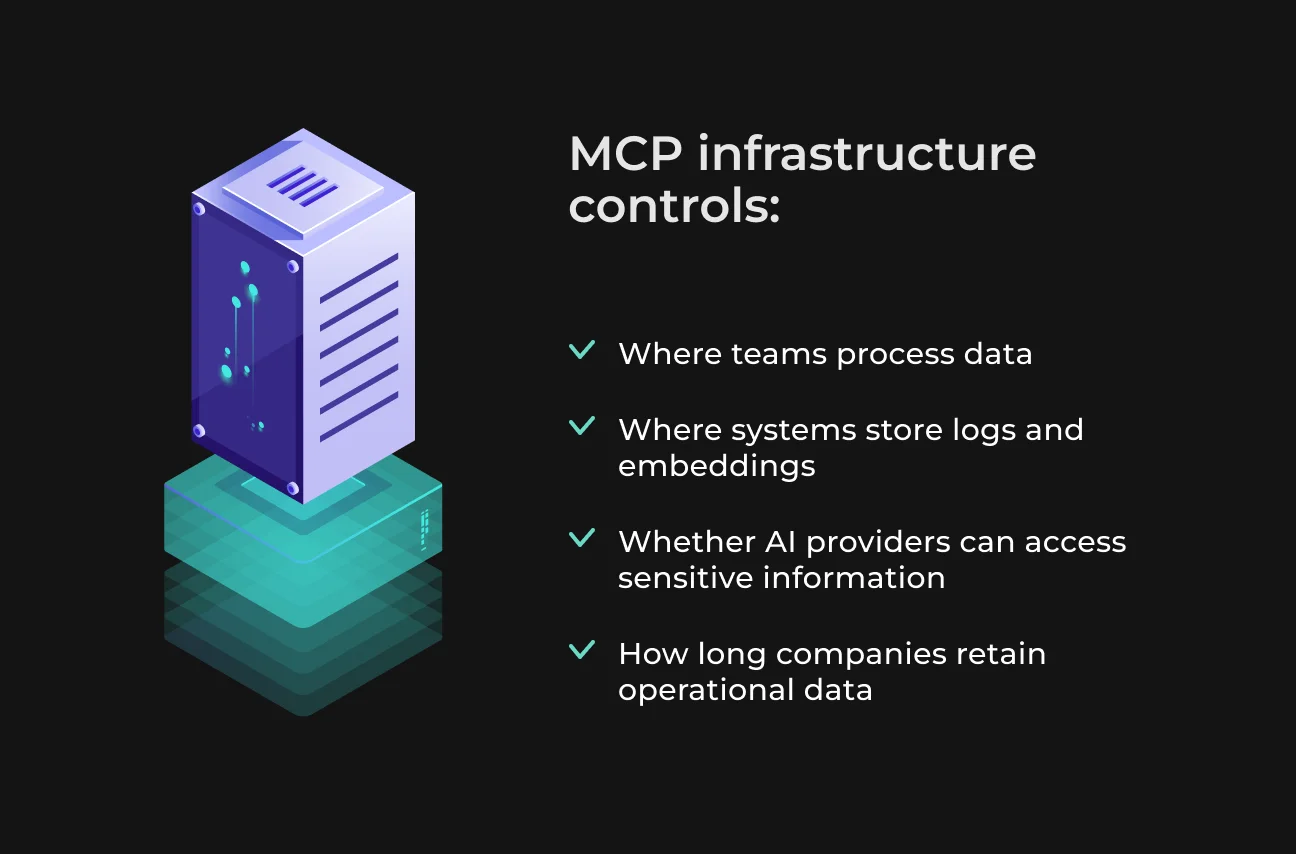
Control Where Data Is Stored and Processed
Data residency controls are relevant for companies working with healthcare, financial, legal, or customer data. Here, MCP infrastructure helps control:
- Where data is processed;
- Which regions store logs or embeddings;
- Whether external AI providers receive sensitive information;
- How long operational data is retained.
These controls make regulatory compliance — GDPR, HIPAA, and similar frameworks — easier to demonstrate.
Protect Against DNS Rebinding Attacks
DNS rebinding is a network-based attack that can trick applications into communicating with unintended internal systems.
MCP servers connected to internal infrastructure need explicit protections:
- Validating allowed hostnames.
- Restricting internal network access.
- Blocking unexpected IP ranges.
- Enforcing secure network policies.
These protections are necessary for remote MCP deployments connected to cloud infrastructure or internal enterprise systems.
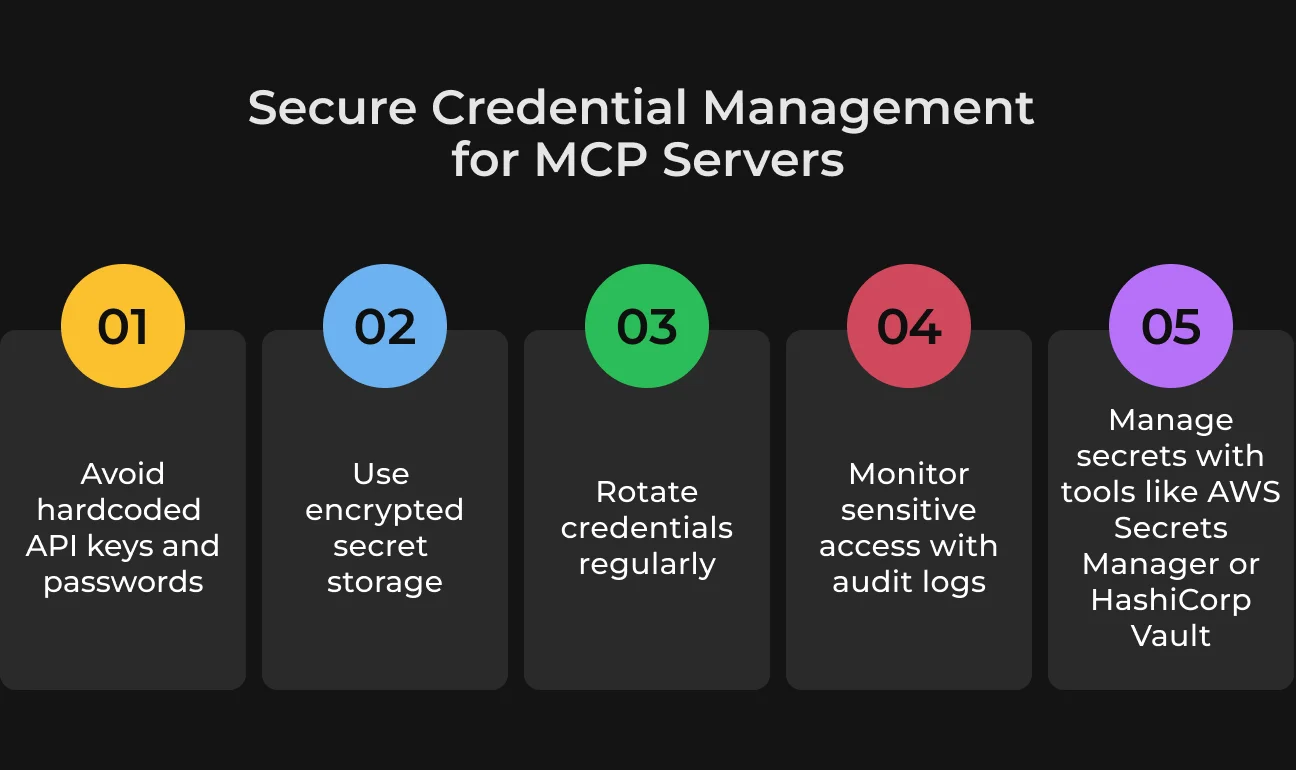
Handle Credentials Securely
API keys, tokens, database passwords, and service credentials should never be hardcoded into MCP workflows or configuration files.
Use encrypted secret storage, establish key rotation policies, log access to sensitive credentials, and consider dedicated secret management tools like AWS Secrets Manager or HashiCorp Vault for production deployments.
Restrict High-Risk Operations
Even authorized AI systems should operate within defined execution boundaries.
One practical approach is to create predefined operations with strict rules — for example, allowing an AI assistant to restart a staging environment through an approved workflow while keeping direct production access blocked entirely.
Why Choose SapientPro to Build Your MCP Server
An MCP server needs to work reliably inside real business systems, where AI tools require secure access to internal data and existing workflows.
SapientPro builds scalable MCP solutions that connect AI models with the tools your business already uses. Our team creates integrations that reduce repetitive tasks and improve communication between systems.
Get in touch to build production-ready MCP servers for your AI workflows.
Turn Your Business Data Into AI Context
SapientPro builds MCP servers that work in production.