All Multimodal AI Applications: How to Use Text, Image, and Audio Models
September 27, 202610 min read


Give a text model a customer complaint, and it can analyze what the customer wrote.
The limitation appears when a key detail exists in another format. A customer may describe damage vaguely, but an uploaded photo can clearly show the problem. A call recording may change the interpretation by adding context that never appeared in the chat.
Internal records can reveal earlier issues linked to the same order or product.
Multimodal AI lets the system use that evidence together. The model can connect written information with visual input and use audio when a conversation contains relevant context. Video is relevant when movement or sequence affects the result. Structured data can give multimodal AI systems access to company records the model cannot infer from the conversation or media.
In 2024, fewer than 10% of enterprise software and applications were multimodal. Gartner now expects that share to reach 80% by 2030. This forecast suggests multimodal features will become far more common across enterprise software.
SapientPro’s team reviewed multimodal AI applications used in business and the choices that influence their performance in production.
What Is Multimodal AI?
Some business tasks draw on information presented in different formats. In field service, a technician may describe the fault in writing, but a photo can reveal damage that the note misses. A multimodal AI system can use both when assessing the issue.
Audio or video is relevant when spoken details or the sequence of events affect the result.
Structured records can supply business context that the model would never get from the visual or written input alone. Google describes multimodal AI models as systems capable of processing different forms of information and producing outputs across modalities.
Multimodal AI vs Multimodal Generative AI
The output is what separates the two. Multimodal AI can use a photo together with a written claim to decide the next step for a case. The model works across formats, even when the final result is simply a decision.
Multimodal generative AI creates new content after processing those inputs. An image can become a written explanation, while a spoken request can receive a generated audio response. The word "generative" refers to that content-creation step.
Multimodal AI | Multimodal Generative AI | |
| Typical role | Interpretation and decision support | Content creation |
| Common output | Label, score, recommendation | Text, image, audio, or video |
| Business example | Reviewing a claim using a photo and case data | Producing a product description from an uploaded image |
How Do Multimodal Models Work?
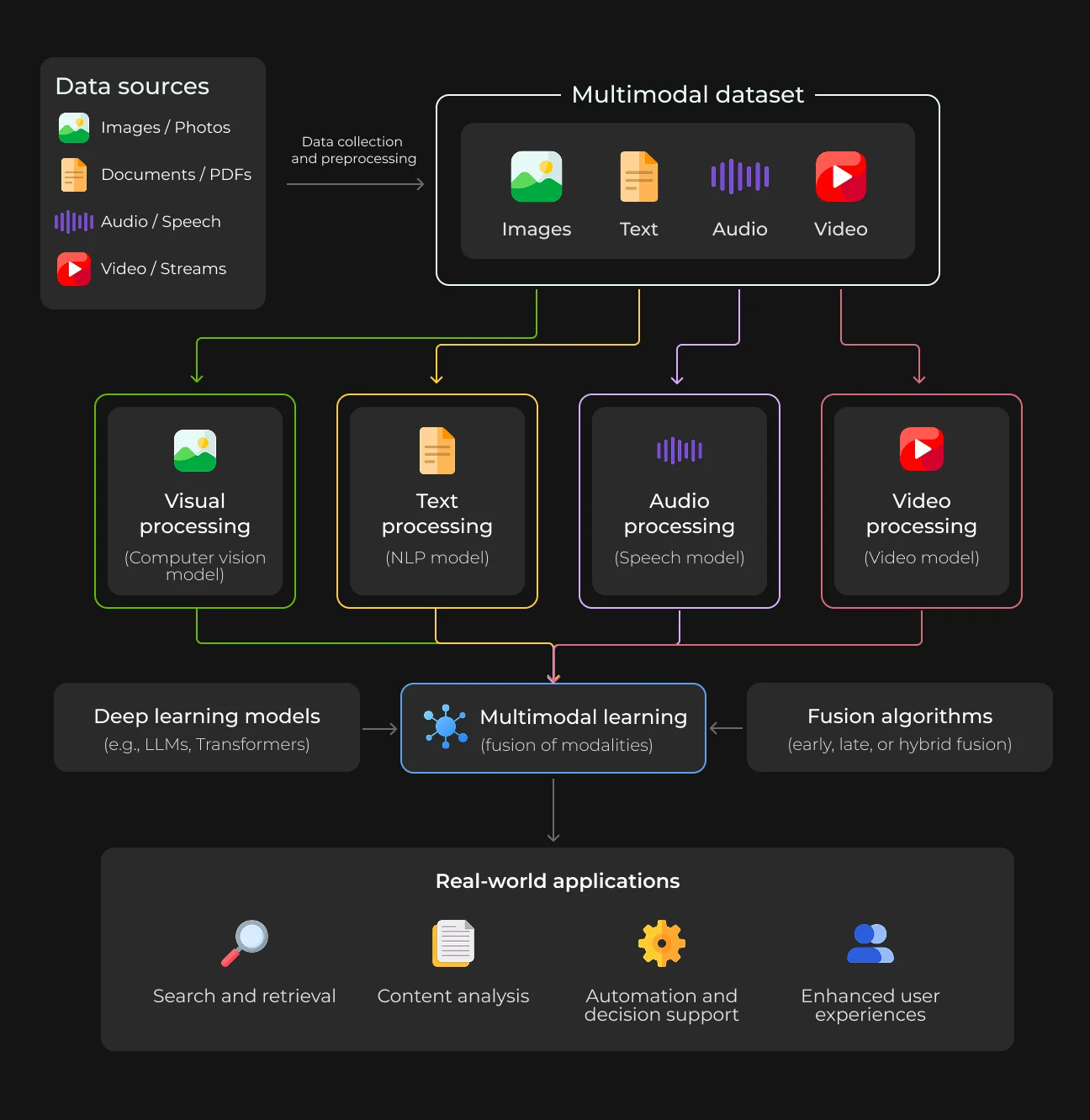
A multimodal model first has to translate very different inputs into a form a neural network can compare. A sentence and a photograph arrive as completely different data, yet the system may need both to answer the same question. Audio captures timing and sequence, with structured records adding factual context from business systems.
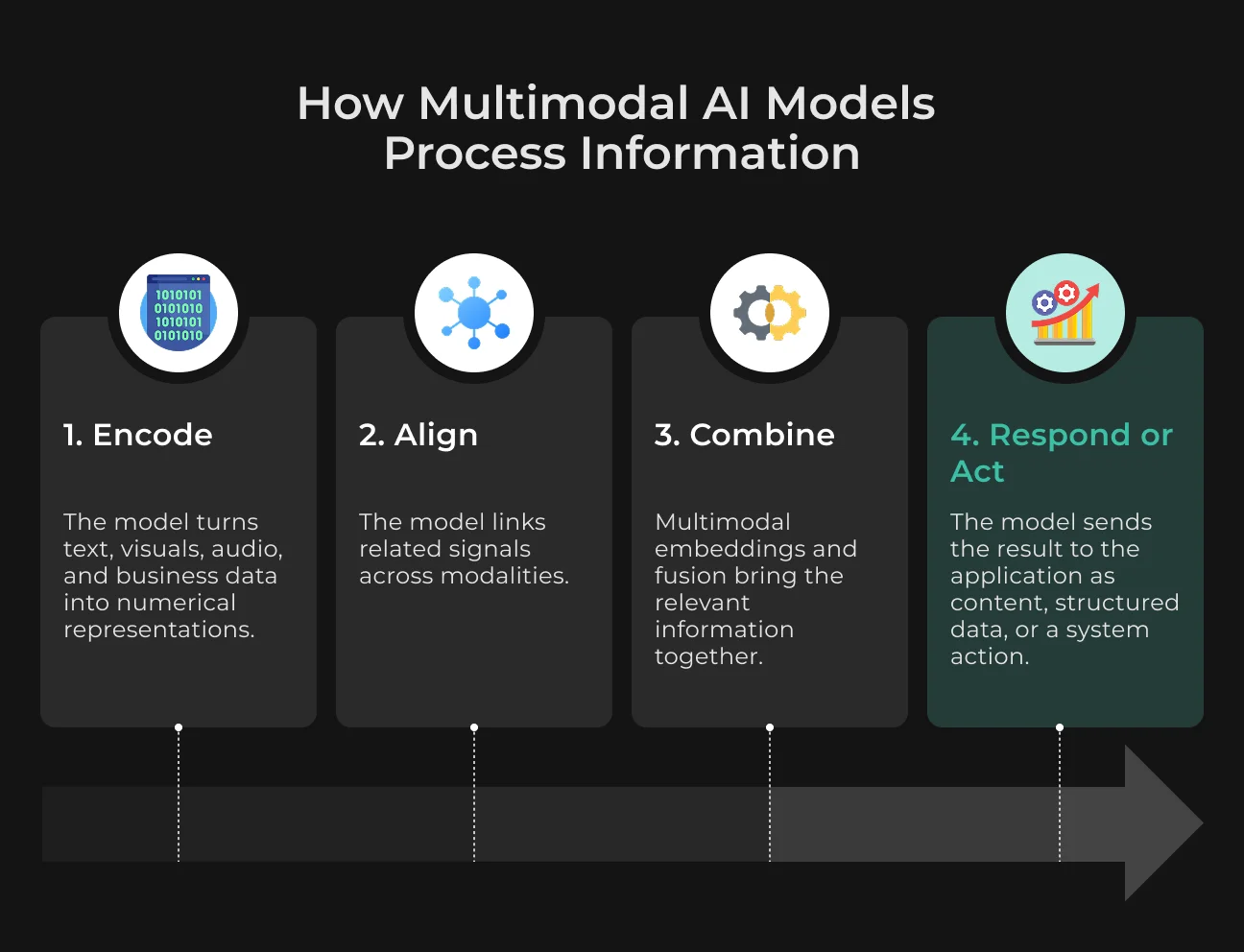
The model converts these sources into numerical representations and learns where their meaning connects.
1. Each Modality Is Encoded
Text first passes through a tokenizer, which converts language into numerical representations. Image encoders capture visual features and spatial relationships. Audio and video use representations that capture timing and changes across frames.
Structured business data is mapped into a numerical form the model can process.
2. The Inputs Are Aligned
Alignment links information that refers to the same object or event. In a machine-inspection task, the phrase “crack near the joint” must point the model toward the relevant area of the image. Cross-attention helps build that connection by letting one modality guide how another is processed.
3. The Model Combines the Information
The model then brings those representations into a common space.
Multimodal embeddings make related content easier to compare, so a written query can retrieve a relevant image based on meaning. Fusion can happen early or late in the pipeline, with hybrid architectures using both strategies.
4. The System Produces an Output or Action
The final result depends on how the application uses the model. A support platform may receive structured JSON for downstream processing, whereas a conversational product can return text or speech to the user. In operational software, the model may trigger an action directly, like creating a service ticket after reviewing the available evidence.
Stop Reviewing Every Document by Hand
SapientPro builds document workflows that interpret text, tables, and visual details together.

How Businesses Combine Text, Image, and Audio in Real Applications
Business decisions often rely on evidence stored in separate places. A support team may have a customer conversation in one system and the relevant business record in another. Multimodal AI can connect those sources when they need to inform the same decision.
1. Document Intelligence: Images + Text
Layout can change how a business document is interpreted. On an invoice, the position of a number can determine whether it refers to a unit price or a tax amount. In a contract, a handwritten change or signature may affect how the page is reviewed.
OCR extracts visible text, but multimodal document systems also examine the page structure around it. That provides them with access to tables, diagrams, signatures, and other visual cues that affect interpretation. A procurement workflow, for example, can associate a quantity with the correct product even when the supplier uses an unusual invoice layout.
The same document analysis applies to claims processing and legal review.
Insurance teams can assess a form together with attached visual evidence, and legal teams can locate clauses without losing the surrounding page context. Finance and logistics operations also gain from better extraction when incoming paperwork is scanned or inconsistently formatted.
2. Customer Service: Audio + Text + Screenshots
A support case can change once the system sees what the customer saw. Someone may call about a failed payment, but the screenshot reveals a specific error code. CRM history shows earlier account activity that may affect the next step.
Multimodal AI agents can connect the call with the screenshot and use the account record to determine the next action. They may prepare a response or update the ticket with the details the agent needs. In technical support, this removes much of the guesswork that comes from relying on the customer’s description alone.
The same evidence can make call summaries more specific. An error shown on screen, for example, can appear in the summary even when the customer never names it during the conversation.
3. Visual Inspection: Image or Video + Text
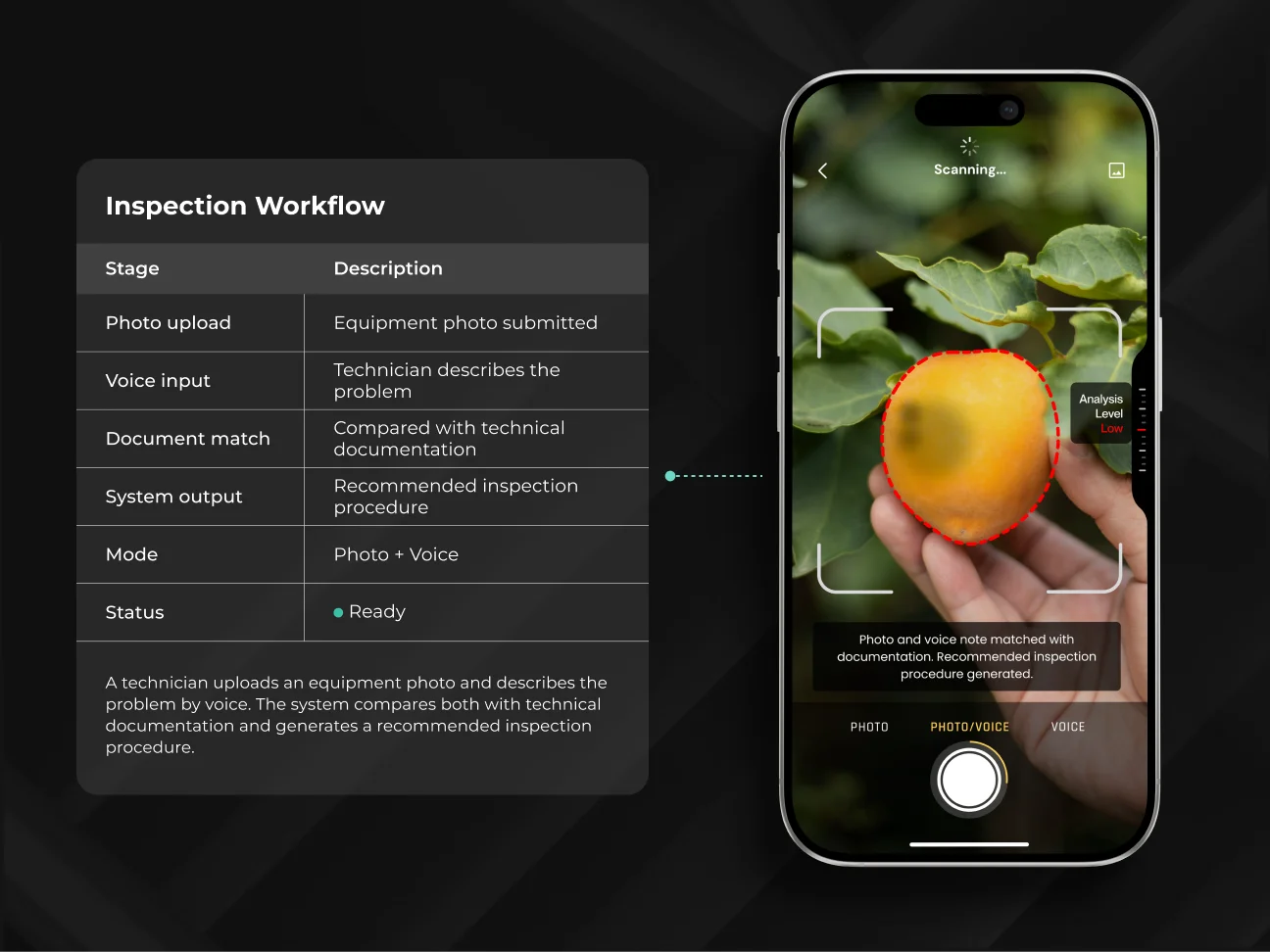
Manufacturing and field-service teams often need to judge a defect against operating context.
A production-line camera may capture an irregular weld, while the inspection record shows the tolerance range approved for that component. The model can connect the visual finding with the specification an engineer needs for review.
Video helps with faults that appear only during operation, like repeated vibration or an unstable mechanical cycle. A technician’s written note can narrow the inspection further by explaining when the problem occurs.
This approach fits equipment maintenance and other inspection workflows where technical records help explain what the model sees in the image or video.
4. Search and Knowledge Systems: Text + Images + Audio
An engineer may remember a damaged connector from an earlier incident without knowing the file name or the wording used in the report. A query like “previous connector damage after overheating” can still surface the inspection photo linked to that case.
Multimodal embeddings connect related material across formats. The engineer can search in plain language and retrieve a photo or jump to the relevant moment in a call recording, even when the original files use different terms.
For large maintenance or support archives, this cuts the time spent opening files one by one and makes prior cases easier to reuse during current investigations.
Multimodal LLM vs Separate AI Models
A multimodal product can rely on one foundation model or split processing across specialized components. The architecture determines how easily teams can trace failures and manage model costs as the system evolves.
IBM reported that a typical enterprise was already using about 11 generative AI models.
The company expects that figure to grow by roughly 50% by 2027. In practice, this means many enterprise AI setups already rely on several models, each assigned to a specific task.
Single Multimodal Model
A multimodal large language model works with several input types within one request.
This architecture is practical when the model needs direct access to the raw inputs during reasoning. For instance, it can interpret a screenshot together with a short voice message without routing either source through a separate reasoning service.
Fewer components also mean less orchestration during early development. Inference cost still depends on how the provider prices visual or audio input, so a smaller system architecture may still be expensive at scale.
Multi-Model Pipeline
A pipeline splits processing between specialized models. Speech may first go through a transcription service, and OCR can extract document text before the LLM receives it.
Teams get finer control over which model performs each task. A stronger extraction model can process complex documents, while routine classification can run on a smaller model. Replacing one component does not require rebuilding the entire pipeline.
Intermediate outputs also help engineers trace failures. They can see where the result changed and test that component directly.
Multimodal AI solutions may rely on either architecture. Single-model systems reduce orchestration when cross-modal reasoning happens inside one request. Pipelines offer closer control over operating cost and individual components.
When Does a Business Actually Need Multimodal AI?
Multimodal AI has a clear role when another data type changes what the system can conclude or do. A workflow built around clean text extraction may gain little from image or audio processing. It becomes more relevant when important evidence exists outside text.
Business problem | Multimodal AI fit |
| Text-only document workflow | Usually unnecessary |
| Images affect how written information is interpreted | Strong |
| Call analysis requires CRM context | Strong |
| Search must retrieve visual or recorded evidence | Strong |
| OCR already captures the required fields | Often unnecessary |
| Users submit voice or visual input | Strong |
An invoice workflow that only needs totals and dates may require only OCR. Claims processing needs a broader view because damage photos can affect how the case is evaluated. Gartner’s guidance on multimodal AI apps makes a similar point.
Combining modalities is most valuable when they improve decision quality or enable capabilities that one input type cannot provide.
How to Build a Multimodal AI System
Multimodal projects can become costly when extra modalities are added before their role in the workflow is clear. Each input needs a defined purpose, and the system needs a clear result the application can use.
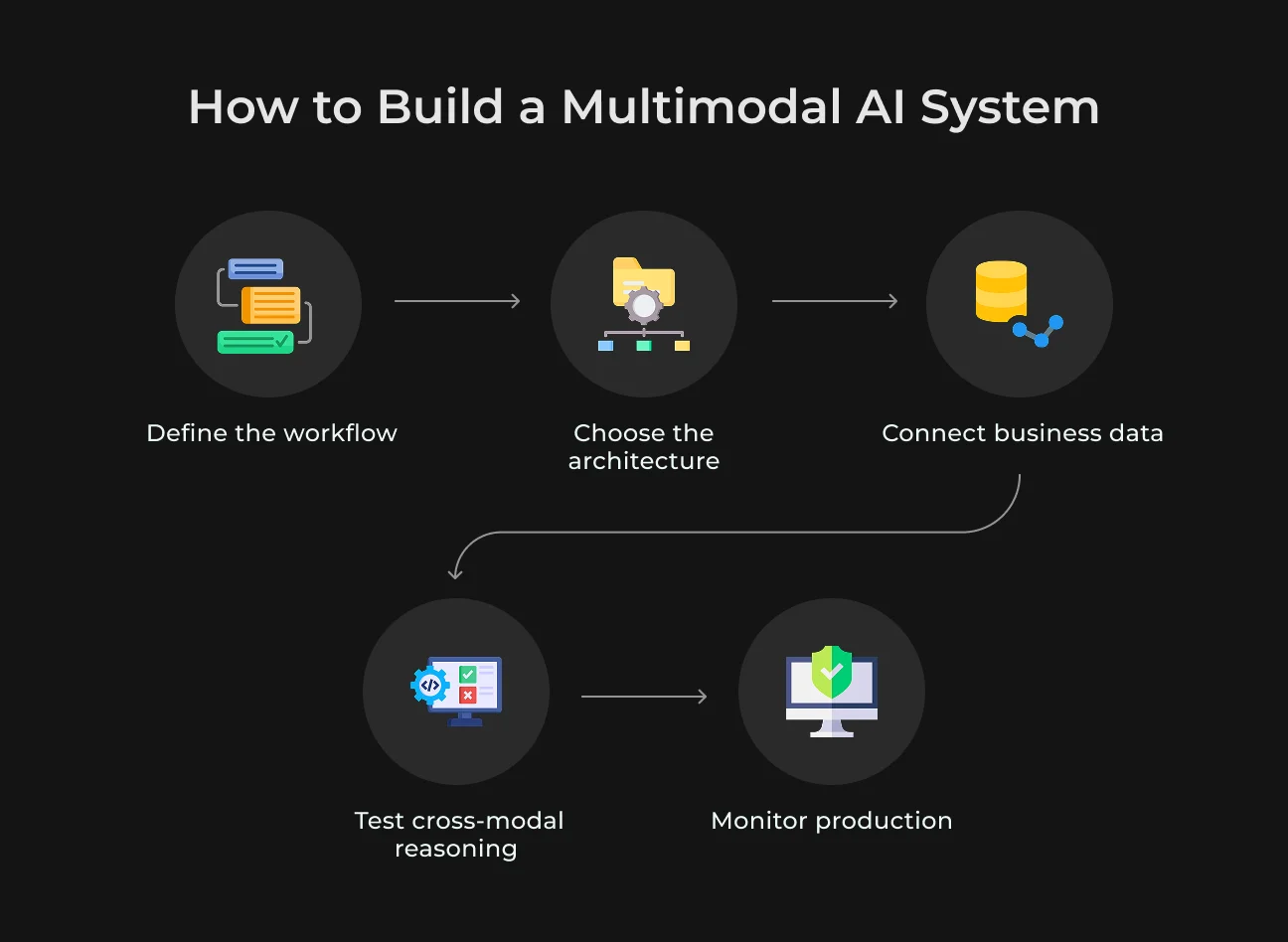
Step 1. Define the Multimodal Workflow
Start by identifying the exact point where one input format stops being enough.
In equipment diagnostics, a photo may show visible damage, but it may say nothing about when the fault appears. A technician’s voice note can supply that context, and maintenance records can show if the issue has happened before.
From there, define the result the system must produce. For this workflow, that could be a diagnosis with the suspected fault and the next inspection step. The output must give another system or employee the detail required to act without reconstructing the case manually.
Step 2. Choose the Architecture
The architecture follows how closely the inputs need to interact. When several input formats must influence the same reasoning step, one multimodal foundation model can keep that processing inside a single model call.
Some workflows already rely on stable components with proven performance. A company may keep its existing speech or OCR service and pass the processed result to the LLM. That keeps established tools in place and limits changes to the parts that need them.
A hybrid design is practical when cross-modal reasoning is needed only at one stage. The team also needs visibility into where errors occur and what each processing stage costs at production scale.
Step 3. Connect Business Data and Retrieval
A model answering a support or maintenance request often needs facts that never appear in the prompt. The application can read account data from the CRM and equipment history from the ERP, using those systems as the current record for the case.
Multimodal RAG becomes relevant when text retrieval misses visual evidence.
A field-service assistant can pull the right manual page together with an earlier inspection photo for the same equipment. Vector search helps the system find the right passage or image in a large technical archive.
Live business data, like current order or account details, can come directly from the source system.
Step 4. Evaluate the Combined Result
Image and audio scores alone miss errors that appear when inputs interact. Test the model on cases where the answer depends on the connection between formats.
In customer support, for example, a screenshot may show one error, but the call describes a related symptom. The test needs to verify that the model links those details correctly. Include cases with missing or conflicting evidence because real inputs are rarely perfectly consistent.
Compare the final result with a human-reviewed answer and save failed cases for regression testing. This makes it easier to see whether a model or prompt update actually improves the workflow.
Step 5. Deploy and Monitor
In production, track latency and inference spend by modality, and record which processing step produced each failure. A transcription error points to speech processing, whereas a reasoning error points to model logic. That distinction speeds up debugging and prevents unrelated failures from being grouped together.
Latency and error rates do not show the business impact on their own.
In equipment diagnostics, escalation rate shows how often a specialist still needs to review the case. In customer support, resolution quality shows how often the response solves the issue. Use those results to evaluate model updates after release.
Challenges of Multimodal AI in Production
Multimodal systems can fail even when each input looks correct in isolation.
Errors often appear where the inputs connect, and several processing stages can make the source harder to trace. The next section focuses on the problems teams usually meet after a prototype moves into production.
1. Data Alignment
A correct transcript can still lead to the wrong answer when it is paired with the wrong image. Video creates a similar risk if spoken context is attached to the wrong moment on screen.
Timestamps and record IDs help keep related inputs linked throughout processing. For longer workflows, each input also needs a clear reference back to its source so the model does not mix evidence from separate cases.
2. Latency
Media-heavy requests usually take longer to process than short text prompts because audio requires preprocessing and video processing grows with clip length.
Reduce the payload before the model call by trimming video to the relevant section and resizing images when fine detail does not affect the answer. Real-time products also need explicit limits on media duration and file size to keep response times predictable.
3. Cost
Multimodal costs rise with media size because high-resolution images increase the input volume and long recordings add extra processing before reasoning begins. Input size, therefore, becomes an architectural choice.
Teams can lower image resolution when fine detail is irrelevant and send only the relevant section of a recording. Routine requests can go to smaller components, reserving the larger multimodal model for cases that require cross-modal reasoning.
4. Evaluation and Observability
A bad final answer may originate before the LLM sees the request. A transcription error can change what the user said, or retrieval may pull the wrong record and give the model faulty evidence.
Keep the important intermediate results in the logs so engineers can inspect the transcript and retrieved content that shaped the answer. Record tool calls clearly so failures in external systems do not get mistaken for model errors.
Testing should include conflicting inputs and missing evidence. These cases show what the model does when the evidence does not line up.
5. Privacy and Security
Visual media and audio can expose sensitive data the model never needs. A support screenshot might include an account number in the corner, or a recorded call may capture private details from a much longer conversation.
Mask sensitive content before sending media to the model and set separate retention rules for original media and transcripts. For third-party models, record what data is sent outside the company and when the provider deletes it.
Building Multimodal AI Applications With SapientPro
SapientPro brings 7+ years of experience in computer vision, voice processing, RAG, and backend engineering to multimodal AI development.
Our team connects these capabilities with your business data and software so applications can interpret different inputs, retrieve relevant context, and act on the results. Working with us means getting an experienced team of 70+ engineers who can help with:
- Document intelligence: extract data from scans, tables, and images;
- Voice and visual assistants: process speech, screenshots, and text;
- Multimodal search: find answers across documents, images, and recordings;
- AI integrations: connect models to CRM, ERP, and backend workflows;
- Production support: test accuracy and monitor speed, errors, and costs.
Book a call to define your workflow, integration requirements, and development scope.
Connect AI Answers to Business Actions
SapientPro integrates multimodal AI models with your business to improve reporting & efficiency.

FAQ
1. How Much Does It Cost to Develop a Multimodal AI System?
The cost depends on what the system needs to process and what happens after it produces an answer.
An application that reads photos alongside written requests requires less engineering than one that analyzes live video and updates ERP records. Data preparation, integrations, and testing shape the development budget. Model usage, media storage, and maintenance add ongoing costs after launch.
2. What Are the Main Business Applications of Multimodal AI?
Multimodal AI helps when a decision depends on evidence in different formats.
A claims team may need damage photos alongside a written report. A support agent may need a screenshot to understand the error described during a call. The value comes from connecting those details so the system can assess the case with the relevant evidence in view.
3. Do You Need to Train a Multimodal AI Model From Scratch?
Most projects can start with an existing multimodal model. The work then moves to preparing inputs, connecting company records, and checking whether the model handles real cases correctly. Existing OCR or speech services can stay where they already perform reliably. Fine-tuning becomes relevant when testing reveals repeated errors that better prompts or access to the right information do not resolve.