All AI App Builder Limitations: Why AI-Built Apps Still Need Production Engineering
September 14, 202610 min read


AI app builders are becoming a practical part of software delivery.
Gartner puts worldwide spending on AI models and platforms at $64 billion in 2026, 63.4% above 2025. AI platform spending alone is forecast to rise 36.9%, showing how quickly these tools are moving into wider use.
For product teams, speed is the obvious advantage.
An idea can become something testable much sooner, with far less setup at the start. Production is less forgiving. Releases, permissions, monitoring, backups, performance, and long-term code maintenance still require proper engineering.
The article explains the limitations of AI app builders and what engineering work is needed to make AI-built apps ready for production.
What Is an AI App Builder?
In practice, an AI app builder is a development environment with a conversational interface.
You describe what the product needs to do, and the platform creates enough of the application to start working with it. The request might cover a complete customer portal or something much smaller, like a signup flow or admin page.
The label covers several very different products:
- Source-code generators leave developers with files they can review and continue editing outside the platform;
- Managed builders keep more of the application inside their own runtime;
- Hybrid products expose the code but still take care of services such as authentication, hosting, databases, or deployment.
For a quick prototype, these differences may have little practical effect. For an engineering team taking over the product later, they determine what can be changed directly, what remains tied to the platform, and how easily the app can move into an existing development setup.
Segment | 2025 | 2026 | 2025-2026 Growth % |
| Foundation Generative AI Models | 11,438 | 23,356 | 104.2 |
| DSLMs and Specialized GenAI Models | 1,583 | 4,910 | 210.0 |
| AI Application Development Platforms | 6,885 | 9,541 | 38.6 |
| AI Platforms for Data Science and Machine Learning | 19,405 | 26,444 | 36.3 |
| Total Market | 39,311 | 64,252 | 63.4 |
How Does an AI App Builder Work?
Suppose a team asks for a client portal with login, document uploads, and a page showing account activity. The first output is usually the visible structure: pages, navigation, forms, buttons, tables, and other UI components. The team can test that version and keep changing individual parts through prompts or manual edits.
Those screens also need behavior. Logging in requires authentication and a valid user session. Uploading a document needs storage and validation. Account activity has to come from the right records and respect the user’s permissions.
Common operations like creating, reading, updating, and deleting data are relatively easy for builders to generate. Custom rules with several states, approvals, background processes, or exceptions usually need closer engineering work.
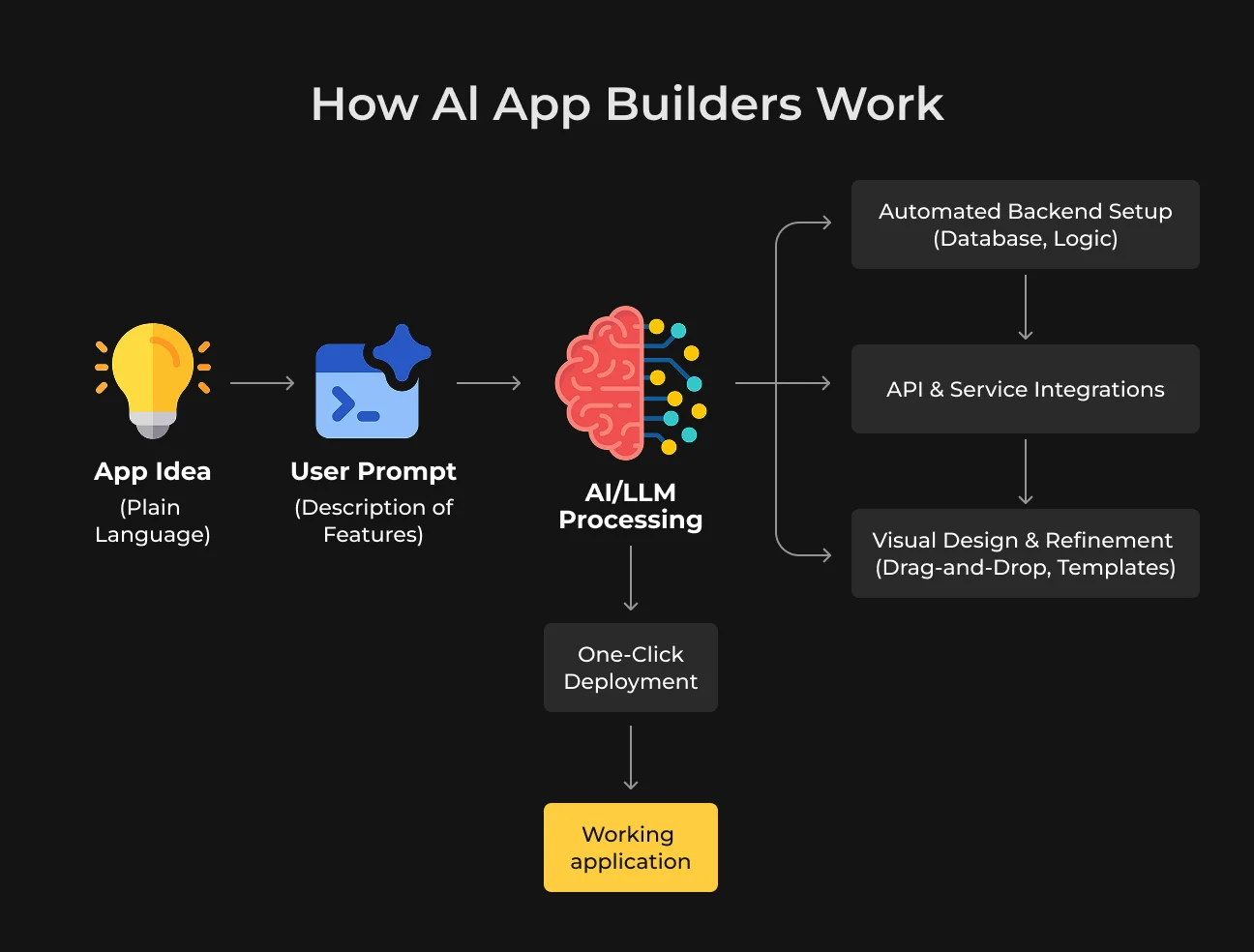
Where the data lives depends on the platform.
- A managed builder may provision its own database and authentication service as part of the project;
- A code-focused tool may connect the application to infrastructure the team already uses.
Payments, CRM data, email, file storage, or analytics can come from separate services already used by the business. The builder may expose the related code and settings, or keep some of that setup inside its own environment.
Testing during the build is usually fast. A changed screen or workflow can appear in preview within seconds, which makes prompt-driven iteration practical. Publishing may also happen from the same workspace, with the platform handling hosting and deployment.
This is where implementations begin to diverge.
One team may finish with a regular repository that can move straight into its normal engineering workflow. Another may have working source code but still rely on the builder for the database, runtime, or deployment.
A fully managed product can leave even more of that stack under the provider’s control.
Any of these models can work well for an MVP. Later, the setup affects how developers trace production failures, replace services, add custom infrastructure, and manage releases.
What Is a No-Code AI App Builder?
Open a no code AI app builder and much of the basic setup is already waiting for you. You can describe a feature, work with the generated screens, connect data, and publish the result from the same place. Services like hosting, authentication, and databases often come with the platform.
The market around these tools is growing quickly.
The global no-code AI platform market was valued at $6.56 billion in 2025. It is projected to reach $8.6 billion in 2026 and $75.14 billion by 2034.
For an MVP or an internal tool, this can remove days of setup. Limits become clearer as the product gets more specific. A team may need custom backend behavior, a less common integration, or infrastructure settings that the builder does not expose.
Code-generating tools take a different route. They give developers the source code and more room to shape the product themselves. AI coding agents go further again, working directly with an existing codebase and leaving most technical decisions with the engineering team.
Type | Typical advantage | Production consideration |
| No-code app builder with AI | Fast setup with much of the stack already managed | More dependence on the platform as the product grows |
| Code-generating builder | Source code available to the team | Developers take over more of the architecture and maintenance |
| AI coding agent | Broad control over the codebase | Strong engineering skills are needed to review and manage the work |
The real difference is how much control the team keeps as the product grows. That affects later work on architecture, backend logic, integrations, infrastructure, and releases.
7 Limits of AI App Builders That Matter in Production
An AI-powered app builder can cover a large part of an early build. Production puts more pressure on security, architecture, performance, and maintenance. These seven limits are the ones teams tend to feel first.
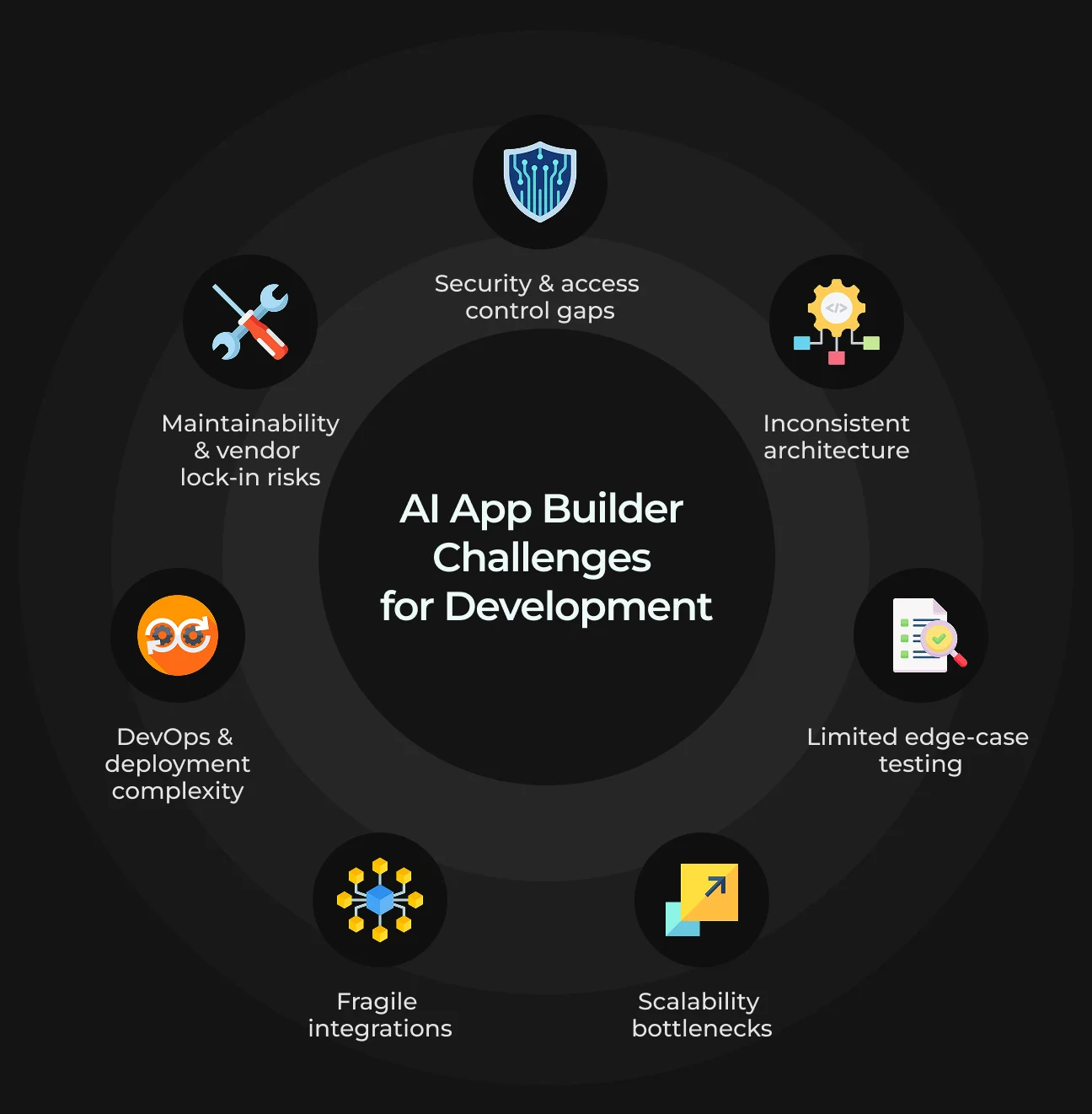
1. Security and Access Control Need Independent Verification
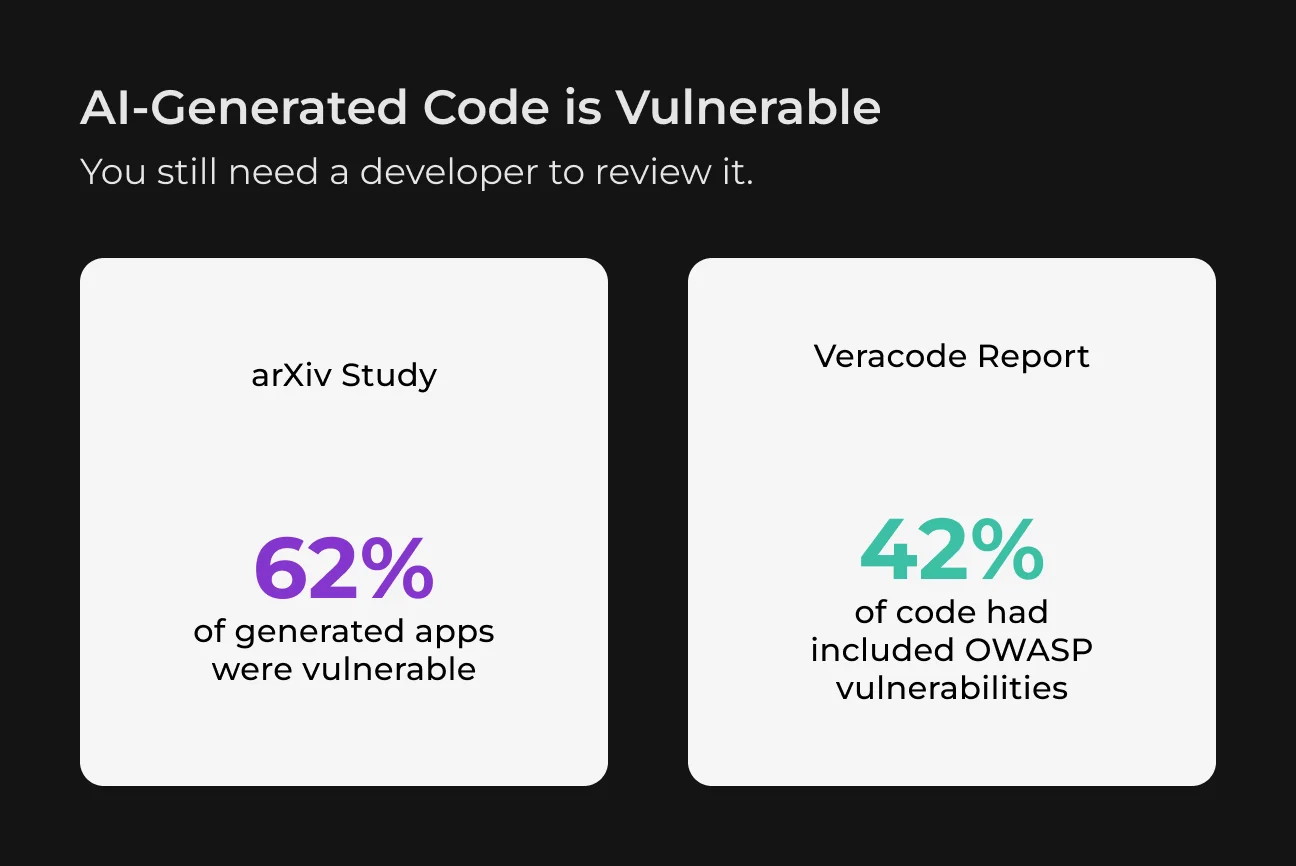
A login flow only proves that a user can sign in. The harder part is controlling what that user can access after login. Engineers need to review server-side permissions, database rules, input validation, secrets, dependencies, rate limits, and payment or webhook checks.
Supabase is a useful example. Its documentation calls for appropriate Row Level Security on exposed tables. Its production checklist also covers backups, load, availability, and security settings.
The same concern appears in benchmark testing. A 2026 study covering five LLMs found that generated solutions contained at least one vulnerability in 10.17% to 24.01% of the tasks evaluated.
2. AI Can Solve Individual Tasks Without Designing a Coherent Architecture
AI builders often add features one at a time. Each feature may work, while the codebase gradually collects duplicate logic, inconsistent data access, or several ways of solving the same problem.
A billing feature might update account status directly in the database, while reporting calculates the same status elsewhere. Both work until the business rule changes and engineers have to update several separate implementations.
The same issue can affect database schemas, API boundaries, state management, tenant isolation, and background jobs. Generated architecture still needs review against the real product, expected traffic, and operational requirements.
3. Happy-Path Testing Is Not Enough for Real Users
Development usually covers the expected flow first. Real usage brings expired sessions, payment timeouts, duplicate requests, lost connections, malformed input, and concurrent updates. Browser and device differences can expose another set of bugs.
A recent SaaS discussion about a fully AI-built product described regressions, edge cases, and problems that appeared across desktop and mobile.
Automated tests give teams a repeatable way to catch these issues. Integration and E2E tests cover complete user flows, while regression testing checks that later changes have not broken features that already worked.
4. Scalability Problems Usually Appear After Real Usage Starts
Early testing rarely puts much strain on an app. As usage grows, database queries handle more records, connections stay busy for longer, and repeated API calls consume more capacity. Limits from payment systems, CRMs, or other external services can also become part of the problem.
Supabase addresses many of these issues in its production guidance, including query optimization, indexes, connection management, and load testing. An early AI-generated setup may work well for an MVP while still requiring changes for the traffic expected in production.
Engineers can use load tests to find the actual bottlenecks. The fix may involve caching, background jobs, fewer API calls, query changes, or additional infrastructure.
5. Integrations Are Harder Than Generating the Integration Code
AI builders can quickly connect payments, CRMs, ERP systems, AI APIs, email, SMS, or external databases. Production work begins when those connections have to stay reliable under real conditions.
Requests can fail, time out, arrive twice, or depend on credentials that later need rotation. Webhooks need verification, retries need clear rules, and API changes can break flows that worked before. Fallback behavior also matters when an external service becomes unavailable.
These issues become more complex when several systems share the same business logic. SapientPro can take over the custom engineering around those integrations, connect them with the existing product architecture, and build the handling needed for retries, failures, credentials, and version changes.
6. Deployment Is Only the Start of DevOps
Publishing puts the app online. Keeping releases stable involves much more than that first deployment.
Staging gives developers a place to test changes before users see them. CI/CD keeps releases consistent. Secrets, database migrations, logs, alerts, backups, rollbacks, and recovery plans cover the rest of the operational work.
Lovable’s documentation separates its managed deployment from external infrastructure. Lovable Cloud can handle deployment, hosting, authentication, storage, and environment management. Moving infrastructure elsewhere shifts more of those tasks to the engineering team.
For production, teams need a release process they can repeat, inspect, and recover from quickly.
7. Maintainability Becomes a Business Risk as the Application Grows
Poor maintainability raises engineering costs. Releases take longer, technical debt grows, and onboarding new developers becomes harder.
Platform dependency adds another risk. Moving code, data, or infrastructure can become expensive when too much of the product depends on one builder or runtime.
OWASP’s guidance says developers remain responsible for AI-generated code and need to review it before use. Clear ownership and documented architecture also make the app easier to maintain later.
When Is an AI App Builder Enough?
The same AI builder can be enough for one product and risky for another. What matters is how much a failure, security gap, or technical limitation could cost the business.
Product | AI builder alone | Engineering review |
| Landing-page prototype | Usually enough | Optional |
| Internal proof of concept | Often enough | Depends on the data involved |
| Investor demo | Usually enough | Minimal |
| Small internal tool | Depends on complexity | Recommended |
| Customer-facing SaaS | Limited fit | Yes |
| App processing payments | Limited fit | Yes |
| Multi-tenant platform | Limited fit | Yes |
| High-traffic marketplace | Architecture review needed | Essential |
| Healthcare, financial, or regulated product | Engineering-led | Essential |
Get a Professional Code Audit Today
SapientPro reviews your AI-built app for security gaps, weak architecture, and production risks before launch.

What Can Developers Do With an AI App Builder Project?
An AI-built app rarely needs a full rebuild. Developers can keep the parts that work, clean up weak areas, and bring the project into a regular engineering process. The steps below show how to do that in practice.
Step 1: Audit What the AI Builder Produced
Developers first map the project as it exists today. This reveals which parts are stable, where technical debt has already appeared, and which issues could create problems in production.
SapientPro’s software code audit services cover the areas that matter at this stage, including architecture, security, performance, and scalability.
Step 2: Separate Fixes From Necessary Refactoring
The audit will usually uncover issues of very different sizes. Some need a quick fix, while others point to deeper problems in the code structure.
Action | What it means |
| Keep | The code is stable and fits the current architecture |
| Fix | A contained bug or security issue needs correction |
| Refactor | The feature works, but its structure makes future changes harder |
| Replace | The current implementation creates a serious security, performance, or maintenance problem |
This prevents unnecessary rewrites. Working parts stay in place, while developers focus on the areas that create risk or slow future changes.
Step 3: Secure Access and Data
Developers verify how users reach data and actions across the app. They check roles, API permissions, secrets, dependencies, and tenant separation where several customers share the same product.
Step 4: Make Releases Safer
Critical flows need proper test coverage before releases become more frequent. E2E and regression tests help catch problems across complete workflows. Staging gives the team a place to check changes before they reach users.
CI/CD makes the release process more consistent. Logs and monitoring help trace failures, while backups and rollback give the team clear recovery options after an incident.
Step 5: Continue Development Outside the Builder
The repository becomes part of the team’s normal workflow. Engineers take ownership of environments, releases, monitoring, and future feature development. The AI-built version becomes the starting point for further product work.
Need to fix your AI app?
Contact SapientPro to review your AI-built app and plan the engineering work needed for production.
FAQ
Are AI App Builders Good Enough for Production?
Sometimes. A small product with limited risk may work well with the builder’s own setup. A live SaaS product usually needs engineers to check security, reliability, and maintainability before release.
What Is a Generative AI App Builder?
A generative AI app builder creates a first version of an app from a written request. The result can then be edited and refined as development continues.
What Are the Main Features of an AI App Builder?
A prompt is usually enough to generate the first screens. Users can then adjust the interface, add basic logic, and test changes in preview. Some platforms also handle hosting and deployment.
Is AI-Generated Code Safe to Use in Production?
Before release, a developer needs to go through the generated code. That review can catch weak permissions, exposed secrets, unsafe data handling, risky dependencies, and mistakes in core logic.
How Do I Make an AI-Built App Production-Ready?
Begin with the existing build and identify the weak areas. Security gaps, unstable code, missing tests, and release issues usually come first. Working parts can stay in place while engineers improve the areas that create real production risk.
Do I Need a Developer After Building an App With AI?
That depends on what happens next with the product. An early demo may need little engineering input. A live product brings ongoing work around integrations, releases, bugs, security, and new functionality.
Can Developers Continue Working With Code Generated by Lovable, Bolt, Replit, or Another AI App Builder?
Yes, when the platform provides access to the source code or repository.
Developers can take over the project, keep useful parts, refactor weaker ones, and continue development with standard tools. How much freedom they have depends on which services remain tied to the original platform.