All AI in UX Design: What Teams Still Review Before Handoff
August 7, 202610 min read


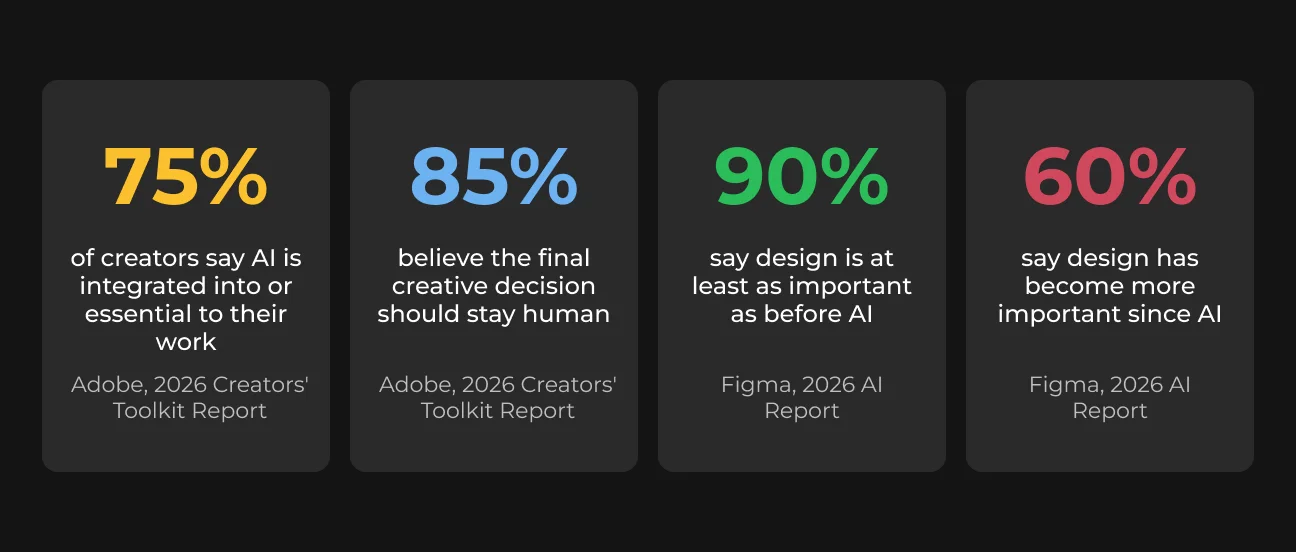
AI can generate a polished interface in seconds, but speed does not make a design ready for development. According to Adobe’s 2026 Creators’ Toolkit Report, 75% of creators consider AI integrated into or essential to their work, while 85% believe the final creative decision should remain human.
The same pattern appears in product design. Figma’s 2026 AI Report found that 90% of designers, developers, and product managers consider design at least as important as it was before AI, and nearly six in ten say it has become more important.
We asked seven practicing designers where AI saves time, where it creates rework, and what they would never hand to a developer without checking first. Their shared rule was simple: AI can handle reversible work, but a person must own every decision that affects users, brand consistency, product scope, or development.
Expert | Position | Social profiles |
| Anna Tarnovetskaya | Graphic Illustrator & UI/UX Designer at SapientPro | |
| Awais Shah | Freelance Graphic & UI/UX Designer | |
| Bon Pang | Design Manager at EY Mtel, ex-Deloitte. | |
| Stanislav Makhun | Product and UI/UX Designer at SapientPro | |
| Mmonu Victor | UI/UX and Product Designer | |
| Tetiana Prodan | Product Designer at Akker | |
| Vicente González | Product Designer and Design System Lead at bbg Bitbase Group |
Where AI Actually Helps UX Designers
Anna Tarnovetskaya, UI/UX designer & illustrator at SapientPro, creates marketing visuals, print materials, and article illustrations rather than developer-ready screens. For her, AI is most valuable when it takes over repetitive tasks that once consumed a significant part of her working week.
The AI tools built into Figma now handle the routine, monotonous tasks that used to eat up thirty to forty percent of my week. Vectorize, replace content, boost resolution, remove background—between those four, I've replaced about ninety percent of what I used to do in Photoshop.

Anna Tarnovetskaya
Awais Shah, freelance graphic & UI/UX designer, places the strongest win a stage earlier, before there's anything to vectorize or clean up. In his experience, AI does its best work moving a designer from a blank page to a set of directions, useful for brainstorming and testing rough possibilities before any decision has been locked in.
Vicente González, Senior Product Designer and Design System Lead at bbg Bitbase Group, names the mechanism underneath both of these examples.
When an agent can't find a rule, it invents one. If the typographic hierarchy isn't explicit, it improvises. If the spacing grammar isn't encoded, it distributes elements generically.

Vicente González
These cases share a property worth naming directly: neither is close to final. Vectorizing an icon or generating five mood board directions costs almost nothing to redo if it's wrong. That's the actual reason AI works here, not a wider claim about AI being good at design.
Where AI Creates Rework in UX Design
Move one step closer to a finished screen, and the same tools start costing more time than they save.
Anna Tarnovetskaya has tested this mostly with general-purpose models like Gemini and GPT rather than agent-style tools such as Claude, and her verdict is specific to that category:
- Once she tries to build on top of a generated layout, she loses more time fixing inconsistent text styles and spacing than she would have spent drawing the screen from zero.
Bon Pang, design manager at EY Mtel, sees the problem at the decision-making stage. When a team has not yet defined what it needs to build, AI can create more noise by generating options before anyone has spoken to real users.
Awais Shah sees the same issue in the output itself. AI can continue producing plausible variations long after the useful ideas have already appeared, but more options do not necessarily lead to a better design. The concern is not that AI always produces poor results. It is rather that AI can generate plausible output faster than a team can decide whether that output solves the right problem.
What Designers Never Hand Off Without Reviewing
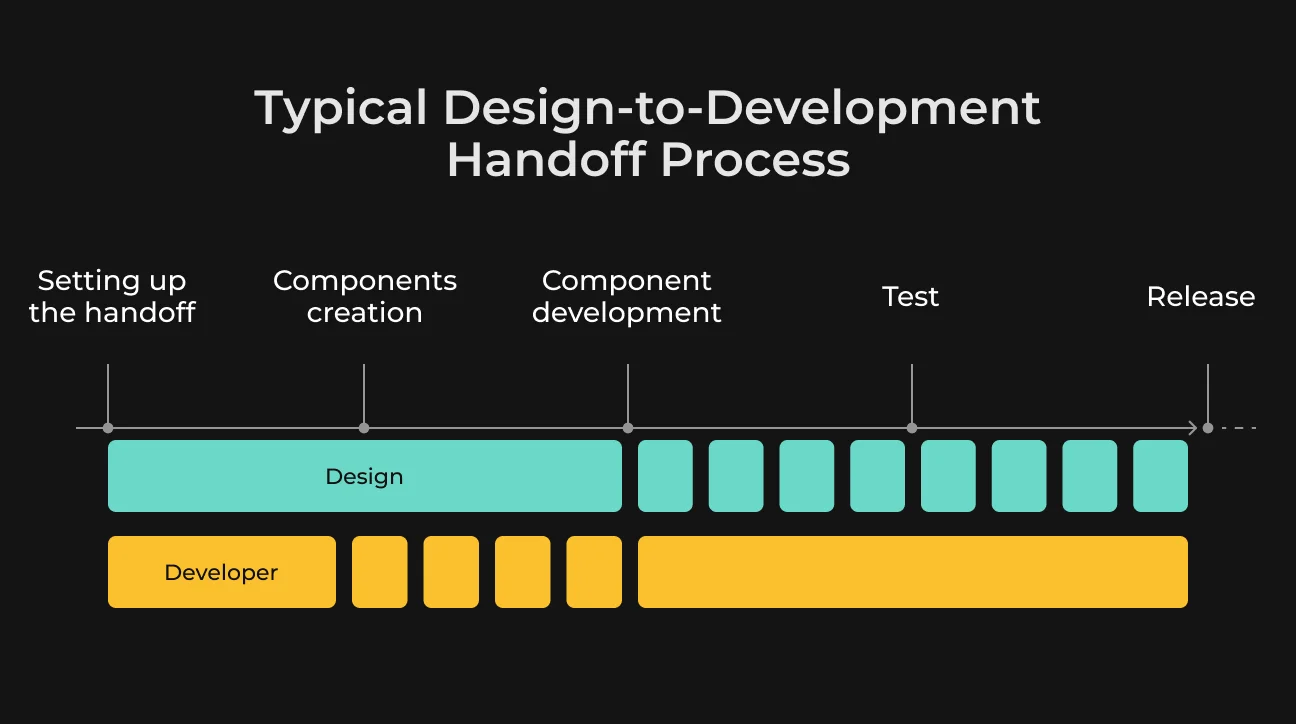
Ask any of the seven where they'd never skip a human review before the design-to-development handoff, and the answer converges on the same moment: the file that's about to leave the design team's hands.
Anything generated by an AI agent must be reviewed, validated, and finalized by a human expert. Even a clickable prototype built in a few clicks still needs a designer to walk through the entire flow, validate the logic, and refine it by hand.

Stanislav Makhun
That prototype detail matters more than it first sounds. Figma's AI features can now generate a clickable prototype in a few clicks, which makes it just as easy to send straight to a client or a developer without ever testing the flow.
Mmonu Victor, a UI/UX product designer, treats the same review as routine rather than exceptional.
I always review each component and never assume AI's output is production-ready. I check for consistency and responsiveness, and make sure everything is clear enough for developers to implement. AI assists the process, but I own quality control.

Mmonu Victor
Bon Pang adds a detail the others don't quite say outright: skipping this step doesn't only create rework for developers. When tokens are undocumented or interaction notes are missing, the designer ends up doing the same review later anyway, after the file has already shipped and someone downstream has started guessing. That guessing is precisely what separates a handoff that works from one that doesn't.
A clean handoff is when AI has helped accelerate the process, but the designer has still taken ownership of the final result. A messy handoff is when someone exports AI-generated screens or code and says, here is the design.

Awais Shah
Bon Pang's version of a messy handoff adds a concrete tell: a prototype with ten screens when the actual MVP needs three. More screens read as more finished. A developer working through ten speculative flows will still end up building the wrong one.
Vicente González puts a name to why a polished prototype is so easy to mistake for a finished decision.
Fidelity now outruns certainty. It used to be that a rough artifact signaled a rough decision, and a polished artifact signaled a settled one. That correlation is gone, and teams haven't adjusted their instincts yet.
Vicente González
That's exactly what makes Stanislav's rule and Bon Pang's screen count matter: a prototype can look finished and still be a decision nobody actually made.
A Dev-Ready Checklist for AI-Assisted Design
Bon Pang reduces the entire review down to one test, and it's the sharpest single line we heard across all seven conversations.
I ask one question: can someone build from this without guessing? The practical test is simple. Hand it to a developer or a coding agent and say, build the next screen using only these files. If they need a call to clarify intent, it wasn't dev-ready.

Bon Pang
Tetiana Prodan, a UI/UX designer at Akker, uses a similar test but adds a few checks AI often misses. She compares each asset with the official design library, discusses unclear details with developers, and tests edge cases such as small screens, long text, and missing data.
Combined with Bon Pang’s “build without guessing” test, her approach forms a practical handoff checklist:
- Design tokens use semantic names instead of raw hex values;
- Screens include the final copy and all relevant states: loading, empty, error, and success;
- Scope clearly states what developers should build and what remains outside the current release;
- A written source of truth documents tokens, components, interactions, and implementation notes;
- Edge cases cover small screens, long text, missing data, and unusual content.
A file that clears all five is dev-ready.
A file that needs a call to explain any of them isn't, no matter how finished it looks.
Where the Saved Time Should Go
Assume the review is complete and the checklist is clear. AI has still saved hours somewhere in the process, and what the team does with that time matters more than where the saving came from.
Mmonu Victor is clear about where his extra time goes. He does not use it to finish early. He puts it back into testing flows and refining the details that make the final product easier to use.
Bon Pang takes a broader view. He uses the saved time to check whether tokens, flows, and specifications are consistent and ready to build. He also tests earlier with real users to see where they hesitate and updates documentation before missing details carry into the next redesign.
Awais Shah points to the risk on the other side. Because AI makes new variations cheap and fast to produce, saved time can easily turn into more revisions, more options, and more work that adds little to the final design. The extra hours only matter when the team decides in advance how they should be spent.
How to Explain AI-Assisted Design to Clients
Designers increasingly face the same question from clients: if AI can produce design work faster, why has the price not gone down? Everyone has a different response for this one.
I explain AI's role as similar to a junior team member, handling the areas where I personally need less support. On price, I push back. AI tools aren't free, subscriptions and credits are expensive, so if a client expects AI to be used, that cost belongs in the conversation, not a reason to pay less.

Tetiana Prodan
Tetiana’s point is that AI changes how the work is done, not who remains responsible for the result. The designer still reviews the output, corrects mistakes, and decides what is ready to show or build.
Awais Shah makes the same case from the client’s side. Clients are not paying for the time spent clicking inside a design tool. They are paying for the judgment that identifies the right option among ten AI-generated variations. Faster production does not make the final decision any less important.
The Rule for Using AI in UX Design
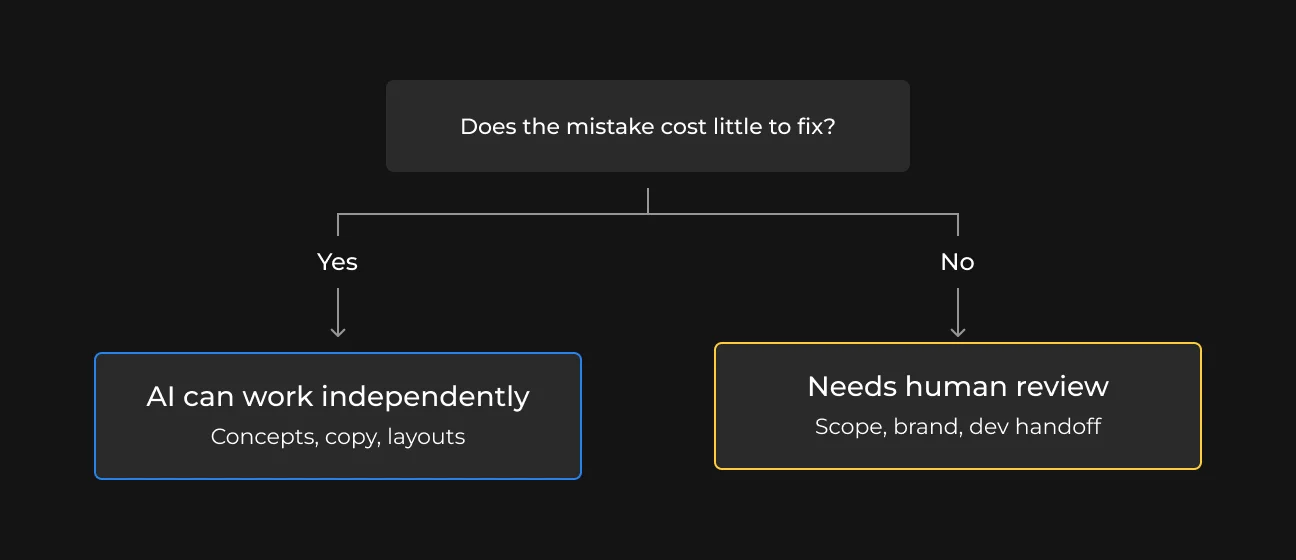
Use AI where mistakes are cheap to fix. It works well for rough concepts, placeholder copy, early layout ideas, and repetitive production work that can be reviewed or replaced in minutes.
The line changes once the output affects product scope, accessibility, brand consistency, interaction logic, or developer implementation. A screen may look finished while still missing states, edge cases, documentation, or clear instructions for development.
That is where human review remains non-negotiable. The designer must confirm that the work follows the design system, covers real scenarios, and gives developers enough information to build without guessing.
SapientPro helps product teams define where AI fits into the design process and where human review must remain. Our UI/UX and AI teams create workflows that reduce repetitive work without passing incomplete or unclear designs into development.
Design a product users love
Turn complex ideas into intuitive, conversion-focused digital experiences with SapientPro’s UI/UX experts.

RELATED ARTICLES
10 min
Five Lessons from AI Failures in Production
95% of enterprise AI pilots never make it to production. We asked the founders who've seen it firsthand — here's what they said.