All OpenClaw Use Cases That Actually Work: Insights from SapientPro's Team
June 3, 202610 min read


Most people still see AI as something you prompt: a chatbot, a coding assistant, or a tool that waits for input and returns an answer. OpenClaw points to a different model. It is AI that does not just respond. It keeps running, takes action, and connects directly with your infrastructure.
This shift matters because AI is already moving from experiments to real workflows. Around 95% of US companies use generative AI, and 79% are implementing AI agents.
At the same time, more teams are moving toward local or hybrid AI setups to protect data, reduce costs, and keep systems reliable.
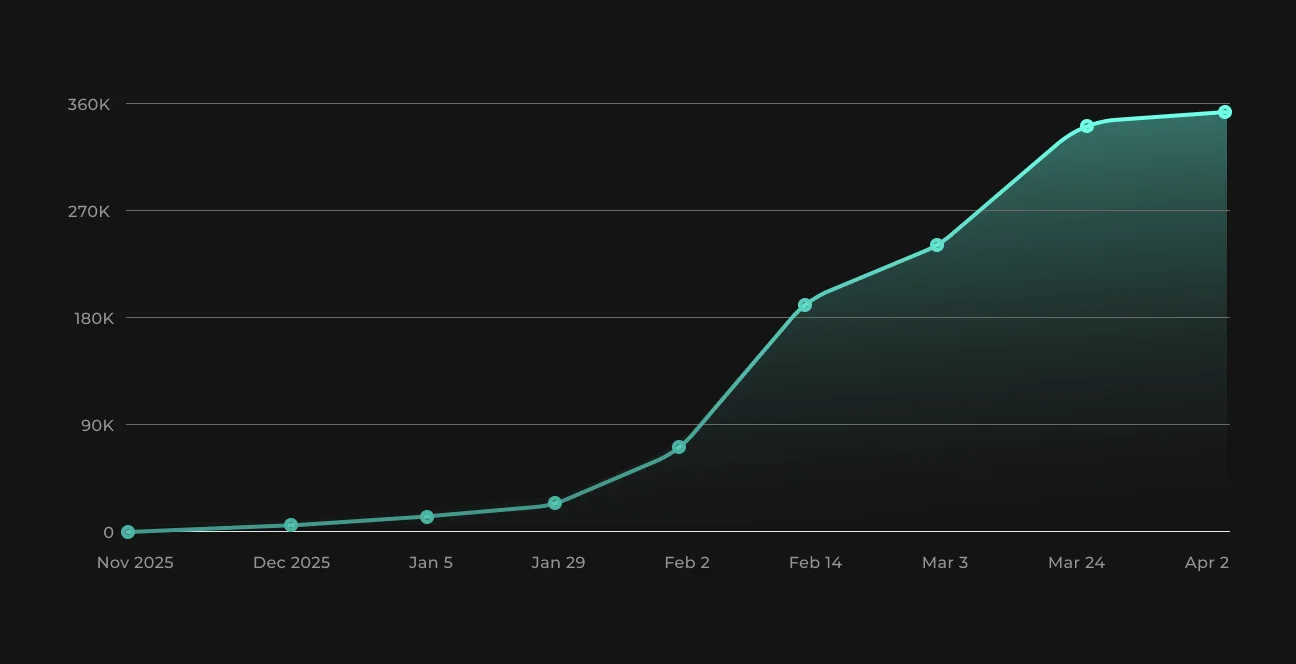
That is exactly where OpenClaw fits. With 375.4k Github stars as of June 2026, it's getting more popular than ever.
In this article, SapientPro’s experts explain what OpenClaw is, how it works, and where it can bring real value in production environments.
What Is OpenClaw Software, and Why Are Engineers Talking About It?
OpenClaw is not just another AI interface — it’s an open-source implementation of a local AI agent that can run inside your own environment and actually do work on your behalf.
As Max Tatarchenko, CTO at SapientPro, explains:
OpenClaw is an open-source implementation of a local agent that can be deployed with relatively little effort. It works with most commercial LLM services as well as local models, and it’s highly flexible.

Max Tatarchenko
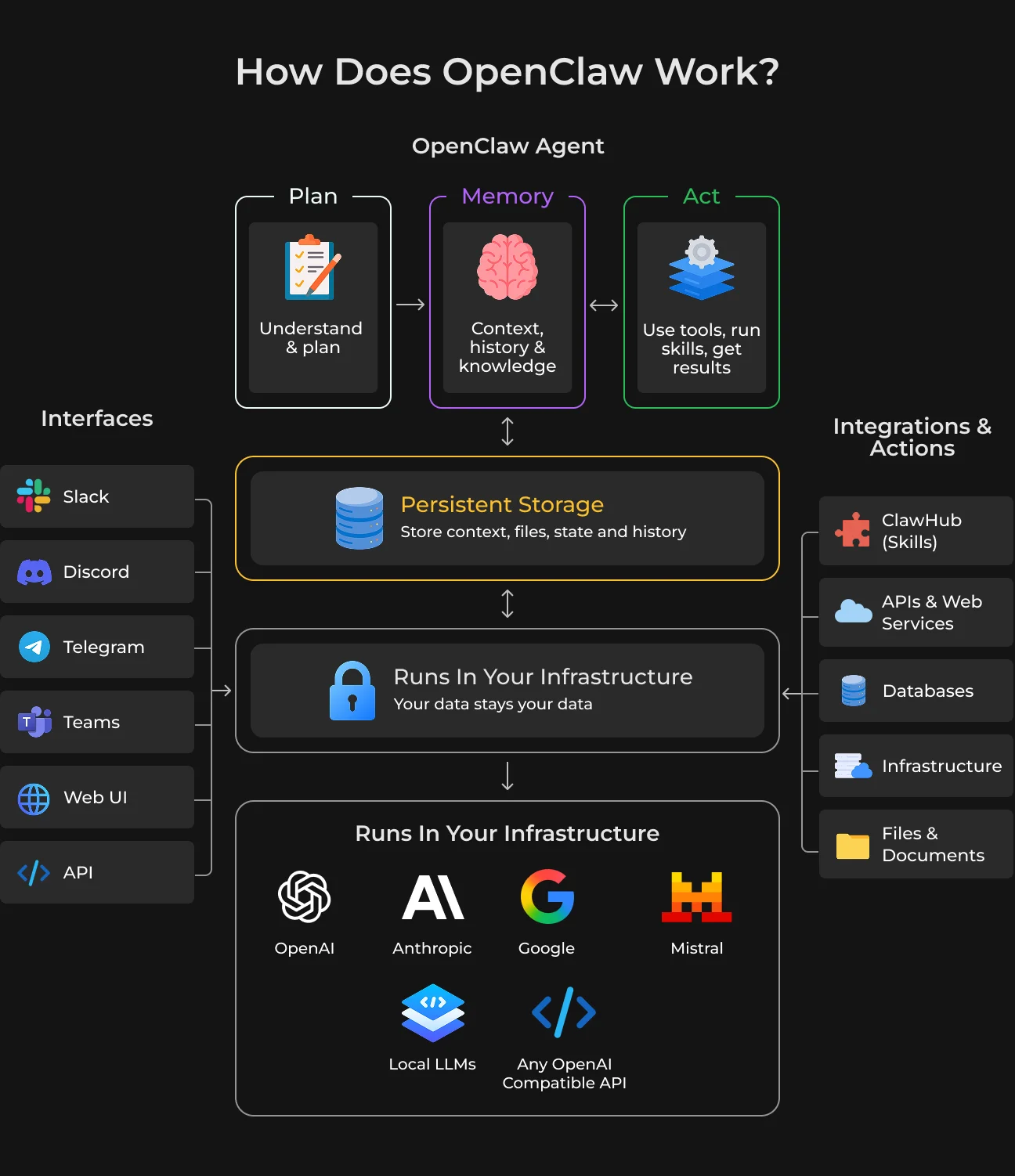
One of the interesting aspects for engineers is how it brings multiple capabilities together in one system:
- Supports cloud-based and local LLMs to give teams control over cost, latency, and data privacy;
- It’s extensible through ClawHub, a collection of skills that expand what the agent can actually do;
- Keeps context files and interaction history so that the system can learn how to best suit user preferences (not actually learning in the traditional sense, but close enough);
- It can be connected to messaging platforms, allowing you to speak with the agent through tools you are familiar with.
Max Tatarchenko also highlights an important nuance. As the agent interacts, it stores user preferences in dedicated context files and keeps a history, which allows for something very similar to learning.
And that distinction matters. OpenClaw turns AI from a reactive tool into something closer to a persistent digital operator embedded in your workflow.
How Does OpenClaw Work: The Architecture Explained
OpenClaw is an agent-based system that maintains state (as opposed to a stateless prompt-response tool). OpenClaw architecture consists of three foundational layers:
- LLM orchestration.
- Persistent context management.
- Extensible execution via skills.
This is what allows it to move beyond isolated interactions and function as a continuous operational unit. The agent can preserve intent, track decisions, and build continuity across tasks — something traditional AI tools struggle with.
The execution layer is powered by modular skills (via ClawHub), allowing the agent to interact with APIs, infrastructure, and external systems. Ihor Hamal, COO at SapientPro, describes what reply his own OpenClaw agent gives:
My OpenClaw says: "I act less like a chatbot and more like an embedded digital team member. My job is to help turn ideas into execution — research, analysis, technical problem-solving, workflow support, structured memory, and ongoing operational assistance."

Ihor Hamal
The system compresses the gap between thinking and doing by keeping everything (context, tools, and execution) connected.
Another practical advantage is multi-interface communication. OpenClaw can be integrated with messaging platforms, meaning the agent is accessible in real time without building dedicated frontends.
A systems view suggests this is actually closer to a lightweight orchestration layer built on top of AI than an independent tool. It does not replace engineering infrastructure but speeds up team interaction.
What Does OpenClaw Do That a Normal Chatbot Can’t?
The key difference is simple: chatbots answer — OpenClaw executes, remembers, and adapts within a workflow.
Traditional AI tools are session-based. With every new task, you need to bring context back in, restate goals, or validate assumptions. By contrast, OpenClaw is a flexible assistant – you do not have to explain the current context to it several times. So iteration cycles become more rapid.
That turns into tangible wins. Companies that use AI agents for marketing, for example, can increase their revenue by 10% to 30%, using highly personalized campaigns.
As Ihor Hamal puts it:
It’s not about code generation. It’s about compressing the whole loop — less setup, less context switching, less repeated explanation, and faster movement from ‘what if’ to ‘let’s test it.
Ihor Hamal
This loop compression fundamentally changes how work gets done. OpenClaw enables parallel, high-density collaboration, where multiple layers of work evolve simultaneously.
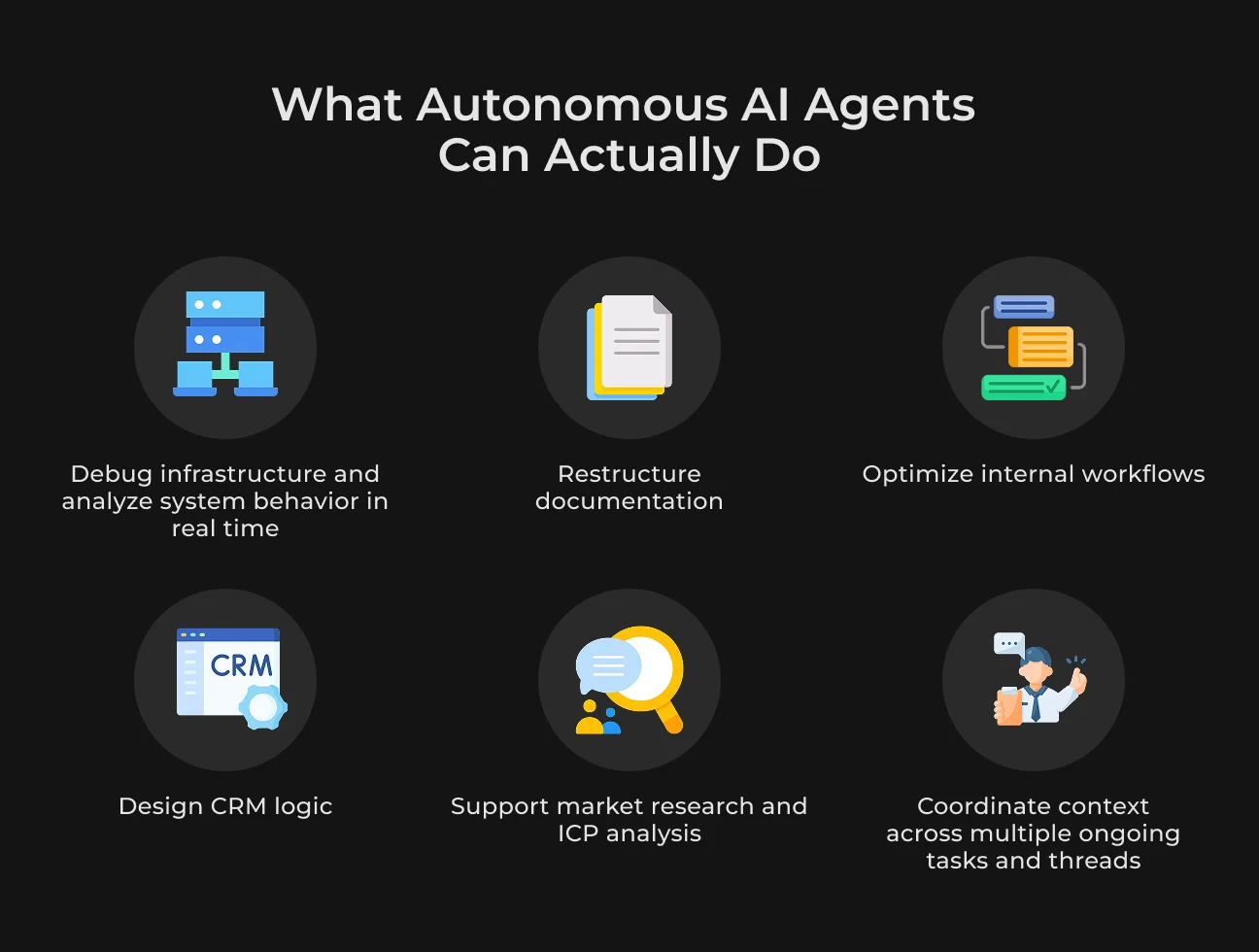
The range of tasks it can handle also goes far beyond typical chatbot use cases. In real workflows, the agent can easily move between:
- Debugging infrastructure and analyzing system behavior;
- Restructuring documentation and internal processes;
- Designing CRM logic and automation flows;
- Supporting market research and ICP analysis;
- Coordinating context across multiple ongoing threads.
What makes this effective is not just capability, but continuity across domains. Ihor Hamal explains this quite clearly from his agent's reply: “I’m not there just to answer questions. I’m there to stay in context, keep momentum, and help move work forward.”
This is why engineers increasingly treat systems like OpenClaw not as tools, but as operational extensions of the team.
OpenClaw Use Cases: How SapientPro's Team Uses It Every Day
At SapientPro, OpenClaw is not used as another AI chat interface. It works more like a real-world application layer that removes repetitive checks, keeps processes running, and makes system activity visible without manual effort.
The point is not to talk to AI but to let it handle recurring tasks, connect scattered tools, and preserve continuity across repositories, servers, APIs, and internal workflows.
Factual OpenClaw use cases examples come from Taras Hanych:
Right now, I’ve implemented several features. It records notes, runs regular news research based on filters, reports repository updates, notifies about open pull requests, and monitors server security — including daily reports on detected password attack attempts.

Taras Hanych
Basically, this setup replaces multiple manual workflows:
- Repository monitoring. OpenClaw checks for new commits and open pull requests and reports them proactively. No need to manually review GitHub several times a day;
- Security monitoring. The agent scans server logs and reports suspicious activity (e.g., password brute-force attempts). This turns passive logs into daily actionable summaries;
- Filtered research. Instead of searching for updates, the agent runs predefined queries (news, tools, trends) and delivers only relevant findings;
- Notes and context tracking. Important decisions and observations are stored, so there’s no need to reconstruct context later.
From the architecture side, Max Tatarchenko uses OpenClaw as an evolving system.
He says the agent runs on a separate machine. You can communicate with it, and over time, it improves through process descriptions, adding skills, and extending capabilities.
This means the setup typically looks like:
- A dedicated environment where the agent runs continuously;
- Connections to internal systems (repositories, servers, APIs);
- Incremental expansion via new skills (e.g., monitoring, reporting, automation scripts).
The agent becomes more useful with time as more workflows are formalized and delegated to it. Engineers receive structured updates and act only when needed, without opening multiple tools (like GitHub, logs, and dashboards).
Key OpenClaw Features as of 2026
OpenClaw is not useful due to the abstract capabilities of AI, but for the way it operates within real workflows. Every feature is something you can touch, see, and trust on a day-to-day basis. Let’s check them out.
Persistent Memory That You Can Actually Work With
This isn’t just conversation history. OpenClaw writes structured context files that store preferences, past decisions, and task outputs. The only difference, in fact, is that this memory is transparent — you can open it at any time and modify it or reset the whole thing.
What this looks like in practice: you can correct wrong assumptions a minute after identifying them, set rules specific to the project once (naming, environments, workflows), and ensure long-running tasks remain consistent without repeated instructions.
Autonomous Tasks With Real Triggers
Tasks can be scheduled or triggered by conditions, allowing the agent to run independently. It monitors, reacts to changes, and reports results without constant input.
For example, it can track repositories and summarize pull requests, scan logs for anomalies, or run recurring research and update notes.
The real value isn’t automation itself, but eliminating repetitive manual checks.
Model Switching Based on the Task
OpenClaw doesn’t force you into one model. Depending on the task, one model can be used with cost, quality, or privacy needs. As suggested, teams work with cheaper models for routine parsing or monitoring and delay the use of higher-tier models until stronger reasoning is required.
Sensitive workflows can stay entirely on local models, which is critical for internal tools.
Skills That Execute, Not Just Assist
ClawHub skills are closer to small operational modules than prompt templates. They can bring data, analyze it, and return structured results.
For example, a repo skill doesn’t just talk about code — it can pull commits, analyze diffs, and generate summaries. A server-related skill can check the system state or detect suspicious activity. This is where OpenClaw shifts from text generation to actual interaction with systems.
Parallel Workflows Without Context Loss
OpenClaw doesn’t operate as a single linear chat. It can keep several threads, each with a context of its own, while also sharing relevant information across them when needed.
It enables you to run infrastructure monitoring, updates of documentation, and tracking of your research while isolating them from one another. This is rarely achievable with standard AI-based tools.
Controllable Learning
The agent doesn’t learn in a hidden way. It writes what it learns into context files. This makes its behavior predictable and auditable. You can see exactly what it remembers, remove outdated data, or enforce what should persist.
This is important in engineering environments where silent drift or incorrect assumptions can cause real issues.
Runs Independently From Your Main Environment
OpenClaw is typically deployed on a separate machine or instance. Such separation matters more than it seems. This lets the agent run for as long as you want it to, even when your local environment is powered down.
See more
Learn about the case studies where AI failed in production and what were the reasons
Read moreWhat Are OpenClaw Skills and How Do They Work
The first time you install OpenClaw, it quickly becomes obvious that by default, you are running a minimal setup. The agent has no idea what systems it can access or what it is allowed to do.
Skills is the layer that gives it that ability, going from just a conversational tool to something more — something that could check your emails, search for things, or run automations.
A Skill acts as a bridge between the agent and a specific service or tool.
Each Skill is stored in its own directory and revolves around a single SKILL.md file. This file is just plain text: it defines the Skill’s name, explains its purpose, and includes instructions in natural language describing when and how the agent should use it.
There’s no need to learn a custom syntax or deal with complex configuration formats. Creating a Skill feels more like writing a clear set of instructions for a teammate than developing software. The agent interprets these instructions and applies them when it detects a relevant task.
The Awesome OpenClaw Skills repository on GitHub already lists more than 5,400 Skills as of early 2026, covering a wide range of use cases.
How Does This Actually Work?
When OpenClaw starts, it scans all existing Skill directories and checks whether each Skill can run in the current environment. If a Skill depends on something unavailable, such as an API key, system binary, or platform-specific tool, OpenClaw simply does not load it.
This validation happens before execution, which helps prevent workflows from failing halfway through a task. The SKILL.md file defines these requirements.
It can describe required environment variables, system dependencies, supported platforms, and other conditions the Skill needs to work properly.
Because of this, Skills can be reused across different setups. Still, Skills with external dependencies may need extra configuration when moved to a new machine or environment.
OpenClaw also gives teams more control in multi-agent setups. A Skill can be available only to the running agent in its workspace, or installed system-wide through the ~/.openclaw/skills directory.
This is useful when different agents handle different responsibilities. One agent can focus on repository monitoring, another on research, and another on infrastructure checks, while each loads only the Skills relevant to its role.
OpenClaw Security Risks: What Our CTO and Dev Team Found
OpenClaw introduces a different level of risk compared to typical AI tools because it doesn’t just generate responses.
The agent operates with the same level of access as the user — it can read files, execute commands on your behalf, and interact with system resources. As Max Tatarchenko points out, this is exactly what makes it powerful, but also where the main risks come from.
Without proper control, mistakes are no longer just incorrect outputs — they can affect real environments.
Uncontrolled System Access
One of the biggest risks is giving the agent too much freedom. It can change configurations, install or modify packages, or create system-level issues that leave vulnerabilities behind. Misconfigurations can quietly introduce holes that are hard to detect later.
Risk of Takeover
If the environment isn't locked down, then the agent itself can be compromised. In this case, it could leak sensitive data, credentials, or internal information. And since the system operates at the user level, the impact can be significant.
Unbounded Token Consumption
Autonomous agents can easily enter loops or repeatedly execute expensive actions. As SapientPro's CTO, Max Tatarchenko, notes, using high-end models for simple tasks is a common and costly mistake.
Hallucinations in Actionable Tasks
Hallucinations are not just a content issue. If the agent performs actions (sending messages, modifying data, executing commands), incorrect outputs can lead to real damage. Even advanced models still show error rates in complex tasks.
Risks with Sensitive Data
Working with valuable data adds another layer of danger. The agent can misunderstand instructions and perform destructive actions, like deleting important files or modifying critical datasets.
Infrastructure and Deployment Risks
Running the agent on a personal machine increases exposure.
Taras Hanych, a Senior PHP Developer at SapientPro, specifically advises against this, recommending isolated environments like VPS or virtual machines. Even then, additional security measures are required.
OpenClaw is not magic — it’s a tool with the same limitations as other LLM-based systems. It is very easy to create setups that waste or expose data. So nothing can replace human oversight.
How to Use OpenClaw Safely and Efficiently
Working with OpenClaw requires a different mindset. Since the agent can act on your system, setup and discipline matter just as much as capabilities.
Based on insights from Max Tatarchenko and Taras Hanych, a few practical principles can significantly reduce risks and improve results.
- Run the agent in an isolated environment. Use a VPS or virtual machine instead of your main device to limit potential damage and control access;
- Restrict permissions from the start. Only give the agent access that it needs to do its tasks;
- Balance model usage and costs. Configure routing so simpler models handle routine tasks, while more advanced ones are used only when necessary;
- Understand how tasks are executed. Differentiate between cron tasks and heartbeat loops. Misconfiguration is a common problem here, resulting in token and resource exhaustion;
- Monitor usage and prevent loops. Set limits and control how often tasks run, especially those that trigger API calls or expensive operations;
- Don’t rely blindly on outputs. Always validate important actions. Even strong models can produce incorrect results that lead to real issues.
- Plan infrastructure realistically. Local models still require powerful hardware, and in many OpenClaw best practices, you’ll rely on paid APIs anyway — this is not a free setup;
- Invest in technical design upfront. As Taras notes, better upfront system design leads to fewer mistakes later and gives you more control over how the agent behaves.
How to Set Up OpenClaw: Deployment Options
OpenClaw can function across a few environments, but the setup is mostly consistent. For quick tests, you can quickly deploy it locally – clone the repo, install dependencies, add your API keys, and run it. It's the easiest option, but not safe for sensitive tasks.
A more reliable setup is a VPS, or virtual machine. You install all of these the same way, but in a restricted and controlled environment, minimizing exposure risk. For a bit more flexibility, consider using containers like Docker. That simplifies the management, scaling, or use of multiple agents.
No matter the setup, the flow is simple: install, configure access, add Skills, and test on small tasks before scaling.
Deployment Option | When to Use | Pros | Cons |
| Local Machine | Quick testing, learning | Dast setup, easy to debug | High risk, full system access, not for real data |
| VPS / Virtual Machine | Regular use, safer environments | Better isolation and more control | Requires setup effort and basic DevOps knowledge |
| Docker / Containers | Scalable or structured setups | Portable and easy to scale | More complex setup, requires container knowledge |
Is OpenClaw Free to Use?
Basically, yes, but partially. OpenClaw itself is open-source and free to download. But while running, costs can appear.
OpenClaw relies on external models (like GPT, Claude, etc.) or your own hardware to actually work. If you use cloud APIs, you pay per usage (tokens). If you run local models, you avoid API fees, but you still need decent hardware.
There are ways to run it for free, for example, using only local models or free API tiers. But these come with issues like slower performance or strict limits.
Partner with SapientPro to Leverage the Power of AI
Most AI setups usually break for the same reasons: weak isolation, poor model routing, compliance concerns, and uncontrolled costs.
SapientPro helps teams avoid these issues from the start. Our AI experts design agent architectures with proper environment isolation through VPS or containers, set up model routing to reduce token waste, and define clear task cycles so agents do not get stuck in loops.
We also handle integrations with APIs, repositories, servers, and internal tools while keeping sensitive data protected.
Reach out to SapientPro’s AI experts to build an AI solution that behaves predictably, runs safely, and keeps costs under control.
Build Your Software with SapientPro
Get a free estimate and project roadmap.
FAQ
What Is OpenClaw?
OpenClaw is an open-source AI agent designed to run on your own hardware, communicate via messaging applications (e.g., Telegram, WhatsApp), and act autonomously.
What Does OpenClaw Do?
OpenClaw carries out real-world tasks — managing inboxes, performing server inspections, researching leads, creating reports, writing code, and opening PRs through a command in the chat or on a set schedule. It is less a tool, and more a digital colleague that just never leaves the team.
Is OpenClaw Safe?
OpenClaw is a significant security risk if the system is poorly configured. Since it runs at user-level access, it should be separated, have permission limitations, and never directly connect to production-sensitive data.
How Is OpenClaw Different from Claude Code?
OpenClaw is a general-purpose agent designed for ongoing tasks across systems, while Claude Code is focused on coding workflows inside the terminal. OpenClaw setup is more flexible but requires more effort, whereas Claude Code is simpler but limited in scope.
Is OpenClaw AI Framework Free?
The framework itself is free and open-source, but running it isn’t truly free. Setting up OpenClaw usually involves ongoing costs depending on how you use it.
RELATED ARTICLES
10 min
Five Lessons from AI Failures in Production
95% of enterprise AI pilots never make it to production. We asked the founders who've seen it firsthand — here's what they said.