
All How to Turn Your Lovable Prototype Into a Real Product
August 28, 202610 min read


You can start with a rough idea in Lovable and soon have a working app in front of users. The prototype may already cover the main user flow and be serving its first customers. As usage grows, early technical choices start affecting speed, security, and future updates.
Some problems stay hidden during testing because the app is working with limited data and predictable flows:
- A query that feels fast at first can slow down as the database grows;
- An external service can fail during signup or payment and stop the process;
- Access rules also need more attention once the app starts storing real customer data.
This matters more as AI-built products move into everyday business use.
Enterprise deployment of AI agents was reported by 17% of companies in 2025, and 42% expect to deploy them in 2026. Google’s 2025 DORA study, based on nearly 5,000 technology professionals, also found that AI brings more value to teams that already have solid engineering practices.
This guide explains how SapientPro can take a Lovable AI product from prototype to production while keeping the parts that already work well.
What Is Lovable AI and What Is It Good For?
Lovable software turns written instructions into a working web app. A founder can describe an idea in plain language, get the first interface, and keep adjusting the product with new prompts as the concept develops.
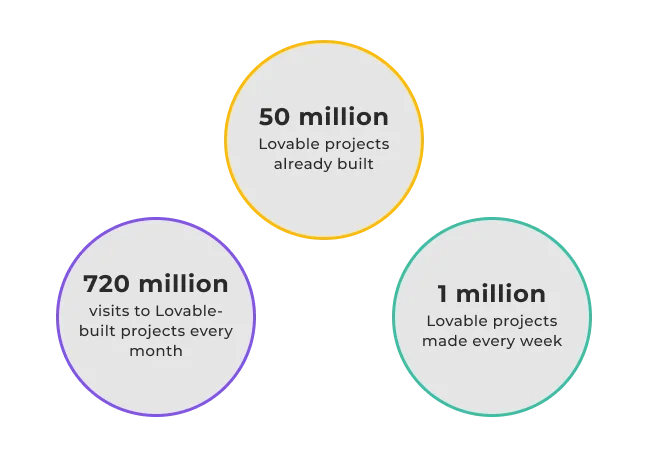
The Lovable app development platform is most useful during validation, when the team needs a working version early enough to collect real feedback. People can try the product, while the team sees where users pause, which features they use, and whether the idea deserves more time and budget.
A small validation build and a product serving 100,000 users face very different conditions.
More traffic can slow down queries, while a failed payment service or API can interrupt an important customer flow. At that stage, developers can review the Lovable build, keep the solid parts, and improve the areas that need stronger code or architecture.
Your Lovable App Works: Why Isn’t That Enough for Production?
A prototype can work well in a demo and still run into problems during daily use. A failed payment, broken login, slow page, or bad release can affect revenue and customer trust.
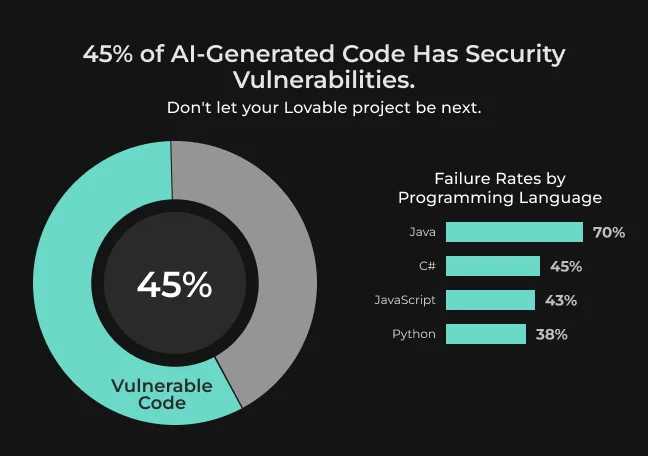
During validation, the team is trying ideas and learning what works.
A live product has to cope with busy periods, failed integrations, larger datasets, and frequent releases. The Lovable AI export code also needs to stay clear enough for another developer to understand and change months later.
Reliability, security, scalability, and maintainability become part of everyday technical decisions.
Lovable prototype priority | Production product requirement |
| Make the idea work | Keep it reliable during daily use |
| Build quickly | Release changes safely |
| Test with early users | Handle changing usage patterns |
| Cover the main flow | Handle edge cases and failures |
| Set up the database quickly | Plan data structure for growth |
| Add basic authentication | Apply secure authorization rules |
| Check features manually | Run automated tests |
| Deploy quickly | Use CI/CD with rollback |
| Spot errors during use | Track them with monitoring and observability |
| Let the founder manage the build | Make the codebase maintainable for an engineering team |
Production work can still build on the Lovable version.
The first step is a technical review of the Lovable download code, database, access rules, integrations, tests, and deployment setup. This shows which parts are already solid and where more engineering work is needed before usage grows. For a team with working user flows, this review helps avoid unnecessary rework.
Can Developers Take Over Your Lovable Project?
Yes. Lovable gives developers access to the generated source code, and the project can be synced with a GitHub repository owned by your company. The repository keeps the code history and stays in GitHub even if the Lovable connection is later removed.
Lovable Platform GitHub Integration and Code Export
With the code in GitHub, developers can clone the repository, work in their own IDE, create branches, and review pull requests before changes reach the main branch. Paid Lovable plans also allow direct codebase downloads.
GitHub recorded almost 1 billion commits in 2025, up 25.1% from 2024.
Teams also merged about 43.2 million pull requests per month on average. For a Lovable project, keeping the code in a company-owned repository gives the team a record of changes and a familiar way to review development work.
Developers also need the app’s dependencies and environment configuration.
Lovable projects can be modified outside the platform, deployed on external infrastructure, and fully self-hosted. Once the repository and configuration are in place, the team can connect CI/CD, change hosting, and continue development with its usual tools.
Is Lovable Open Source?
Lovable is a commercial platform that grew out of GPT Engineer, the open-source project created by its founders. The generated application code is separate from the platform itself. Project code remains under the customer’s control and can be moved to the company’s own repository or infrastructure.
What SapientPro Does to Turn Your Lovable Prototype Into Production Software
When SapientPro starts working with a project built in Lovable, the team first checks what is already working well. Some parts may be good enough to keep, while others require cleanup or deeper changes. The goal is to improve the product without rebuilding useful code from scratch.
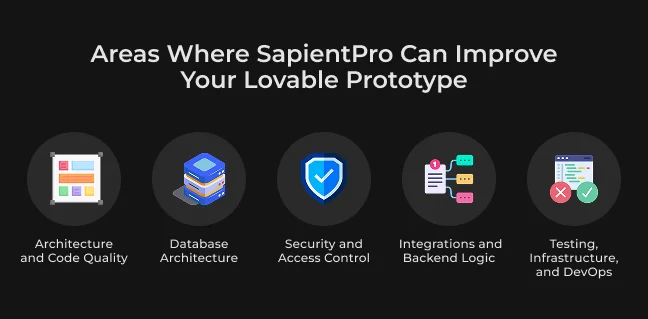
Area | Questions the assessment answers |
| Architecture and code | Can another developer follow the structure? Is logic repeated? Are dependencies justified? |
| Database | Will the schema and queries cope with more users and data? Can changes be migrated safely? |
| Security | Can users reach only the data and actions allowed for their role? Are secrets and permissions handled safely? |
| Integrations | What happens when a payment, API, webhook, or external service fails? |
| Testing and DevOps | Can the team test, deploy, roll back, and trace production issues reliably? |
Architecture and Code Quality
SapientPro’s engineers trace real product flows through the codebase to see how the frontend, backend, and core business rules connect. This often reveals duplicated logic, oversized components, or dependencies that make simple changes harder than expected.
A small feature update can tell a lot about code quality. When it touches several unrelated files, future development usually takes more time and carries more risk. Stable parts stay in place, while SapientPro cleans up the areas that create extra work.
See more
Check out where the hidden technical debt usually comes from and why it matters later.
Read moreDatabase Architecture
SapientPro checks the schema, table relationships, indexes, migrations, validation, access rules, backups, and expected data growth. The team also looks at how safely developers can change the database while the product is already live.
Database changes are much easier while the app still has little real data. Once customer accounts, payment history, and other important records build up, even a small structural change can take more time and require careful planning. Fixing weak parts early helps avoid a much harder migration later.
Security and Access Control
SapientPro checks how users sign in, what they can access, and how those permissions are handled across the app. The review covers authentication, roles, API access, sessions, and sensitive customer data.
The team also checks whether access rules are enforced on the backend. A hidden button in the interface is not enough if the API still accepts the request. Engineers look for gaps that could let one user access another account’s data or perform actions meant for a different role.
The issue we run into most often when we review fast-built MVPs is authorization that only exists in the interface. The screen hides a button or a menu item, but nobody checked whether the API behind it verifies the same thing — it just confirms you're logged in, not what you're allowed to touch. Once you pair that with a missing tenant check or an admin role that's broader than it needs to be, you've got one login that can reach data it was never supposed to see. That's the gap I look for first, because it's the one AI-generated code hides best.

Max Tatarchenko
Integrations and Backend Logic
SapientPro checks the services connected to the product, including payments, AI APIs, email, CRM, analytics, authentication, and other SaaS tools. The team looks at what happens when one of those services fails or responds in an unexpected way.
A payment can time out after the charge is completed, a webhook can arrive twice, or an AI API can hit a rate limit. Engineers check retries, timeouts, duplicate events, delayed webhooks, and error handling so one failed integration does not break the whole flow.
Testing, Infrastructure, and DevOps
The team checks how every change moves from development to production. Automated tests cover the main user flows, and staging lets developers try a release in an environment close to the live product.
SapientPro reviews CI/CD, production environments, infrastructure, rollback, logs, monitoring, and backups. The team focuses on three practical points:
- Can developers repeat a release safely?
- Can they roll back a bad deployment quickly?
- Can they trace the cause of a production issue?
The team also tests backups by restoring data and checking how quickly the product can recover after a failure.
Turn Your Prototype Into Production
Talk to SapientPro about moving your Lovable build toward real customers without a full rebuild.
Keep, Refactor, or Rebuild Your Lovable App?
SapientPro reviews the product you already have before deciding how much work each part needs. Some code may already be worth keeping. Other areas may only need cleanup, while a few components may be easier to rebuild once the current structure starts blocking further work.
The choice comes from the code itself and from what the product needs next. When the current stack still fits, SapientPro keeps it and focuses engineering time on the parts that actually require attention.
Option #1: Keep
Working code can stay in the product. This often includes clean UI components, a stable frontend, straightforward integrations, and application logic that developers can understand and reuse.
Keeping these parts saves development time and preserves what has already been tested with users. Engineers can continue building around them instead of replacing code that is already doing its job.
Option #2: Refactor
Refactoring works well for parts of the product that still function but have become harder to maintain or extend. The architecture may need cleanup, database relationships may create problems as data grows, or permissions may need stronger checks on the backend.
Code quality can also vary across the same project. One workflow may be clear, while another contains repeated logic or depends on several services working perfectly. SapientPro improves those areas while keeping the product behavior users already know.
Option #3: Rebuild Selected Components
Sometimes one part of the app is easier to rebuild than keep patching. This can happen when the current structure blocks a core feature, a security problem is tied to how the component was built, or performance remains poor because of structural limits.
A major change in business logic can lead to the same choice. In that case, SapientPro replaces only the component that has reached its technical limit and keeps the rest of the product in place.
Situation | Keep | Refactor | Rebuild selected component |
| Code is clear and stable | ✔ | ||
| UI works well and is easy to extend | ✔ | ||
| Logic is repeated across several files | ✔ | ||
| Database structure is starting to limit growth | ✔ | ||
| Permissions need stronger backend checks | ✔ | ||
| A workflow depends on fragile integrations | ✔ | ||
| Architecture blocks a core product requirement | ✔ | ||
| Security issue comes from the component structure | ✔ | ||
| Performance limit is built into the current design | ✔ | ||
| Business logic has changed significantly | ✔ |
Lovable Platform Limitations for Your Growing Product
A Lovable AI app can stay useful well past the first demo.
Limits usually become visible later, once the product has more roles, more data, heavier traffic, or business rules that the first version never had to deal with. At that point, parts of the product may need custom engineering outside the original prototype workflow.
Backend Logic and Permissions
A simple flow is easy to manage. Complexity grows once the product needs approval steps, background jobs, recurring tasks, or several actions tied to the same event.
Permissions can become difficult too.
A SaaS product may have admins, team members, clients, and partners, each with different access. Those rules need to stay consistent across the backend and APIs. Complex RBAC, account ownership, and server-side checks often need more hands-on development.
Scale, Performance, and Infrastructure
A product can feel fast with a small database and light traffic. The picture changes after thousands of users start creating records, sending requests, and running heavier operations at the same time.
Developers may need to tune queries, add caching, move jobs into queues, or change how large tasks are processed. High-volume products can also require more control over compute, storage, networking, or deployment regions.
A slow query, an expensive API call, or a background job running too often can each become a problem as usage grows.
Integrations and Legacy Systems
Integrations become harder when the product has to work with systems that were built for a very different environment.
An enterprise client may rely on an internal CRM or ERP. Another project may need a private API, an older database, or a company identity system. These connections often come with their own authentication rules, data formats, and network restrictions.
Specialized integrations can require custom connectors and data mapping. Legacy systems may also need extra testing because a small change on one side can affect a process the business has used for years.
Advanced Testing
Early testing usually covers the main user flow. As the product grows, bugs can appear in API calls, backend logic, or processes that rely on several services at once. A checkout flow, for example, can look fine in the interface and still fail when the payment provider times out.
Unit and integration tests help catch problems in the logic behind these flows, while end-to-end tests check complete actions like signup or payment. Load tests can also reveal slowdowns before higher traffic starts affecting users.
DevOps and Compliance
Once releases become regular, the team needs a reliable way to move changes into production. Staging gives developers room to test updates first. CI/CD, monitoring, rollback, and backups make releases easier to control and help the team recover faster after a problem.
Finance and healthcare products usually need tighter control over how data is stored, accessed, encrypted, and recorded. Enterprise clients can add their own security, hosting, or deployment requirements as well.
Lovable can stay in the workflow, while the engineering team manages the production setup.
How SapientPro Takes a Lovable App From Prototype to Production
Lovable AI software already gives the team code, user flows, and product logic to work with. SapientPro uses that base and focuses on the gaps that matter once the app starts serving real customers:
- The team reviews the code and architecture before adding new features;
- Engineers keep stable parts and clean up or rebuild weaker areas;
- Automated tests cover critical user and business flows;
- The team sets up staging, CI/CD, monitoring, rollback, and backups;
- Engineers prepare the backend and infrastructure for more traffic and larger data volumes.
This keeps the work tied to the product you already have. Time goes into the areas that need stronger engineering instead of recreating parts that already work. Contact SapientPro for a technical review of your Lovable app and a clear path to production.
Check Your Lovable App's Security Gaps
Request a security and access-control review before your Lovable app handles real customer data.

FAQ
Can I turn a Lovable prototype into a production-ready app?
Yes. A Lovable build can become the base for a production product. Developers can review the existing code, database, security, integrations, and release setup, then strengthen the areas that need more work.
Can developers export and continue working with Lovable code?
Yes. Link the Lovable project to GitHub and the code is available in a regular repository. A developer can clone it, work locally, and use the team’s existing setup for branches, tests, and releases.
Do I need to rebuild my Lovable app from scratch?
A full rebuild is often unnecessary. Working frontend code, clean components, useful integrations, and reusable logic can stay in place. Developers can refactor or replace only the parts that have reached a technical limit.
What are the main Lovable platform limitations for production?
Complex backend logic, detailed access rules, heavy data processing, custom infrastructure, and enterprise systems can require more direct engineering control. These areas often become harder to manage as the product gains users, data, and new functionality.
When should I hire a development team for a Lovable app?
Bring in a development team when the app starts doing work the business depends on. Payments, customer data, heavier traffic, complex integrations, or frequent releases are common signs that the current setup needs stronger engineering support.

