All How to Build an AI Knowledge Base for Enterprise
September 30, 2026


Employees often know that the information they need exists somewhere inside the company. Finding the current version is harder. A policy may have been updated in one system while an older copy still appears in search results.
An AI knowledge base shortens that search by returning information linked to the source it came from.
For an enterprise knowledge base, retrieval quality has a direct effect on trust.
The model only sees the material selected for the query. If retrieval pulls an outdated policy or a weak match, the response may sound convincing even though the evidence is wrong. Access rules add another constraint because two employees asking the same question may be allowed to see different material.
The knowledge base holds the company sources, search index, and access rules. A chatbot is one interface for querying that system. The same knowledge layer can support AI agents that act on retrieved information. SapientPro’s guide on how to build an AI agent explains that setup.
Before the model generates a response, the system needs to identify the current source and check what the requester can access. Retrieval then selects the passages that best answer the query. The sections below explain how that process works from ingestion to final response.
What Does an AI Knowledge Base Architecture Include?
A generative AI knowledge base connects several components, each with a specific role in retrieval and answer generation. One layer brings company content into the system and prepares it for search. Another stores that content in a form the retrieval service can query.
The final stage selects relevant passages and sends them to the language model so it can produce an answer grounded in company sources.
The architecture also carries information that search alone cannot infer. A document may apply only to a certain department or country. It may also have been replaced by a newer version. Those details need to travel with the content from ingestion through retrieval.
Source Connectors and Document Processing
AI knowledge base software needs access to the systems where company information already lives. Source connectors pull content from SharePoint, Confluence, cloud storage, databases, or internal applications connected through APIs. Each item needs a clear source reference so the system can trace where it came from and detect later updates.
The raw content often needs processing before search can use it reliably.
Files may contain repeated headers, page numbers, navigation text, or old version notes that add noise to retrieval. Scanned PDFs require OCR, and tables may need structured extraction so values remain connected to their labels and categories. A poorly extracted pricing table, for example, can separate a fee from the service it applies to.
Good document extraction preserves that relationship before the content reaches the index.
The processing stage also assigns stable document IDs and stores metadata used later during retrieval. That metadata can include the source location, publication date, owner, version, and access rules. If a policy is replaced, the system can update the existing record instead of leaving several versions with equal search priority.
Large documents are usually split into smaller passages before indexing.
The goal is to keep each passage focused enough for accurate search without cutting apart information that belongs together. A policy section with a rule and its exception, for example, needs to remain connected so retrieval does not return only half of the meaning.
Search Index and Answer Generation
Once company content is prepared, it needs a place where the retrieval system can search it efficiently. The index stores the text and, where semantic search is used, embeddings.
It also keeps the metadata needed to connect each passage to its source and apply the correct access rules.
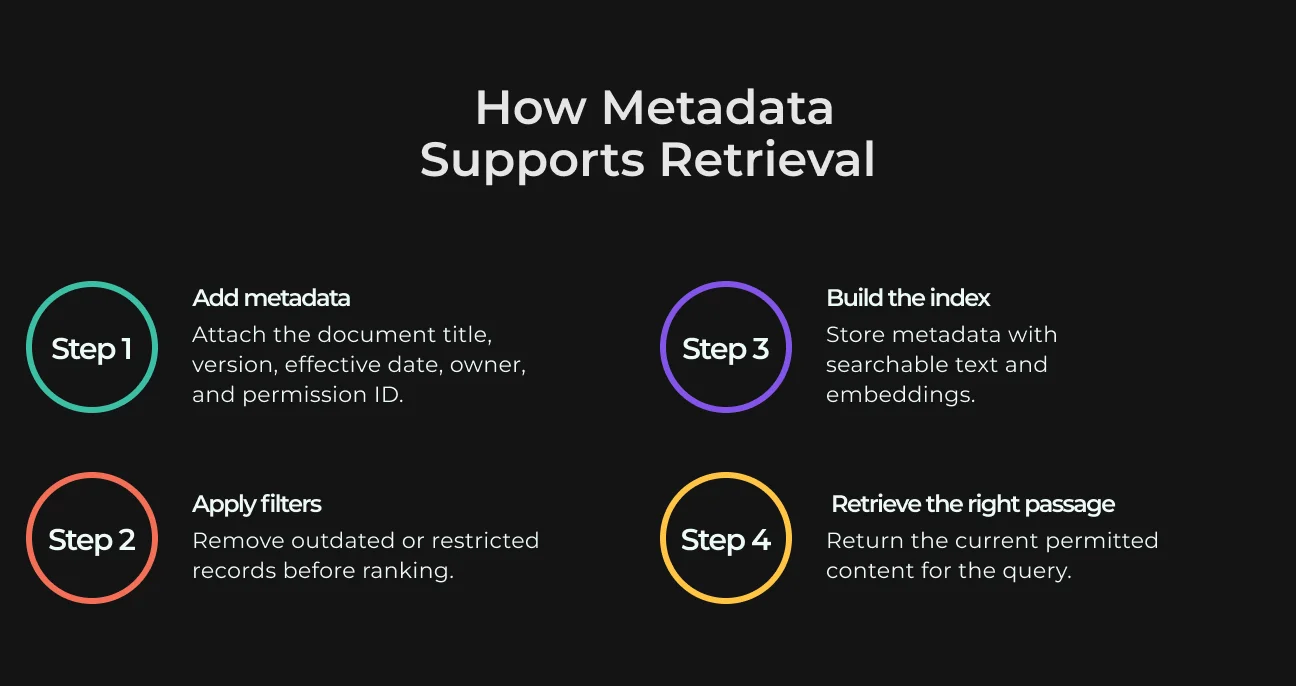
That metadata becomes important once two documents look relevant to the same question. For example, retrieval can exclude documents outside the employee’s access scope before ranking begins. This reduces the chance of pulling a valid passage from the wrong policy.
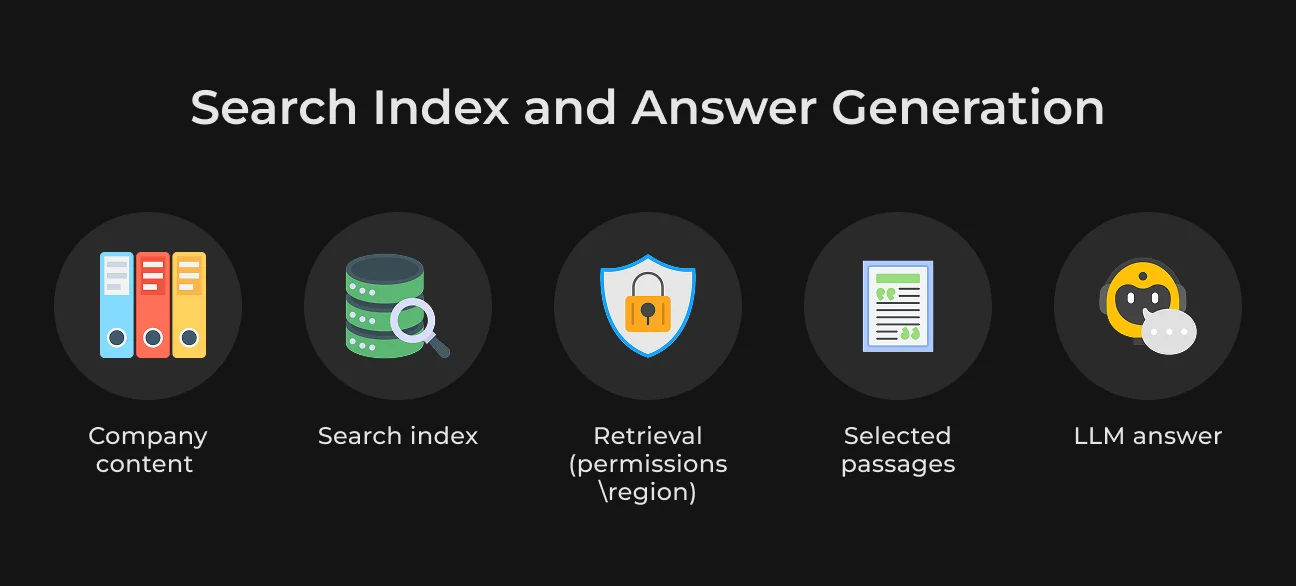
In a knowledge base LLM setup, the model only sees the content selected for the query.
The retrieval layer searches the index, ranks the strongest matches, and sends those passages to the model as context. The model then writes the answer from that evidence instead of searching the company repository directly.
The same setup makes retrieval errors easier to trace. If an answer includes the wrong expense limit, engineers can inspect the retrieved passage and its source to see where the error began.
How to Build an AI-Powered Knowledge Base
An AI-powered knowledge base project is easier to control when the first release is tied to one real workflow. This gives the team a clear baseline for testing before the system is expanded to more employees.
1. Choose a Workflow and Collect Representative Questions
Take one workflow, like HR answering policy questions. Collect real employee queries and match each one to the source that contains the answer. Include vague wording and cases where the same policy is described in different ways.
Also add questions the system must reject. For example, it should not answer from confidential employee records or draft policies.
2. Audit Sources and Assign Document Owners
Before indexing content, review what actually exists. Duplicate files and outdated policies can create problems later. Restricted documents need separate attention, and some sources may have several versions with no confirmed current copy. Each source needs an owner who decides which version is authoritative. That person can also confirm when an older copy should be removed from search.
3. Extract, Clean, and Chunk the Content
Content processing determines what the retrieval system will see later. Headings should stay attached to the clauses they describe, and table values need enough surrounding structure to remain understandable.
For example, a section called Meal Reimbursement — Germany may state that employees can claim up to €45 per day. If chunking separates the heading from that sentence, the system may retrieve the amount without the regional limitation.
Short fragments can strip away context, while long fragments may bring in unrelated text and weaken the match. A small overlap between neighboring chunks can help around section breaks.
4. Add Metadata and Build the Index
Metadata helps the system understand where a passage came from and how it can be used.
A record may include the document title, department, version, effective date, owner, and permission ID. These fields support filtering before ranking and make citations more reliable.
For example, if two policy versions are indexed, the effective date can help exclude the older one from the result set. The index stores this metadata alongside searchable text and embeddings where semantic search is used.
5. Connect Retrieval to the Answer Interface
For each question, the system identifies the user first. It limits the search to content the user can access. Retrieval then selects the strongest matching passages.
The LLM receives only those passages as context. The answer interface then shows the response with source links. If the system cannot find reliable evidence, it should say so. A clear “no reliable answer found” response is safer than generating a confident answer from weak context.
How Should an Enterprise AI Knowledge Base Retrieve Answers?
In an AI driven knowledge base, retrieval controls the evidence available to the model. It needs to match the question with the right passages while respecting access restrictions. When several versions cover the same topic, the current source should take priority.
Keyword Search, Vector Search, and Hybrid Search
Exact names and internal IDs often work better with keyword matching. Questions written in looser language can benefit from vector search, which looks for semantic similarity between the query and indexed content.
| Method | Best fit | Example query |
| Keyword search | Exact policy names, document codes, product IDs, or fixed internal terms | HR-POL-204 parental leave |
| Vector search | Questions that use different wording from the source document | How much leave do I get after adopting a child? |
| Hybrid search | Queries that mix an exact identifier with a natural-language question | HR-POL-204 adoption leave rules |
Hybrid search runs keyword and vector retrieval in parallel, then combines the candidate results. This helps the system catch exact identifiers and semantically related passages in the same search.
Repositories built around policy codes or product names often favor keyword matching. Help centers with varied wording can benefit more from semantic search.
Reranking and Source Citations
Initial search often returns several plausible passages. Reranking scores the candidate passages again and moves the strongest matches higher before they reach the LLM.
Similar wording across several documents can confuse the first retrieval pass. A query about travel expenses might match a global policy and an older regional copy. Reranking can push the current, more relevant passage higher.
The final answer needs a source users can verify. Showing the document link and version lets employees check the response and gives engineers a concrete record when retrieval returns the wrong content.
Multi-step retrieval fits questions that cannot be resolved with one search.
An agentic RAG setup can split a complex request into smaller searches and decide what to retrieve next based on the results.
When Should the System Refuse to Answer?
The system should refuse when it cannot support a response with reliable company content. If the user cannot access a source that answers the question, the model has nothing valid to cite.
Conflicting policies also require a stop. An expired document should not support a current answer. Related text is also insufficient if it never addresses the question directly.
In these cases, the interface can state that no reliable answer was found and direct the user to the relevant team or source repository. The model should not fill the gap with general knowledge.
Stop Searching Across Scattered Company Documents
SapientPro connects your company sources so employees can find answers with source links.
How Do You Keep Restricted Documents Out of AI Answers?
A document can match a query and still be off-limits to the person asking it. Access rules need to be applied during retrieval so restricted content never reaches the model. The first control point is always the user’s permission set.
Apply User Permissions Before Passing Content to the LLM
Permissions need to be checked before the model sees any retrieved text.
An employee asking about compensation policy may have access to the HR guidance for their role. A salary record for another employee may use similar terms, yet it must stay out of the results. If the user cannot open the source, the model should never receive content from it.
Log Access and Set Data Retention Rules
Access logs help security teams see which user made a request and which sources the system retrieved. Prompts and retrieved passages can contain sensitive company data, so teams need clear limits on retention and access. IBM’s 2024 research found unmanaged data in 35% of the breaches it studied. These incidents took an average of 291 days to identify and contain.
When a source document is removed, its indexed copy and cached content should disappear with it. For a broader look at storage, retention, and related security controls, see SapientPro’s guide to AI data protection.
How Do You Test and Maintain an AI Knowledge Base?
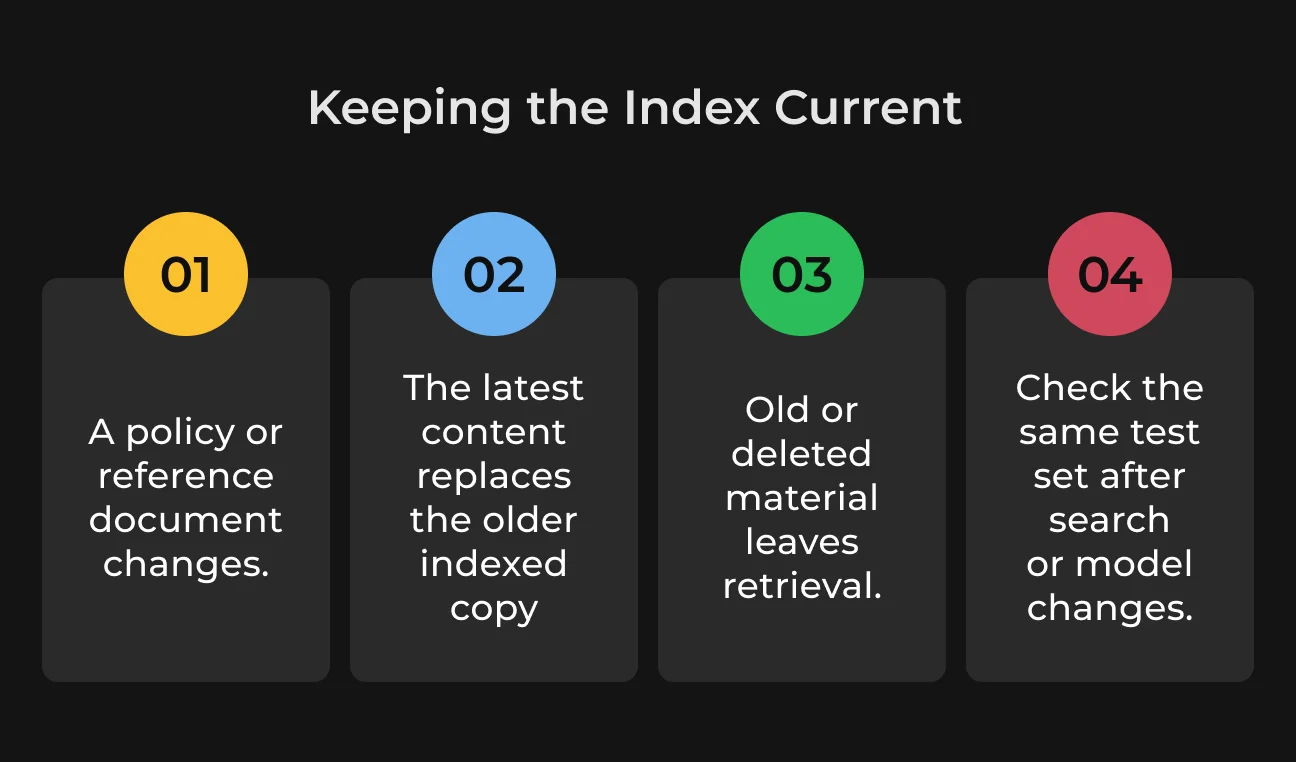
A policy update or a change in search configuration can make a previously correct response outdated. Regular testing helps spot those shifts before employees see the wrong source or an inaccurate answer.
Measure Retrieval Quality and Answer Accuracy Separately
Use a fixed set of real questions and check the retrieved passages before reviewing the final response. The correct source needs to appear in the results.
Then compare the answer with that source.
The response should reflect the source accurately, and the citation should lead to the exact document version used. Track unanswered questions and response time separately, and use dedicated test cases for permission failures because they point to access-rule problems.
Reindex Changed Documents and Remove Old Versions
Reindexing frequency depends on how often the source is updated.
A policy revised every week needs a shorter refresh cycle than stable reference material. When a new version becomes authoritative, remove the older copy from search. If the source is deleted, its indexed content should disappear from retrieval.
A change to ranking or chunking can shift search results even when the documents have not changed. Model updates can do the same. Run the test set again after each update and compare the results with the previously approved results before release.
AI Knowledge Base Example: Hybrid Search in a SapientPro Project
Retrieval projects outside internal company search can offer relevant AI knowledge base examples. SapientPro’s AI shopping assistant is one such case. The project is built for e-commerce and searches across product data with both keyword and vector-based methods.
Exact product names and fixed terms are easier to find with keyword search.
Vector search helps with broader requests where users describe what they need in different words. The project later moved the vector layer to PostgreSQL with pgvector, giving the team more control over filtering and aggregation.
Enterprise search faces a similar challenge. One employee may know the exact policy ID, while another only remembers the topic. Hybrid search gives both queries a better chance of reaching the same authoritative source.
Contact SapientPro to discuss the retrieval architecture for your enterprise knowledge base.
Stop Confident Answers Built on Weak Evidence
SapientPro builds retrieval checks and fallback responses for missing, conflicting, or unreliable sources.

FAQ
Do You Need a Vector Database for an AI Knowledge Base?
No. Embeddings can live in PostgreSQL with pgvector or in a search engine that supports vectors. Some teams use a dedicated vector database when vector search becomes a major workload. The right choice depends on scale and filtering needs.
How Is a RAG Knowledge Base Different From Fine-Tuning?
RAG pulls information from company sources at the time of the query, so updated documents can be used straight away. Fine-tuning teaches the model how to respond based on training examples, so it is better suited to changing behavior or output style than keeping company facts current.
Can an AI Knowledge Base Use SharePoint and Internal Wikis?
Yes. An AI knowledge base can pull content from SharePoint or Confluence, along with other internal wikis. It can keep the same access restrictions and refresh the index when those sources change.