All How to Fine-Tune an LLM on Business Data: Practical Guide for Non-ML Teams
September 29, 202615 min read


Fine-tuning usually enters the conversation after the same model mistake keeps coming back. An LLM may confuse internal labels, ignore a required output structure, or apply company rules differently across similar requests. Once that pattern is clear, the team already has something concrete to train on
Pretraining builds a foundation model from massive datasets and requires substantial computing resources. LLM fine tuning adapts an existing model with selected examples that shape its behavior for a narrower task. RAG gives the model external information at inference time.
The key decision is whether the problem comes from model behavior or from access to current information. Fine-tuning fits stable patterns like classification logic, output formats, domain conventions, or writing style. RAG fits workflows built around changing documentation, policies, or product data.
This guide explains how businesses can fine tune LLM systems with their own data, prepare strong training examples, and decide whether fine-tuning is the right approach for an LLM for business.
What Is LLM Fine-Tuning and How Does It Work?
Fine-tuning begins with an existing foundation model. The company prepares examples where the expected result is already known, like support tickets with verified labels or responses approved for a specific workflow. These examples become the material for another round of LLM training.
During that LLM training process, some or all of the model’s parameters change in response to the patterns in the dataset. A support model, for example, may become more consistent at mapping requests to the company’s own categories and keeping replies in the format the team uses every day.
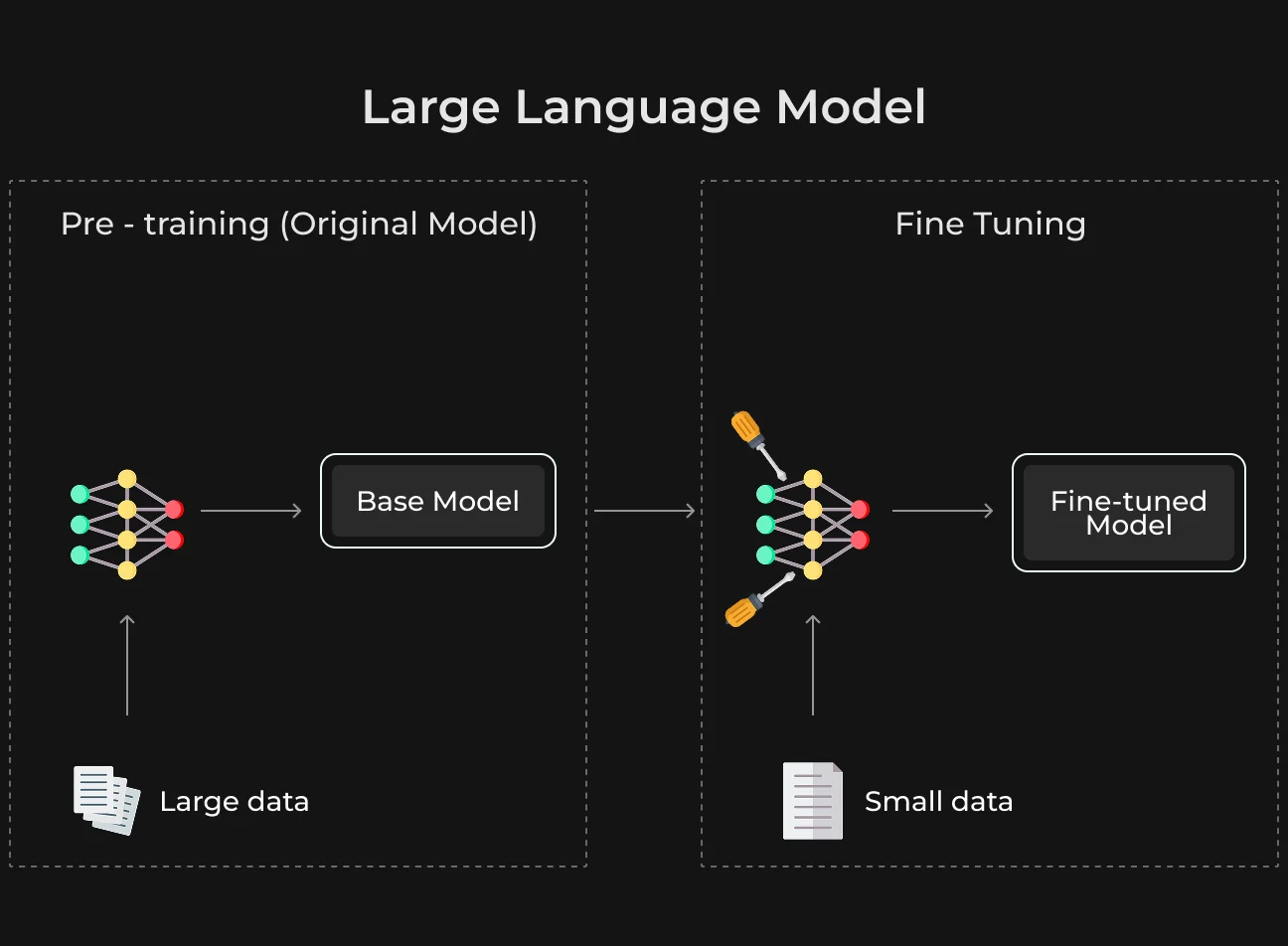
This is also where fine-tuning differs from two other common approaches. Prompt engineering changes the instructions sent with a request. RAG supplies relevant information at inference time, like a policy document or product record. Fine-tuning changes the model’s learned response behavior through additional training.
For a business team, that distinction helps narrow the problem. A missing fact may point to RAG. Poor instructions may be solved in the prompt. Repeated behavior that remains wrong across many similar requests is the stronger case for fine-tuning.
Most companies researching how to train an LLM for a specific business task begin with an existing foundation model. Full LLM model training from scratch is a much larger engineering project and is rarely necessary for that type of work.
Fine-Tuning vs Training an LLM From Scratch
Training from scratch means creating the model’s general language capabilities in the first place. It requires enormous datasets, large-scale GPU infrastructure, deep ML expertise, and control over the architecture and training pipeline.
Fine-tuning skips that foundation-building stage. The model already understands language, so the work centers on examples that represent the company’s task and the behavior it wants to reinforce.
Area | Fine-Tuning | Training From Scratch |
| Starting point | Existing foundation model | New model with untrained parameters |
| Main objective | Specialize behavior for a defined task or domain | Build general language capabilities and model behavior from the ground up |
| Iteration cycle | Teams can retrain on revised examples as requirements change | Each major training run requires substantial engineering and compute |
| Cost | Usually limited to additional training and evaluation | Includes model development, infrastructure, training runs, and extensive validation |
| Typical business case | Classification, extraction, structured outputs, terminology, or style | Organizations building a proprietary foundation model with requirements existing models cannot meet |
See more
Read the guide for a critical look at LLM optimization, security protocols, and key performance metrics for evaluating LLMs.
Learn moreWhat Business Data Can You Use for Fine-Tuning?
Good fine-tuning data is usually a small part of all the data a company holds.
What you need are records that connect a task with an accepted outcome. A resolved support case with the correct label can work as a training example. The same applies to a contract with verified extracted fields or a product brief with a final approved description.
In 2025, 72% of CEOs said proprietary company data was key to getting value from generative AI. For fine-tuning, the most relevant records are those that already show an approved decision or output.
The quality of the link between input and output is more important than the volume of raw material.
Support Tickets and Approved Responses
Support teams often already have the records fine-tuning needs. A resolved ticket may already contain the original request, the final category, and the response that passed review.
Those records still need curation. Old policy answers, duplicate cases, and threads with conflicting agent decisions can distort the training set. The cleaner cases are the ones where the outcome is clear and still reflects current practice.
For classification, the ticket can be paired with its verified issue type.
For response generation, the same request can be matched with an approved reply that shows the terminology and level of detail the company expects.
Classified Documents and Extraction Examples
For document workflows, fine-tuning data needs a verified target. A contract can be paired with an approved document type, and an invoice with confirmed fields like vendor, date, amount, and payment terms. For extraction tasks, the training output needs to match the format used in production.
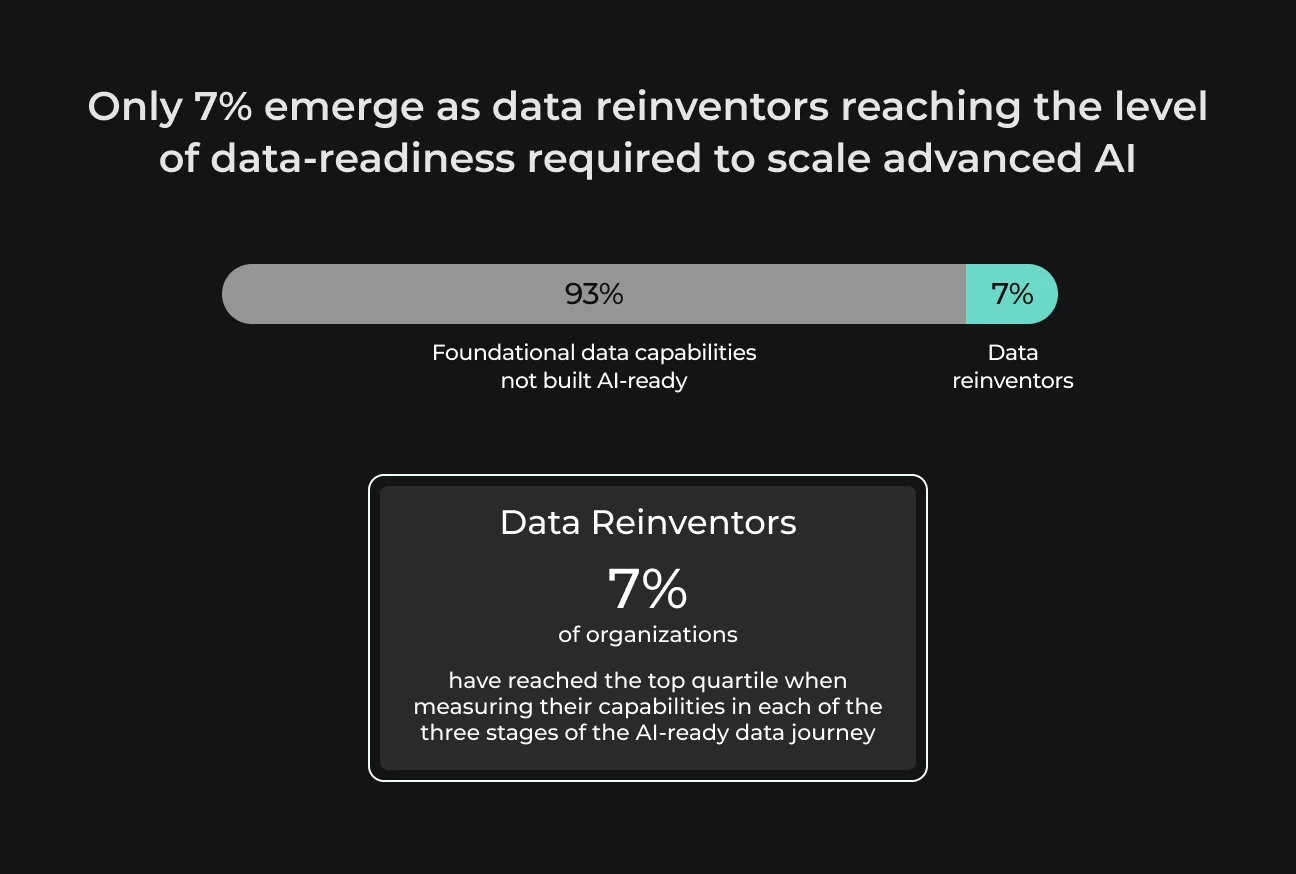
Among 2,000 companies surveyed, only 7% had advanced AI-ready data capabilities. Fine-tuning projects often begin with data preparation, because source files need a consistent structure and each example needs a verified target.
A folder of contracts, policies, or reports is still source material.
Teams extract the relevant sections and connect them to labels, structured fields, or approved outputs that define the task. Database records go through the same conversion. A product table, for example, becomes training data once selected fields are tied to a verified category or another target result used in the workflow.
Terminology, Product Content, Q&A, and Workflow Outputs
Internal terminology is most effective when it appears in real task examples. A glossary explains what a term means, but an approved ticket or document shows how employees use it in context.
Product descriptions can teach structure, wording conventions, and brand voice. Structured Q&A provides examples of the answer patterns expected for recurring questions. Reviewed summaries, risk labels, routing decisions, and completed forms can become training pairs when the original inputs are available.
How to Fine-Tune an LLM on Your Own Data
If you’re figuring out how to train an LLM on your own data, most of the work happens before the first training run. The five steps below cover dataset preparation, model selection, tuning, and evaluation.
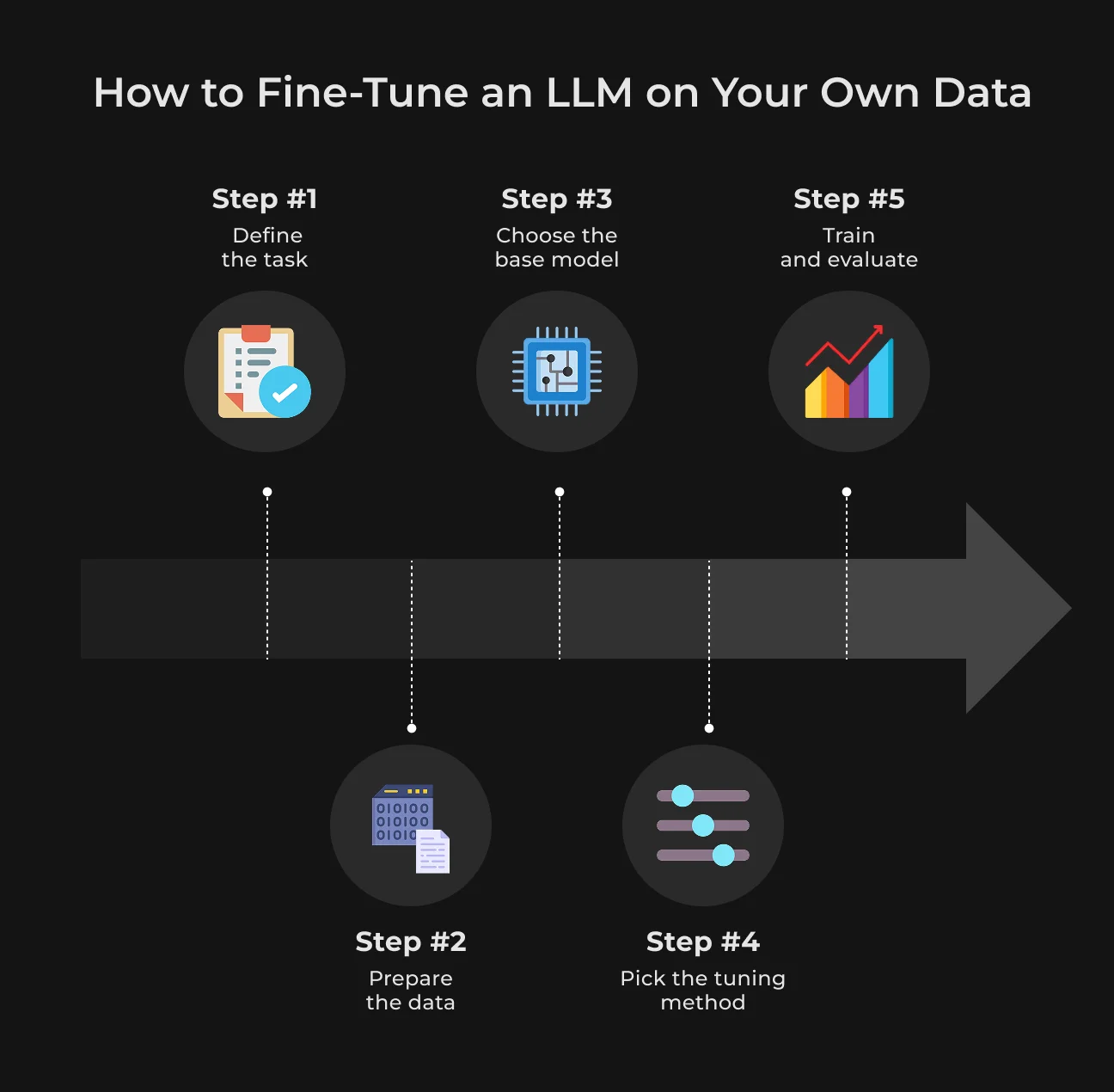
Step 1. Define the Task and Success Metric
“Improve customer support” is too broad. “Route incoming tickets to the correct internal category” gives the team a clear task and a result that can be tested.
For extraction, define the required fields. For summaries, agree on what belongs in the final output. Style tasks work best with approved examples of wording and tone, and structured output should follow a fixed schema.
Use a metric that reflects the error the team actually cares about. F1 is common for classification and schema validity fits structured output. Record the current model’s score on the test set before training, then run the fine-tuned version on those same cases and compare where the results changed.
Step 2. Prepare and Clean the Dataset
Old business records rarely arrive ready for training. A dataset may contain outdated policy examples, duplicate cases, or inconsistent labels, so review and clean it before training.
Near-duplicates can give certain cases too much weight. The dataset also has to represent the harder requests the model will meet later, including ambiguous tickets, missing extraction fields, unusual layouts, or imperfect source text.
Split the data before tuning begins. Training examples teach the model and validation data helps check progress during development. The test set stays untouched for the final comparison.
Sensitive data requires its own pass. Remove fields that add nothing to the task and mask personal or confidential information where possible. Also check how the provider handles training data and retention.
Step 3. Choose the Base Model
Filter the shortlist by the constraints that could rule a model out in production. For a narrow classifier or extraction tool, a larger model may add little on the actual task, so the extra inference cost and response time may be hard to justify.
With an API-based model, serving stays with the provider. Open-weight models are more relevant when the company wants inference inside its own environment or tighter control over data handling. In that setup, engineering also takes responsibility for deployment, scaling, updates, and monitoring.
Area | What to check |
| Licensing | Whether commercial fine-tuning and deployment are permitted |
| Privacy | Where training data is processed, stored, and retained |
| Latency | Whether response time fits the workflow |
| Deployment | API, private cloud, VPC, or self-hosted requirements |
| Context window | Whether typical inputs fit comfortably |
| Cost | Training expense plus ongoing inference cost |
Once two or three fine-tuning LLM models meet the technical requirements, test them on the same evaluation set. That comparison gives the team better evidence than model size or benchmark rankings alone.
See more
Check out our LLM security guide for CTOs and IT Security Officers to review the key AI security risks and controls in 2026.
Read NowStep 4. Choose a Fine-Tuning Method
Full fine-tuning is the most resource-intensive of the LLM fine-tuning techniques covered here because it updates all model parameters. It makes sense when the team needs deeper changes to model behavior and has the infrastructure to support them.
LoRA keeps the base model largely intact and trains a much smaller set of added parameters. QLoRA reduces memory use further by combining LoRA with a quantized base model, which makes larger open-weight models more practical on limited hardware. Both belong to the broader PEFT family of parameter-efficient methods.
For many business projects, LoRA or QLoRA offers enough flexibility without the cost of updating every parameter in the model.
Step 5. Train, Evaluate, and Iterate
A fine-tuned model can improve on training data and still perform worse on new cases. Watch the validation results during training for a widening gap between training and validation performance, which usually points to overfitting. After the run, compare the fine-tuned model with the baseline from Step 1 on the same held-out test set.
Review a sample of outputs with people who know the workflow. They can catch failures that barely affect an automated metric, like a support case sent to the wrong escalation path or a summary missing information required for the next step.
A higher F1 score means little if ticket routing still requires the same amount of manual work. For extraction, track the fields that still need correction; for generated content, measure how much editing remains before approval.
Turn Business Data Into Better Models
SapientPro prepares your data, tunes the model, and builds reliable evaluation workflows. Talk to our team to get an estimate.

LLM Fine-Tuning Best Practices
These practices keep fine-tuning runs easier to compare and make it simpler to trace where a regression or performance change came from.
Establish a Baseline Before Fine-Tuning
Record how the current model performs on the target task before changing it. Use the same test cases, prompt setup, and metrics later so improvements are measured against a real reference point instead of intuition.
Treat Data Quality as a Release Gate
A larger dataset does little for a model when the examples are outdated or unreliable. Review the records that will influence training most heavily, and remove anything the team would reject in production.
Keep Evaluation Data Outside Training
The test set needs to stay untouched during training and prompt adjustments. Once examples from that set influence development decisions, the final score becomes less trustworthy because the model setup has already been shaped around those cases.
Build Edge Cases Into the Dataset
A dataset built mostly from clean, obvious cases can give a misleading picture of model quality. Add ambiguous requests and incomplete inputs to the dataset. Include unusual formats or cases close to category boundaries so evaluation covers the situations that usually require manual review.
Version Datasets and Models Together
Keep each model version linked to the dataset and settings used for that run. This makes comparisons cleaner and helps the team see which change caused a drop or improvement in performance.
Test for Regressions Beyond the Target Metric
A better overall score can still hide weaker performance on important cases. Before releasing a new version, check the categories and outputs where mistakes would create the most extra work or risk.
Use Human Review for Subjective Outputs
Style, tone, summary quality, and response relevance depend on judgment, so automated scoring alone is limited. Give reviewers a short rubric with concrete criteria and keep it unchanged across model versions. When reviewers disagree, record the reason. Those cases often expose unclear criteria or borderline examples worth adding to the evaluation set.
Common LLM Fine-Tuning Use Cases
A domain-specific LLM is most useful when the same type of task appears repeatedly and the business already has reviewed examples of the expected result. The table below shows where fine-tuning can reduce recurring corrections.
Use Case | What Fine-Tuning Can Improve | Example |
| Customer support | Ticket routing, escalation, and response structure | Map incoming requests to internal queues and keep replies in the format agents already use |
| Document extraction | Extraction logic and stable field output | Pull contract clauses or invoice values into the exact fields |
| Industry terminology | Internal vocabulary and domain phrasing | Use product codes, acronyms, and specialist terms the way employees use them in daily work |
| Legal and financial categorization | Consistent labeling under internal rules | Sort contracts, transactions, or cases into the categories used for review and reporting |
| Structured report generation | Required sections and output structure | Produce compliance summaries or operational reports in an approved format |
| Brand and style consistency | Wording, tone, and editorial conventions | Generate product or support content that follows established company guidelines |
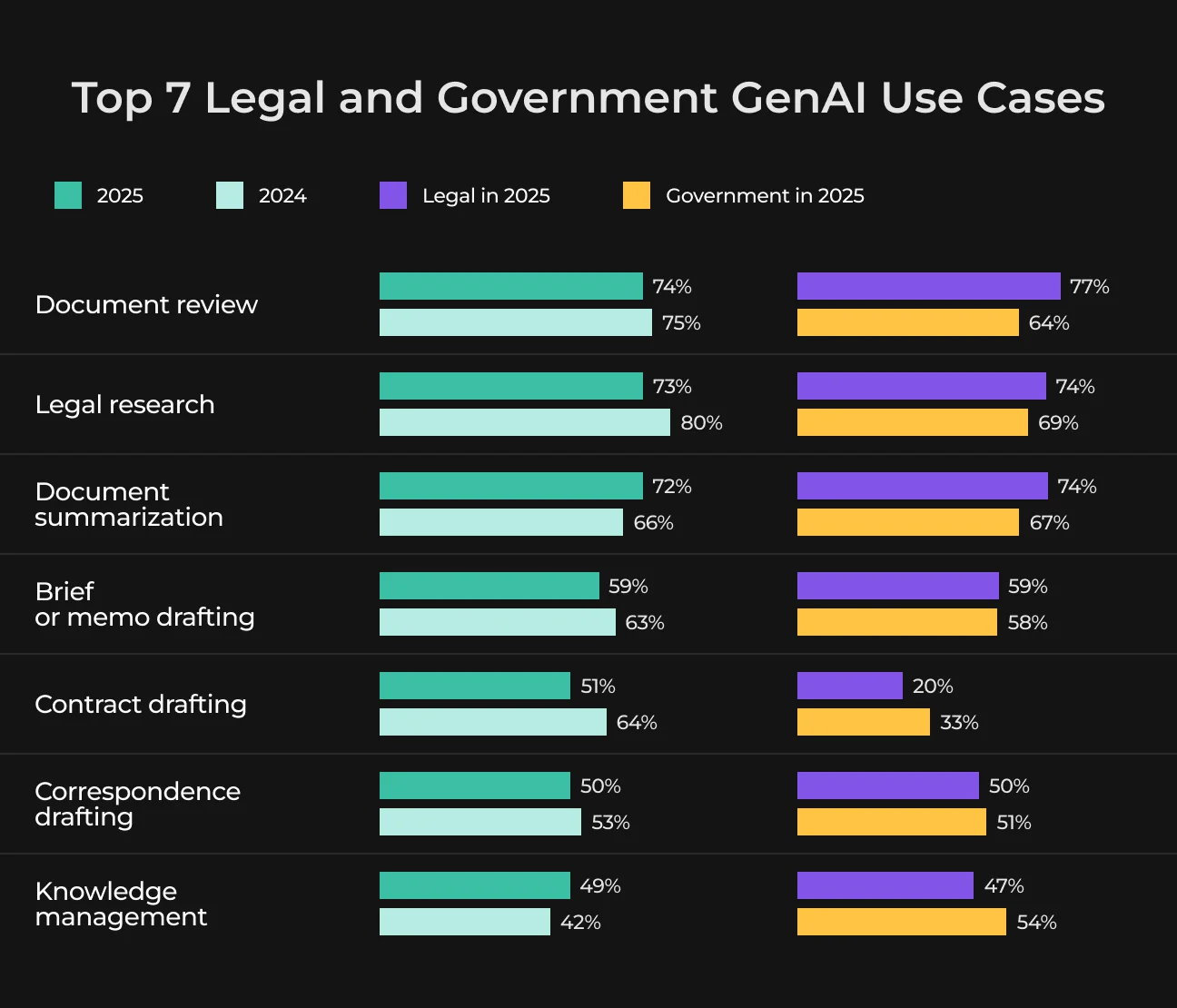
Document review and summarization are already common GenAI tasks in legal and government teams. In 2025, 74% of users in those sectors used GenAI for document review, and 72% for summarization.
How to Evaluate and Deploy a Fine-Tuned LLM
Test the fine-tuned model on a fixed set of real business cases that stayed outside training. Run the baseline on those same cases. This gives the team a direct comparison and shows where the new version actually improved the workflow.
Average scores can hide expensive failures. Break results down by the cases the business cares about most and track the errors relevant to the task. For generated outputs, check first for hallucinations and missing required information.
Then verify that the response follows the required format. Classification models need the same attention at the category level, since a strong overall score can still hide weak performance on a smaller class.
Test latency and cost with real production traffic. Better output is still a bad trade if responses become noticeably slower or each request gets too expensive.
Release Check | What to Verify |
| Business quality | Performance against the baseline on the same evaluation set |
| Errors | Hallucination rate, missing fields, wrong labels, or other task-specific failures |
| Performance | Response time under expected request volume |
| Cost | Fine-tuned inference cost per request or workflow |
| Version control | Model, dataset, tuning settings, and evaluation results recorded together |
| Rollback | Previous production version remains available for a quick restore |
| Monitoring | Quality, latency, errors, and cost tracked after release |
Deployment determines who owns the operational work. With an API model, the provider handles serving and scaling. A self-hosted setup keeps data location and runtime controls in-house. The engineering team also becomes responsible for infrastructure capacity and ongoing operations.
After launch, keep the production model linked to the dataset and evaluation record used for that release. Track quality, latency, error rate, and cost over time.
See more
Considering self-hosting? Read our guide to running an LLM locally, with practical use cases and setup steps.
Read nowHow Much Does LLM Fine-Tuning Cost?
In a 2025 test, full fine-tuning ran for 4 hours 20 minutes, while LoRA finished in 1 hour 30 minutes under the same setup. Reported GPU memory use dropped from roughly 8 × 40 GB to 8 × 17 GB.
Those figures show how much the tuning method alone can change resource use. The final budget also depends on model size, dataset volume, repeated runs, evaluation work, and production inference, so a single average price for LLM fine-tuning would be misleading.
Cost Driver | What Affects the Cost |
| Model size | Larger models use more compute and memory |
| Dataset size | More training data increases processing time |
| Experiments | Each additional run adds compute and evaluation cost |
| Fine-tuning method | Full fine-tuning uses more resources than LoRA or QLoRA |
| GPU or API fees | Cost varies by infrastructure and provider pricing |
| Evaluation | Test runs and human review add separate project costs |
| Inference | Production usage creates ongoing operating costs |
| Monitoring and maintenance | Quality checks, logging, and later retraining continue after deployment |
For budgeting, separate the initial training expense from recurring production costs. Inference creates an ongoing bill after launch, while monitoring and later retraining add further costs over time.
Custom LLM Development with SapientPro
SapientPro works with businesses that need LLMs adapted to real internal workflows. Our team has 7+ years of experience with this and covers the full path from business data preparation and model selection to deployment, evaluation, and production monitoring.
Depending on the use case, we can help with:
- Fine-tuning models on approved business data and task-specific examples;
- RAG pipelines for changing documents, policies, and internal knowledge;
- Open-weight and self-hosted LLM deployment;
- Integration with existing tools, databases, APIs, and business systems;
- Evaluation pipelines for quality, latency, regressions, and cost;
- MLOps for dataset and model versioning, monitoring, and rollback;
- Security controls for data access, hosting, and sensitive information.
The architecture depends on the problem. Some workflows need fine-tuning, others work better with RAG, and many production systems combine both.
Contact SapientPro to review your LLM use case, data, and deployment requirements. Our team can help define the right approach and build it into a production-ready system.
Build LLMs Around Your Business Data
We turn approved company examples into tested models built for real workflows. Talk to our engineers to see how we can help.

FAQ
How Does LLM Fine-Tuning Work?
LLM fine-tuning takes an existing foundation model and trains it further on examples from a specific task or domain. These examples teach the model patterns such as internal terminology, classification rules, output formats, or writing conventions. The goal is to make recurring model behavior more consistent without training a new LLM from scratch.
How Do You Fine-Tune an LLM?
Start by defining one measurable task and creating a baseline for the current model. Then clean and split the training data, select a suitable base model, choose a fine-tuning method such as LoRA or QLoRA, and train it. Finally, compare the fine-tuned model against the baseline using held-out test data.
RAG vs Fine-Tuning: What Is the Difference?
RAG and fine-tuning solve different problems. RAG supplies external information to an LLM at inference time, making it useful for changing documents, policies, and product data.
Fine-tuning changes learned model behavior, making it better suited to stable patterns such as terminology, classification logic, output structure, or writing style.
How Much Does LLM Fine-Tuning Cost?
LLM fine-tuning cost depends on model size, dataset volume, tuning method, number of experiments, GPU or API fees, and evaluation work. LoRA and QLoRA generally require fewer resources than full fine-tuning. Businesses should also budget for recurring inference, monitoring, maintenance, and later retraining after deployment.