All
How to Build a Restaurant App: Development Guide with Features and Tech Stack in 2026
Updated:November 3, 202615 min read


Successful restaurants are just as much about software as they are about food.
Mobile ordering and custom software solutions are no longer "extras". They are the modern standard. While off-the-shelf restaurant management software might cover the basics, a branded app offers the tailored features and integrated data needed to truly scale a dining experience.
Let’s take a look at the best approaches to developing restaurant software solutions from SapientPro’s engineers with 9+ years of experience in the industry.
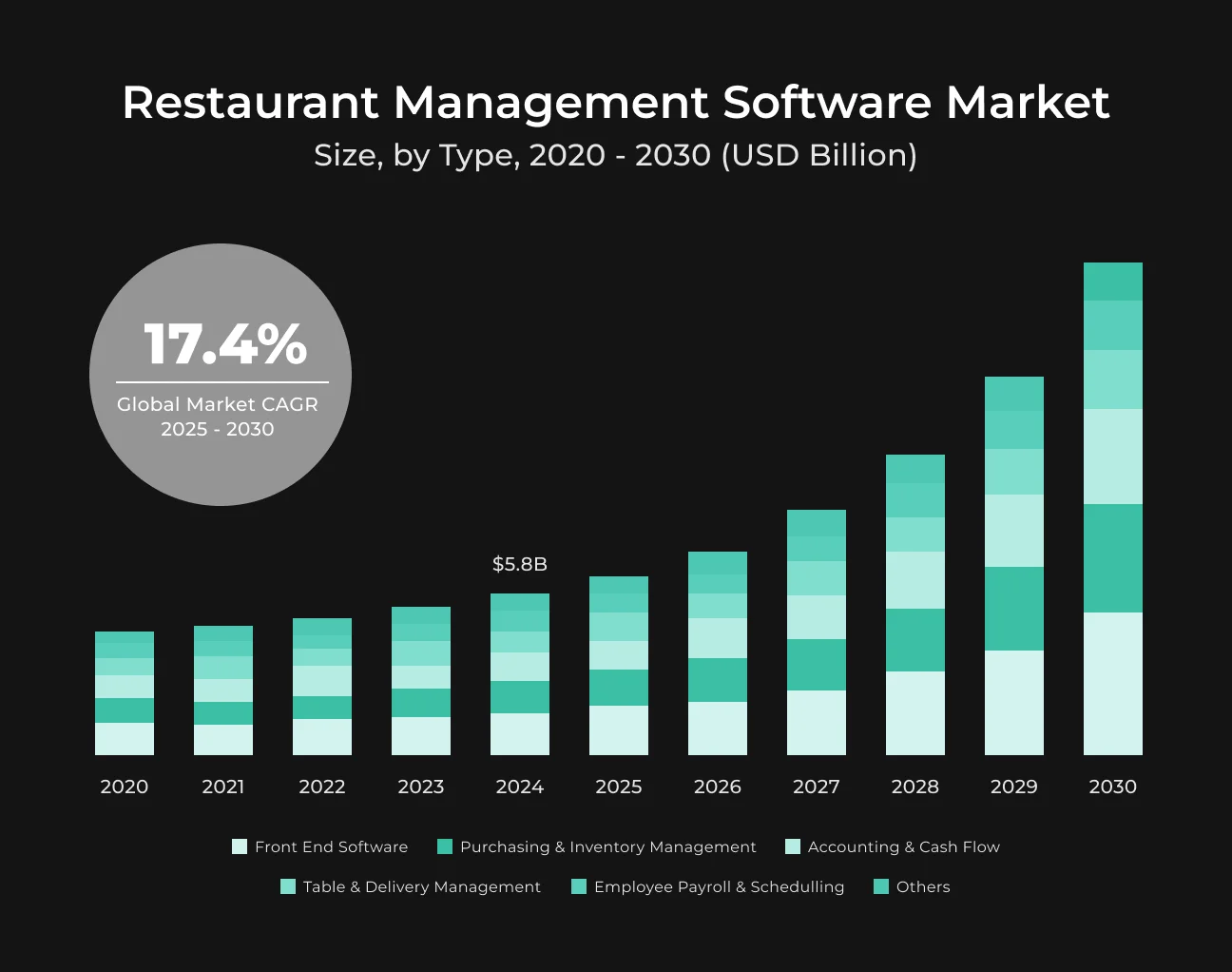
Key Takeaways
- 55% now prefer to order food without having to communicate with an individual;
- 39% of consumers prioritize “ease of use” when ordering takeout, the top reason for choosing a food ordering method;
- 47% of consumers belong to a minimum of one restaurant loyalty program, and they come in 20% more and spend 20% more than non-members;
- 65% of a restaurant's sales can be sourced from repeat guests, and loyalty rewards make that;
- Loyalty program members add 12-18% more revenue to businesses annually compared to non-members.
Why Build Your Own Restaurant App?
Let’s take a look at the key reasons why restaurant owners develop custom solutions and how this saves money in the long run.
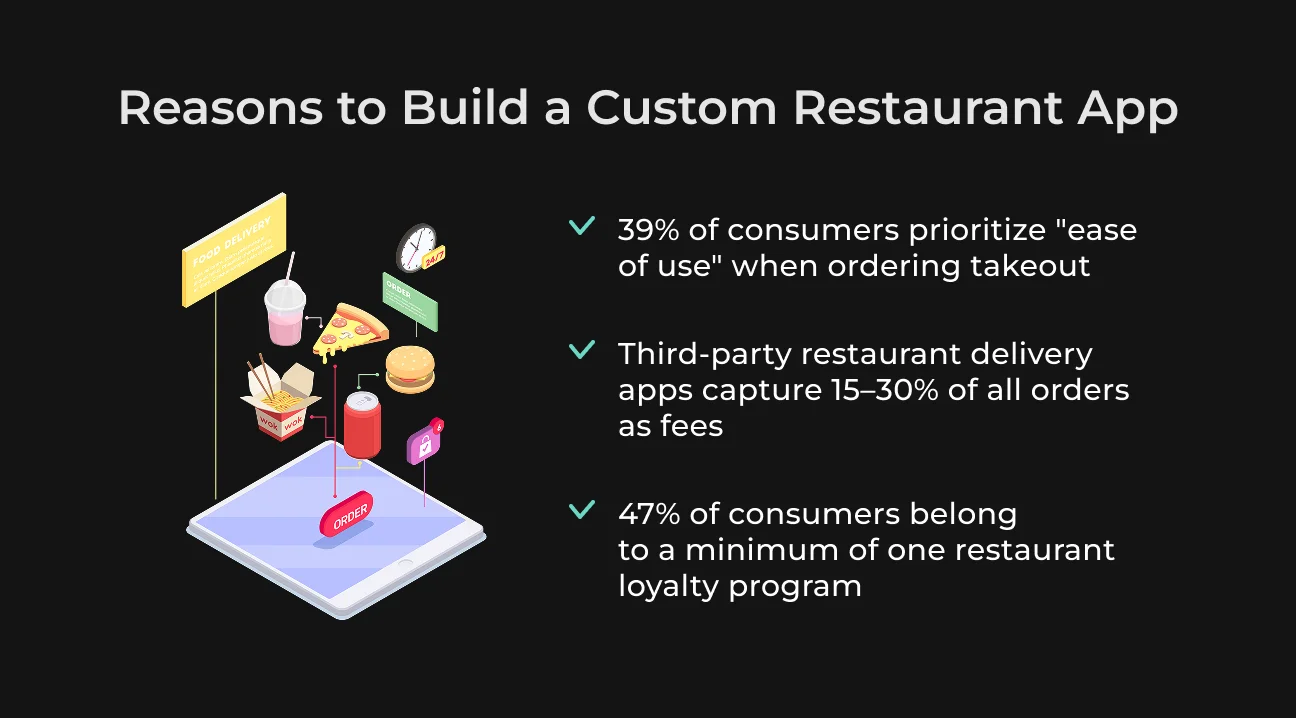
Meet Customer Demand for Convenience
Customers expect the ease of digital ordering and self-service.
In fact, 55% now prefer to order food without having to communicate with an individual. A customized app permits customers to order, book, and pay at their own convenience, reducing friction.
39% of consumers prioritize "ease of use" when ordering takeout, the top reason for choosing a food ordering method.
Avoid Getting Devoured by Heavy Third-Party Commissions
Third-party restaurant delivery apps (DoorDash, Uber Eats, etc.) have deep commissions that devour margins. These operators capture 15–30% of all orders as fees. In the long term, those commissions reduce your profit.
By owning your own restaurant software for delivery or pickup orders, you keep the wholesale and have the ability to control costs. For example, instead of paying out a 20% commission on each delivery, you might pay out in advance in development but save hugely per order thereafter.
Controlling the ordering channel also enables you to charge your own delivery fees or policies, improving profitability. In a low-margin market, the absence of third-party commissions is an extremely compelling case for creating a custom-built solution.
Improve Customer Loyalty and Retention
A specific restaurant software is an awesome location to implement loyalty programs and marketing automation. This impacts customer retention directly. 47% of consumers belong to a minimum of one restaurant loyalty program, and they come in 20% more and spend 20% more than non-members.
With the use of loyalty cards, reward points, or exclusive promotions within your app, you have repeat visits. Take the example of Starbucks – its mobile app with loyalty features escalated to 16+ million active members, accounting for 46% of the overall.
Types of Restaurant Software Solutions
Your custom restaurant app can have multiple use cases. Let’s take a look at both customer-facing and operational solutions that help HoReCa businesses grow.
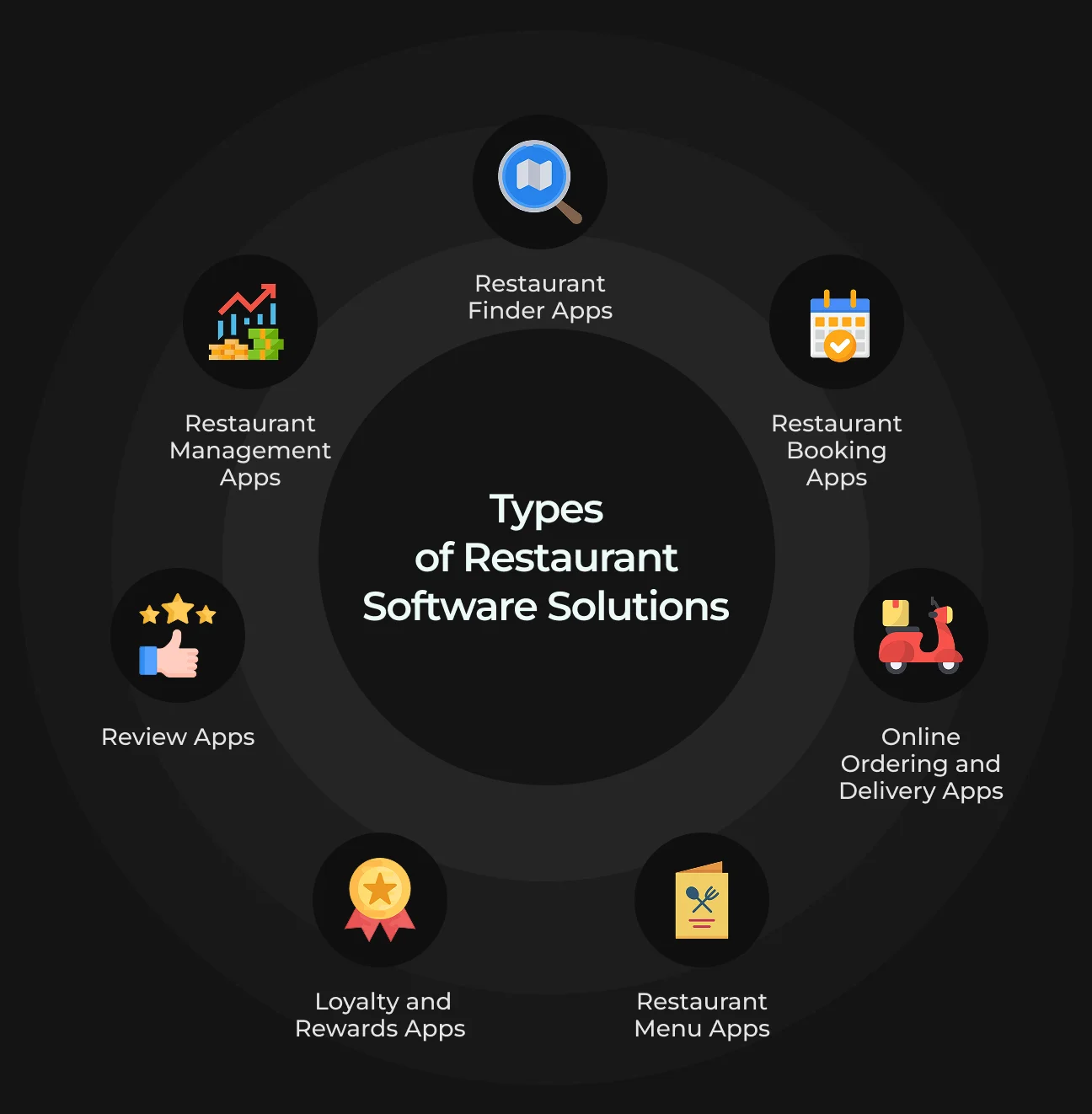
1. Restaurant Finder Apps
These apps lead users to restaurants near them or in a specified area, typically with maps and filters. Picture Yelp, Zomato, or TripAdvisor – they use location services to suggest restaurants based on the user's GPS location or search term.
Restaurant finder apps are among the most important drivers of new customers. In fact, being included in them can drive a great deal of traffic. If you're going to build one, focus on geolocation accuracy and deep content (menus, images, ratings).
For more on implementing location features, see our tutorial on creating a location-based app.
2. Restaurant Booking Apps
Reservation or booking apps allow customers to reserve a table at a restaurant for a given date and time. The classic example is OpenTable, as are websites like Resy or TableIn. Such apps usually show instant table availability and enable people to book (and sometimes pre-order or pre-pay) from their phone.
For restaurants, a booking app can maximize tables and reduce no-shows (frequently through credit card holds or reminder texts). Customers love the convenience – they can snag a spot without calling in.
3. Online Ordering and Delivery Apps
Online ordering apps enable consumers to order for delivery or pickup from the restaurant. The segment has mushroomed with growth in food delivery – from separate chain apps (Domino's, McDonald's) to third-party aggregator apps (Uber Eats, DoorDash) that offer listings of an enormous quantity of restaurants.
An ordering app for your restaurant would be named after your company (or chain name), feature your menu for viewing, allow personalization of options, and enable ordering. Integrating payment processing makes checkout smooth.
4. Restaurant Menu Apps
A menu app makes the dining menu experience go digital. There are a number of ways this may occur: in-house digital menu tablets, QR code mobile menus, or an app component that gives clients the ability to see the menu in detail.
High-quality images, descriptions, allergy details, and even AR/VR glimpses at meals fit here.
A customer-facing menu app (or menu module within your app) helps customers decide on ordering something, either when coming to your location or ahead of time.
Visual appeal matters. Appealing food photographs can boost sales as customers "eat with their eyes" (having added visual menus has been shown to make customers feel more confident in their choices).
5. Loyalty and Rewards Apps
Some restaurants offer a rewards program in an app for repeat customers. They range from simple virtual punch cards (e.g., "buy 10 get 1 free" coffee apps) to points-based schemes (earn points per dollar that can be used on food). A standard rewards app will track customers' purchases and profiles after joining.
Subscribers may see their rewards, tier level, or promo coupons. For example, large chains have separate loyalty apps or fold loyalty into their flagship app – Starbucks, Chick-fil-A, and others have been incredibly successful in making customers members.
65% of a restaurant's sales can be sourced from repeat guests, and loyalty rewards make that.
If you build a loyalty app, include features like:
- Push notifications for rewards ("You've earned a free dessert!");
- Personalized offers on birthdays;
- Easy redemption.
Integrating loyalty into ordering or payment in an app is all the more enticing.
6. Review Apps
These are customer opinion and reputation management applications. While there might be general review sites, a specific review app can be used by a chain restaurant or a platform owner to collect and display customer reviews.
Examples include giving ratings of food or overall experience, leaving comments, and reading comments by other users. Some restaurant chains have in-app feedback or survey forms rather than a public stream of reviews.
Encouraging in-app reviews can give you a second chance to recover unhappy customers before they vent publicly. Ratings and reviews are important because customers depend heavily on them – a good digital word-of-mouth spurs trust.
For your own app, adding a basic star rating and feedback form after purchase can give immediate insights. It tells customers that you value their feedback and helps maintain quality across locations.
7. Restaurant Management Apps
While the above are customer-facing, restaurant management apps are utilized by owners and staff to run operations. All-in-one restaurant management systems usually consist of:
- Point-of-Sale (POS) for processing sales;
- Inventory management for managing stock and ingredients;
- Table management for floor plans and seating;
- Employee scheduling and time management;
- Payroll and HR functions;
- Accounting/bookkeeping integrations, etc.
Key restaurant management software features include:
- Sales reporting and POS.
Process dine-in, takeout, and delivery orders and track sales in real-time. This can be integrated with daily reports, taxes, and analysis. (Example: a POS machine that also prints end-of-day reports of sales and data.)
- Inventory & stock control.
Monitor amounts of ingredients, get low-stock alerts, manage supplier orders (procurement), and even track food cost vs. sales for menu items.
- Table & reservation management.
A system for handling floor plans, table status (open, occupied, needs cleaning), and integrating with reservations so that reservations booked online are reflected in-house.
- Employee scheduling & payroll.
It helps you to create staff schedules, track shift trades, and record hours. Proper scheduling allows you to have the proper staff and manage the labor expenses.
- Customer relationship & loyalty.
Within itself, management software might include a CRM to monitor customer likes, manage a loyalty program, or send automated marketing emails.
- Accounting & bookkeeping integration.
Bring daily sales and expenses in sync with the bookkeeping software. Automatic invoice generation, vendor management, and event or catering billing can be added. Maintaining updated financial records also helps achieve tax and regulatory compliance.
New restaurant management software is usually cloud-based for ease and real-time synchronization across outlets. For instance, cloud POS allows multi-unit restaurants to aggregate data and remotely manage the changes being put in place instantly.
The best example is a customized Magento POS terminal by SapientPro, which unifies online and offline sales with real-time inventory synchronization and single-point management.
Get a POS Solution for Magento 2
Synchronize online & offline orders in your restaurant for better management.
7 Key Features of a Restaurant App
Below are 7 must-have restaurant management software features.
Seamless Online Ordering & Delivery Tracking
The restaurant software should be able to:
- Accommodate a user-friendly menu interface;
- Enable customers to personalize their order (additional toppings, special needs);
- Pass on the order to the kitchen in real-time.
On ordering, customers like to be able to track their orders – real-time status updates such as "Order Received", "Being Prepared", and "Out for Delivery", along with timing estimates.
It improves the experience. Customers feel assured about where their food is and are less prone to call the restaurant for an update.
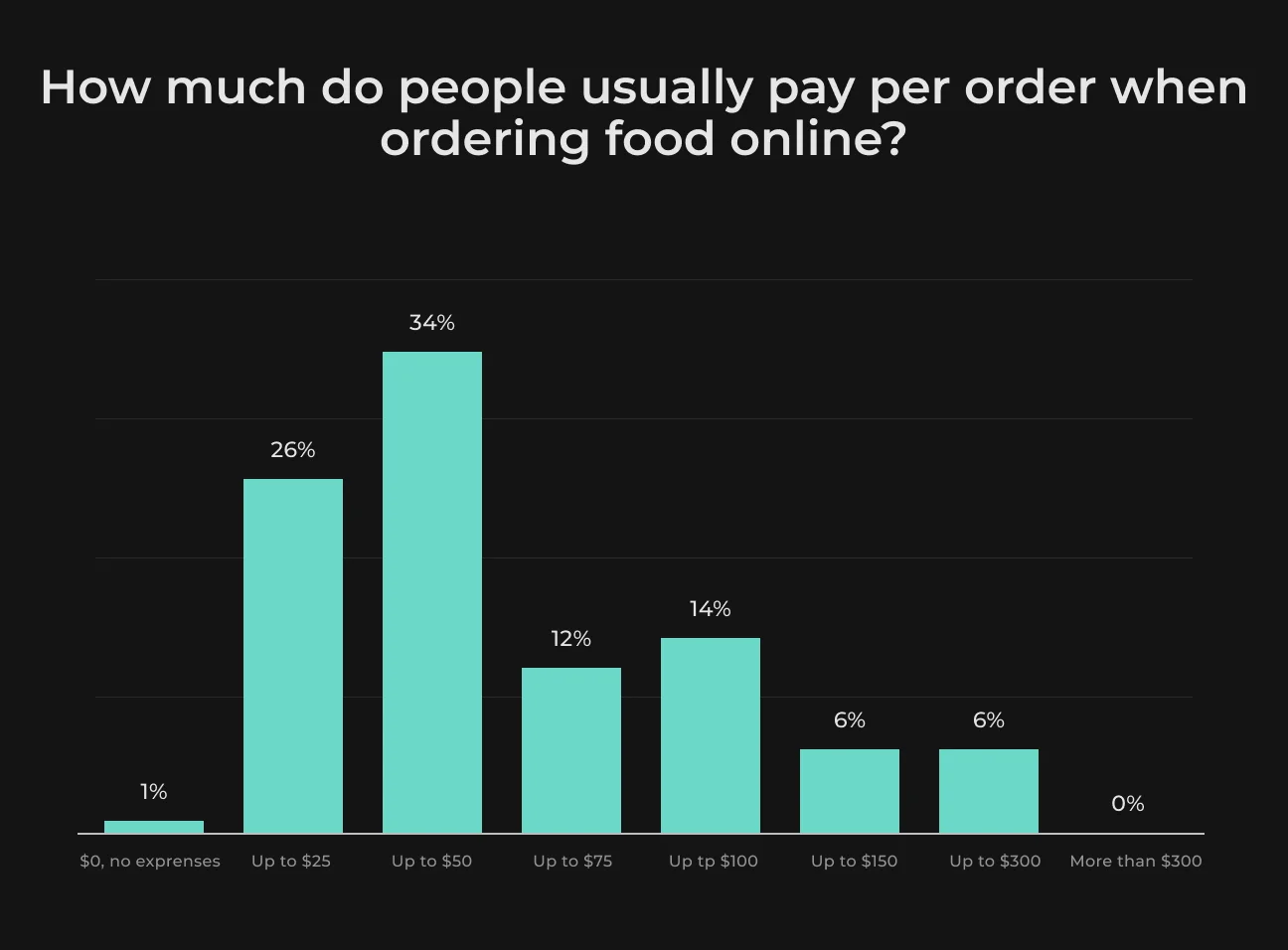
Real-time GPS tracking of delivery drivers is a bonus, since it provides a map view of the delivery en route (similar to how Uber Eats works).
Table Reservation Booking
For full-service restaurants, a table reservation is a top solution. Allow users to view available times and book a table in your app without making a phone call.
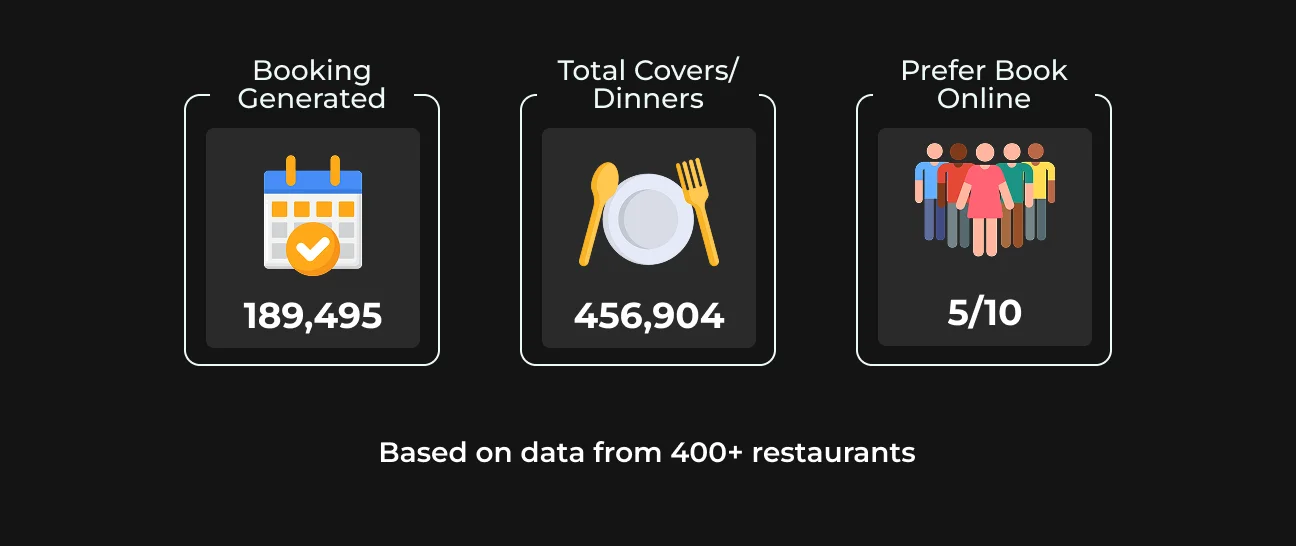
Custom restaurant app should validate the booking and perhaps send a reminder notification as the event approaches. Advanced versions enable customers to choose a seat of their preference (e.g. patio, window) or specify special requests (high chair, allergy-specific needs).
By enabling reservations through your app, you simplify eating and make it modern.
Interactive Digital Menu (with Photos & Customization)
An app should have the ability to browse menus much more advanced than a static PDF.
Clients should have the ability to enjoy high-quality food pictures, detailed descriptions, ingredients, or allergen details, and prices – essentially an interactive virtual menu. For international or tourist restaurants, multilingual support comes in handy.
Fundamentally, this feature serves both service and marketing functions – it showcases your menu offerings through pictures and assists in the ordering decision process for the consumer.
Maintenance of the menu through a content management system (or your restaurant management system) is important so that the app is always current with what is being offered.
Integrated Payment and Checkout
Simple, secure payment is a core feature in any transactional app. Customers need to be able to store their payment methods or mobile wallets in order to pay for orders or bookings through the app, and not have to pay in cash in person or on delivery.
Having several options for payment is important:
- Credit/debit card;
- Apple Pay;
- Google Pay;
- PayPal;
- Local e-wallets, etc.
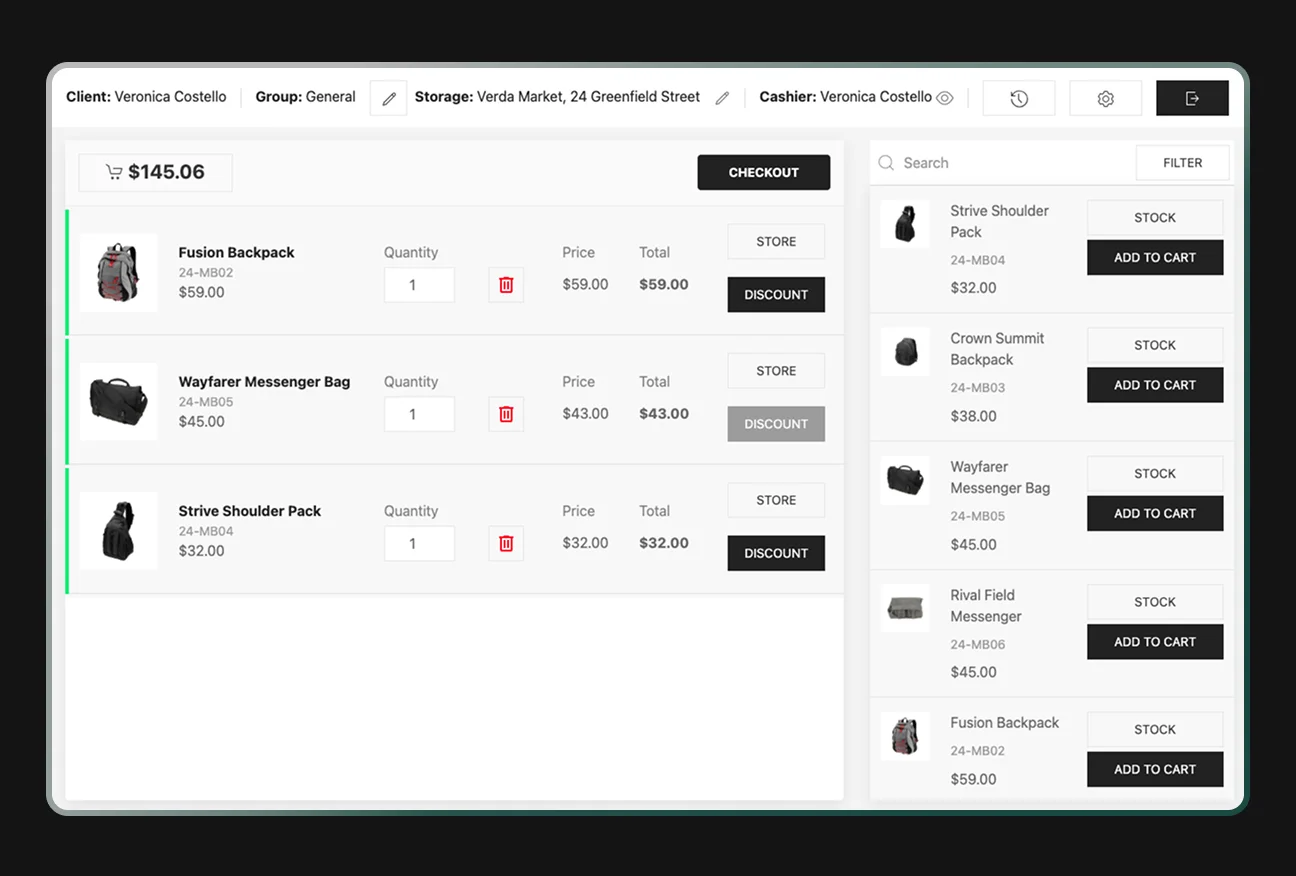
Custom restaurant app should encrypt and, better yet, tokenize customer card information, and be PCI-compliant to accept payments.
Loyalty Program and Rewards
This can be points-based (e.g., 10 points per $1 and redeem a reward at 1000 points), visit-based (e.g., free coffee at the 10th visit), or tiered (e.g., Silver/Gold members with escalating benefits).
Your custom restaurant app should also have a loyalty dashboard showing users' balance of points, available rewards, and progress to the next reward or tier. Push messages can remind users of rewards ("You have $5 credit – use it on your next order!") or exclusive loyalty-only deals.
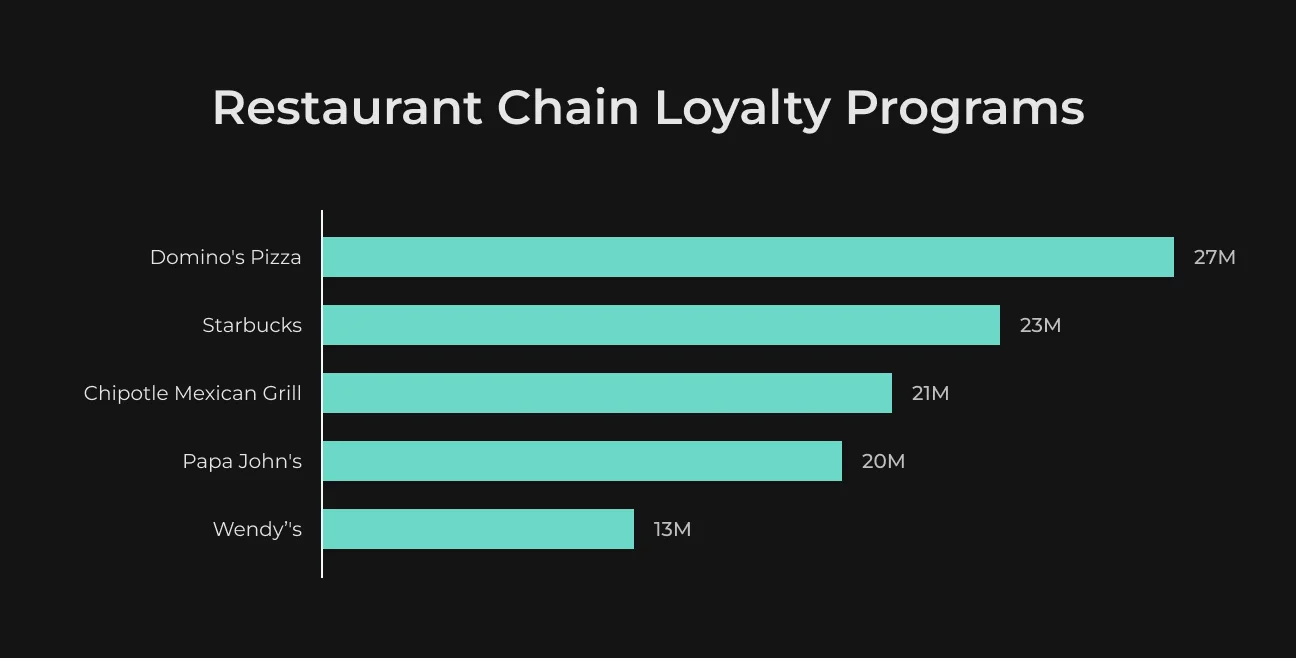
Loyalty integration has clear benefits. Customers will more likely be using you instead of your competition if they're building up rewards. According to business facts and figures, loyalty program members add 12-18% more revenue to businesses annually compared to non-members.
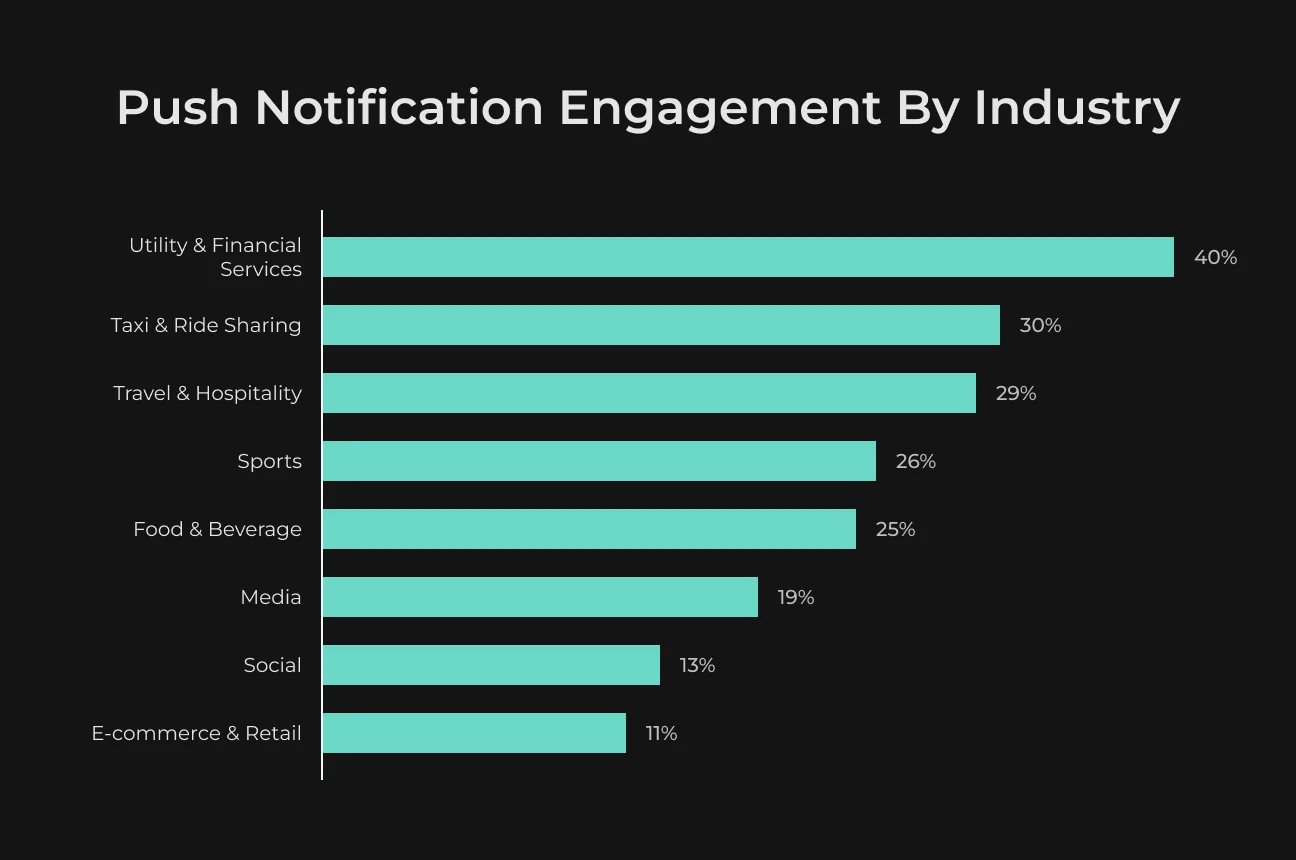
Push Notifications & Personalized Offers
Some common and effective uses include:
- Announcing special menu items or seasonal products;
- Flash deals ("Happy Hour half-price appetizers today 4–6pm!");
- Order status ("Tracking" feature);
- Reminders to use loyalty points;
- Basic welcoming message, such as "It's been a while since your last order – here's 10% off your next meal".
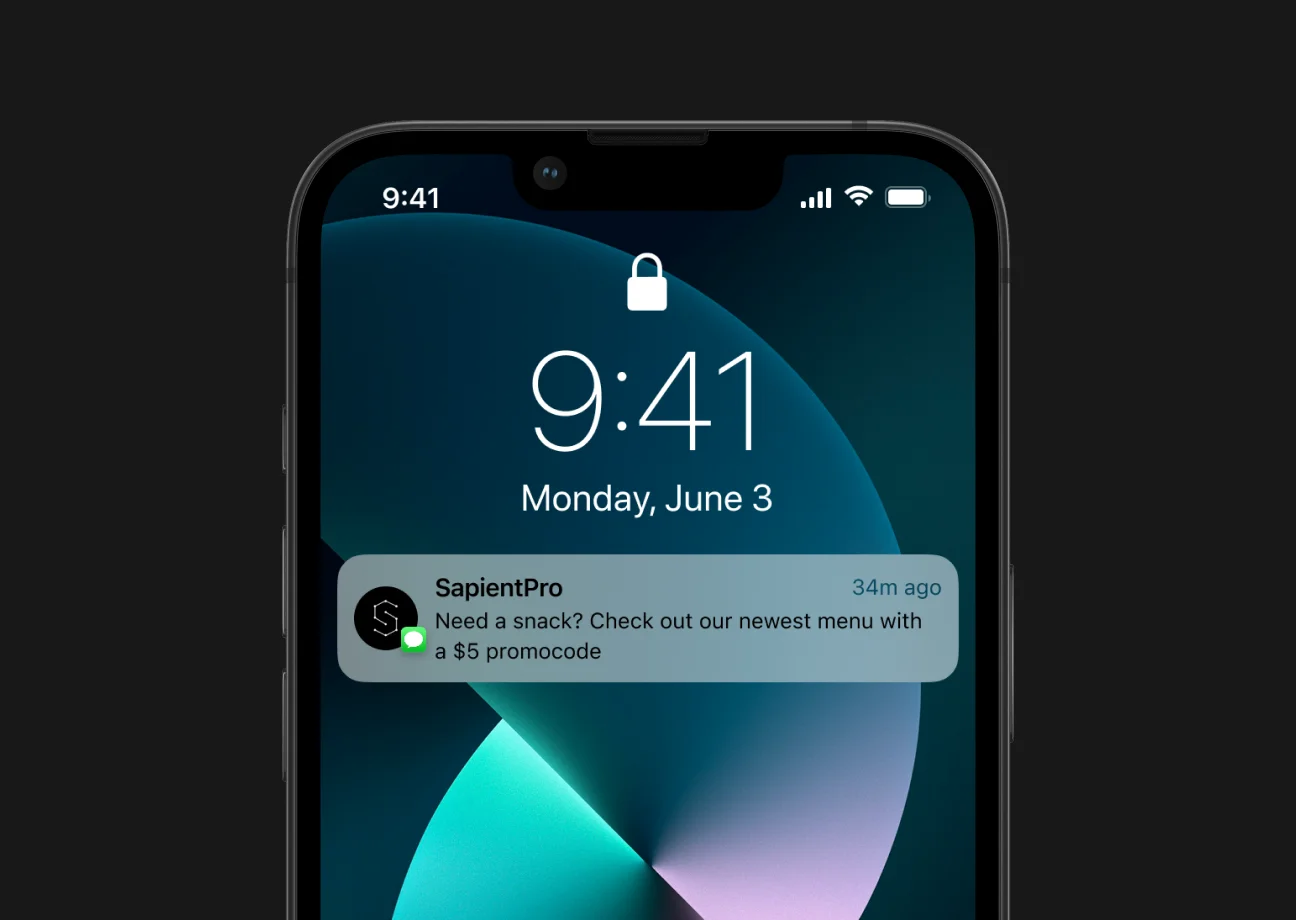
Throwing an AI-driven recommendation engine into the mix can elevate this feature to the next step. Custom restaurant app can scan a user's activity and give an auto-suggestion like "Craving pizza? It’s Friday night – how about your favorite Margherita?”
AI-Powered Personalization & Chatbot Assistance
To differentiate yourself from others and offer cutting-edge service, include AI-powered features. An example is a built-in chatbot or virtual assistant.
Modern AI chatbots, supported by large language models, can offer natural language assistance and free up your employees from answering repetitive questions. They can even take orders or reservations.
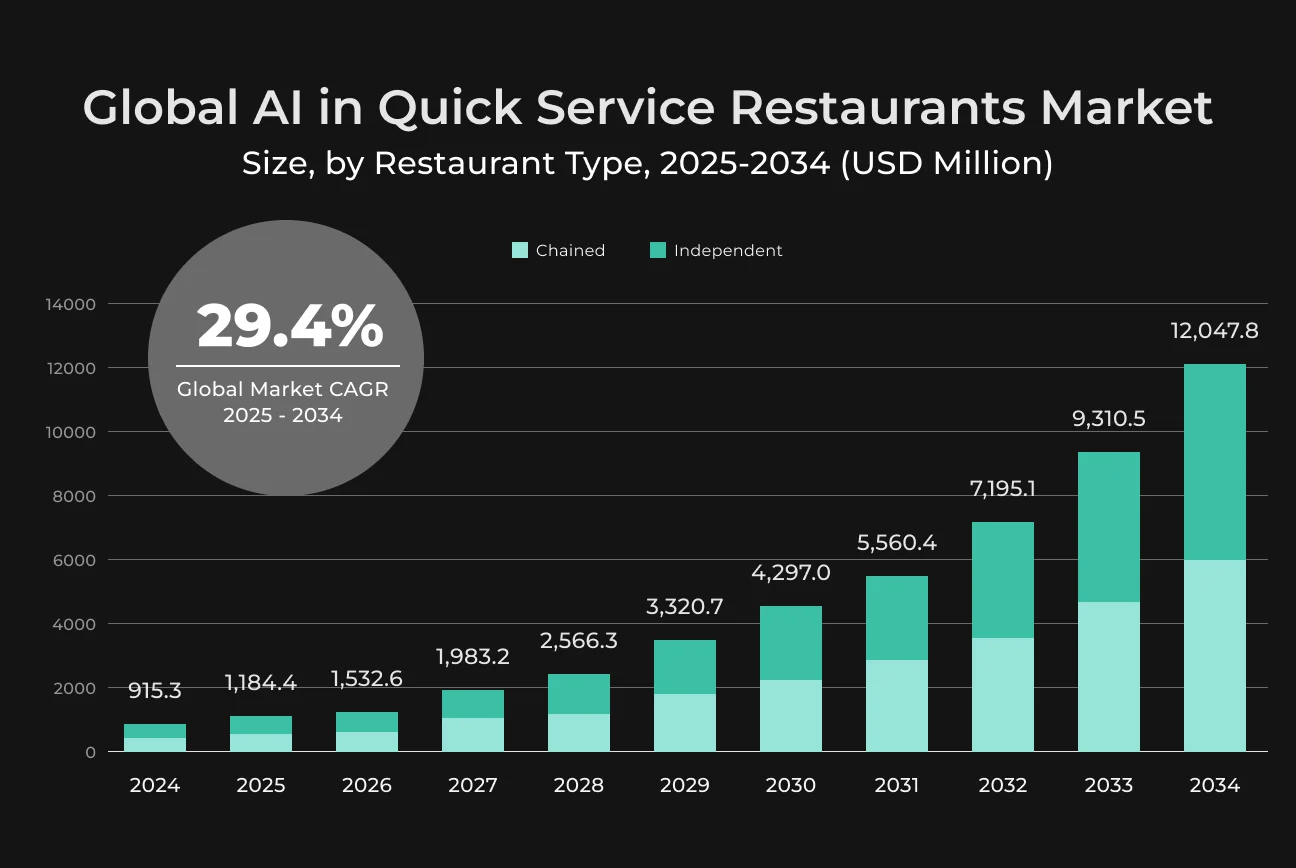
A second application for AI is personalized dish suggestions. Similar to e-commerce apps ("You might also like…"), your custom restaurant app can review a user's past orders and shopping and suggest new things they would adore, or ideal add-ons ("Want extra sauce?" or wine pairings).
AI can further empower promotions – predicting which promotion a user will be most likely to use based on viewing their profile. Big chains are already using AI for dynamic pricing and menu engineering.
Implementing these requires some technical know-how – it is best to hire developers with AI development experience. You can even start as a smaller restaurant and scale with AI integrations on the go.
How to Create a Custom Restaurant App in 7 Steps
Restaurant software development can be complicated, but our step-by-step process will provide a successful outcome. The following steps will help build your own restaurant app.
Step 1: Define Your Concept and Objectives
To create a restaurant app, start out by clearly setting what you want to do with the app. For instance, perhaps you are trying to drive delivery sales, improve table turnover, or combine loyalty tracking.
Learn about your customers and gather feedback – maybe your customers want an easier way to order takeout or reservations.
Also, review competitors and industry leaders: what do apps for top restaurant companies provide? Think about how the app supports your overall business strategy – it should improve your restaurant's special value (be it lightning-fast delivery speed, gourmet menu nuances, or a tailored VIP experience).
Step 2: Decide on Features and Type of App
Based on your concept, list down significant features your app needs and rank them as "nice-to-have" vs "must-have". Ensure the restaurant management software features match the user's needs.
It is better to get a few core features working extremely well rather than have too many.
Step 3: Budget and Technology Strategy Planning
Developing a custom app is an investment – now budget, timeline, and technical strategy are next to create restaurant app. Start by determining your budget range and studying costs.
To be clear with restaurant management software price, obtain estimates from several sources where feasible: development in-house vs. agency vs. freelance developers.
Given your feature list from Step 2, identify any specialized tech needs. You may need mapping APIs for location features, a payment gateway, and perhaps an AI service if you plan to include chatbots or recommendations. Finding these will help with budgeting.
Step 4: Design the User Experience (UX/UI)
Start with user experience (UX) design – mapping out the structure of the app and making it reasonable and intuitive for users. That typically involves the development of wireframes or rough sketches of each screen and navigation path.
As an example, design the order flow: Home screen -> Menu -> Item detail -> Cart -> Checkout -> Order confirmation. Be very careful to minimize the steps of major activities (ordering, table reservation).
Next, the user interface (UI) design brings these wireframes to life with visual materials – your colors, pictures of food, icons, and text.
Since this is a custom restaurant app, decent-looking materials matter: good-quality food photos, perhaps a design theme for dish thumbnail images, and a color scheme consistent with your restaurant brand (for instance, a coffee shop might use warm brown tones in the app).
Also, create such design elements as your logo placement, splash screen, and any artwork.
You may want to create a prototype (using something like Figma or InVision) that you can actually navigate through. This enables you and some test users to see the app flow and discover any unclear portions prior to coding commencing.
Step 5: Build the App and Integrate Systems
You should ideally have a development team or a restaurant software development services company do this, depending on the previous steps. It typically starts with getting the backend (server, database, APIs) up and running because those will determine the features.
For example, if you're creating an online ordering system, the backend will handle order entries, menu information, user accounts, etc. If you went for a backend-as-a-service or some cloud functions, implement those now.
Next is mobile app development (or web app, if that is your target).
The developers will include the features as per the design:
- Menu browsing;
- Authentication (user sign-up/login);
- Ordering workflows;
- Payment integration (including SDKs of Stripe, PayPal, or others), etc.
All the restaurant management software features should be well integrated with the backend. Integration is the big focus here: integration of the app to your existing restaurant management system or POS, if required.
For example, make sure that when an order is placed through the app, it prints out in the kitchen or shows up on the staff's order list. This could mean utilizing APIs offered by your POS provider or custom connectors.
Similarly, integrate with third-party APIs for:
- Geolocation (Google Maps API to show your restaurant's location or delivery tracking);
- Push notifications (Firebase Cloud Messaging or Apple/Google push services);
- Implementing AI solutions (for chatbots or suggestions).
Maintain good practice during development: version control, code review, and iterative builds so that you can see the progress. It's generally a good practice to include sprints (taking an Agile approach) to develop restaurant management software features in batches and test them.
Step 6: Test Thoroughly and Polish
Start with functional testing to ensure every feature works as intended: place orders, make reservations, apply a promo code, earn loyalty points, and process payments. Test all possible user flows.
Next, perform edge case testing:
- What if a user tries to order 1 minute before closing time?
- Does it exclude booking of tables during restaurant operating hours?
- How does it handle a sold-out product?
Important too is performance testing. Test a large number of users to ensure that your app and backend are prepared for loads during peak hours (Friday night dinner hours, for example). If your app becomes slow or crashes on load, users will drop it.
Step 7: Deploy, Launch, and Continuously Improve
Deployment is the process of releasing the app to your end-users. For mobile, that means publishing to the App Store (iOS) and Google Play Store (Android). Review and prepare the app for submission and adjust according to Apple/Google feedback (they may need changes specifically regarding payment or privacy).
Once released, use analytics (Firebase Analytics, Mixpanel, or similar) to track user engagement.
This will inform future releases. Be ready to provide support as well: respond to app store reviews, have a support contact email or chatbot for complaints about the app, and hotfix any high-priority issues that emerge after release.
Best Tech Stack for Restaurant App Development
Below, you can see possible technologies for your restaurant software development tech stack.
Aspect | Technologies & Tools |
| Mobile App (Frontend) |
|
| Web App (Frontend) |
|
| Backend (Server-side) |
|
| Database |
|
| Cloud & Hosting |
|
| Integration & APIs |
|
| AI/ML Features |
|
| DevOps & Security |
|
Partner with SapientPro to Create a Restaurant App
SapientPro provides custom restaurant software development services.
We've helped restaurants and hospitality chains transition to digital with technologies like location-based restaurant finder apps, custom POS integrations, and AI-powered recommendation systems.
When you partner with SapientPro, you get a team of experts who appreciate the changing dynamics of the food & beverage industry. Your businesses will grow together with modern technology and trends.
Ready to create your restaurant app?
Contact SapientPro today for a consultation!
Build Your Restaurant App with SapientPro
You'll get an expert team that understands your needs and helps you grow.