All
How to Make a Video Editing App: Tips, Technologies and Cost Estimation
April 1, 202610 min read


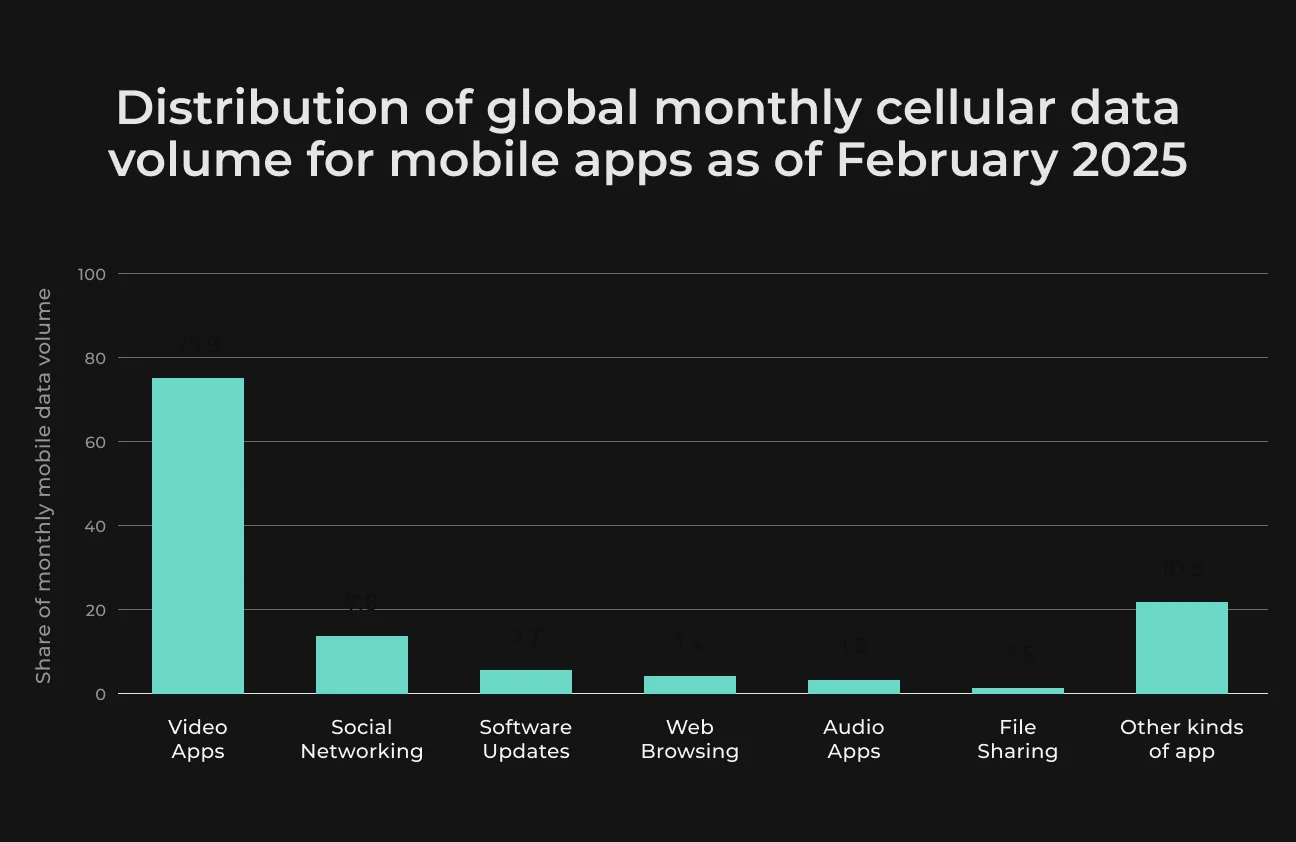
Video is integral in modern marketing and it made up around 82% of all internet traffic in 2025. The surge in video consumption has also resulted in a huge spike in demand for video editing software.
There are more than 3.2 billion smartphone users who create video content, and they need tools to edit their conversion-oriented videos. Globally, more than 410 million people use these tools, with 36% choosing professional suites and 64% using consumer-level editors.
In the video editing SaaS niche, there are opportunities to develop AI-driven tools that simplify content creation and cloud based video editors that reduce production costs.
You can learn more about why now is an excellent time to invest in video editing solutions and find a step-by-step guide on how to develop a video editing app from SapientPro’s engineers.
Why Invest in Video Editing Solutions
Videos are the most engaging form of content compared to all other types of visual media. Actually, product launch announcements or explaining new features with a video increase sales faster than reading an infographic.
But what else?
- Grabs attention. Thousands of people have access to the social media market. Good video editing grabs your viewers’ attention and holds on to it. This is mostly because people remember 95% of a message when they watch it as a video, but only 10% if they read it;
- Clear message. You help tell your story as a video editor by cutting out irrelevant chunks, adding visuals and captivating titles, and choosing formats. This makes your message more powerful and easier to digest;
- Cost-effective. All you need is the appropriate tools for taking charge of your creative and marketing activities without an agency. It saves you money and allows you to create high-quality videos at a quick pace. Also, a good video has a long shelf life on social media.
Rise of Social Media Video Editors
There are also many video editing apps that let users publish their videos directly to YouTube, Instagram, or TikTok. It was this capacity to share things that fueled the growth of online content and empowered creators to spread their work.
The vast majority of the global population — more than two-thirds — uses social media actively every month.
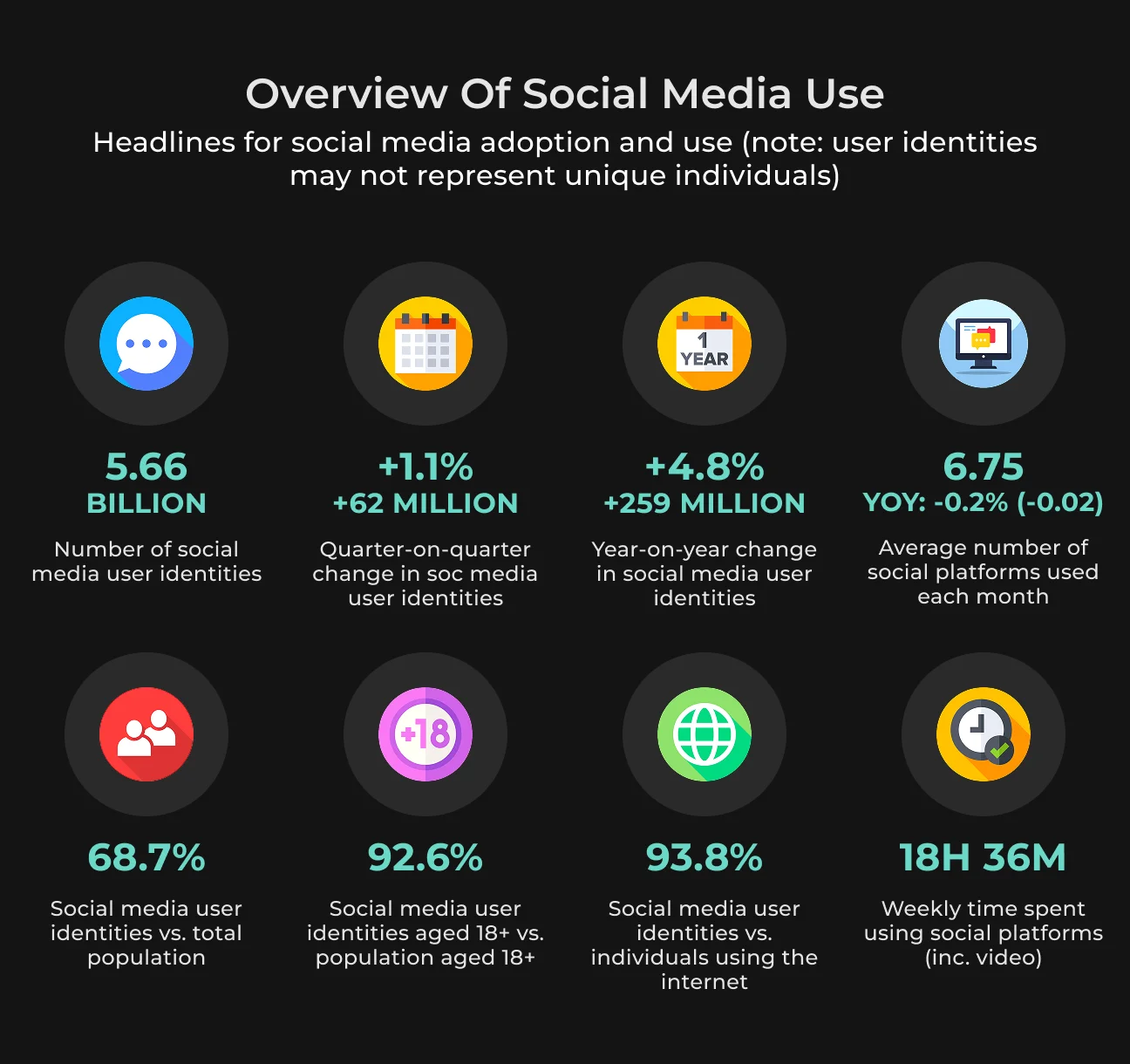
Short video formats exploded in the last few years and are still growing with Instagram Reels, YouTube Shorts, and Facebook Reels. TikTok was one of the fastest-growing networks in 2025, with over 1.04 billion monthly users.
Short videos are popular for a reason: they capture the attention of our dwindling attention spans, producing bite-sized media that is both entertaining and informative.
According to surveys, 90% of vertical videos (reels, stories, and TikTok videos) are preferred by viewers over horizontal videos.
Creator Economy Growth
The creator economy emerged thanks to platforms like YouTube, Instagram, TikTok, and Patreon that simplified content creation. These platforms reward creativity and offer a chance to earn revenue through ads, subscriptions, merchandise or affiliate agreements.
Basically, 50 million people call themselves creators, and many are making a decent income. In fact, Instagram influencer marketing is projected to reach a revenue of over 16 billion dollars this year alone — this tells us the real economic strength behind creators.
For example, Patreon. It’s a space where creators can earn repeat income simply for making content exclusive to their subscribers. YouTube compensates video creators via ad revenue, channel memberships, or merchandise purchases.
Instagram is where you can use sponsored posts, affiliate marketing, or promote your own product with visuals and Reels.
How AI Transforms Video Editing
One of the most helpful tools that AI video editing has to offer is shortcuts, letting you speed up the creation of any particular piece of footage.
Video editing is creative and technical but monotonous work.
With the evolution of AI, editors can have their tedious tasks automated and streamlined. Giving editors more time to spend on the story, visual effects, and other creative elements that are a priority when producing commercials, corporate videos, or marketing materials.
Most AI video editing tools are the same, but some do more than you would think.
- Rough cuts from transcripts. AI produces rough transcripts fast, identifies who’s speaking, and slots soundbites into your timeline;
- Automatic color correction. Above all else, the software can modify color grades to resolve things like white balance and exposure;
- Eliminate long pauses or redundant words. An AI tool can effortlessly clip out all the uh's or um's without making an edit;
- Edit audio. Producers can also fine-tune for background noise, audio distortion, and voice clarity — a process that previously could take up hours of post-production time.
Types of Video Editing Apps
Good camera work is just the start of making great videos for whatever channel you need. You also need the right editing software.
To help you find the right app, we take a look at different video editing types.
1. Basic Video Editor Apps
Basic video editing apps are great for casual users, or anyone making videos for social media, family gatherings, or personal projects.
Or if you plan to be a professional video editor but are in the beginner stage, these are also good for you. Basic apps will help you try everything without too steep a learning curve.
Such apps usually come with:
- User-friendly drag-and-drop so that even a non-expert can use it;
- Basic functions like trimming clips, cutting each frame from the whole one, splitting and merging clips;
- Video filters or transitions for appearance changes without the need for complex adjustments;
- Simple methods for entering text, captions, or titles;
- Royalty-free music and sound effects to improve audio quality or add background scores;
- Simple export for platforms, including YouTube, Instagram, and Facebook.
2. Professional Video Editing Apps
Video editors and filmmakers who produce high-production videos, movies, advertisements, and other content definitely need professional video editing apps.
These apps include the following features.
- Advanced editing tools, such as color grading and key-framing;
- Effects, like green screen chroma keying and motion graphics;
- Special features including smart audio ducking, sound repair, and multi-channel editing;
- Collaboration tools that let members of different teams edit on the same project side by side in shared workspaces;
- Support for formats as large as 4K or even 8K — and VR video;
- Export settings, formats, and compatibility with various platforms (including broadcast standards).
3. AI-Powered Video Editing Apps
Ideal for professionals like social media managers looking to create stunning visual content in minutes and with little manual effort. The real-time generation of tuned video campaigns makes it easier than ever for marketers and advertisers to spin out numerous variants.
Some key features of AI-derived editing apps are.
- Automatic editing tools that can self-cut footage, trim footage automatically, and arrange it in a way specified by the user;
- Smart suggestions based on content analysis and user preferences that recommend the most suitable music, effects or transitions;
- AI can create design mockups or video rough cuts based on implemented templates or identified video characteristics;
- Natural language processing enables users to edit videos through voice commands or written instructions for optimal effectiveness.
Technology Stack for Video Editing App Development
Depending on the core features you wish to integrate, building an AI-powered video editor application requires various technologies, from simple elements to advanced AI capabilities.
Here are technologies commonly used for developing these kinds of apps.
General Tech Stack
Any video editor application is powered by solid programming languages and frameworks to make it run on different devices and platforms.
- Video editing applications often require the speed of C++ to handle complex video processing;
- The app can be scripted and automated using Python. Because of its great library coverage, it is one of the most important languages you must have to add more intelligent features;
- JavaScript within frameworks like React or Angular enables developers to create frontend user interfaces that are interactive and dynamic;
- React, Angular, or Vue. js frameworks transform static HTML into dynamic apps with end-user interactivity and responsive layouts;
- Python’s Django or Flask framework is preferred for server-side development, specifically AI applications. They enable easy integration of machine learning models and support the rapid training and deployment cycle of AI capabilities;
- SQL and NoSQL databases like PostgreSQL, MySQL or MongoDB are used to manage structured data, usually through JSON or large amounts of metadata.
Video Processing Technologies
Effective video management requires dedicated tools to ease processing, conversion, and editing activities.
- FFmpeg. This is a great open-source tool for video editing. FFmpeg is a complex tool that can read, write, and perform various video and audio format processing. It is critical for any video conversion, compression, and real-time editing;
- GStreamer. Multi-media processing framework for building complex workflows. It has a pipeline design that does not repeat unnecessary calculations, computing only essential functions;
- Open-source OpenCV can help get computer vision into video editing apps. It might be beneficial for facial recognition, motion following, and scene identification. These cut the amount of time you spend on editing through automated visual analysis;
- AVFoundation / Core Image and Android MediaCodec. These technologies are used to create video functionality on iOS and Android. AVFoundation — and, for real-time effects, Core Image — are not cross-platform but are comfortable in Apple’s fold. They allow video to be composed layer upon layer;
- MediaCodec is an Android framework for the efficient management of video processing. It leverages hardware acceleration to encode (or decode) video.
AI and Machine Learning Technologies
AI tools can analyze videos rapidly, choose the best clips, and combine them easily to produce complete videos. They rely on algorithms that can produce slick edits far more quickly than manual editing could manage.
But all of this is achieved with the help of certain tools:
- TensorFlow and PyTorch. For complex video analysis and automation workflows, these technologies offer the required intelligence through developing and deploying models. They can perform workloads like scene recognition as well as object detection;
- OpenGPT models. NLP is crucial for video processing in applications like voice commands and auto-subtitling. OpenAI's GPT models enable advanced language understanding and generation for these apps;
- Computer Vision APIs. Platform products like Google Cloud Vision or Amazon Rekognition offer out-of-the-box, powerful tools to implement visual recognition tasks They help detect objects, recognize faces and retrieve text from images and videos;
- AI video enhancement. AI-powered tools are used for the enhancement of a low-resolution video in post-processing. This includes automatic resolution upscaling, dynamic range improvements, color correction, and noise reduction, among many others, to better the final output.
Step-by-Step Process to Develop a Video Editing App
To create a responsive and extensible video editor from scratch, you need great design, optimally implemented media processing, and system resource-efficient use.
Check out this list to understand the key steps for building your own video editing app.
| Step 1. Know your market | Understand your audience and how other similar apps in your niche work. |
| Step 2. Make features | Define your must-have features, some good-to-have ones, and AI tools you can add to your video editing solution. |
| Step 3. UI/UX design | Create quick wireframes and prototypes. |
| Step 4. Set technology stack | Choose the programming languages, frameworks, and access to video tools you will be using. |
| Step 5. Backend development | Set up the server-side infrastructure, like APIs and databases. |
| Step 6. Developing frontend | User interface development and responsiveness. |
| Step 7. Input video edit | Include libraries for video editing and rendering. |
| Step 8. Add AI features | Implement or integrate ML for more intelligent functions. |
| Step 9. Testing | Ensure that the app functions properly and securely when released. |
| Step 10. Deployment | Prepare the application for deployment on multiple platforms (web, iOS, and Android). |
Build Your AI Video Editor
SapientPro's engineers will help you leverage modern tech for your application.
Monetization Strategies for Video Editing Apps
When it comes to monetizing a video editing app, having a good strategy is imperative.
Here are common monetization approaches.
Subscription Model
These are chargeable plans, where users pay a subscription cost (monthly or annually) to access all the app features. That is what makes this model so popular, since it creates a stable and predictable revenue stream.
It's not only a way for developers to charge users, but it also keeps their end-users engaged. Most subscriptions have multiple tiers — for basic, pro, or premium pricing, you get various levels of features and services.
An example of this might be the Basic tier with essential editing tools. Higher tiers may include Premium features like project storage in the cloud, exclusive effects, or AI-assisted editing tools.
But you cannot just kick back and relax. You need to remain highly engaged with users and keep rolling out new features so that subscribers don’t become tempted to leave for something else.
Freemium Model
The freemium business model is when the application is offered free with basic features. The idea is to reduce the barrier of entry to a large user base who then can upgrade by purchasing advanced features or tools.
Essential to this strategy is providing sufficient value in the free version to hook users while encouraging an upgrade with more advanced paid offerings.
Such benefits can include access to advanced effects, paid templates, or HD exports. Once a user gets a taste of what those upgrades provide, conversion rates into paid users become significantly higher.
In-App Purchases
Users can purchase additional features, effects, templates, or tools via app purchases. These are one-time purchases — as opposed to subscriptions, they allow users to customize the purchase according to their needs by buying only as much as needed.
A video editing app, for example, can offer a library of effects packs on specific themes — vintage, cinematic, seasonal, etc.
Enterprise Licensing
Enterprise licensing sells licenses to organizations whose larger teams or specific professional requirements need advanced video editing tools. This model usually has bigger or longer-term contracts and, therefore, cash flow predictability.
Enterprise customers have specific needs like collaboration tools, increased security, or integration with other services.
Selling to enterprises can be a lot more complex and often requires customer support, as well as account managers. But it can also be lucrative because there is room to upsell these features or specialized support. Strong connections with such clients can grow into long-term relationships.
Video Editor Pricing and Development Cost
To estimate the development cost and how much to charge for a video editing app, we analyze industry standards, required feature sets, and resources needed to build and maintain the application.
Exact prices can differ quite a lot depending on the specific needs and market situation, but SapientPro's team will outline some general guidelines for estimating such costs.
Video editing apps can vary in terms of their pricing structures, like free versions, subscription-based models, or one-time payment options.
Here are some common elements of pricing in terms of:
- Freemium or premium pricing. Many apps provide a free version while monetizing advanced features. Prices for these premium features can range from a few dollars to $10-$50 for the larger features;
- Subscription costs. Subscription costs depend on the service level. Monthly subscriptions typically run $5 to $30, while annual subscriptions, which include discounts for committing to a year, might be $50 to $300;
- Custom-made solutions. Monthly fees for a custom license can begin at $30 per user and scale upwards based on what a business needs, like collaboration tools.
Development Costs
The rate can vary significantly, depending on multiple aspects: feature complexity, platform (web, iOS, or Android), and the development team location. SapientPro, as a leading custom application developer, can give you approximate estimates of development costs.
- A basic application with trimming, cropping, and effects features can be priced at $20,000 to $50,000. That also means building a simple UI and basic editing features;
- We estimate that apps with complex features, like advanced transitions and AI tools (something like automated editing or scene recognition), can cost from $50,000 to $150,000 or higher. AI adds to costs, of course; it requires expert knowledge and additional resources;
- If you are going to develop an app for multiple platforms (iOS, Android, web), it usually requires special adjustments in each platform. So that your cost of development should increase by 20% – 40% for each platform;
- The annual cost of maintaining the app (fixing bugs, updates) is generally 15–20% of the initial development cost after launch. This ensures the app works with new hardware and system updates.
To get an accurate estimate for your software project, align the cost calculation with your business priorities. SapientPro can provide this through a quote after evaluating your project's goals. With a full consultation, we ensure the pricing is precise and meets your expectations.
Challenges in Video Editing App Development
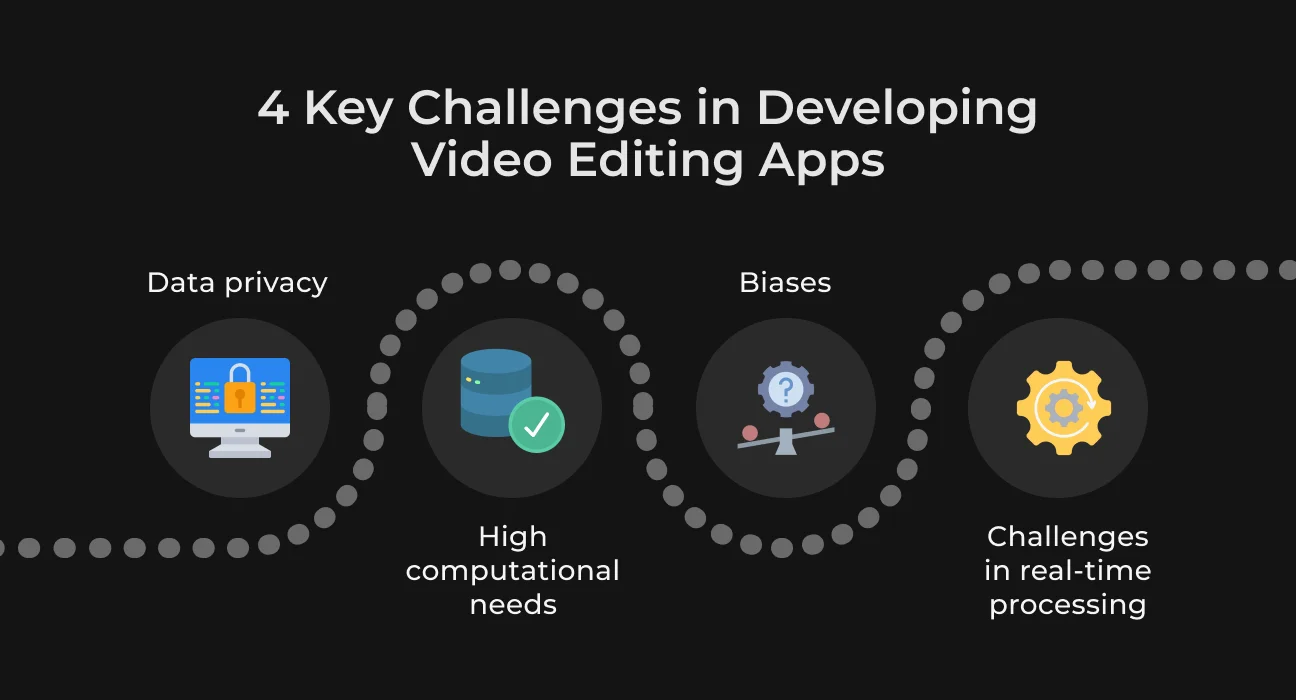
Developing AI video editing software features is really never easy. There are challenges, and developers must handle them to deliver fluid and safe experiences.
Data Management and Privacy
AI models can only be trained with enough data. However, getting this information while respecting users and their privacy can be a challenge.
There are special requirements on how developers deal with personal and sensitive video data, such as GDPR or CCPA compliance.
When it comes to video editing elements like automatic scene detection or object recognition, deep learning models must be trained with extensive datasets containing a great deal of variety.
Also, they need constant updating to reflect new trends and editing styles.
High Computational Needs
AI video editing is heavily dependent on computing power to function properly. Your computer may run slowly when editing multiple high-definition videos simultaneously with relatively low-powered hardware.
This occurs simply because AI editors analyze a ton of data to make sure that the edits are a lot more seamless.
Ensure your hardware satisfies the requirements to avoid slow performance or crashes.
If you want to edit an AI-created video better, be prepared with a faster computer featuring more processing speed and RAM. Or you can use cloud services that augment computing power and make life easier for your computer.
Bias and Ethical Concerns
Biases result from algorithms that learn from bad training data. For example, if facial recognition software is biased against all skin tones equally, it may unfairly favor select races. To prevent this, use a diverse and representative training dataset.
There must also be mechanisms to uncover and address biases to make sure editing results are equitable.
Real-Time Processing Challenges
AI can make real-time video editing feel almost magical — but finding a balance between speed and quality can be tricky. One concern is latency, which can create delays and affect the speed at which edits show up.
Technical limits can slow AI’s real-time edits. This is because AI must immediately analyze and adjust these components while maintaining performance strain.
You should give priority to processing the data that requires real-time response and process less critical data in separate threads.
Future Trends in Video Editing Technology
Traditional TV viewing has declined 4% a year in the US from 2022 to 2024. In parallel, the streaming services market has grown by 13%, and social video platforms by 14%.
Gen AI has emerged as a game-changing technology. It provides video marketers and filmmakers with a suite of powerful tools to edit raw footage into polished videos. And all this within seconds.
Automatic captions and edits for particular platforms are redefining the creation and distribution of video.
One of the most crucial components for automated video editing will be machine learning AI scene detection, in which these programs sift through videos and identify key moments to extract.
Gemini, for example, has a token limit of 2 million tokens, so it can be trained with hour-long videos from various genres. Its long context window can handle around a couple of hours' worth of video and audio at the same time, saving time in processing.
But enabling anyone to make realistic videos also opens the door to potential misuse by scammers. Deloitte estimates that generative video creates enough concern for regulators to respond this year.
Basically, AI video editing tools are developing into smart creative collaborators. Those who adopt early will have significant advantages with engagement, productivity, and quality of content.
Build Your AI Video Editing App with SapientPro
SapientPro develops custom video editing software with advanced AI for top-notch results.
The nature of our cloud systems is scalable to support collaboration and workflows. We develop cross-platform apps tailored for each client’s needs, ensuring they work on any device.
SapientPro is your ideal tech partner for implementing AI solutions. See for yourself:
Case study | Key results |
| AI-powered SDS automation platform for faster compliance & zero manual overhead | Automated SDS processing with structured data extraction, multilingual matching, and centralized access, enabling faster compliance and reducing manual workload across organizations. |
| Sub-second AI shopping assistant that boosts product discovery & conversion | Delivered an AI assistant with <1s response time that simplifies product search and replicates an in-store consultant experience across e-commerce platforms. |
| Real-time AI language tutor that personalizes learning and increases engagement | Built a voice-enabled AI platform with interactive avatars, instant feedback, and adaptive learning, improving both student engagement and teacher productivity. |
Contact us and let's discuss all the details of your future project!
Integrate AI in Your Editing App
SapientPro's team will help you build a modern video editor for viral content.