All Edge AI vs Cloud AI: When Does On-Device Processing Make Business Sense?
October 9, 202610 min read


Cloud processing is a poor fit for some AI workloads. A factory camera may need to flag a defect instantly. A security device may keep working during an internet outage. In cases like these, waiting for data to travel to a remote server can create a real operational problem.
Cloud AI has a different advantage. Teams can run larger models without putting powerful processors into every device. Local inference shifts more responsibility to the hardware.
The same constraint appears when running an LLM locally, since memory and power limits determine which models can run at acceptable speed.
The edge AI vs cloud AI choice usually comes down to the workload.
Some systems need very fast local responses or stricter control over where data is processed. Others benefit more from cloud compute and centralized management.
Cloud deployment can reduce upfront hardware spending, while local processing may lower transfer costs for data-heavy workloads.
Factor | Edge AI | Cloud AI |
| Response time | Inference happens near the data source, reducing network delay | Requests travel to remote infrastructure before the result returns |
| Connectivity | Local functions can keep running through connection drops | Processing usually depends on access to the cloud service |
| Data transfer | Raw feeds can stay local, with selected results sent onward | More source data may need to cross the network |
| Hardware | The device or gateway carries the inference workload | Most compute stays in remote infrastructure |
| Model capacity | Available memory and processing power set practical limits on edge AI devices | Larger models have access to greater compute resources |
| Updates | New model versions must be distributed across devices or gateways | Teams manage model changes from one central environment |
| Raw data | Footage and sensor readings can stay on the device or at the site | Source data is sent to remote infrastructure for processing |
When Does Edge AI Technology Make More Business Sense Than Cloud AI?
Edge AI becomes a practical option once cloud processing starts creating visible limits in daily operations. Production systems may lose time waiting for a response, or constant video transfer can push infrastructure costs up quickly.
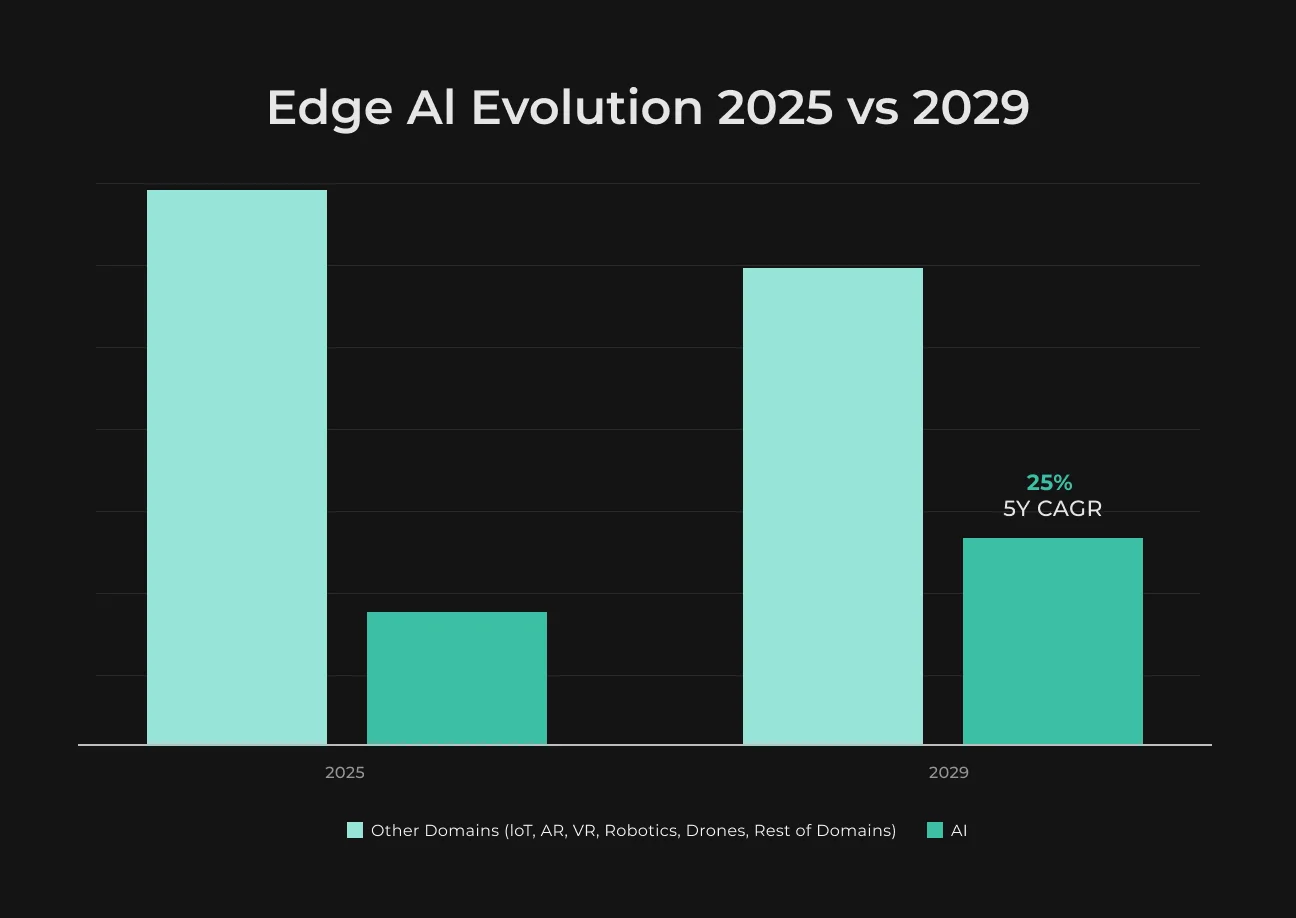
IDC reports that worldwide edge computing spending reached $265 billion in 2025, with spending forecast to reach $450 billion by 2029. These figures cover edge computing overall, rather than edge AI alone.
The Decision Cannot Wait for a Network Round Trip
Some industrial edge AI applications have only a short window to react.
A production camera needs to catch a defect before the item leaves the reject zone. If the model responds in 40 milliseconds but sending the image to the cloud adds 300 more, inference speed says little about real system performance.
Measure the full time from capture to action.
If the decision stays on the camera or nearby gateway, the line can react without waiting for data to travel to the cloud and back. Model updates and later analysis can still happen in the cloud. SapientPro covers this setup in its guide to computer vision for manufacturing quality control.
The System Must Work During Internet Outages
Remote equipment cannot stop every time the connection drops. Fault detection and urgent alerts can keep running locally, while inspection data stays on the device until connectivity returns. Google Cloud describes the same edge-hybrid pattern. Time-sensitive actions stay at the edge, while reporting and historical data can sync with the cloud later.
Sending Every Image or Sensor Reading Is Too Expensive
A single 4 Mbps camera produces about 43 GB of video in 24 hours.
Across 50 cameras, daily traffic exceeds 2 TB. At the same bitrate, uploading 200 ten-second clips per camera per day reduces daily uploads to about 1 GB per camera, or 50 GB across the site. These calculations use decimal units and exclude audio, metadata, and protocol overhead.
Use the site’s actual bitrate and event frequency when estimating bandwidth, storage, and transfer costs. Sensor data can stay local, with only summaries or exception records uploaded to the cloud.
Sensitive Raw Data Should Stay at the Site
A quality-control camera can process footage locally and upload only a defect record or approved image. This keeps raw video inside the facility and limits what reaches the cloud.
Local storage still needs strong protection. Access rules define who can retrieve footage, while the retention policy sets a clear deletion schedule.
When Is Cloud AI the Better Choice?
AI cloud services fit workloads that exceed the compute available on endpoint hardware. Cloud-hosted inference also gives teams a central environment for model releases and monitoring. It is useful when device capacity or distributed updates would limit the deployment.
The Model Needs More Compute Than the Device Can Provide
Some models are simply too demanding for endpoint hardware. If memory use gets close to the device limit, teams may need a smaller or quantized version. Long inference sessions also increase power use and can push compact hardware toward thermal limits.
Cloud infrastructure provides access to more memory and compute.
With suitable scaling rules, capacity, and service quotas, teams can add resources for demand peaks and reduce them afterward.
The Team Needs One Place to Deploy and Update the Model
Once a fleet reaches hundreds of devices, model updates become a logistics job.
Some endpoints may sit in stores or factories that engineers rarely visit. With cloud-hosted inference, the team publishes one release centrally and can roll it back from the same environment if something goes wrong.
SapientPro explains centralized AI operations in its article on AI cloud computing.
How Do Edge AI and Cloud AI Costs Compare?
Edge AI and cloud-based AI distribute costs differently. The real comparison depends on how many devices you expect to run and how much data they process. Generic price estimates rarely tell you much without that workload context.
Cost area | What to include |
| Edge | Device or gateway purchase, installation, power, replacement, remote updates, monitoring |
| Cloud | Inference usage, storage, data transfer, connectivity, cloud operations |
| Both | Model development, testing, security, support |
Edge usually requires more upfront hardware spending because processing runs on local devices or gateways. That can pay off for workloads that generate large amounts of data on-site, since less information needs to travel to the cloud continuously.
Cloud AI shifts more spending toward recurring compute, storage, and service usage. Uploading data is not always chargeable: Google Cloud notes that inbound traffic may be free. Budget for connectivity, processing, storage, and any applicable outbound or cross-region transfer charges.
Compare total cost per site per month alongside cost per 1,000 inferences. Spread hardware and installation costs over the planned service life, then add operating and support costs. Use the same device count, data volume, and model quality requirements for both estimates.
Keep AI Working Through Connection Drops
Plan local inference and offline workflows with SapientPro. We help you consider all possible cases.

What Does a Hybrid Edge–Cloud AI Architecture Look Like?
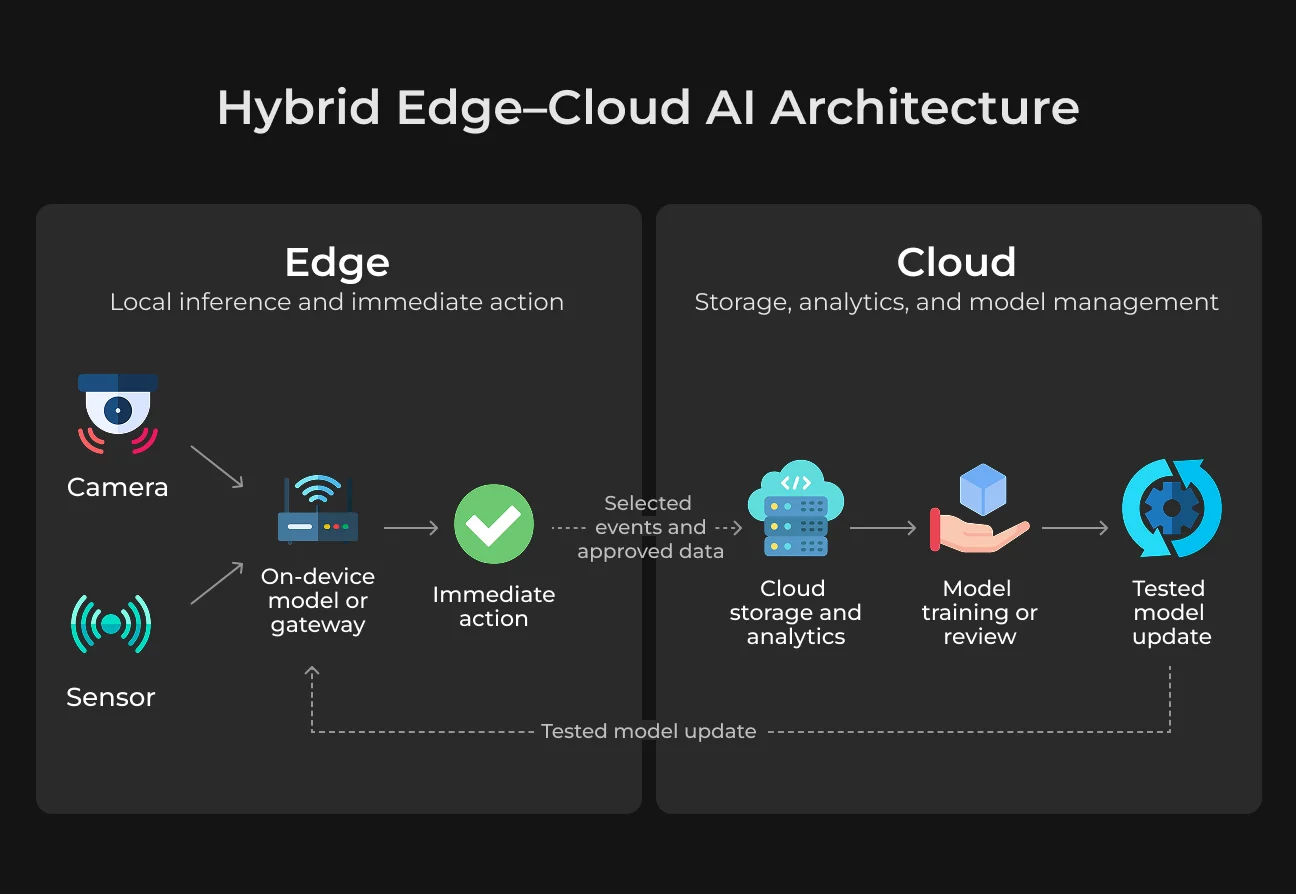
A hybrid edge AI architecture divides processing between local hardware and the cloud based on where each task makes the most sense. Time-sensitive decisions stay close to the camera or sensor, while heavier analysis and model updates happen centrally.
Run Time-Critical Inference Locally
At the edge, data from a camera or sensor goes straight to a model running on the device or a nearby gateway. On-device AI keeps that decision close to the data source when response time is tight or connectivity is unreliable.
During a network outage, the device can continue using the latest approved model and store selected events locally until the connection returns.
Send Selected Results to the Cloud
The edge layer can send approved events or selected samples to cloud storage. Teams can review that material and use it for model training in the cloud when preparing a new model version. If the connection drops, the device stores new records locally.
Timestamps, unique IDs, and delivery acknowledgments track records waiting to sync.
Once connectivity returns, uploads resume.
The receiving system uses those IDs to recognize retries and avoid creating duplicate records. After testing, an approved model version is sent back to the devices. Local decisions continue at the edge, while model review and updates stay centralized.
How to Decide Where Your AI Model Should Run
Before choosing an edge AI deployment, measure the workflow under the conditions expected in production. Let’s look at what to measure first and how both deployment options perform under the same workload.
Measure the Workflow Before Choosing Infrastructure
Collect a few facts from the real workflow:
- Maximum acceptable response time;
- Number of devices expected in production;
- Data generated per hour at each site;
- Connection reliability during normal operation;
- Model size and hardware requirements;
- Cost of an incorrect or delayed decision.
These figures help narrow the choice. A vision system that triggers a reject mechanism may need a response within milliseconds. Daily sensor analysis can tolerate a longer delay and run more of the workload in the cloud.
Test the Same Task in Both Locations
Run a small pilot with the same model and representative production data where hardware permits. If the edge deployment needs a smaller or quantized model, measure the resulting quality difference.
Early edge AI implementations can reveal device limits or connectivity problems that are easy to miss during development. Test both deployments under conditions close to the expected workload.
What to compare | What to record |
| Output quality | Accuracy on the same test set |
| End-to-end latency | Time from input to result |
| Offline behavior | System response during a connection loss |
| Data transferred | Volume sent across the network |
| Projected cost | Operating cost at the expected device count |
| Update effort | Time required to deploy a new model version |
SapientPro’s article on production testing explains how deployment can expose issues that never appeared during development. Use the pilot results to choose the architecture that delivers the required response time and reliability at an acceptable operating cost.
Offline AI Workflow Example: Produce Inspection With Unreliable Connectivity
SapientPro’s produce inspection project was built for inspectors who often worked in areas with unreliable internet. The app let them complete and save inspection sessions offline, so fieldwork could continue during connection drops.
Inspectors added photos and voice notes during each check. AI analyzed the produce images, and the app converted spoken observations into structured records. SapientPro reports that inspection time fell by 87.5% after the new workflow was introduced.
The project demonstrates offline data capture within an AI application.
The published case study does not specify where inference runs, so it should not be treated as evidence of on-device AI. For similar projects, define separately which capture, analysis, and reporting functions must work offline.
Contact SapientPro to assess your workflow, connectivity limits, and model requirements before choosing an edge, cloud, or hybrid deployment.
Test Your AI Before Scaling
Validate latency, accuracy, and operating costs with a SapientPro deployment pilot.
FAQ
What Is the Difference Between Edge AI and Cloud AI?
Edge AI runs inference on a device or nearby gateway, while cloud AI processes inputs on remote servers. Edge deployment reduces dependence on internet connectivity and can keep raw data local. Cloud deployment supports larger models and centralized operations. The right choice depends on latency, hardware, privacy, and workload requirements.
Can Edge AI Work Without an Internet Connection?
Edge AI can work offline when the model, runtime, and required data are available locally. However, authentication, external tools, or other cloud dependencies can still interrupt the workflow. Define which functions must remain available during outages, provide enough local storage, and test how records synchronize after the internet connection returns.
Is Edge AI Cheaper Than Cloud AI?
Edge AI can cost less for continuous workloads that generate large data volumes, but hardware, installation, maintenance, and fleet updates add expenses. Cloud AI may suit variable demand with lower upfront investment. Compare total monthly cost per site and cost per thousand inferences using equivalent quality, volume, and reliability requirements.
What Is a Hybrid Edge–Cloud AI Architecture?
A hybrid edge–cloud AI architecture runs selected tasks locally and others on remote infrastructure. Devices handle urgent inference and buffer records during outages. The cloud supports shared analysis, training, monitoring, and model distribution. This approach requires explicit rules for data synchronization, access permissions, version control, and recovery when connections fail.
When Should a Business Choose Edge AI?
A business should consider edge AI when network delays disrupt decisions, connectivity is unreliable, or raw data must remain onsite. Common examples include visual inspection and remote equipment monitoring. Validate the choice with a pilot that measures output quality, complete response time, offline behavior, and costs across the planned deployment.