All
How to Eliminate Manual HR Entry With Employee Data Management Software
July 17, 202615 min read


Manual HR entry seems cheap until a simple mistake causes problems across departments. If a start date changes after the contract is signed, payroll often keeps the original version, and HR only catches the mismatch during payroll checks.
This happens because the process relies on memory, manual reviews, and constant copying.
The Australian Payroll Association’s 2025 survey found that poor data inputs caused mistakes for nearly a third of organizations. These problems can start the moment an employee file enters the system, long before the pay run.
Employee data management software helps prevent them by keeping employee records, payroll details, and updates in one controlled system.
This article from SapientPro’s engineers explains where repetitive entry appears, which HR workflows to automate first, and how to connect HR with payroll without adding more admin work.
Real Cost of Manual Data Entry in HR
Manual entry creates mistakes that hit payroll directly, which costs way more than the time spent copying files. A bank detail can be typed incorrectly, or a document can be marked as received even when the data inside was entered wrong.
International hiring makes it harder because one missing local tax field delays the whole onboarding. Mergers create a similar issue when HR has to manually fix conflicting employee IDs and pay rules from two companies.
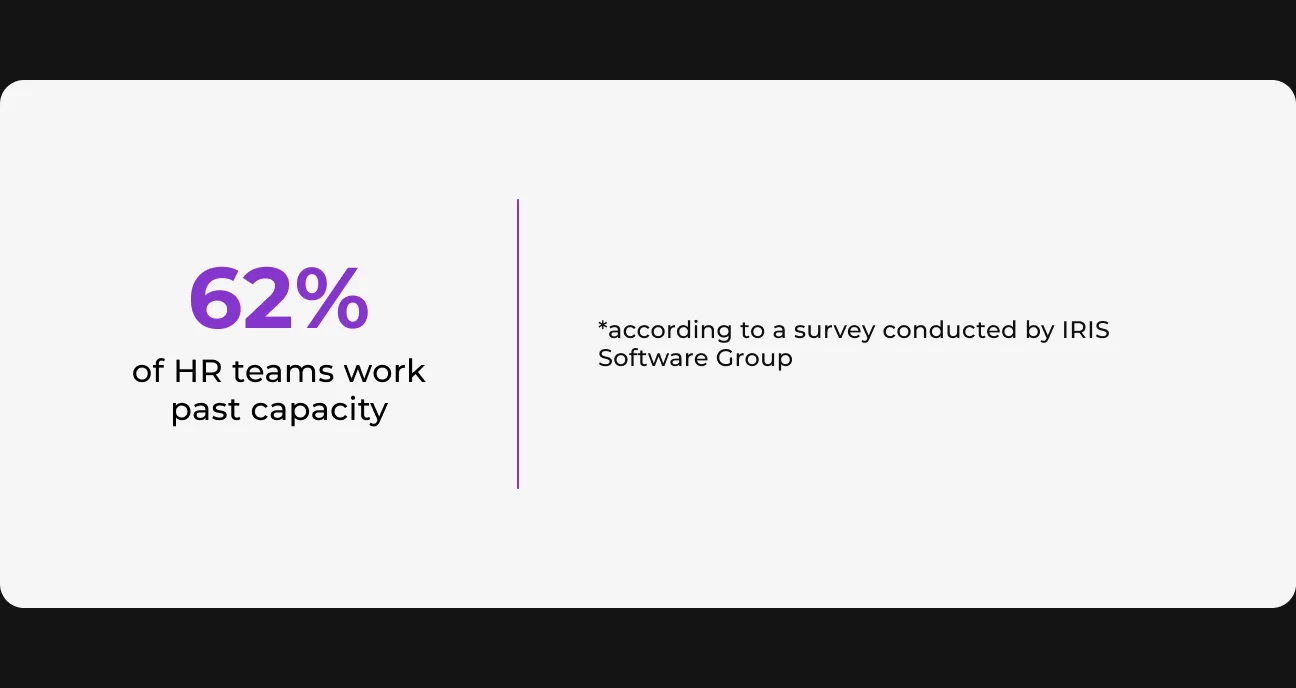
This becomes impossible to manage during growth. Basically, 62% of HR teams work past capacity, and 57% are understaffed. Manual typing just takes away time needed to double-check pay runs and support staff.
What Is an Employee Document Management System and How It Helps
When a candidate becomes an employee, their data affects payroll, contracts, IT access, and compliance. Employee document management software gives HR one clear place to manage this information before any changes sync with tools used by other teams.
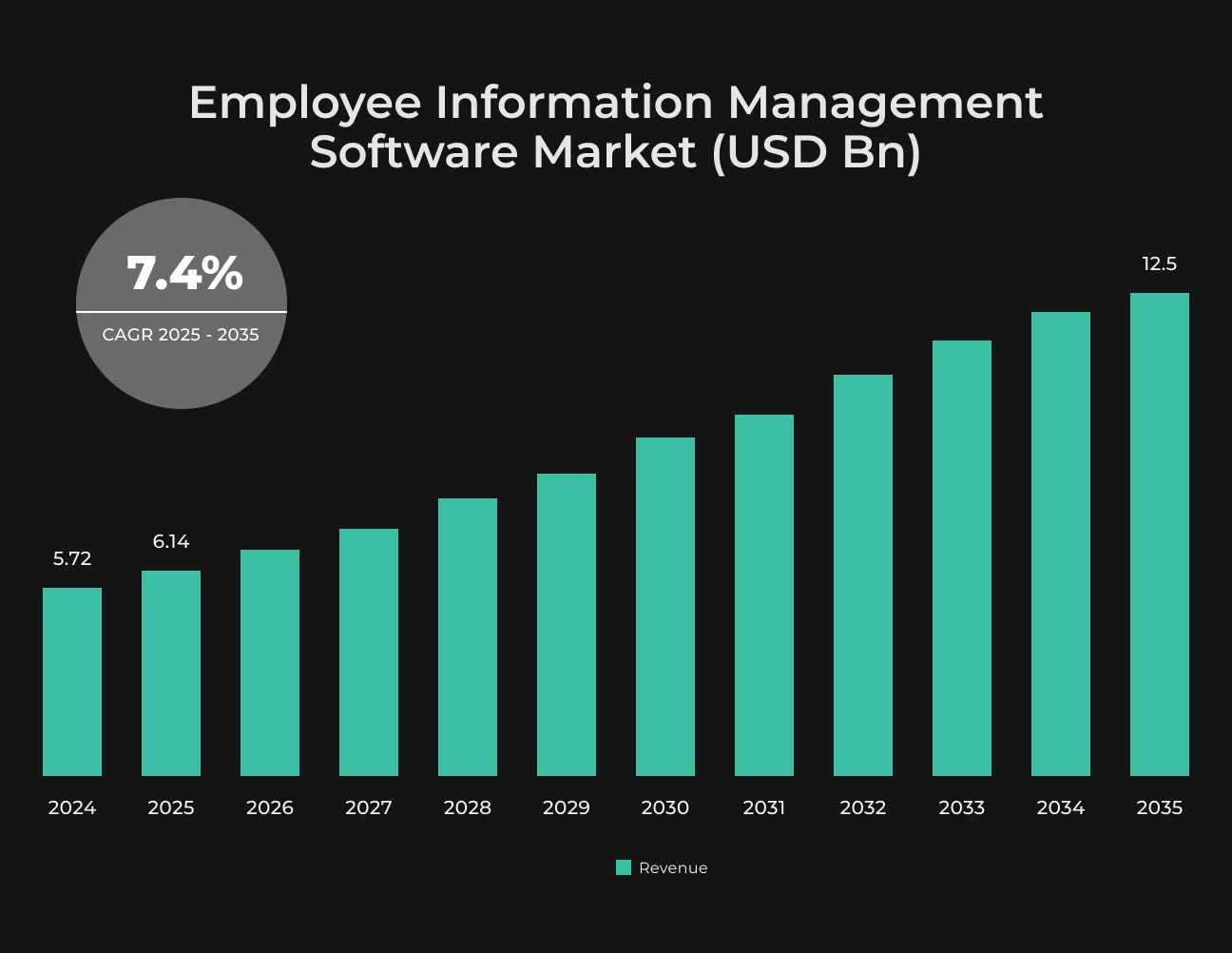
The market for this software is growing from $6.14 billion in 2025 to an estimated $12.5 billion by 2035.
How It Differs From an HRIS and Other Tools
A standard HRIS handles broad operations like leave and performance reviews. Employee data management focuses strictly on controlling the record itself. It defines who can edit sensitive fields, which updates need approval, and how to track the history of those changes.
This software also connects separate tools. Instead of manually copying a candidate's details from an ATS into a payroll system, an employee information management system automatically turns the hiring file into a payroll-ready record without duplicate work.
Its basic setup relies on five elements:
- One central HR employee database;
- Access controls to hide or restrict sensitive fields;
- Change logs to track edits, approvals, and document updates;
- Connections to link the data with your ATS, payroll, and finance tools;
- Automated checks for missing bank details, tax fields, or start dates.
How Automation Optimizes Employee Lifecycle Management
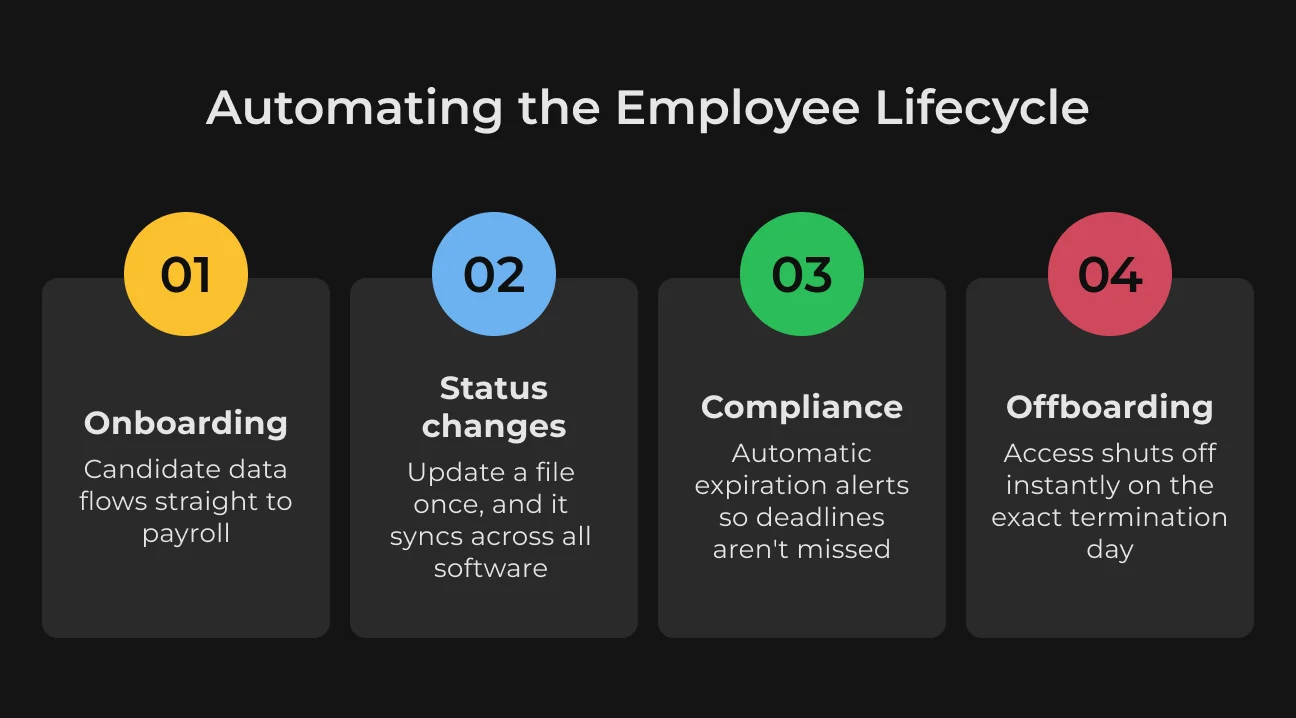
Manual employee data entry creates more risk as people move through hiring, payroll, role changes, and offboarding. Automation reduces repeated data tasks and keeps routine updates moving through each stage of the employee lifecycle. Here is how it works in practice.
Hiring and Onboarding
Copying candidate info from an ATS into payroll is a waste of time. Instead, the file moves directly into the main database. Contracts and onboarding forms get signed online and save themselves to the right folders. This means HR stops copy-pasting bank details and tax forms out of emails.
Employee Status Changes
Promotions or internal moves usually mean logging into several different tools to update a salary, change a manager, or fix access rights. Syncing these systems corrects that. You change the details once in the central base, and it updates finance and IT tools at the same time.
Compliance and Certification Tracking
Tracking license expiration dates in spreadsheets can lead to missed deadlines and fines. Automated reminders flag upcoming renewals before the deadline, so the employee uploads the new certificate, the file updates, and HR does not have to chase anyone.
Offboarding
HR process automation can trigger offboarding workflows as soon as the termination date is confirmed. The system can schedule access removal, store final documents, and apply retention rules. Each task just moves through a set workflow .
Build Smarter HR Systems With SapientPro
Automate employee data, documents, payroll integrations, and compliance workflows.
How to Eliminate Manual HR Entry: Step-by-Step Guide
Automating all HR processes at once can overload the team.
A sudden system change creates confusion and can lead to new data entry mistakes. It is much better to fix the HR workflow automation in small, manageable stages. This approach keeps your records clean while everyone adjusts to the new system.
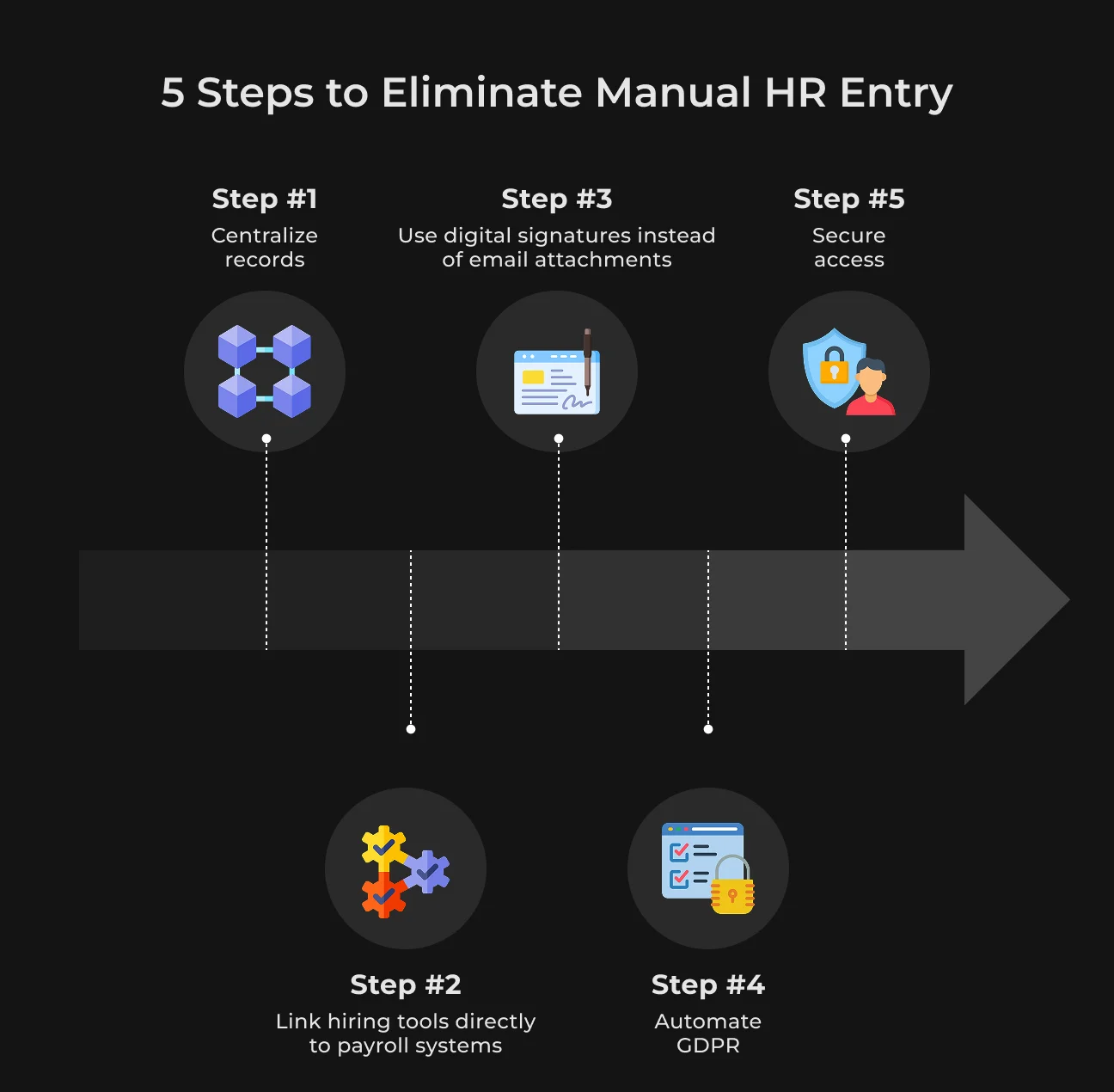
Step 1: Centralize Employee Records in One Database
Data mismatches often go unnoticed when employee records are spread across disconnected files. Moving staff records into an HRIS helps fix this problem at the source.
When an employee changes address, the update is made once, and the relevant teams work with the same verified record.
Step 2: Automate Data Sync Across the Employee Lifecycle
Connecting recruiting and payroll systems reduces manual entry before onboarding begins. Once a candidate signs an offer letter, their profile moves into the employee registry without HR copying the same details again.
Step 3: Digitize Employee Document Management
Physical onboarding folders and emailed PDF attachments are a security risk and an administrative bottleneck. Secure digital signature platforms replace them completely.
New hires upload tax documents and direct deposit details through a portal that routes files straight to their personal profile. HR never has to download attachments again.
Step 4: Build GDPR and Compliance Checks Into the Workflow
Relying on memory to follow data retention rules is a massive regulatory liability. An employee data management system solves this by automatically executing compliance schedules. The software can apply retention rules based on each document type.
It keeps payroll, tax, and employment records for the required legal period, then flags them for deletion or archiving once the retention period ends.
Step 5: Set Role-Based Access Controls and Audit Trails
Restricting system access helps protect confidential staff details. Permissions can be set so line managers see only team schedules, while payroll teams handle compensation data. Every edit should also create an automatic log entry.
Key Features in an Employee Data Management Platform
Choosing the right platform means looking beyond basic data storage. The system should reduce admin work by handling routine tasks in the background. These features are foundational when you compare automation tools.
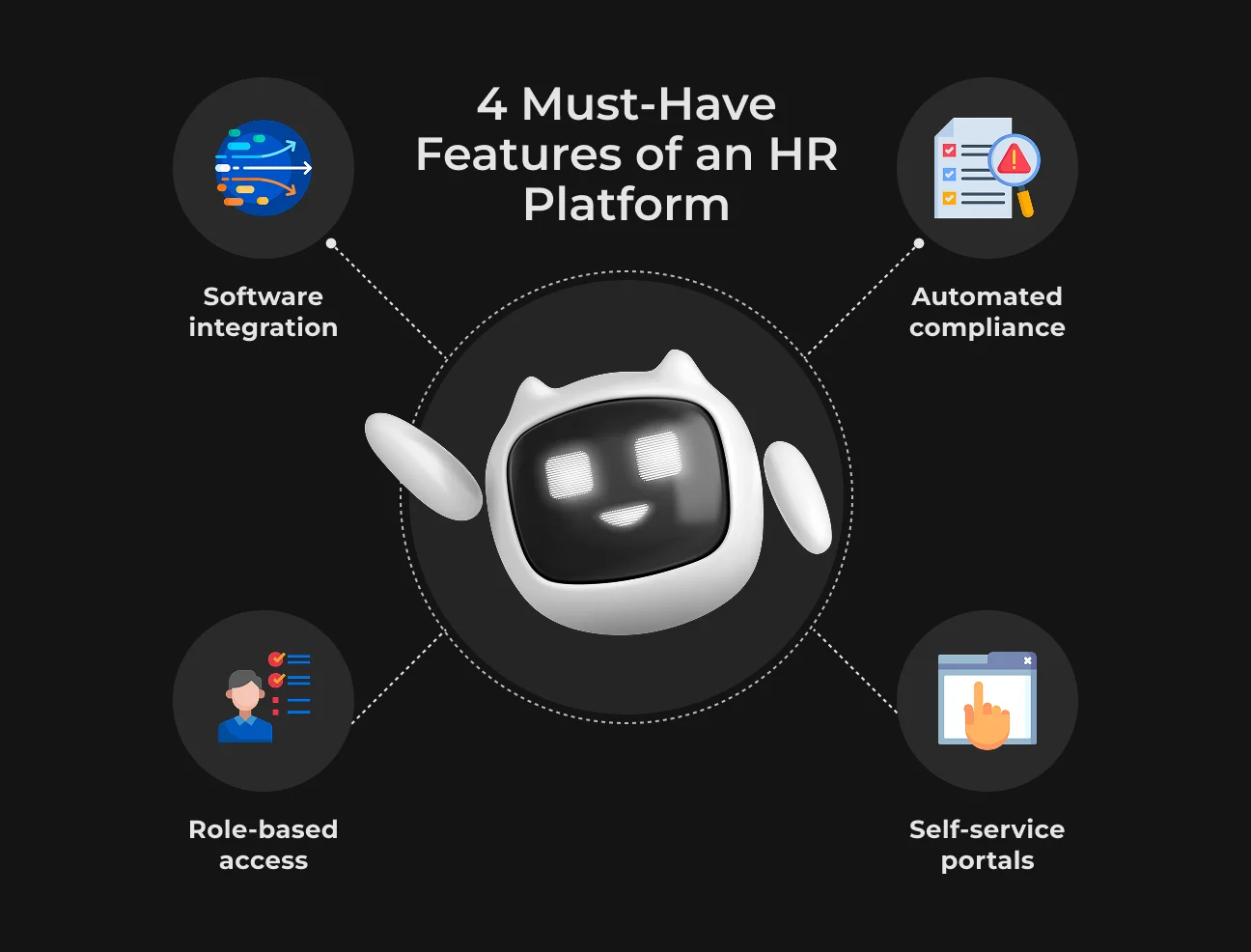
Direct Software Connections
Fragmented HR applications create endless manual work. When software systems operate in isolation, personnel details must travel from the recruiting portal to core management databases and payroll registries by hand.
Built-in platform integrations eliminate this tedious step by routing data automatically. An adjustment made in any single tool updates every linked system immediately, preserving data accuracy across the company.
Self-Service Portals
Gathering onboarding paperwork and banking details manually drains administrative resources. Self-service tools shift this responsibility by providing new hires with direct, secure account access to submit their own profiles.
If an employee changes addresses or bank accounts down the road, they submit the modification themselves, updating corporate files without consuming HR time.
Automated Retention Rules
Manual compliance tracking exposes businesses to regulatory risks and oversight errors. Automated background workflows solve this by taking over data lifecycle tasks.
The platform automatically tracks legal deadlines to delete old profiles and flag expired certificates. This automated cleanup process secures data compliance without regular file reviews.
Granular Access Settings
Internal privacy leaks usually happen when companies grant broad, department-wide system access. Protecting sensitive worker data requires a platform that restricts visibility by exact job titles.
A line manager needs to see team schedules, but they have no operational reason to view compensation figures or medical histories. Locking down individual roles keeps confidential files private without blocking daily administrative tasks.
Benefits of HR Data Management Software
Dedicated HR software provides clear metrics for strategic business decisions. The system directly impacts five key areas.
1. Instant Workforce Analytics
Siloed department data forces HR teams to manually compile reports, leaving leadership with outdated figures. A unified database eliminates this lag by providing instant, real-time metrics for headcount and turnover planning.
This clean data foundation supports future automated workflows. By 2030, AI will augment 100% of HR tasks and independently manage half of them.
2. Organizing Data for Buyers and Investors
Due diligence during a corporate sale or funding round requires immediate access to complete staffing records. Scattered contracts and compliance logs stall due diligence and delay deal closures.
A centralized repository removes this conflict. External auditors can verify agreements immediately, which keeps the transaction on track and proves the company manages its legal risks.
3. Centralized Data Security
Companies face unnecessary security risks when they hold employee bank accounts, home addresses, or tax data across multiple platforms. Separate recruiting and payroll systems mean that duplicates of sensitive files end up in different places.
A single secure database eliminates these extra copies. Security teams only defend one central repository. They no longer need to track leaks across multiple separate systems.
4. Elimination of Costly Payroll Errors
Manual data transfers between HR and accounting systems often lead to mistakes. Finance teams then have to fix payroll errors, issue extra payments, or recalculate past pay.
Centralized software updates salary changes across the relevant systems automatically. This helps payroll stay on schedule, reduces correction work, and lowers the chance of compliance issues.
5. Onboarding and Employee Self-Service
Manual onboarding wastes a new hire's first few days on forms or account setups. The administrative overhead impacts current staff too. Employees often have to email HR just to check vacation balances or update a home address.
Self-service tools let employees enter and update their own details. New hires can complete onboarding forms before day one, while current team members can change profile information without sending every update to HR.
Risks of Getting Employee Records Management Wrong
When companies treat employee data management as just routine admin work, they may overlook how much messy records actually cost the business. A single lost contract or a spreadsheet typo does not stay in HR — it directly disrupts payroll or legal workflows.
Let's look at four major risks this disorganization creates.
1. Cross-State Tax Mistakes
Remote hiring complicates payroll when staff live in different states. Without accurate location tracking, companies face unexpected tax bills. Accounting teams may send tax payments to the wrong region, which leads to government audits or fines.
Correcting these errors takes weeks of manual payroll adjustments and expensive legal help.
2. Security Risks from Former Employees
Messy offboarding processes put company data at risk. When internal records are scattered, HR teams often forget to delete user accounts when an employee leaves. Leaving these accounts active allows ex-employees or hackers to see internal files.
Security teams cannot protect the network without a clear list of current workers.
3. Stalled Company Sales and Investment
Investors review employee records during fundraising or a business sale. Missing contracts or unverified stock option logs slow down the process. Auditors might pause negotiations if a company cannot provide past compliance files.
4. High Costs from Payroll Errors
Manually updating promotions or department changes leads to frequent mistakes. A typo in a bank code can delay an employee's salary. When this happens, the payroll team must drop their daily work to issue emergency payments.
These urgent bank transfers also come with high processing fees.
GDPR Employee Data Management Best Practices
Employee records are strictly private. Your company stores sensitive details like salaries and sick leave, and the law gives workers rights over that data. This checklist helps you review internal systems for legal risks.
1. Handling Subject Access Requests (SARs)
Staff members can legally demand a copy of every piece of data you hold on them. This goes way beyond a standard HR profile, and you need a system to pull records without exposing other people.
- Map every communication channel.
Audit trails must extend past your core HR software. Ensure your data-retrieval process covers internal Slack histories, email threads, performance review apps, and informal manager notes;
- Clean out third-party information.
Never hand over raw files. Strip out names, salaries, or specific peer feedback belonging to other employees before sharing the document package.
2. Managing Erasure Requests vs. Legal Retention
Ex-employees can ask you to delete their data. The catch is that labor and tax laws usually require you to keep financial history for years. Your system needs to know the difference so it deletes old resumes but saves payroll data.
- Separate employee data into retention tiers.
Payroll registers and tax forms can follow the statutory minimum, often 5–7 years. Outdated resumes, interview notes, and emergency contacts can be flagged for review and deletion when there is no legal reason to keep them;
- Wipe unneeded files on day one.
Clear out basic worker records right when a contract ends. Keep only the exact tax and legal documents required by law;
- Clear out backups too.
Don't leave copies on your archive servers when you delete them from the main app. The next backup cycle must overwrite those old records.
3. Cross-Border Controls for Distributed Teams
Hiring globally means employee files travel across borders. If you store a European worker's contract or background check on a US server, standard passwords and firewalls won't save you from GDPR fines. You need the right legal framework.
- Audit your vendor's server locations.
Check exactly where your HR tools host their data. Switch to vendors that offer localized EU data centers for your European workforce;
- Set up data sharing paperwork.
Make sure you have standard data contracts ready for any foreign branch or cloud tool using your HR data. It is the only way to legally move EU staff records outside the region;
- Limit who can see files.
Hide local staff records from global managers by default. Keep sensitive files like medical histories or bank setups visible only to the local HR team.
How SapientPro Helps with Employee Lifecycle Management Systems
Off-the-shelf HR tools often fall short when dealing with strict compliance or custom workflows. SapientPro builds tailored document systems to handle your specific internal security and data layout needs.
Here is how our past work translates to better internal record keeping:
- Strict access controls and audit logs.
During our safety data automation project, we built a platform that separates user roles, keeping sensitive files visible only to authorized staff. The system logs every document edit and login, giving management a clean history to show legal auditors;
- Standardizing messy staff profiles.
A hiring agency client had files scattered across different formats and unreadable scans.
We built employee lifecycle management software that reads these messy documents and fills out a single corporate template. It dropped profile processing from two hours to five minutes, which is exactly how you clean up old, chaotic employee databases.
If your current software setup creates legal risks or leaves too much HR work manual, contact us to discuss a custom solution.
Automate Your Employee Lifecycle With SapientPro
Build secure workflows for onboarding, updates, compliance, and offboarding.