All Scientific Data Management Software: Automating Unstructured Data
August 26, 202610 min read


Long-read sequencing platforms produce large datasets across several file types, including raw signal formats. A 2025 peer-reviewed study describes a tool built to process major long-read formats and generate fast quality-control summaries.
This variety creates a wider data management challenge for laboratories. Scientific data management software captures instrument output, adds the metadata needed to understand it, and links each record to the correct experiment. Scientists can find, review, and reuse data without searching across instrument computers or separate folders.
This article explains how SDMS platforms automate unstructured data processing and improve traceability across laboratory workflows.
What Is a Scientific Data Management System?
A scientific data management system, or SDMS, gives laboratory data a permanent location and keeps it tied to the work that created it. Instrument files remain linked to sample IDs, methods, projects, analysts, and run details. Scientists retrieve a complete record without piecing it together across shared drives or vendor applications.
A LIMS follows samples through the workflow and records tasks, test status, and approved results. An SDMS preserves the scientific files behind those results, from chromatograms and spectra to sequencing output, images, and reports. This connection gives teams a fuller view of each experiment and makes earlier data easier to revisit.
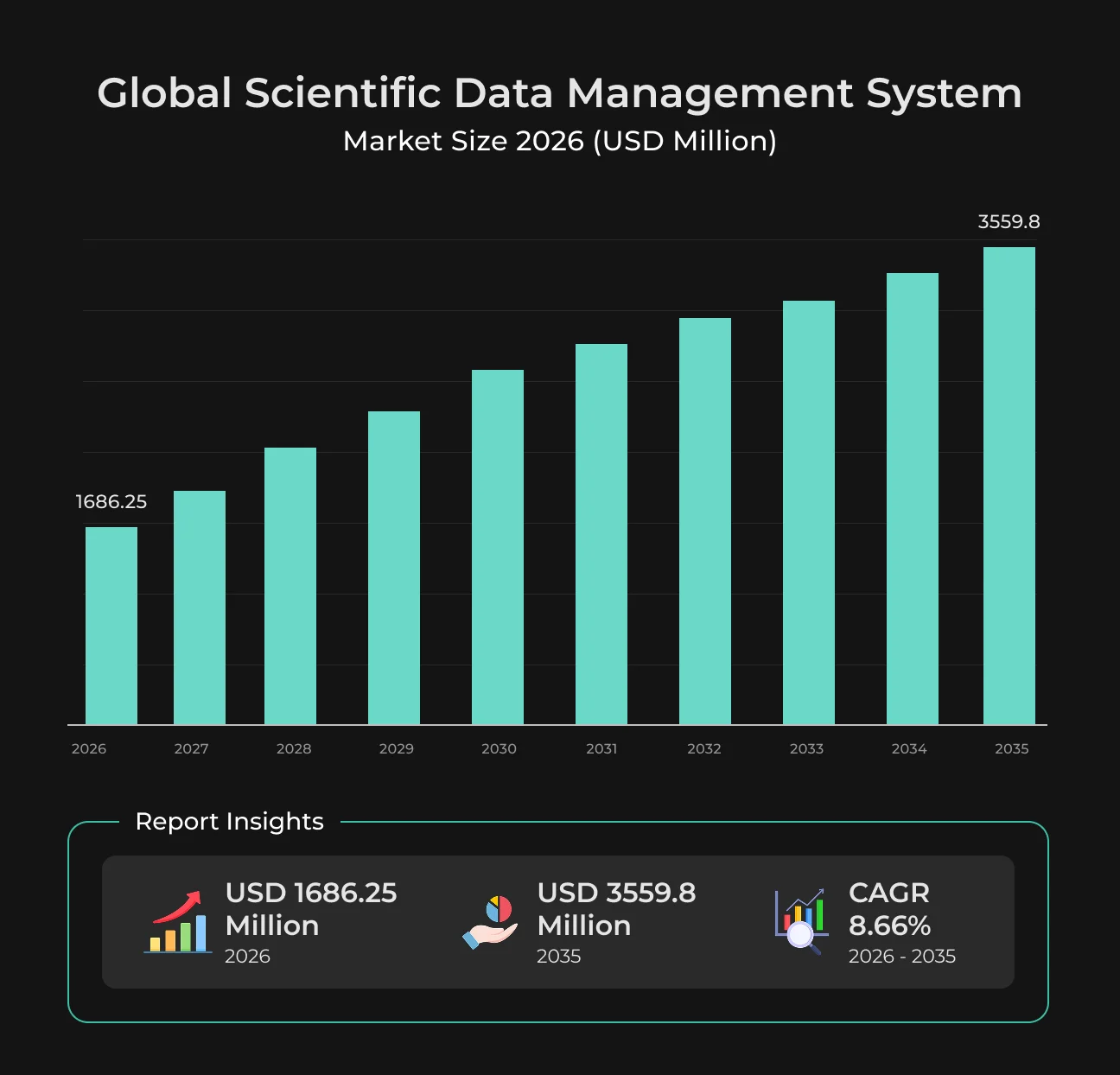
Digital adoption is moving quickly across laboratories. A recent SDMS market report estimates that over 72% of laboratories are replacing paper records with digital systems.
It also reports that 68% of pharmaceutical and biotechnology organizations seek centralized scientific data platforms, while 64% of laboratories already use automated data capture.
Comparison Between SDMS, LIMS, and ELN
These tools overlap in daily use, which makes the difference easy to miss.
Each platform manages a different part of the laboratory record.
System | What belongs there | Typical content |
| SDMS | Original research files and instrument output | Chromatograms, spectra, microscopy images, sequencing data, and reports |
| LIMS | Structured information used to move samples through testing | Sample IDs, assigned tests, workflow status, specifications, and approved results |
| ELN | The written account of how an experiment was carried out | Protocols, observations, calculations, and scientific interpretation |
The distinction becomes clear in a real workflow. The LIMS shows the status of a sample and the tests assigned to it. The ELN records the procedure and the scientist’s observations. The SDMS software keeps the files produced during the run and preserves their link to both records.
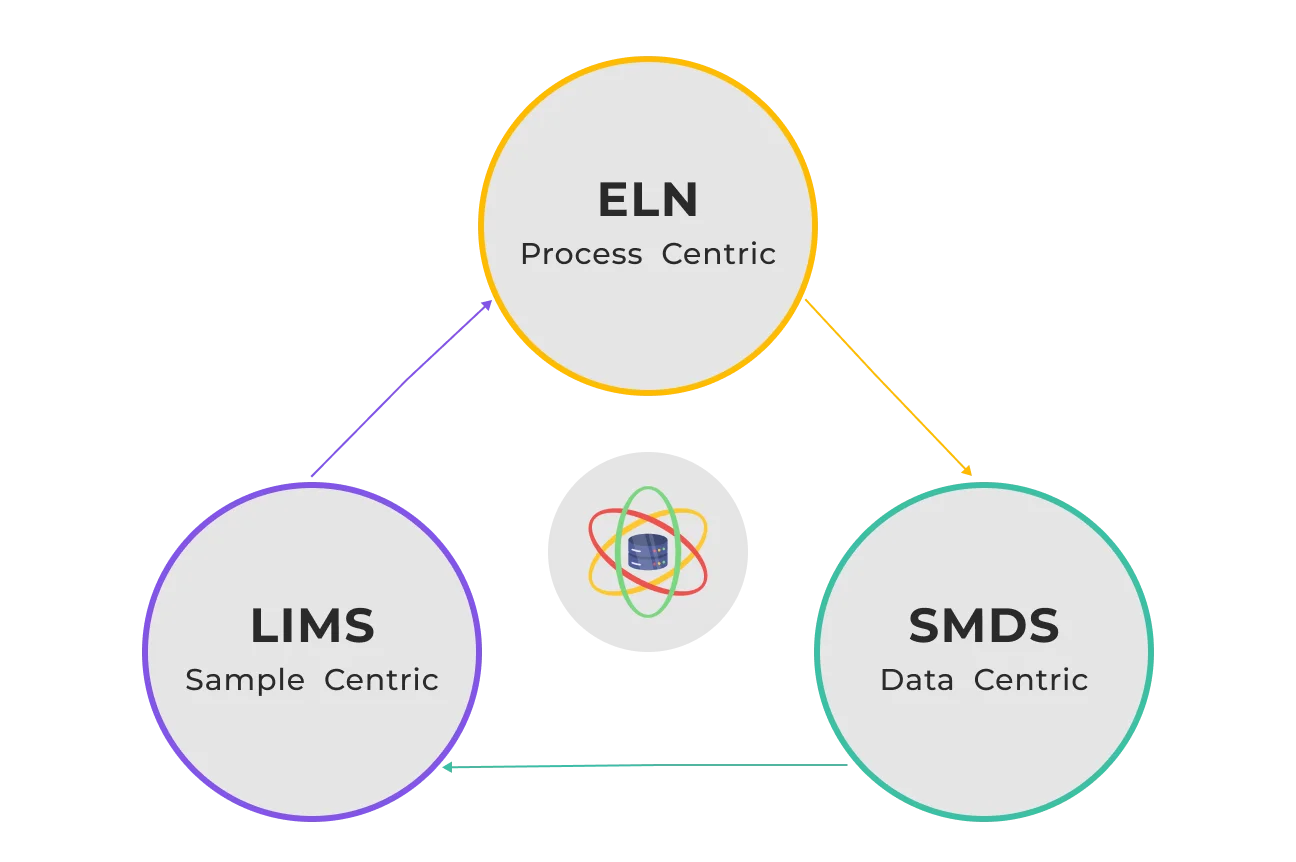
When the systems exchange identifiers and record links, scientists can move from the sample to the protocol and original data without searching through folders.
Why Unstructured Data Has Become a Compliance Problem
Laboratory instruments produce large volumes of raw data every day. Raw files often stay on instrument PCs or local drives, while sample details and method information live elsewhere. Months later, even a familiar result can take time to trace back to the experiment behind it.
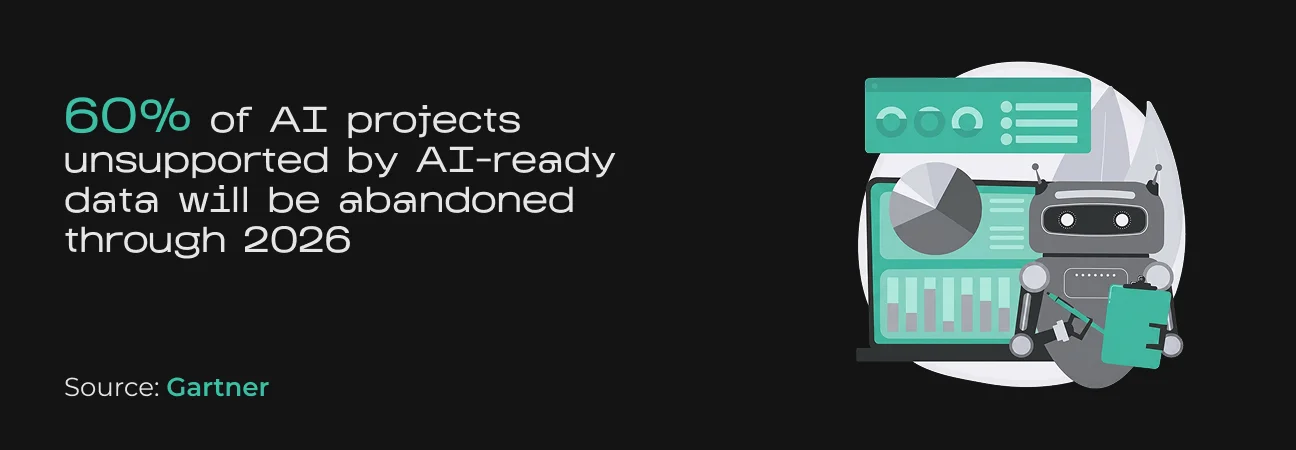
Poor data structure can derail automation and AI work as well. Gartner predicts that through 2026, organizations will abandon 60% of AI projects that lack AI-ready data. Laboratory teams face a similar barrier when older results are difficult to search or prepare for analysis.
For laboratories working under GLP, GMP, or 21 CFR Part 11, scattered records create a serious compliance risk. Auditors need a clear path from the reported result to the original file, along with its review and approval history. Weak indexing and missing audit trails slow inspections and increase the risk of regulatory findings.
Main Features of Scientific Data Management Software
Scientific data management software turns instrument output into records for search, review, and reuse. The platform covers the data lifecycle from initial capture through retention and archival. Four core features support this process.
Automated Data Capture and Routing
Scientific data management system software monitors approved instrument folders, network locations, or software endpoints for new output. After a run completes, it transfers the files to controlled storage and verifies that the stored copy matches the source.
Routing rules place each record under the correct study, batch, project, or review queue. They send chromatography results to quality control and sequencing output to a bioinformatics workspace. Failed transfers trigger alerts so teams can investigate the issue quickly.
The same capture rules apply across shifts and locations, keeping records consistent as staff and instruments change.
Metadata Enrichment and Data Lineage
Raw instrument output is difficult to interpret without context. The platform attaches key metadata to incoming files, including sample numbers, user IDs, project details, and acquisition times.
Good metadata also helps laboratories follow FAIR data principles. Consistent metadata and standard exchange formats help people and software find, access, combine, and reuse scientific records.
Compliance-Grade Audit Trails
Audit trails record actions that affect regulated data. The platform logs creation, review, approval, export, and deletion attempts with the user account and timestamp. Protected history records preserve a clear sequence of events.
Version control supports the same process. When a report or processed dataset changes, the SDMS retains the earlier state and links it to the current version. Quality teams review the progression without rebuilding it from email attachments and backup folders.
Role-Based Access and Security
Administrators assign permissions based on each user’s role and responsibilities. Users see or edit only the records covered by those permissions. Encryption protects data in transit and at rest.
Automate Your Scientific Data Workflows
SapientPro can connect instruments, metadata, compliance controls, and existing laboratory systems.
How Research and Compliance Teams Automate Unstructured Data Processing
Automated pipelines move instrument data into the lab’s central systems as soon as a run is complete. The platform captures the original files, extracts the available metadata, and stores both in a controlled repository.
Sample and method details stay linked to each record, so scientists can find and review the data later without rebuilding its context.
How Research Teams Automate Data Capture and Reuse
Research teams get far more from an SDMS when they can search by scientific context. Instead of relying on file names, they can look up a sample, method, or run condition and see every related record in one place.
This becomes valuable when a result looks unusual. A scientist can pull earlier runs with similar settings, compare the full datasets, and send selected records to analysis or visualization tools. The files already carry consistent metadata, so less time goes into preparing them.
The same records can support new studies, instrument comparisons, and method reviews. Each dataset stays linked to the original experiment, which makes earlier work easier to understand and reuse.
How Compliance Teams Automate Audit Readiness
For compliance teams, automation keeps regulated data under control throughout the workflow. The system records key actions, preserves earlier versions, and limits who can edit or approve each record.
Configured validation rules catch common issues before formal review. They flag missing identifiers and failed transfers, then send the affected record to the responsible user.
During an audit, quality staff can retrieve the source file, metadata, approvals, and full activity history from one place. This saves time spent searching across instrument computers, shared drives, and separate applications.
See more
Read how employee data management software reduces manual HR entry and payroll errors.
Read moreEvaluating a Scientific Data Management Solution
Choosing a scientific data management solution starts with real laboratory workflows. A strong platform captures instrument output reliably, keeps metadata complete, and exchanges records with the LIMS and ELN already in use.
The criteria below help compare dedicated SDMS platforms with broader research information management software.
Evaluation area | What to examine |
| System compatibility | Check support for current instruments, native file formats, LIMS, ELN, analysis tools, and identity systems. Test the platform with real laboratory files to uncover integration gaps. |
| FAIR alignment | Look at how easily scientists can find, access, exchange, and reuse data. Metadata quality, persistent identifiers, export options, and permission controls all affect this. |
| Automation depth | Follow a completed run from the instrument to storage. The workflow may cover file capture, integrity checks, metadata extraction, review routing, and failed-transfer alerts. |
| Compliance and security | Review audit trails, electronic signatures, version history, retention rules, and user permissions. Certification reports need to cover the service and hosting model under consideration. |
| Scalability | Review storage growth, retrieval performance, connector limits, and archive access. Compare pricing for storage, data transfer, and retrieval as data volumes grow. |
| Vendor support | Confirm who manages migration, connector updates, validation, and technical issues. Check response times and whether the support team understands laboratory workflows. |
A pilot gives teams a realistic view of the platform. Use files from several instruments and track them through capture, search, review, export, and archival. This reveals weak points early and shows how much manual work remains.
How SapientPro Builds Lab Data Management Software
SapientPro builds data platforms around the files, workflows, and controls that teams already use. Our work on Steeltrace and an SDS automation platform shows how the same engineering experience applies to research data management.
Steeltrace demonstrates SapientPro’s approach to traceability.
The platform collects product data in digital form, gives each product a unique identity, applies cryptographic signatures to certificates, and keeps those certificates searchable across the supply chain. This traceability model is relevant to laboratory software, where samples, instrument output, methods, and approvals need a connected history.
SapientPro’s SDS automation project shows how the team works with complex documents.
The platform extracts structured information from Safety Data Sheets, matches documents across languages and versions, and stores the results in a searchable database.
It also uses role-based access, activity logs, bulk upload, version tracking, and automated update alerts. The same engineering approach can be adapted for protocols, certificates of analysis, validation reports, and other research documentation.
SapientPro develops laboratory data management solutions in the following areas:
- SDMS platforms for raw files, metadata, and experimental records;
- Automated data capture from laboratory instruments;
- Integrations with LIMS, ELN, analysis tools, and storage systems;
- AI-based document extraction and classification;
- Search, version control, audit trails, and access management;
- Custom dashboards for research, quality, and compliance teams.
Contact SapientPro to discuss your current laboratory setup and the data problems the new system needs to solve.
Turn Raw Lab Data Into Insight
Create connected workflows for data capture, search, audit trails, and reuse.