All
Best Strategies to Modernize a Legacy App in 2026: Full Guide
Updated:October 13, 202610 min read


For many companies, legacy applications are the quiet killers of growth. They hold critical data and workflows. But behind the scenes? They often crash, cost more than they should, and block any attempt to innovate. If your team spends more time fixing than building, your system is part of the problem.
Research by Altera shows that up to 80% of IT budgets go to keeping old systems running. Moreover, 40% of CIOs wish they hadn't invested in outdated technology because it slows their digital transformation. Legacy systems and tools can create significant risks for businesses.
Modernizing your infrastructure means creating systems that are secure, scalable, and prepared for the future. This guide walks you through the real steps of how to modernize a legacy application and do it right. The article is based on SapientPro's 8+ years of experience helping startups, enterprises, and investors upgrade their software. You'll find proven strategies, practical checklists, and expert-backed insights.
Let's break the cycle of patching things up. It's time to modernize with a purpose.
Key Takeaways
- Legacy application modernization is essential. Old systems pose security, compliance, and cost risks that increase each year.
- Businesses allocate up to 70% of their IT budgets to maintain these outdated systems instead of focusing on growth.
- Modernization brings real benefits: lower maintenance costs, improved security, better scalability, and an enhanced customer experience.
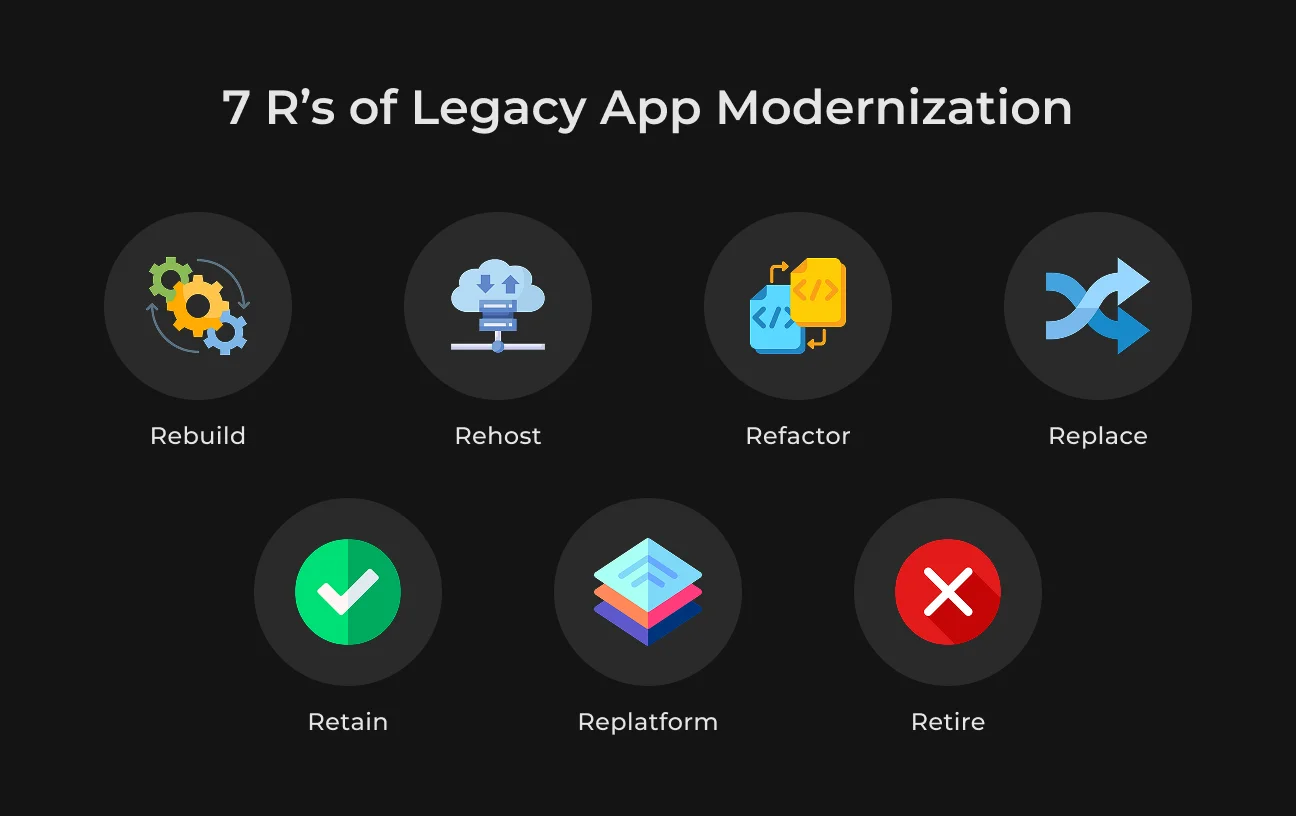
- There are eight main strategies to consider: Rehost, Replatform, Refactor, Rearchitect, Rebuild, Replace, Retire, and Retain. The best choice depends on your specific system and goals.
- Using a well-structured modernization checklist with clear goals, a phased approach, and ongoing improvements ensures long-term success.
- Working with engineers at SapientPro can help you reduce risks, manage technical debt, and create systems that are prepared for the future.
What is a Legacy Application?
A legacy application is software that your business still uses, but it does not meet today's technology standards. It may have been created many years ago. It likely uses outdated code, has security issues, performs poorly, and does not work well with modern systems or APIs.
Still, these systems often carry critical business logic. They're deeply integrated into your daily workflows. This integration makes them hard to replace and even harder to ignore.
Legacy systems typically share these traits:
- Written in older programming languages like COBOL, VB, or Flash;
- Hosted on physical servers or outdated environments;
- Built as monoliths with tightly coupled components;
- Costly and risky to maintain or scale;
- Poor compatibility with cloud, mobile, or third-party platforms.
A lot of companies stick with their old software because swapping it out seems too tricky, expensive, or risky. But the longer they hold on, the more they’re putting themselves at risk.
Outdated software can cause missed updates and compliance problems, slowing down the whole organization. It gets in the way of new ideas, eats up the IT budget, and makes it tougher to stay competitive.
That's why legacy software modernization has become a business priority. It's the process of upgrading your old systems so that they can support modern tools, cloud platforms, and user expectations.
Done right, it doesn't mean you need to throw everything away. With the right legacy app modernization strategy, you can migrate, refactor, or even wrap existing code with APIs to extend its life.
Many companies start with small steps to modernize legacy software: upgrading for compliance, then gradually moving to full cloud application modernization or enterprise application modernization.
If your system is slow, fragile, or hard to update, it's holding you back. To reclaim control, reduce tech debt, and unlock growth, you need to start modernization.
Why Modernize Legacy Software?
Holding on to legacy software might seem like the “safe” option until it breaks, leaks data, or blocks your next big project. Companies often underestimate how much damage outdated systems can cause until they're already losing money, customers, or compliance status.
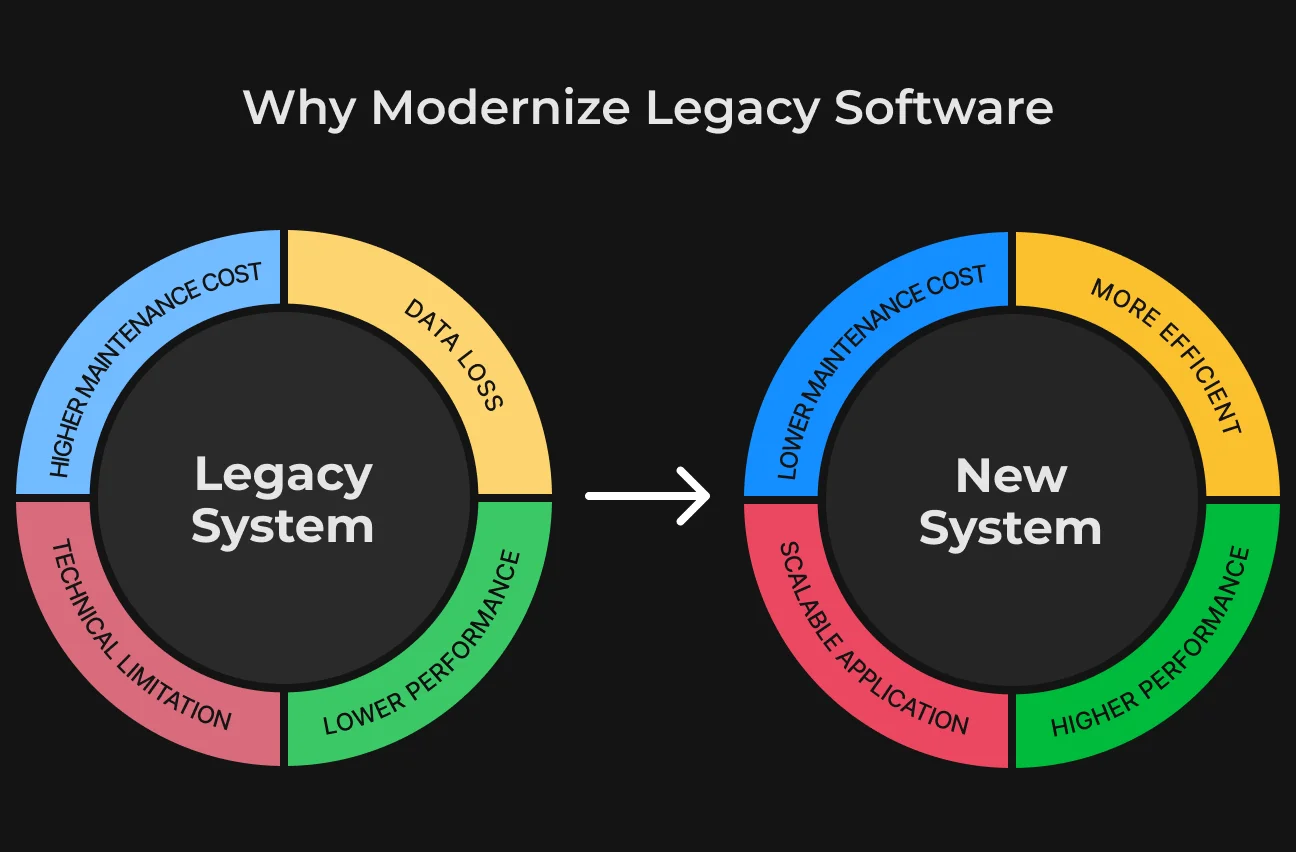
Here are the real risks behind old software and why legacy system modernization is more urgent than ever.
1. Cybersecurity Vulnerabilities and Data Breaches
Old software just can't keep up with today's threats because it often has weak encryption, poor authentication methods, and is missing the latest updates.
This makes older systems easy targets for hackers. In fact, IBM found that the average cost of a data breach hit $4.44 million in 2025, and outdated software is a big part of the problem.
When security patches stop, your system becomes vulnerable. Modernizing legacy applications can fill those gaps with secure coding, real-time monitoring, and compliance-grade defenses.
2. Operational Disruption and System Crashes
Legacy systems usually run on outdated tech or have fragile code that can lead to all sorts of problems. Outages, downtime, and crashes can really mess up your daily operations. Just a weekend outage can drain an enterprise of up to $800,000, according to DOT.
When you modernize legacy systems, you can cut down on these issues. Skilled engineers build modern software that can scale up and recover quickly by either tweaking the existing code or shifting to cloud-native services—without completely stopping your business in its tracks.
3. Accumulated Technical Debt and High Maintenance Costs
Legacy software often accumulates technical debt through patches and quick fixes, making maintenance a struggle. Instead of fostering growth, budgets are consumed just to keep the system running.
That's why a solid legacy app modernization guide and strategy includes efforts to reduce technical debt in legacy systems, refactor messy code, and rework outdated architecture.
4. Incompatibility and Integration Limitations
Modern software ecosystems run on APIs, cloud platforms, and microservices. Legacy systems? Not so much. They often don't support newer integrations, mobile interfaces, or third-party tools, which makes your operations siloed and slow.
API-first legacy modernization helps you break free from those constraints. Your team should replatform or wrap legacy functions with modern interfaces to integrate faster and automate more.
5. Lack of Compliance with Regulations
As laws like GDPR, HIPAA, and PCI-DSS evolve, outdated systems can't keep up. Missing audit logs, poor data control, and weak security measures leave you exposed to serious fines or legal action.
Modernization for compliance helps you align with current regulations, so you need to update how you handle, store, and protect data.
Each of these problems chips away at your business. Together, they create a system that's expensive, risky, and nearly impossible to scale.
Benefits of Legacy App Modernization
Modernizing a legacy system means fixing existing problems and unlocking new potential. A thoughtful legacy app modernization strategy can turn an outdated burden into a growth engine.
Let's talk about what your organization stands to gain.
Cost Reduction and Operational Efficiency
Legacy systems can really drain your budget. You've got licensing fees, custom patches, and old hardware piling up costs. Plus, when only a few developers know the old code, salaries start to climb. Modern apps often run on scalable cloud setups, use open-source tools, and are way easier to manage. By updating these core systems, you could slash IT costs by as much as 30%, according to Deloitte, and boost performance at the same time.
Enhanced Business Agility and Innovation
Modern platforms enhance business agility, allowing for quick adaptation, such as launching new features or integrating third-party tools, which would take weeks or months with outdated software.
Legacy application modernization empowers your teams to build, test, and ship quickly without being blocked by outdated code or clunky processes. This move means faster time-to-market and more room to innovate.
Improved Security and Compliance
Old systems come with some serious risks, like weak encryption, bad access controls, and vulnerabilities that haven't been fixed. Upgrading lets you switch to secure platforms that have features like multi-factor authentication, encryption, audit logging, and automatic updates.
You also simplify compliance. Modernization for compliance brings your system in line with today's regulatory standards, thus reducing risk and avoiding penalties.
Scalability and Performance
Legacy systems often crash under high loads or struggle with concurrent users. They were never designed for cloud-scale or mobile traffic.
With cloud application modernization, your system becomes elastic, able to scale up or down based on usage. Modern stacks also improve speed, reduce latency, and enable 24/7 availability. You no longer have to worry if your infrastructure can keep up with growth.
Addressing Talent Shortages and Vendor Support
Hiring COBOL or Delphi developers isn't easy. As legacy languages age out, finding support becomes harder and more expensive. Plus, many vendors stop supporting old frameworks, leaving you exposed.
When you upgrade your technology, you can hire from a wider talent pool and use better tools. Modernizing your tech helps you find and keep good developers for the future.
Better Customer and User Experience
Today’s users want fast access, mobile compatibility, easy-to-use interfaces, and features that work in real-time. Older systems often fall short in these areas.
Updating enterprise applications allows you to improve important user experiences. You can streamline processes and make engagement better. Whether it’s a user-friendly dashboard or a quicker checkout process, a better user experience leads to happier users and higher retention rates.
Top Strategies for Legacy Application Modernization
There's no one-size-fits-all path to modernization. The right strategy depends on your system's complexity, business needs, risk tolerance, and timeline. Below are the most common options used in legacy app modernization, also known as the “7 R” model, plus a few additional tactics used by SapientPro's engineers.
1. Rehost (Lift and Shift)
What it is:
Rehosting involves legacy software migration from on-premise servers to a cloud environment without making changes to the codebase.
How it works:
You simply “lift” the application from its current hosting environment and “shift” it to cloud infrastructure like AWS EC2, Google Compute Engine, or Azure Virtual Machines. This move allows your team to decommission legacy hardware while gaining access to cloud-level redundancy, basic scalability, and managed infrastructure.
Pros:
- Fastest path to cloud adoption;
- Doesn't require developers to touch business logic;
- No need to retrain internal users;
- Can be a stepping stone toward deeper modernization.
Cons:
- You inherit all the app's legacy issues (poor performance, tech debt);
- Scaling is limited by original architecture;
- No gains in usability, modularity, or agility.
Best for:
Businesses that urgently need to exit legacy data centers or reduce infrastructure overhead without investing in reengineering just yet. Rehosting is often the first stage of a legacy system upgrade, used to buy time before deeper refactoring or rebuilding happens.
Many organizations turn to professional legacy software migration services to minimize risk, ensure compliance, and speed up the transition from outdated platforms to modern, cloud-ready solutions.
2. Replatform (Lift, Tinker, and Shift)
What it is:
Replatforming takes rehosting a step further. While your app still moves to the cloud, you make light modifications along the way to improve performance, cost, or stability without changing the app's core functionality.
How it works:
You can improve your system by moving the database to a managed service, like AWS RDS. You can also replace file storage with S3, update old libraries, or add container management using ECS or Kubernetes. These changes will give you immediate benefits without needing to rewrite everything.
Pros:
- Improves system scalability and runtime efficiency;
- Allows you to tap into cloud-native features like autoscaling, backups, and monitoring;
- Reduces cloud operating costs over time;
- A good balance of speed and ROI.
Cons:
- Still retains much of the legacy structure;
- Some future tech debt may remain unaddressed;
- Can lead to partial improvements instead of full transformation.
Best for:
Mid-size teams pursuing cloud application modernization with limited budgets or engineering bandwidth. Replatforming is popular among SaaS companies looking for a quick upgrade path without rewriting every module.
3. Refactor (Rewriting/Restructuring Code)
What it is:
Refactoring involves modifying your app's internal code to improve readability, performance, and maintainability without changing what the app does from the user's perspective.
How it works:
Refactoring typically means modularizing a large monolith, migrating from outdated frameworks, cleaning up bloated functions, or introducing new design patterns. You may also start breaking services into loosely coupled components (precursors to microservices).
Pros:
- Reduces complexity and technical debt;
- Boosts developer productivity;
- Improves maintainability and testability;
- Sets the stage for further modernization.
Cons:
- Requires deep knowledge of the existing codebase;
- Can take months, depending on size;
- Refactoring without clear goals may introduce new bugs;
- Time-consuming.
Best for:
Organizations that want to modernize legacy systems internally and keep core features but make the codebase cleaner and easier to scale. It's especially useful when the app is still functional but hard to update or troubleshoot.
When you choose to refactor parts of your legacy system, ensuring clean, stable code is essential. Check out our practical guide on how to boost code quality and stability — a great companion to any modernization effort.
4. Rearchitect (Redesigning Architecture)
What it is:
Rearchitecting is about rethinking the structure of your system to support new business needs, scalability, and resilience. Unlike refactoring, which adjusts internal code, this strategy changes how components interact and operate.
How it works:
You might shift from a monolithic app to a microservices or event-driven architecture. You may adopt serverless models or container-based workflows. It often includes introducing modern DevOps, CI/CD, and observability tools.
Pros:
- Positions your app for long-term growth;
- Unlocks modularity, scalability, and high availability;
- Supports parallel development and deployment;
- Enables more advanced legacy app modernization strategies.
Cons:
- High upfront complexity and cost;
- Requires architectural planning, domain modeling, and DevOps maturity;
- Increases risk without expert guidance.
Best for:
Companies investing in enterprise application modernization to support rapid growth, real-time analytics, or global expansion. This is where SapientPro's architecture teams often step in to design scalable solutions from the ground up.
5. Rebuild (Starting from Scratch with Original Scope)
What it is:
Rebuild means throwing out your old codebase entirely and rewriting the application using modern tech, frameworks, and design while maintaining the same core features.
How it works:
This approach allows for total modernization: upgraded UI/UX, secure APIs, and modern infrastructure. It often runs in parallel with the legacy system until the new version is complete and tested.
Pros:
- Clean start with no inherited technical debt;
- Opportunity to fix long-standing UX or performance issues;
- Freedom to adopt modern frameworks, languages, and tools.
Cons:
- High risk and time commitment;
- Complex data migration required;
- Business logic must be re-validated.
Best for:
Systems that are too tangled or outdated to salvage. Companies often choose full rebuilds when legacy documentation is poor or the app can't scale anymore.
6. Replace (Adopting a New SaaS/COTS Solution)
What it is:
Instead of rebuilding your system, you adopt a SaaS platform or commercial off-the-shelf (COTS) product that serves the same purpose.
How it works:
You evaluate the market for platforms like Salesforce, Workday, or Oracle ERP and migrate your processes to that system. Any remaining gaps are handled through configuration or light customizations.
Pros:
- Fastest modernization path;
- Regular vendor updates and support;
- No need to maintain internal code.
Cons:
- May require adapting your workflows to fit the product;
- Risk of vendor lock-in or recurring license costs;
- Loss of control over customization.
Best for:
Organizations with common functions (e.g., HR, accounting) that don't need custom solutions. Replace strategy is also popular in modernization for compliance, since SaaS vendors often support industry standards by default.
If you're choosing to rebuild or replace your legacy system with a SaaS platform, it pays to know how to do it well. Our guide on designing for SaaS offers clear advice for building scalable, modular, and secure cloud services.
7. Retire (Decommissioning)
What it is:
Retiring an application means permanently shutting it down either because it no longer supports your business, its functions have been duplicated elsewhere, or it's become too risky to maintain.
Best for:
Before you pull the plug, your team should assess whether the system is still in use (even indirectly), review any dependencies, and create a data retention or archival plan. Critical data may need to be migrated or securely stored in a read-only format for legal or auditing purposes.
8. Retain (Keeping As Is)
What it is:
Leaving the system untouched temporarily or permanently.
You continue running the system with minimal updates, often isolating it from external changes or wrapping it with protective measures (firewalls, access controls, etc.). This solution is temporary and used to delay a major investment or risk.
Other Strategies to Modernize Your Legacy App
There are several other strategies that you should consider.
- Encapsulation / API Wrappers
Wrap legacy components in APIs to expose limited functionality while hiding complexity.
- Federation
Link multiple legacy systems together to act as a unified layer — great for internal dashboards or BI tools.
- Monolith to Microservices
Decompose the legacy system gradually, isolating features into microservices.
- Hybrid Approaches
Combine multiple methods above, for example, replatform critical modules while retaining less-used ones.
We recommend choosing the right approach based on technical audits, business goals, and risk factors.
Legacy App Modernization Checklist for 2025
Legacy application modernization isn't something you wing. It requires structure, validation, and buy-in from both tech and business sides. Sequencing the work is where most of the risk concentrates, because the order determines how long the business has to run two systems in parallel. CTO consulting services set that sequence against commercial priorities rather than technical convenience. Below is a condensed checklist that maps out the full journey.
Phase | Core activities | Key outcomes | Critical success factors |
| Assessment & Planning |
|
|
|
| Implementation & Execution |
|
|
|
Post- Modernization |
|
|
|
During any modernization project, moving business data safely is just as important as upgrading the codebase. Following legacy data migration best practices ensures accuracy, reduces downtime, and prevents costly errors during the cutover phase.
If your legacy app needs a tailored modernization approach, SapientPro's custom software development services can help you rebuild, refactor, or integrate the right solution from the ground up.
Partner with SapientPro to Modernize Your Legacy System
Modernizing legacy systems is tough, but you don't have to do it alone. Our team helps businesses move from outdated software to scalable solutions. With 8+ years of hands-on development experience, our team has guided startups, enterprises, and investors through every phase of legacy application modernization.
We don't just lift and shift — we assess, plan, refactor, and rebuild with your business goals in mind. If you're battling technical debt, compliance gaps, or integration headaches, we can tailor a strategy that works.
Ready to modernize?
Contact us today to start building your future-proof system.
Modernize your legacy system with sapientpro