
All
How to Develop SDS Management Software: Full Guide
November 8, 202515 min read


As the chemical and pharmaceutical industries grow and safety rules change, old ways of handling safety data sheets just no longer fit. Companies now operate various SDS formats like PDFs, scans, local templates, and different languages without a standard to rely on. It often leads to SDS libraries being stored in different places, which makes them difficult to access and update.
These challenges highlight the need for effective SDS management solutions. SDS management software offers a fix by making it easier to access up-to-date safety information and meet regulations. It allows facilities to centralize SDS storage, ensuring everyone who requires it can access the data and maintain accurate version tracking.
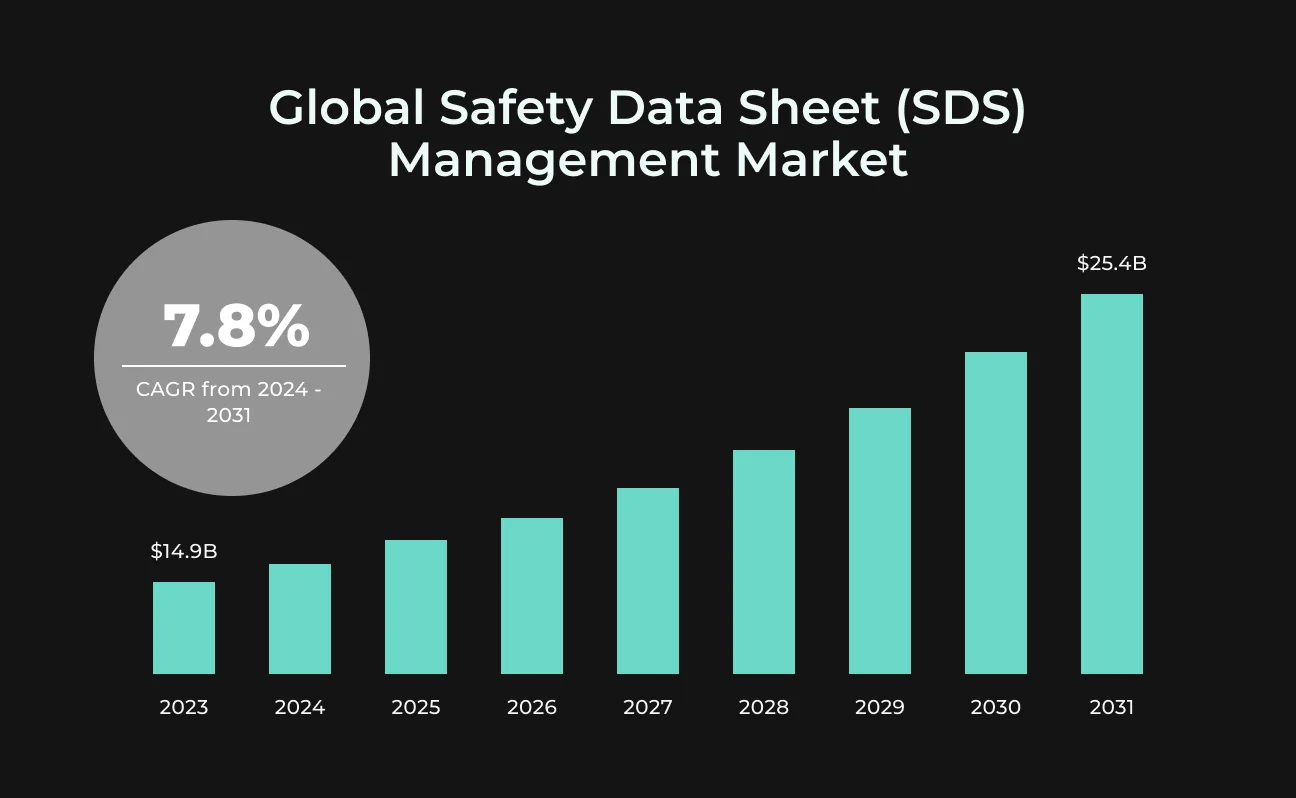
It's no surprise that the SDS management market is expected to grow from $14.9 billion in 2024 to $25.4 billion by 2031, with an annual growth of 7.8%. This article by SapientPro's experts explains the importance of SDS management software and provides a step-by-step guide to developing it.
Key Takeaways
- An SDS management system is a digital tool that helps facilities keep their safety data sheets for dangerous chemicals organized and updated;
- Many companies still have difficulties with OSHA for not handling SDS libraries correctly;
- The market for SDS management systems is expected to grow from $14.9 billion in 2024 to $25.4 billion in 2031, with an annual growth rate of 7.8%.
What is SDS Management Software?
The Global Harmonized System (GHS) aimed to simplify chemical safety documents, but it's actually made creating and updating safety data sheets more complicated. Companies often struggle to keep up with constantly changing national regulations.
AI services can help identify outdated information, find missing details, and give real-time product updates. There’s a need for a system that can manage multiple languages and automatically create country-specific SDS using templates.
This digital tool is SDS management software that organizes and updates safety data sheets for hazardous chemicals. It ensures safety officers and employees have immediate access to key information, like handling instructions, exposure risks, and emergency procedures.
Managing all these hazardous materials manually can be a slow-going and error-prone process, especially with different supplier formats. An efficient GHS-compliant SDS software standardizes this, so information is easy to find. It also keeps all chemical safety details current, accurate, and compliant with regulations.
Benefits of SDS Software in Your Company
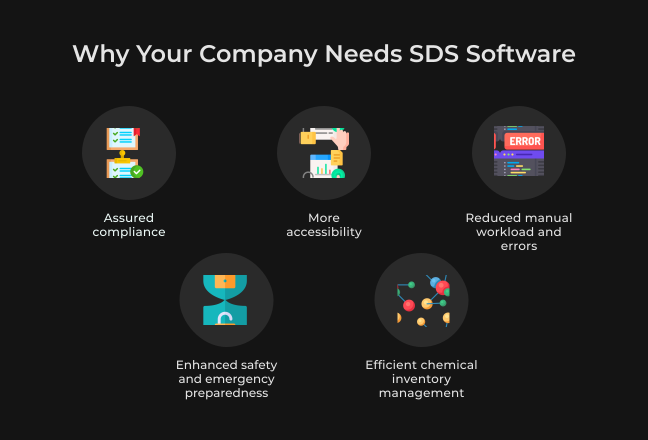
Your workplace must tell you about any hazards, and the manager has to make sure you can easily find the safety data sheets to understand these dangers. Safety data sheet management software simplifies this. Below, you’ll see why this software is a great investment and how it can make life easier in your facility.
Assured Compliance
Hazard communication software helps you follow the law by keeping your safety sheets up to date with the latest regulations. This reduces the risk of fines and boosts your reputation, showing you're committed to compliance and running a responsible business.
Reduced Manual Workload and Errors
Companies depend on SDS files, which come in all sorts of formats, like PDFs and scans, and in different languages and templates. So they're often disorganized. Right-to-left scripts like Hebrew or Arabic or specific regional rules add even more confusion.
Efficiency is what helps save time and money for EHS leaders. Since automatic SDS software keeps everything precise, there's no more stress and guesswork over document accuracy, since everyone gets the same info.
Enhanced Safety and Emergency Preparedness
Risks to health and safety at work are always possible, and everyone should keep alert. For example, in 2021, a chemical plant in Alabama had an accident that killed two people and poisoned a third. It turned out the company didn’t check the air quality or train workers on risks. OSHA fined them $232,000 for 10 violations.
Having SDS software, it's easy to keep safety data sheets always current to comply with OSHA regulations. It's your very own compliance software that helps save you from aggravating fines.
With easy access to SDS, your employees are armed and ready, using the right tools to handle materials safely.
Efficient Chemical Inventory Management
OSHA still frequently cites companies for not properly handling hazard communication, like missing or incomplete safety data sheets. In 2025, each serious violation could cost up to $16,550.
SDS software shows you, in real time, how much of each chemical you have, where they are, and what dangers they pose. This simplifies managing chemical inventory and helps you avoid having too much or too little.
Key Features of SDS Software for Your Enterprise
SDS management features are like a personal assistant for your paperwork. They make SDS task management much easier and keep you aligned with the latest regulations. No matter the size of your facility, these tools help you stay compliant and leave you more time to do important tasks.
Centralized Data Repository
SDS software should offer a single repository for all safety data sheets, keeping them in one place. This helps avoid scattered information, making sure everything is consistent and easy to find.
With all safety documents organized together, facilities can improve their document management, simplify processes, and keep current, accurate records of all chemical info.
Advanced Search and Accessibility
The software provides rapid access to safety data sheets or chemical information using search options like chemical name, manufacturer, or CAS number. It ensures employees can quickly retrieve safety information and improve their decision-making.
Automated Updates and Regulatory Monitoring
Auto-updates ensure your safety data aligns with the latest regulations, including OSHA, REACH, and GHS. This spares your team from overwhelming paperwork and helps you avoid fines.
Label Generation
Every uploaded SDS should automatically be given a visual hazard label that reflects its pictograms and key warning statements (like signal words or H-phrases). These labels could be both searchable and filterable, allowing users to easily identify products with significant environmental or health risks.
Label generation feature improves navigation through SDS records and facilitates quick risk assessments directly from the platform. Additionally, the labels can be printed and used wherever necessary.
Integration with Existing Systems
Safety data sheet software can easily integrate with your current business systems, like ERP, EHS, or inventory management. This connection ensures seamless data flows across programs, making chemical management a natural part of your larger business operations.
User Management and Access Controls
A role-based SDS system can comprise roles like global admin, client admin, or client employee, each with distinct permissions for login, access control, and system management. This streamlines platform administration and ensures secure, suitable access according to each user's responsibilities.
Training Management Integration
The software helps you keep tabs on employee training for safety data sheets and hazardous materials. This ensures everyone knows their chemical safety requirements, meets compliance requirements, and boosts workplace safety.
Chemical Inventory Management & Approval Workflows
Another key point of effective SDS management is the ability to track and monitor chemical inventories. It's indispensable to easily find products with hazardous materials and track their usage to keep the workplace safe.
Reporting and Analytics
Advanced reporting and analytics tools help companies see how they’re using chemicals, while staying safe and following rules. By breaking up these numbers, they can spot trends and find areas that need more attention.
Emergency Response Support
SDS software provides emergency teams with rapid access to vital chemical safety information. This might include procedures for cleaning up spills or instructions for administering first aid. Teams can respond instantly by having such quick access, minimize the effects of hazardous events, and ensure the safety and health of workers.
Feature Category | Specifics | Description |
| Data management | Centralized data storage hub | Puts all safety documents in one easy-to-find place, which improves data control and consistency. |
| Usability | Advanced search and accessibility | Allows for quickly finding safety data using different search options, boosting efficiency and decision-making. |
| Regulation and compliance | Regulatory monitoring and automated updates | Keeps safety info up to date with the latest rules, cutting down on legal burdens like paperwork. |
| System integration | Integration with existing systems | Simplifies data sharing for all business systems, improving operations and connectivity. |
| Employee training | Integration of training management | Monitors employee safety training to make sure everyone follows the rules and the workplace remains safe. |
| Analytics and reporting | Data analysis and report generation | Provides vital info on safety practices using data. |
| Safety and emergency response | Emergency response support during times of crisis. | Gives teams crucial safety info so they can quickly and effectively take care of chemical hazards. |
How to Develop SDS Management Software
An effective SDS management system guarantees compliance, helps communicate hazards, and keeps employees safe. Solutions like SapientPro's AI-based Product Room can speed up this process through automation.
Next, let's look at the step-by-step development of chemical management software, from planning to ongoing updates.
Step 1: Discovery and Planning
- Begin with a list of all chemicals your facility uses. Identify their properties and current management practices;
- Collect data essential for software design, like stakeholder needs, existing issues with SDS management, and user requirements;
- Review regulatory requirements, including OSHA’s Hazard Communication Standard, REACH regulations, and global GHS requirements. Make sure the software follows these guidelines and is flexible enough to handle any new changes;
- Identify current systems, like ERP or EHS software, that your SDS platform must integrate with. Effective integration ensures seamless data exchange and workflow efficiency throughout the facility;
- Determine necessary resources (including personnel and technology) for the project. Assign roles and scenarios, set a budget for development, deployment, and maintenance. Then, accurately forecast the time and financial requirements for successful project management.
Step 2: Design and Architecture
- Develop a flexible design for SDS management software, including grid, typography, controls, and modals. Plan both the front-end and back-end to manage big data effectively;
- Create an intuitive and user-friendly interface that improves SDS management. Design for diverse users, from safety professionals to those accessing SDS data, because good UI/UX improves user adoption;
- Develop user stories to understand how different roles interact with the software. Focus on features like handling documents, searching, compliance reporting, and integration;
- Show these designs to stakeholders to ensure they match business and regulatory needs. Use prototypes or wireframes to see how the designs look. Incorporate user feedback during development to make them better.
Step 3: Development and Implementation
- Keep your focus on building core SDS management software modules like document management, compliance tracking, and automated workflows. You can add AI features for tasks like data extraction and language translation, similar to SapientPro's Product Room;
- Create APIs and connectors to integrate with existing systems. This streamlines SDS management software integration with ERP;
- Make a plan on how to transfer the current SDS records into the new system. Include steps for checking, cleaning, and organizing this data.
Step 4: Testing and Quality Assurance
- Create a testing plan with unit, integration, and system tests to ensure everything works before the software goes live;
- Make sure the software follows all the rules by teaming up with compliance experts. Double-check that hazard info is correct and the SDS docs are formatted right;
- Fix any security holes and make sure the system follows data protection laws, like GDPR, especially if you're working with international data;
- Let end-users test the software to make sure it does what they need and works in real life. Use their feedback to fix everything and make it better before launching.
Step 5: Deployment
- Roll everything out in stages to avoid mistakes. Start with a test run in a few departments to solve any last-minute issues before lunch;
- Get all current and new SDS data into the software. The system must process it correctly to avoid mistakes right from the start;
- Train users so they can easily use the software. This increases the product's value and gets you a better return on investment.
Step 6: Maintenance and Ongoing Improvement
- Once you launch it, make sure to keep the software updated regularly. This will improve its functionality, address user feedback, and meet new regulatory standards;
- Use tools to monitor how the software performs. So, you can see areas to improve. These insights help make the system better and faster;
- Continually collect user feedback. This valuable information helps refine the software, keeping it relevant and user-friendly;
- Provide fast tech support to solve user issues. Regularly update security patches to prevent new threats and protect important data. Tools like SapientPro’s Product Room can greatly boost efficiency, particularly when handling challenging tasks like processing multilingual safety data sheets.
How SapientPro Developed a Custom SDS Management Solution
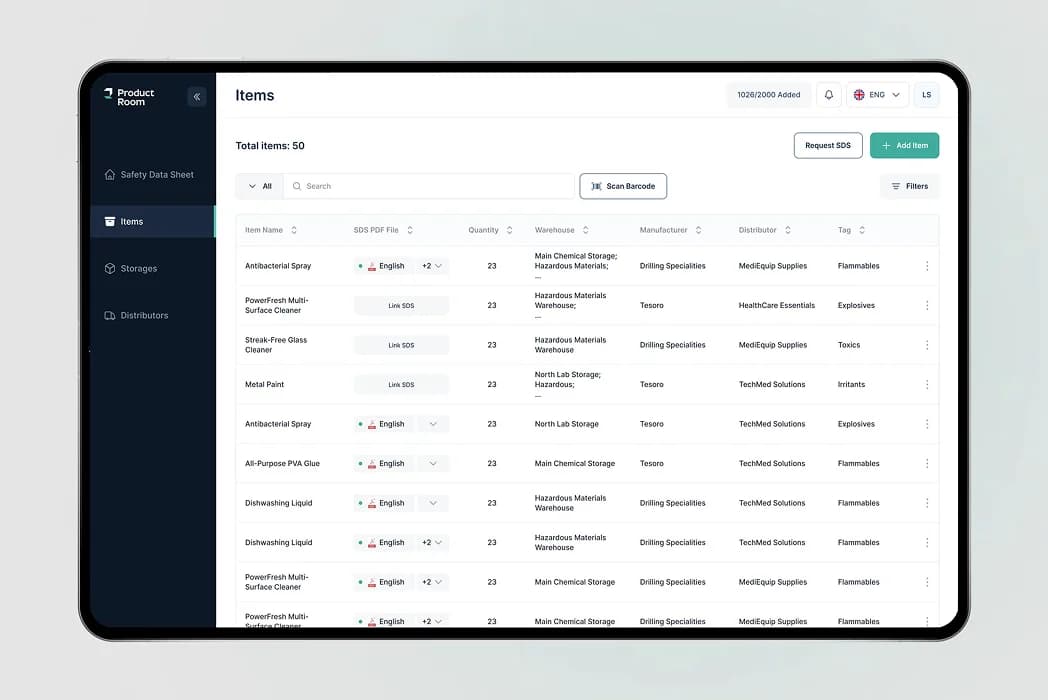
Product Room is a comprehensive AI platform that effectively sorts out safety data sheets (SDS). It resolves common headaches like mismatched formats, missing info, and the unexplained SDS with no barcode (perfect for those products that prefer to stay incognito). Plus, Product Room matches SDS files across languages and regulatory standards like GHS and OSHA.
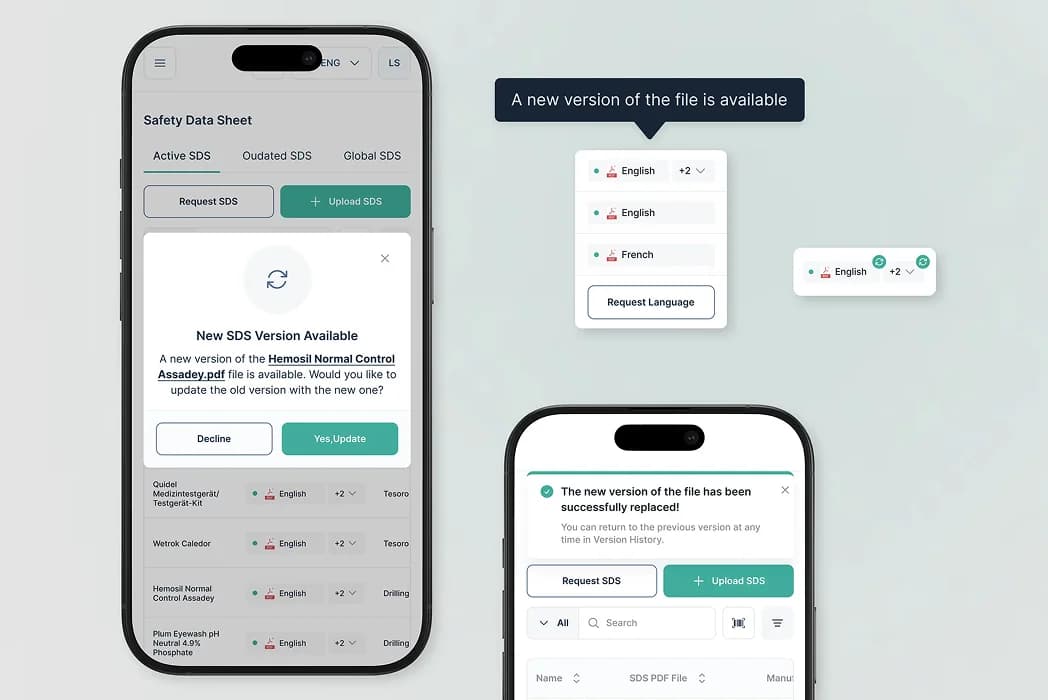
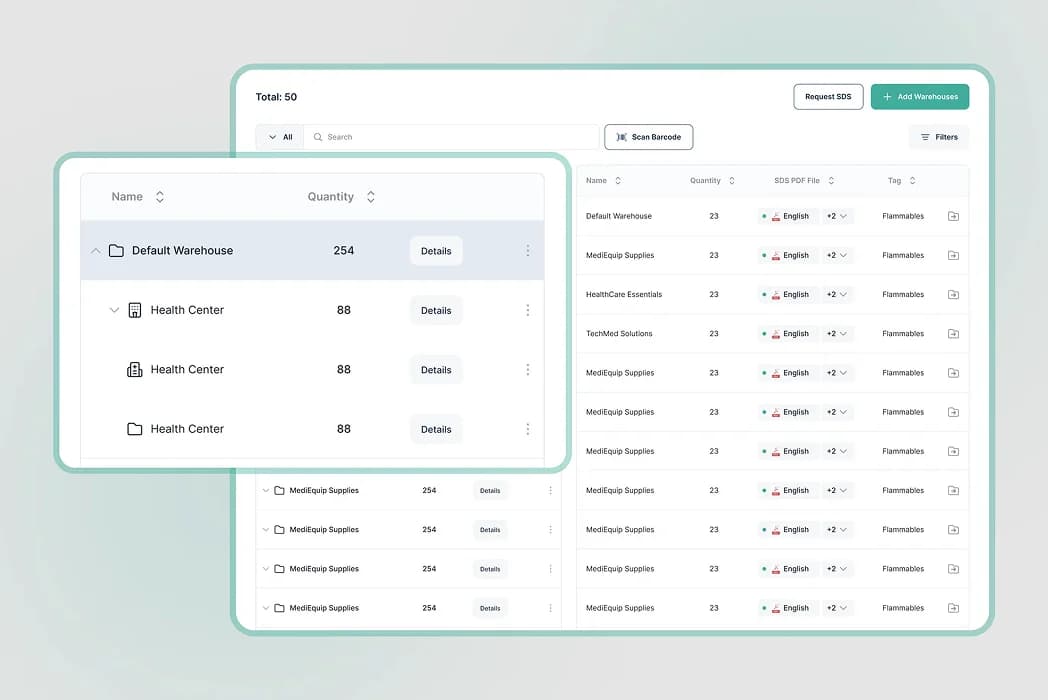
The platform is equipped with practical features like organized SDS storage, automatic data extraction, and access control based on roles. It supports hospital and business users with top-notch search tools, email integration, and version tracking to make sure everyone follows the safety rules.
SapientPro's team also added some specific, user-focused features:
- Quick chemical searches for finding SDS info fast;
- Multilingual and version-savvy matching, which prevents document duplicates;
- Labels to identify products that bring significant environmental or health issues;
- Instant SDS access through product codes;
- Notifications for SDS updates to get the latest safety information.
Product Room turns safety data sheets into a handy dashboard, where AI handles multiple languages, auto-fills important info, and labels hazards with pictures.
The platform lets you import sheets with a click, get reminders when they’re about to expire, and use filters for up-to-date chemical details. Plus, staff members can see only what they need based on their job, whether they work in the lab or the warehouse.
Partner with SapientPro to Build Your SDS Management Software
If building SDS management software has become a daunting task, consider teaming up with SapientPro. Our skilled team provides strategic solutions that match your business goals. We focus on building compliant SDS software to streamline documentation, ensure regulatory compliance, and make your safety operations smoother.
Let us transform your compliance setup with a custom SDS solution for fast and efficient progress. Contact us for a consultation to overcome any technical challenges in managing your safety data.
Start Developing Your Own SDS Management Software