All How to Build an AI Dictation App for Real Workflows
May 29, 202615 min read


Many people still see voice tools as a faster way to type. But in reality, these tools can generate real-time records across different work scenarios, like medical consultations, legal interviews, or internal meetings.
A study covering 270 enterprises in the tourism and hotel industry shows that between 2022 and 2025, the industry’s customer acquisition cost rose by 35%.
Customer lifetime value grew by only 4.5%.
The value of speech-to-text technology is far from limited to generating raw transcripts that require manual sorting. It is in turning spoken information into something the team can use right away: a call summary, a CRM note, a task list, or a compliance record.
In this article, SapientPro’s engineers explain how speech-to-text software works and what it takes to build a dictation app that does more than convert voice into text.
What Is an AI Dictation App?
A few years ago, speech-to-text software had a very simple job: you spoke, and the tool turned your words into text. That was practical, of course, but quite limited.
It worked like a digital notepad — good for quick notes, but not something that really supported a team’s daily workflow.
Modern AI dictation apps can do much more. They can transcribe long sections of audio recordings, identify speakers, and organize information for specific use cases.
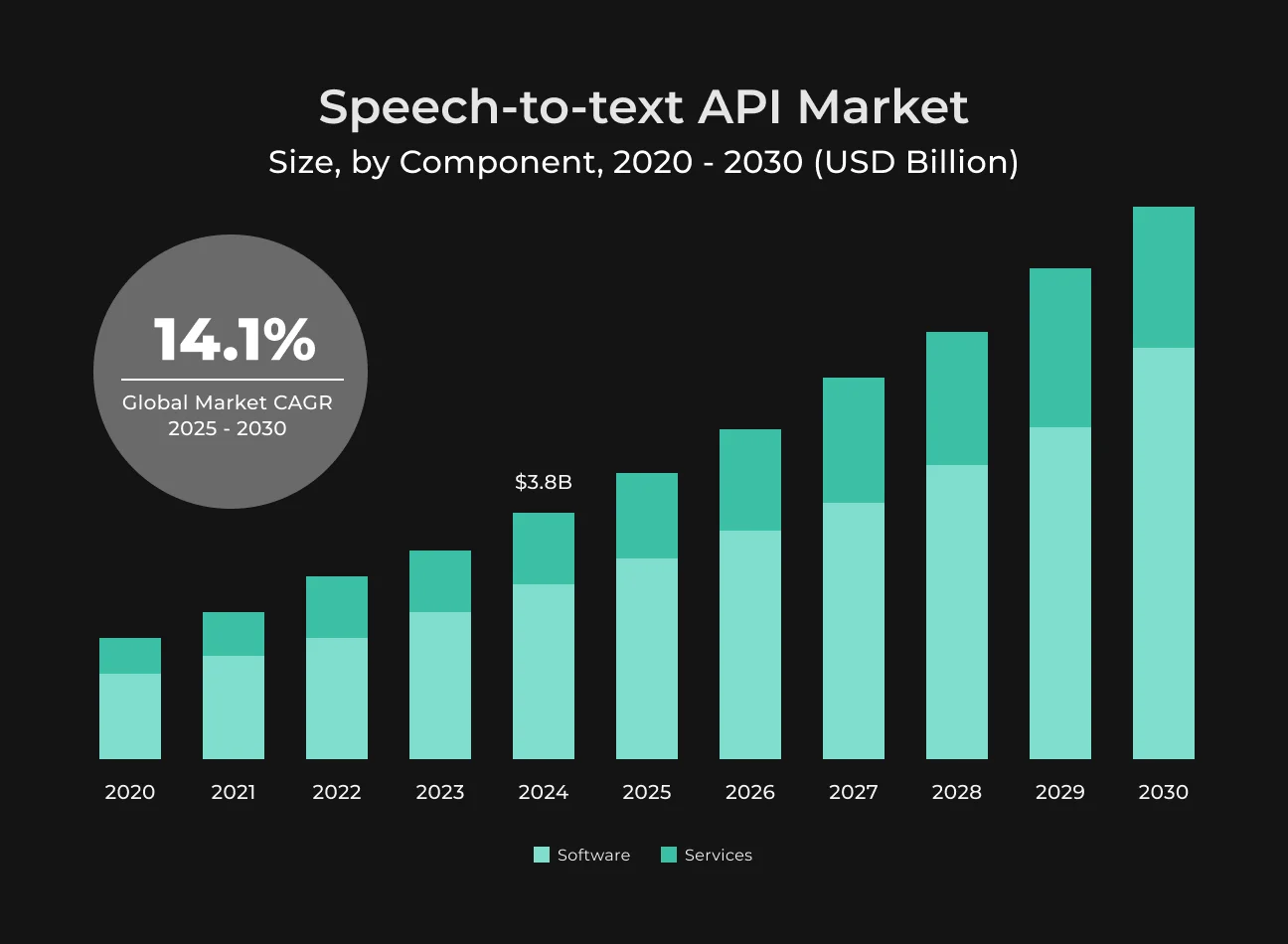
AI dictation software captures speech and converts it into usable content. The global speech-to-text API market might reach $8.4 million by 2030. It also prevents the loss of important information after conversations end.
Voice Dictation Apps
A voice dictation app helps users enter text without stopping to type. They can speak into a CRM, email, note, form, text box, or internal platform, and the app places the words directly where they are needed.
A strong dictation app should also understand punctuation, basic editing commands like delete that or start a new paragraph, and cursor-level insertion.
This is what makes modern voice dictation software more useful than basic voice input. An AI dictation app helps users write faster, reduce manual corrections, and work without switching between tools.
Transcription Apps
This is the basic operating logic of a transcription app: users upload existing audio or video files, and the application converts the content into text. Such a voice transcription app can be used for interviews, podcasts, webinars, training materials, or company meetings.
For example, multiple companies conducted research with an AI meeting assistant and discovered it could save over 4 working hours each week. This is an entire month of working time annually.
The best transcription app should also export files in different formats:
- DOCX;
- TXT;
- PDF;
- SRT;
- VTT, and more.
Live Transcription Apps
A live transcription app converts speech into text when conversations are in progress. Users see live captions in real time.
These tools are used in meetings, support calls, interviews, webinars, conferences, or online classes. Live apps also help people with hearing impairments follow conversations. For teams, they reduce note-taking pressure and prevent the omission of important information.
High-quality speech recognition software should understand different accents, process overlapping speech, filter background noise, and recognize fast speech.
Medical Dictation and Ambient Documentation Tools
Modern AI medical dictation software can listen to a doctor-patient conversation, identify medically relevant details, prepare draft notes, and format content for use in an EHR system.
The need for this is clear. Clinical documentation is one of the biggest pressure points for physicians. In one report, 62% of doctors named excessive documentation as the main cause of burnout. AI adoption in healthcare is already moving forward, with 79% of healthcare organizations using AI in some form.
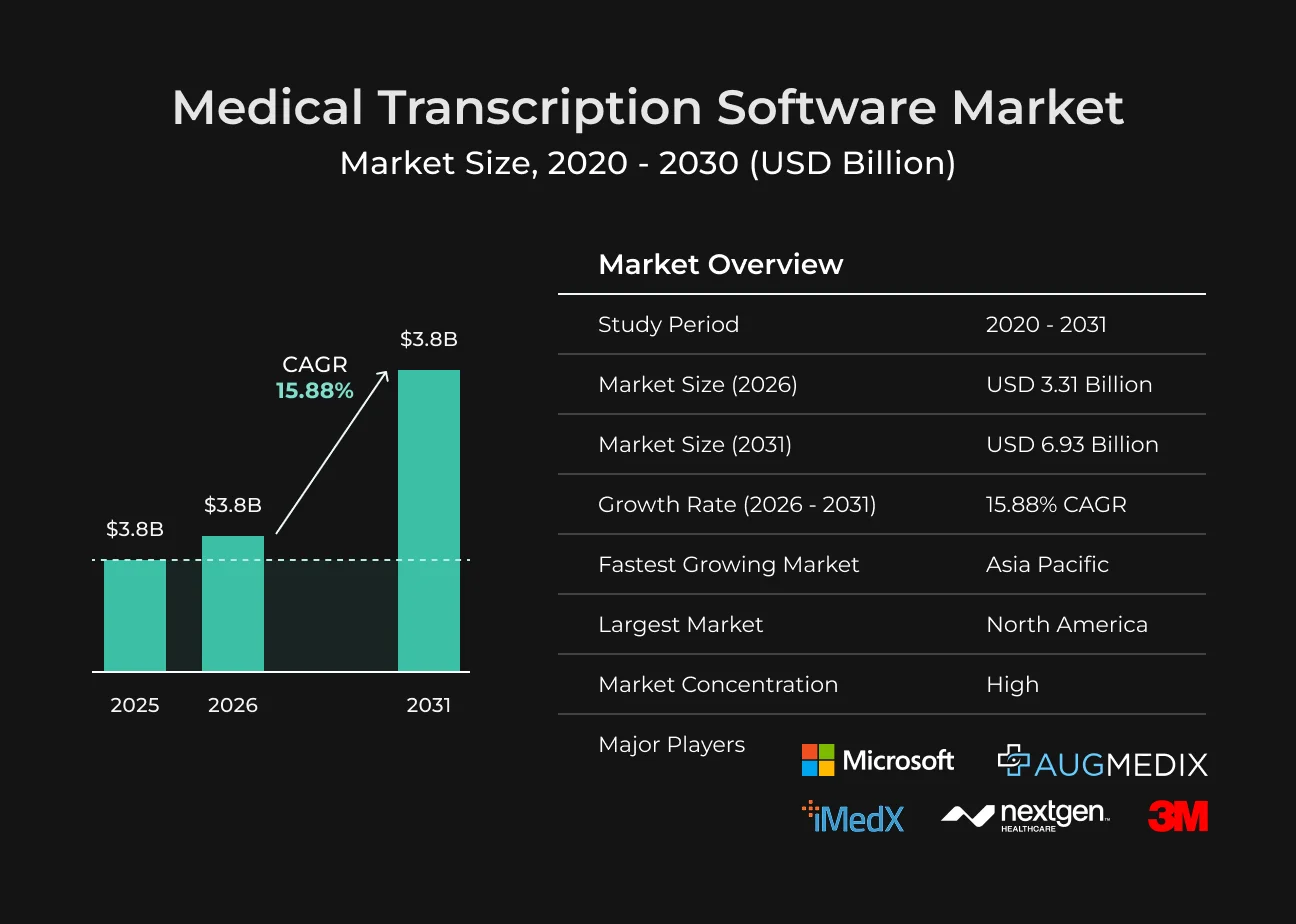
That is why medical dictation software helps turn a real conversation into documentation that is closer to what clinicians actually need.
How Does Speech-to-Text Software Work?
An audio processing system should complete core tasks like audio cleaning, text recognition, text optimization, and output delivery. The following section explains the logic of how speech-to-text software works.
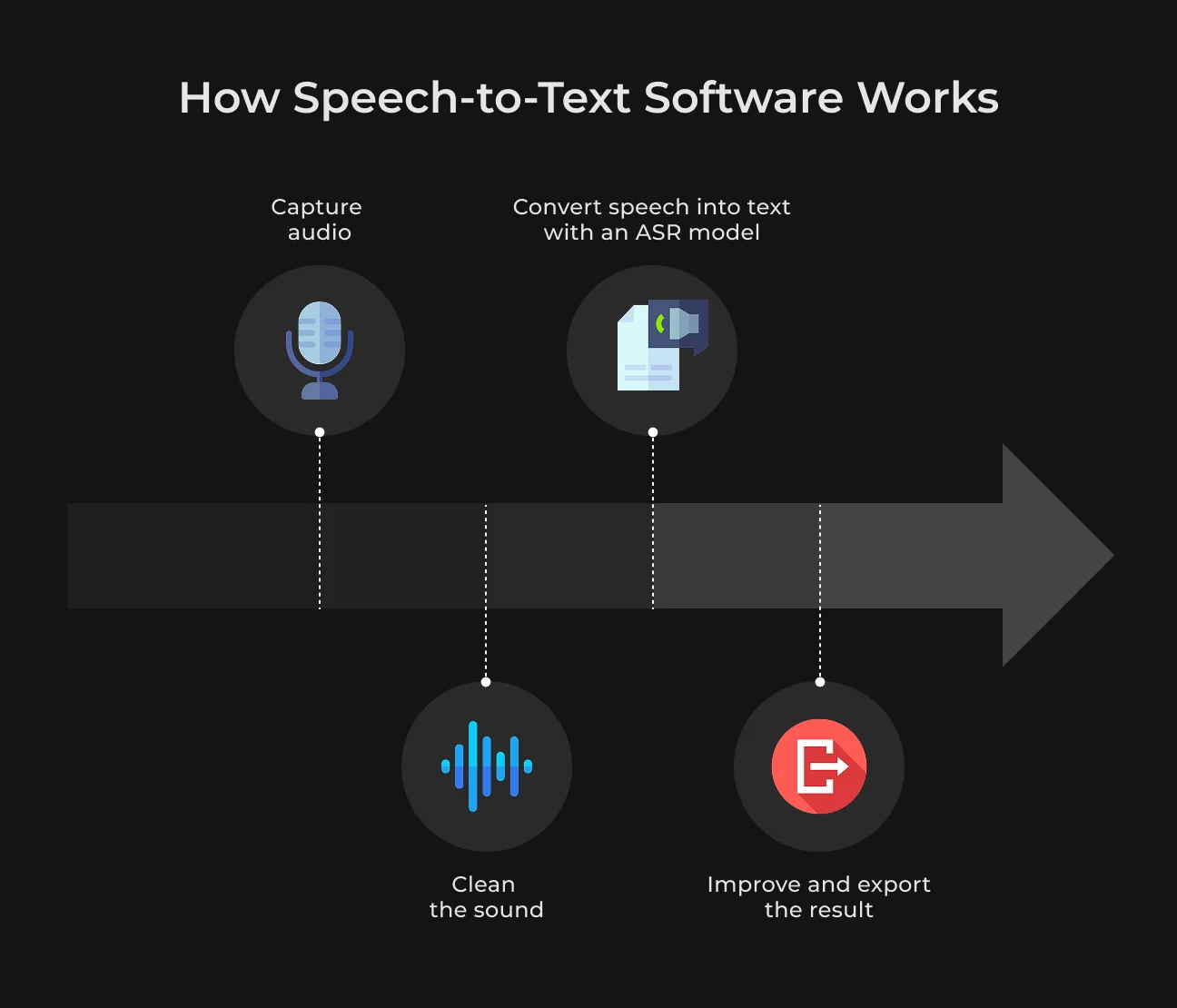
Step 1: Audio Capture and Preprocessing
The starting point of all speech-related processing is audio. The user may speak into a microphone, record a call, or upload an audio or video file.
Before the speech recognition software starts to understand the words, the audio needs to be prepared. This can include reducing background noise, adjusting the volume, normalizing the sound, checking the sample rate, and detecting where speech actually starts and stops.
Among these steps, voice activity detection can filter out interference like silence or pauses. And this matters because poor input leads to poor output.
Step 2: Speech Recognition Model
After audio preprocessing, the automatic speech recognition model (ASR) steps in. It analyzes audio signals and predicts spoken vocabulary. Its output quality depends on accents, background noise, language, speech rate, and industry-specific terminology.
General-purpose models can process daily conversations, but they struggle to understand medical terms or regional accents. Your choice of ASR model can make or break how useful the app can be for real-world teams.
Step 3: Post-Processing
After the model creates the first text version, the system improves it. This stage can add punctuation, capitalization, paragraph breaks, timestamps, speaker labels, and formatting.
More advanced apps may also show confidence scores, highlight unclear words, suggest corrections, or detect action items. For example, if the system is not sure about a name or technical term, it can flag that part for review.
Step 4: Workflow Output
The final step is to decide what happens to the text. In basic tools, the output may be a raw transcript. In more complex products, the same spoken input can become a formatted meeting note, CRM entry, medical note, or searchable knowledge base entry.
The goal is to move information from a conversation into the system where people actually need it.
How Does Voice Recognition Software Work Differently?
Many people often use the terms speech-to-text and speech recognition interchangeably. But they are not identical concepts. Speech-to-text processes a user’s voice input to produce text outputs, including transcripts, notes, and subtitles.
Voice recognition apps has a broader range of functions, like identifying speaker identity, verifying voiceprints, or recognizing commands.
For example, a banking app may use voice authentication to confirm a customer’s identity. A meeting tool may separate speakers and match each part of the conversation to the right person.
Feature | Speech-to-Text Software | Voice Recognition Software |
| Main purpose | Converts spoken words into written text | Recognizes voice patterns, speakers, commands, or intent |
| Question it answers | What was said | Who is speaking |
| Common outputs | Transcript, note, subtitle | Speaker, command action, intent detection |
| Use cases | Dictation, transcription, captions | Voice authentication, smart assistants, call routing |
Main Features of a Strong AI Dictation App
The best speech-to-text app should not give users a raw transcript and leave them to fix and organize everything manually. It must complete the full process of audio capture, transcript cleaning, and integration with tools users already work with.
The features below make that possible.
Real-Time and Batch Transcription
Speech-to-text software must support both real-time transcription and file-based transcription. These two modes adapt to different user needs. Real-time transcription can be used in meetings, customer service calls, interviews, and online courses.
Batch transcription works better for recorded files.
A user uploads an audio or video file, and the system processes it after the recording is finished. This is usually a good fit for podcasts, training videos, research interviews, or long meetings where timestamps and accuracy matter more than instant output.
Speaker Diarization
Speaker diarization helps separate different voices in a conversation, so users can clearly see who said what. Without it, the transcript can turn into one long block of mixed voices. This makes it harder to review, follow the conversation, and understand the context correctly.
Smart Punctuation and Formatting
Raw transcripts are hard to read because people do not speak in perfect sentences or clear paragraphs. A good voice transcription app should clean up the text automatically. It can add punctuation, capitalization, paragraph breaks, and basic structure.
For more advanced tasks, it can also turn the transcript into headings, bullet points, summaries, or ready-to-use templates. As an example, a sales call or team meeting can be turned into a clear recap with key points and next steps.
Domain Vocabulary and Custom Terms
General speech-to-text software solutions work well for routine tasks. Yet they still face terminology barriers across sectors like healthcare, law, finance, logistics, or SaaS. The specialized terms of these fields might not be included in these tools’ databases.
Even minor transcription errors can trigger substantial practical problems, like incorrect product names recorded in support tickets or wrong terms in medical notes.
Editing and Human Review
Even high-performance AI models require human reviewers. The app should help analysts find parts that need attention. Review features usually include low-confidence highlights, timestamp-based audio playback, version history, and simple manual editing.
If the system is unsure about a name, number, or technical term, it just flags that part.
Export and Integrations
A professional app for team collaboration must support universal export formats, including TXT, DOCX, PDF, and SRT. It should also connect to mainstream business tools that teams commonly use, like CRM and cloud storage.
For example, sales teams can use call notes that sync with HubSpot and Salesforce. Medical teams can use structured notes prepared for an EHR.
Privacy and Consent Controls
Voice data can contain private, medical, financial, or business-sensitive information.
The best transcription app must include clear consent flows, access rights, retention settings, audit logs, and data deletion options. Here, privacy is not something that can be added right afterward.
Dialect-Sensitive AI Voice Assistant
See how SapientPro developed a dialect-sensitive assistant that works in Arabic.
AI Features That Make Dictation Software More Useful
Traditional speech-to-text tools can only perform mechanical transcription, retaining spoken filler words (like “um” and “ah”) in their original form.
The new generation of speech recognition AI can identify intent, organize content to adapt to professional workflows, and help voice input deliver far greater value than standard typing input.
AI Formatting
When you dictate ideas freely, you rarely speak in perfectly formatted paragraphs. An advanced AI dictation app solves this by automatically organizing your raw stream of consciousness into clean, professional layouts.
This AI dictation software can identify promised tasks from a user’s dictation and connect them to the right workflow. It also supports importing standardized templates for medical SOAP notes or technical teamwork tasks.
AI Correction Suggestions
Standard autocorrect often introduces frustrating errors by guessing words out of context. A smart AI dictation app is more like a collaborative editor.
Good text processing software can recognize field-specific terms, technical abbreviations, and names. It can also smooth out awkward wording, fix tense issues, and remove repeated phrases.
People should still stay in control. Voice recognition AI software can highlight suggested edits and let users accept or reject the changes in one click.
AI Summaries
Transcribing a long session can be exhausting. AI processing compresses long-form audio into accurate overviews based on the context of the interaction.
Context | What AI Captures |
| Meetings and sales calls | Core decisions, customer complaints, budget constraints, and steps to take. |
| Patient visits | Clinical updates, symptoms discussed, and prescribed treatments. |
| Support recaps | Key issue, troubleshooting steps taken, and resolution status for the next shift. |
AI Search Across Transcripts
Traditional search makes users remember the exact words used in a recording. If they search for revenue, they may miss a part where someone said sales performance was up.
Semantic search works differently. It looks at the meaning behind the words. For example, a person might search for timeline decisions, and the system can still find the right part of the conversation even if no one used the exact word decision.
AI Workflow Automation
The real value of modern dictation is that it can connect spoken notes with the tools people use every day. Users can speak once and let the system turn that input into the next action.
For example, after a client call, a short voice recap can update a CRM record, create a new lead profile, or change the status of a task.
This tool can also generate a first draft of follow-up emails based on the conversation content. Users only need to review the draft before sending it.
It can even extract details like names, dates, and numbers from summaries to automatically fill in complex forms. This actually reduce smuch of the users’ manual work.
How to Build a Speech-to-Text App: Core Development Steps
Start by mapping the full audio path. This is something like how users record or upload audio, how the app processes it, where the transcript is stored, and how the final text will be used.
This checklist lays out all core development steps.
Step | What to do |
| 1. Choose the main use case | Define who will use the app and why, like for meetings, interviews, medical appointments, legal calls, etc. |
| 2. Decide how users will add audio | Plan whether users will record directly in the app, upload files, make calls, or import recordings from meeting tools. |
| 3. Select the speech recognition model | Choose between a cloud API, an open-source model, or a custom ASR model. |
| 4. Prepare the audio before processing | Add basic audio cleanup. This includes noise reduction, volume normalization, format conversion, and splitting long files into smaller parts. |
| 5. Build the transcription flow | Decide whether transcription will happen in real time, after upload, or both. |
| 6. Add speaker separation | Use speaker diarization so the transcript shows different speakers instead of one mixed block of text. |
| 7. Make transcripts readable | Add punctuation, capitalization, paragraph breaks, timestamps, and simple formatting. So users do not have to clean everything manually. |
| 8. Add editing and search tools | Let users correct mistakes, rename speakers, highlight important parts, search by keyword, and export the final text. |
| 9. Use AI for summaries | Turn long transcripts into short recaps, meeting notes, next steps, or structured templates. |
| 10. Plan storage and security | Decide where audio files and transcripts will be stored, who can access them, and how sensitive data will be protected. |
| 11. Test with real audio | Check the app with background noise, accents, poor microphones, several speakers, and long recordings. |
| 12. Improve after launch | Track common transcription mistakes, user edits, processing time, storage costs, and feedback to improve the product. |
Common Challenges When Building Speech Recognition Software
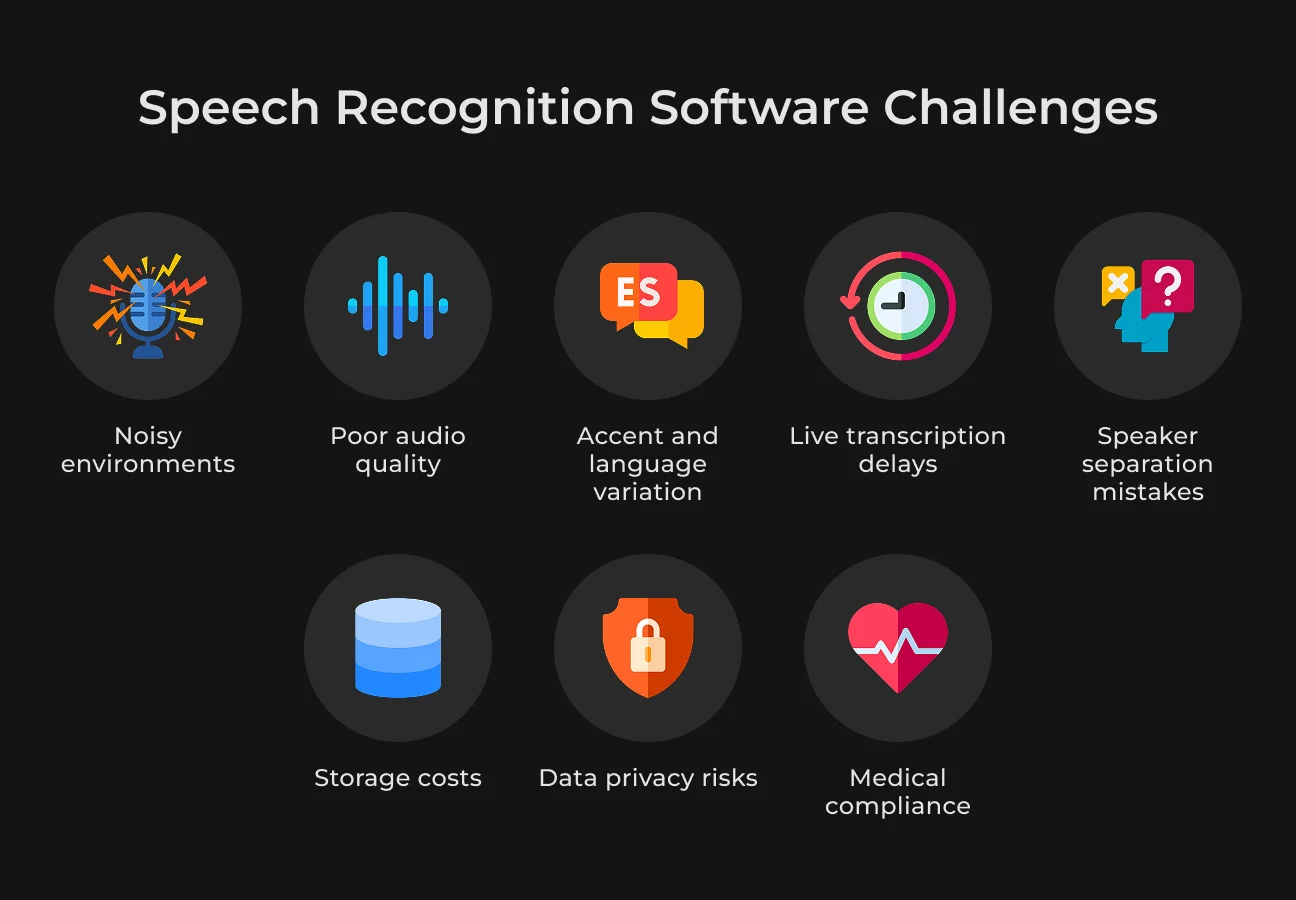
Many people think speech recognition is simple. You just record audio, process it, and get text. But the product has to balance accuracy, speed, and security to work in real scenarios.
Accuracy in Noisy Environments
Audio quality impacts transcription accuracy. Background noise, poor microphones, weak recording setups, and people speaking over each other can all cause missing or incorrect words.
Medical terms, legal wording, product names, technical phrases, and company-specific jargon can be easy for the system to misread. Voice recognition software has to be trained and tested on the exact type of speech it will work with.
Accent and Language Variation
We all speak in different ways. Accent, region, age, speaking speed, and personal style all affect how speech sounds. Some users also mix languages, use slang, shorten words, or stop mid-sentence and start again.
Latency in Live Transcription
Live transcription has to be quick, so people can follow the conversation as it happens. The issue is that instant text is often less polished because the system has less time to check context, wording, and accuracy.
Many apps manage this by showing a rough version first. They clean up the transcript a few seconds later or after the speaker stops talking.
Speaker Separation
Speaker diarization separates voices in a recording, so the transcript is easier to follow. Still, it can get confused when people talk over each other, interrupt, sound alike, or change the way they speak.
Users should be able to fix speaker names, correct wrong labels, and edit unclear parts of the transcript.
Cost Control
Speech recognition costs can grow when the app runs long recordings or has many users. API usage, cloud storage, and backups all add to the final cost.
A practical way to manage this is model routing. Simple voice notes can go through a lighter, cheaper model. Noisy calls, long meetings, or industry-specific recordings can be sent to a more advanced one. This keeps quality where it matters without overspending on every file.
Data Privacy
Original audio can include private details like names, addresses, phone numbers, or client information. Once this speech is turned into text, it becomes easier to search, copy, store, or share, which increases the privacy risk.
Users need clear control over the process: when recording starts, what information is saved, why it is collected, and how they can delete it later.
Medical and Enterprise Compliance
Healthcare, legal, or enterprise clients usually expect a deeper level of control than regular users. They may ask for security documents, audit logs, vendor checks, access rules, and data retention policies.
For such users, governance cannot be added later. It has to be part of the app from the start.
AI-Powered Sales Expansion Tool
See how SapientPro developed a solution that cost $1/hour per agent.
Best Practices for Building a Speech-to-Text App for Your Market
Before choosing development priorities, think about your users. Ask who will use the app, and what kind of recordings they will upload. Doctors, sales managers, and students have different demands, so a universal product design won’t work.
Know the Main Use Case First
Do not build a speech-to-text app around random features. Start with real user situations. For example, doctors may need structured clinical notes. Sales teams need short call summaries and follow-up points. Legal teams need accurate transcripts with speaker labels and secure storage.
Test the App With Real Audio
Do not test the app only with clean demo recordings. Use audio that reflects real conditions before launch. This will help you find weak points, improve recognition accuracy, and avoid problems when people start using the app.
Build Custom Vocabulary for Each Industry
Speech-to-text apps can make errors involving personal names, product names, or professional technical terms. Pre-configuring a custom vocabulary can prevent users from repeatedly correcting the same mistake.
For example, a healthcare app may include drug names, symptoms, diagnoses, clinical abbreviations, or procedure names. A legal transcription tool needs court terms, case references, and names of laws.
Connect Transcripts to Real Workflows
Users shouldn't manage a raw transcript and nothing else once they finish using a speech-to-text app. Your app should connect with existing office tools, like CRMs, task managers, calendars, or document storage systems. A sales manager, for example, can receive the main points or a follow-up list after a meeting.
How SapientPro Built AI Speech-to-Text Software
SapientPro’s engineers have extensive experience in AI dictation app development.
An AI language learning app required a voice tutor that could hold a real conversation without lag. The team built a low-latency speech pipeline on Azure AI Services and OpenAI, with live avatars that respond in sync with spoken output.
Pronunciation scoring runs at the phoneme level. Grammar corrections surface mid-conversation, not after. Users can interrupt or rephrase without losing context. Delivered in 300 hours for a Dutch language school and works live since March 2025.
Building an Arabic voice assistant was harder. The client needed dialect detection from the first few words of a call — Egyptian, Gulf, Levantine — and the system had to hold that dialect through the conversation even when the speaker switched to French or English mid-sentence.
Gender, tone, and regional cues fed into response generation.
The team combined multiple pre-trained models into a hybrid architecture and built a custom TTS engine tuned to match accent and cadence per dialect. VoIP integration kept latency low enough for real-time calls. 1,500 hours of development; 80% dialect accuracy on delivery.
The e-commerce assistant built by SapientPro is a different category, but the engineering problem is the same one that comes up in dictation: interpreting what the user actually means, not what they literally typed. The assistant handles vague natural-language queries — no product names, no filters — and returns accurate results under one second.
It uses a dual-mode search engine where the LLM decides in real time whether to run a keyword or vector search. Early work used Qdrant; the team switched to PostgreSQL with pgvector when filtering and aggregation hit their limits.
Built in 180 hours as a proof of concept on an existing ShopWare platform.
The pattern across all three: the AI output has to be immediately usable. A transcription that needs cleanup, a response that misses intent, or a result that takes two seconds — any of these breaks the workflow. That's the bar SapientPro builds to.
Why Choose SapientPro for AI Dictation App Development
SapientPro builds custom AI voice products. We work on dictation apps that convert speech into structured content — meeting notes, reports, commands — and handle the full stack: voice capture, real-time transcription, and post-processing cleanup.
The problems that make voice software hard in the real world are ones we've dealt with directly: accents, background noise, overlapping speakers, domain-specific vocabulary, and latency.
We know where these break down and how to design around them.
Depending on what you're building, we can help with:
| AI call automation | Bots that handle inbound calls, answer FAQs, capture orders, and route issues without a human agent |
| Custom dictation apps | Speech-to-text tools built around specific workflows, with domain vocabulary and transcript cleanup included |
| Voice assistants | Dialect-aware, multilingual assistants that respond in under a second and connect to your existing data sources |
| Appointment and booking systems | Voice-driven scheduling that syncs with calendars and sends reminders automatically |
| Voice interfaces for existing products | Adding a voice layer to a SaaS platform, CRM, or internal tool that currently has none |
If you have a voice product to build, let’s discuss you're working on.
Build Your AI Dictation App Today
Turn voice into workflow-ready business output.