All How to Automate Contract Management
July 10, 202615 min read


Most contracts are scattered across emails, shared drives, or spreadsheets. This chaos drags out approvals and causes teams to miss critical deadlines like auto-renewals. Basically, the average business loses almost 9% of value annually through poor contract management. Top performers keep this loss around 3%, and the worst-performing companies lose 15% or more.
A structured contract management process reduces this loss. Moving to contract management software pulls your documents out of hidden folders and into one clear, searchable hub.
Read on for a practical guide from SapientPro’s experts on how to automate contract management without making the workflow heavier.
What Is Contract Management Automation?
Contract automation takes over routine tasks: typing out standard clauses, chasing down signatures, updating a status the moment a document moves forward. People often lump this in with contract management software, but a basic contract management solution is really just the traditional way of tracking files with spreadsheets and shared folders.
Automation starts smaller and more specific, like a template that pulls in client data on its own instead of someone copying it in by hand.
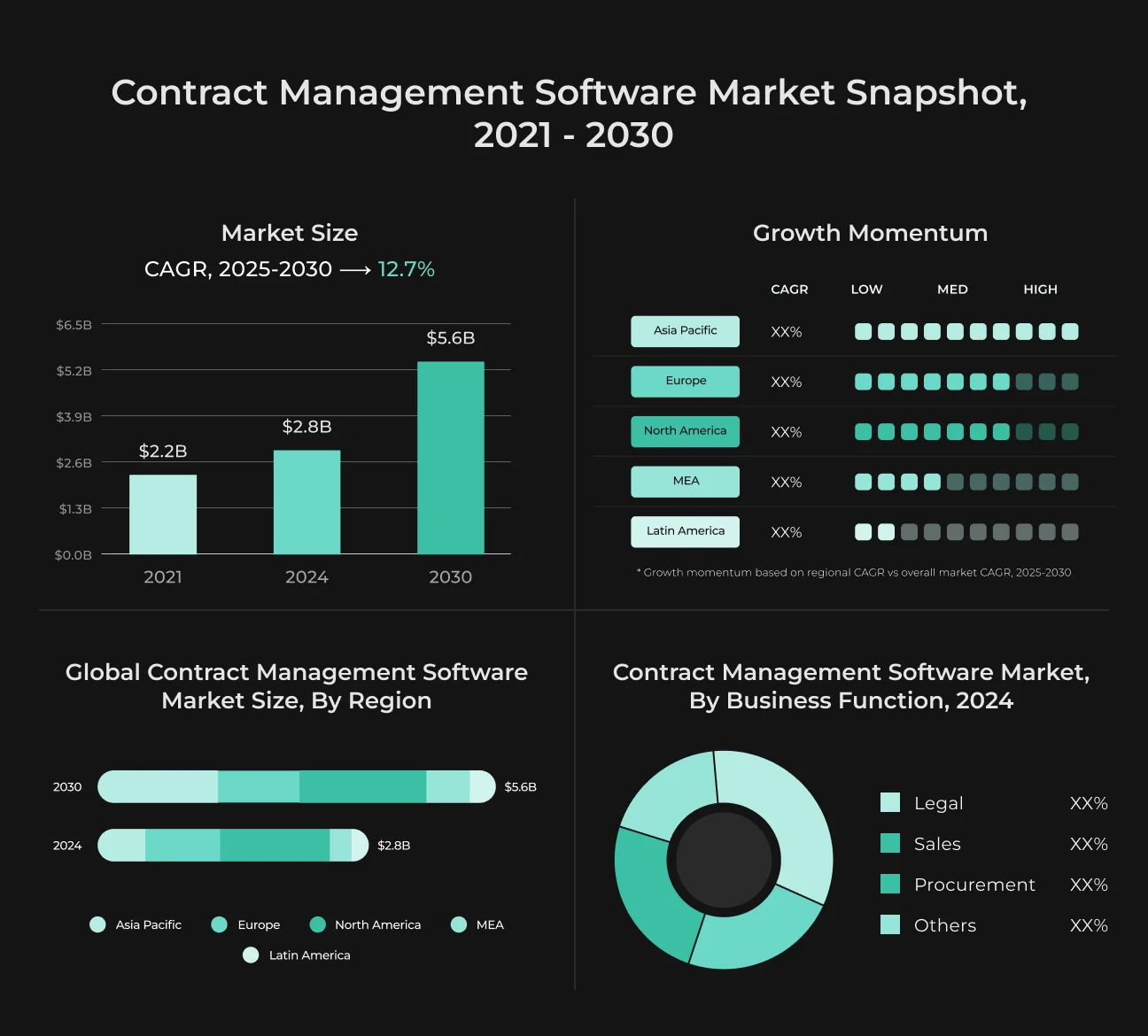
To manage the full cycle, from request to renewal, in one place, you need contract lifecycle management (CLM) software. Spending on these platforms is projected to reach $5.65 billion by 2030. The AI layer in CLM tools scans contract text directly, flags risky clauses, and pulls out deadlines, so reviewers spend their time only on what actually needs a second look.
What Parts of the Contract Management Process Can Be Automated?
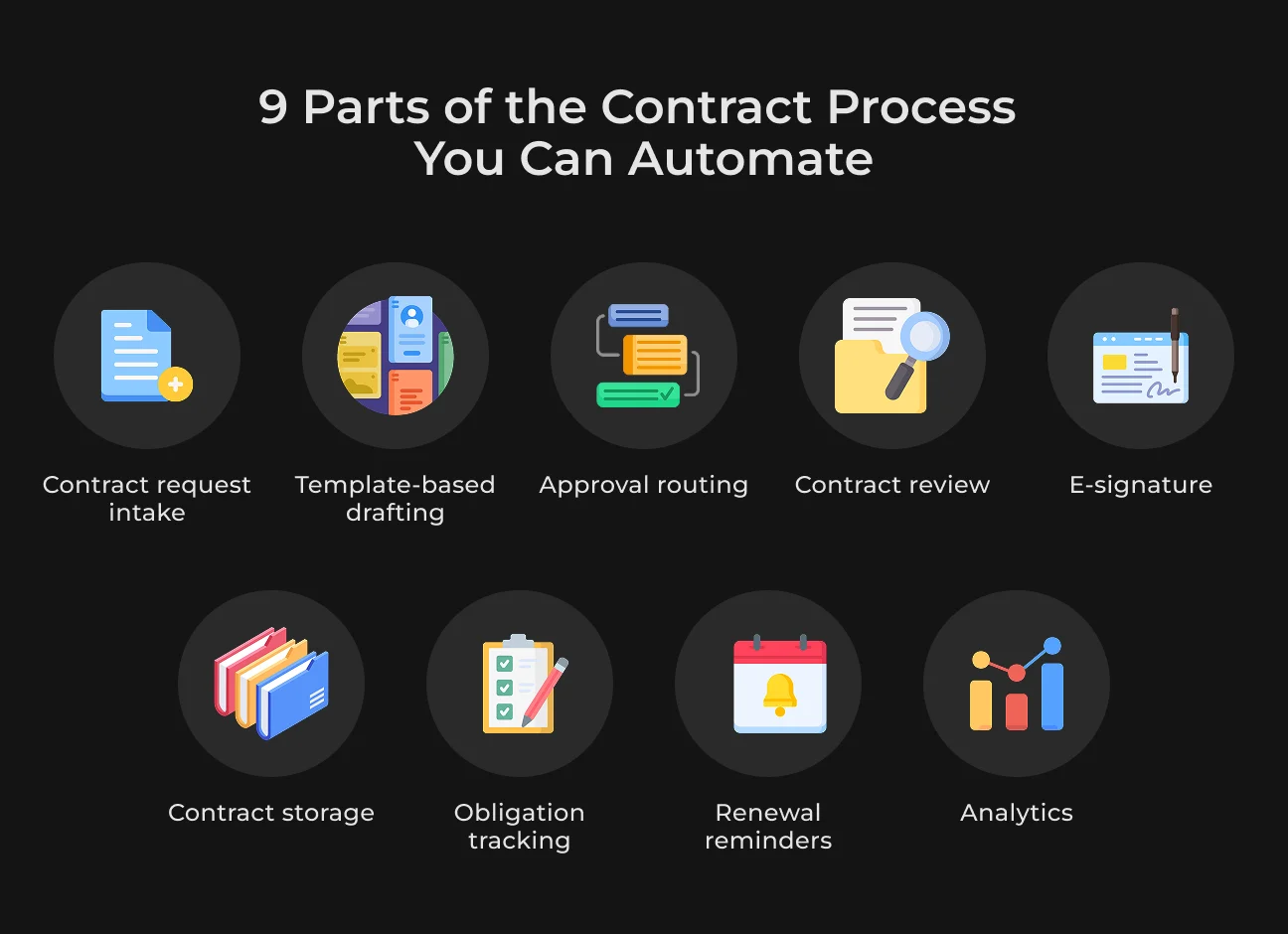
Targeting one specific bottleneck at a time is the easiest way to fix a broken contract management workflow. Mapping out the steps individually makes it obvious where manual paperwork slows down a deal or creates a risk.
Contract Request Intake
Contract requests often start in Slack messages or emails with missing details. A simple intake form forces teams to provide key data (like deal size or counterparty names) before they can submit anything. Legal gets a complete file on day one, cutting out days of back-and-forth questions.
Template-Based Drafting
Copying and pasting clauses from old Word documents is a fast way to leave a wrong client name or outdated terms in a new deal.
This tedious manual drafting eats up time when legal workloads are growing — 96% of professionals say their companies expect more from them than two years ago.
Instead, contract automation software pulls information straight from the intake form into approved master templates, generating a clean first draft.
Approval Routing
Contracts often stall in internal inbox loops. When sign-offs drag out, companies end up missing 90-day cancellation windows or delaying regulatory filings, which leads to fines or forced renewals.
Automatic routing rules push the document to the right person instantly. For example, agreements over a certain dollar amount skip the first-level approval queue and go straight to executive leadership.
Contract Review
Negotiating via email attachments makes version control impossible. Moving edits into a shared browser space lets everyone work from the same version.
Reviewers can use modern contract tools to catch unauthorized clause changes or hidden liabilities, so nobody wastes time proofreading standard text line by line.
E-Signature
Chasing people for physical signatures wastes days. Sending a digital link lets clients sign from their phone or laptop in seconds. As soon as the final sign-off happens, the software archives the document automatically.
Contract Storage
When signed contracts live on personal employee folders, finding them later is harder. A shared cloud hub fixes this by keeping everything in one secure place. The automated contract management system indexes every word, so you can search thousands of pages and pull up a specific clause instantly.
Obligation Tracking
Relying on manual spreadsheets to remember payment milestones or deadlines increases the risk of missed dates. Modern software scans the text and turns these dates into reminders so nobody has to track them by hand.
Renewal Reminders
Missing a cancellation deadline usually means paying for another full year of a service you don't even use. Setting up alerts for 30, 60, or 90 days out gives you enough breathing room to renegotiate rates or drop the vendor before it auto-renews.
Analytics
Trying to speed up your contract management workflow without hard data is just guesswork. Live dashboards track exactly how long contracts take at each step, showing where deals slow down and giving leadership the clarity needed to fix the friction.
Key Features of AI Contract Management Software
Take a look at the features that support legal and sales work from request to renewal:
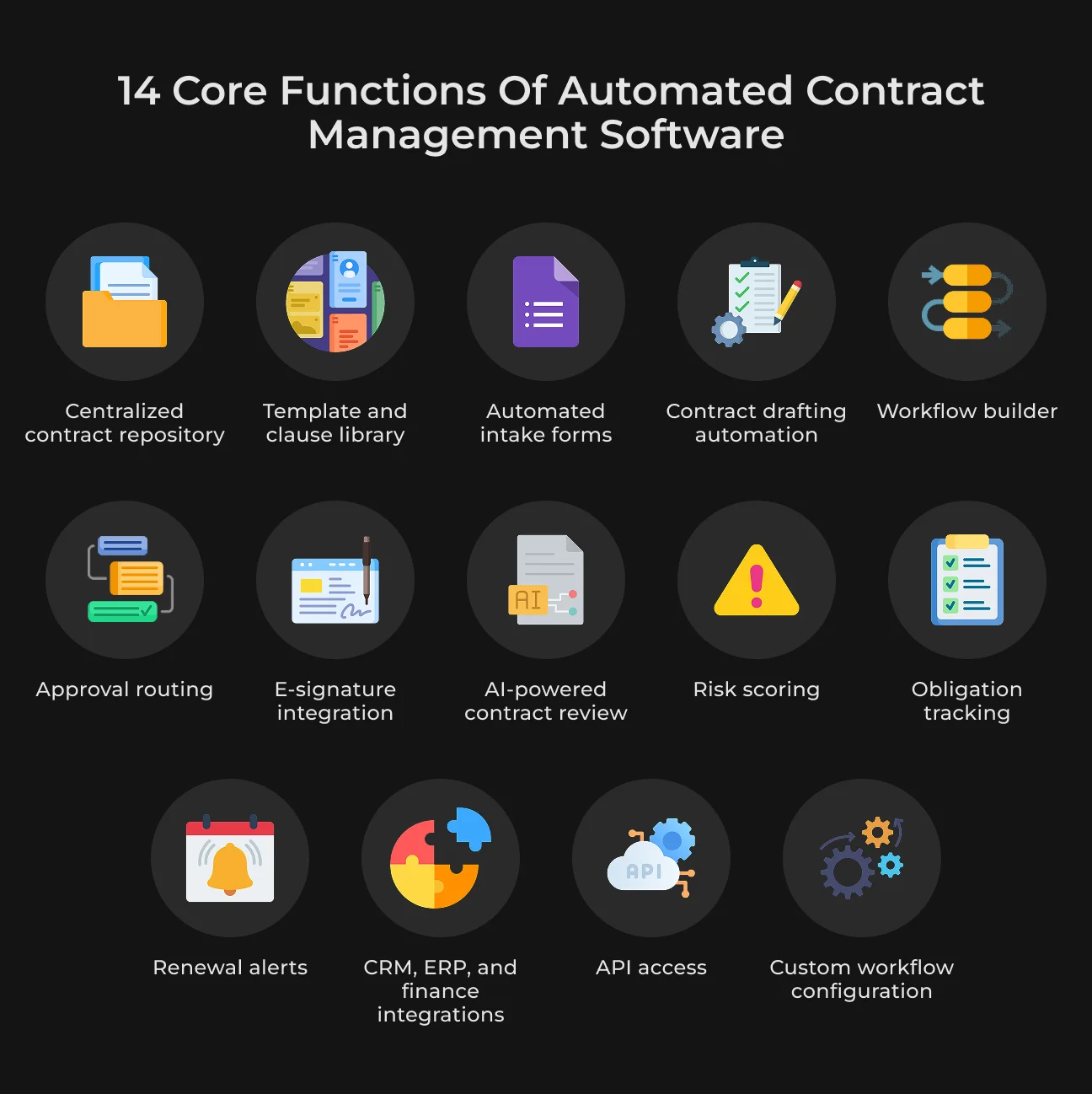
- Centralized contract repository. A single cloud hub that eliminates scattered local folders and keeps all active agreements secure;
- Template and clause library. Pre-approved text modules that let teams generate standard documents without waiting for manual legal reviews;
- Automated intake forms. Dynamic questionnaires that collect key deal data upfront to prevent messy email requests;
- Contract workflow automation. Tools that populate master templates with intake data to generate a clean first draft;
- Workflow builder. A visual setup that lets you map out your specific business logic and internal processes;
- Approval routing. Logic that pushes documents to the right stakeholders based on defined parameters like deal size;
- E-signature integration. Built-in digital signature tools that allow parties to execute agreements securely from any device;
- AI-powered review. Automated scanning that analyzes incoming third-party documents to flag legal issues;
- Risk scoring. A system that evaluates compliance and rates the liability level of a contract before anyone signs it;
- Obligation tracking. Post-sign monitoring that tracks specific performance milestones and financial commitments;
- Renewal alerts. The system sends renewal alerts before cancellation windows close;
- CRM, ERP, and finance integrations. Connections that link contract data directly to platforms like Salesforce, NetSuite, or HubSpot;
- API access. Open contract software development tools that allow your engineering team to connect contract workflows with proprietary internal software;
- Custom workflow configuration. The flexibility to modify routing paths and rules as your organizational structure scales over time.
AI in Contract Management
Legal teams are already testing GenAI in daily work. Thomson Reuters reports that GenAI use in the legal sector almost doubled, rising from 14% in 2024 to 26% in 2025.
AI contract management is most practical at the review and data extraction stages. It can shorten the first read, prepare contract data for tracking, and find unusual language faster. The final decision belongs to the people who understand the deal, the risk level, and the company’s legal position.
Faster Contract Review
AI can prepare a short summary before a lawyer opens the full draft. A good summary focuses on terms that affect decisions, like liability limits or renewal rules.
Clause comparison checks third-party wording against approved legal language and shows where the draft moves away from the playbook. Risk flagging can point reviewers to missing data protection terms or unusually broad liability language.
Suggested redlines need tighter control. Use approved fallback wording, so the reviewer works with language the legal team already accepts.
Better Control After Signature
Signed contracts often turn into static files after the deal closes. AI can extract renewal dates and notice periods from executed agreements, then turn them into fields owners can track.
Search also becomes more practical. A contract owner can ask which vendor agreements renew next quarter or which customer contracts include high-risk liability terms. This saves time during audits, renewals, and migration from old shared drives.
AI can also spot duplicate files or records where metadata does not match the signed agreement. These small errors create real problems later, especially when teams rely on contract data for billing, reporting, or compliance.
Risks That Need Attention
AI can misread a clause or miss the business context behind it. A side letter or special pricing term can change the meaning of the agreement, even if the main contract looks standard.
Access control needs careful setup. A sales user might need customer agreement data, but sensitive employment files or acquisition documents need to stay restricted.
AI cannot leave the team guessing later. If a question comes up during an audit or dispute, the record needs to show what the tool flagged and how the reviewer handled it.
How to Implement AI Safely
Before adding AI to contract work, clean up the legal playbook. The tool can compare clauses or suggest fallback wording only after legal confirms which terms the company accepts.
Start with a narrow rollout:
- Test AI on NDA summaries or renewal-date extraction, where mistakes are easier to catch;
- Keep lawyer review for contracts with liability or data protection risk;
- Check extracted renewal dates against the signed document before they affect alerts or reports.
Keep each AI flag tied to the exact contract version. Then add the reviewer’s final decision next to it.
Contract Management Automation Implementation Roadmap
Use the starter checklist below to keep the rollout small and practical. Choose one contract type your team handles often, test the workflow on real requests, and add more contract types once the process works in daily use.
| Area | Actions |
| Pilot scope | Choose one contract type for the first rollout |
| Process | Review three recent contracts and mark where delays appeared |
| Approvals | Remove sign-offs that do not change risk or terms |
| Ownership | Assign the person responsible after signature |
| Files | Keep the signed contract as the main record |
| Data | Check the renewal date and notice period against the signed file |
| Templates | Upload only legal-approved templates |
| Routing | Send the contract to the right reviewer automatically |
| Signature | Connect the approved file to e-signature |
| Renewals | Set alerts before the notice window closes |
| AI | Test AI on summaries or renewal dates first. Only then check the AI output against the signed contract. |
| Rollout | Run the pilot with one team |
Ready to Automate Your Contract Workflow?
Let's map your current process and find where automation saves the most legal review time.
Common Contract Lifecycle Automation Mistakes to Avoid
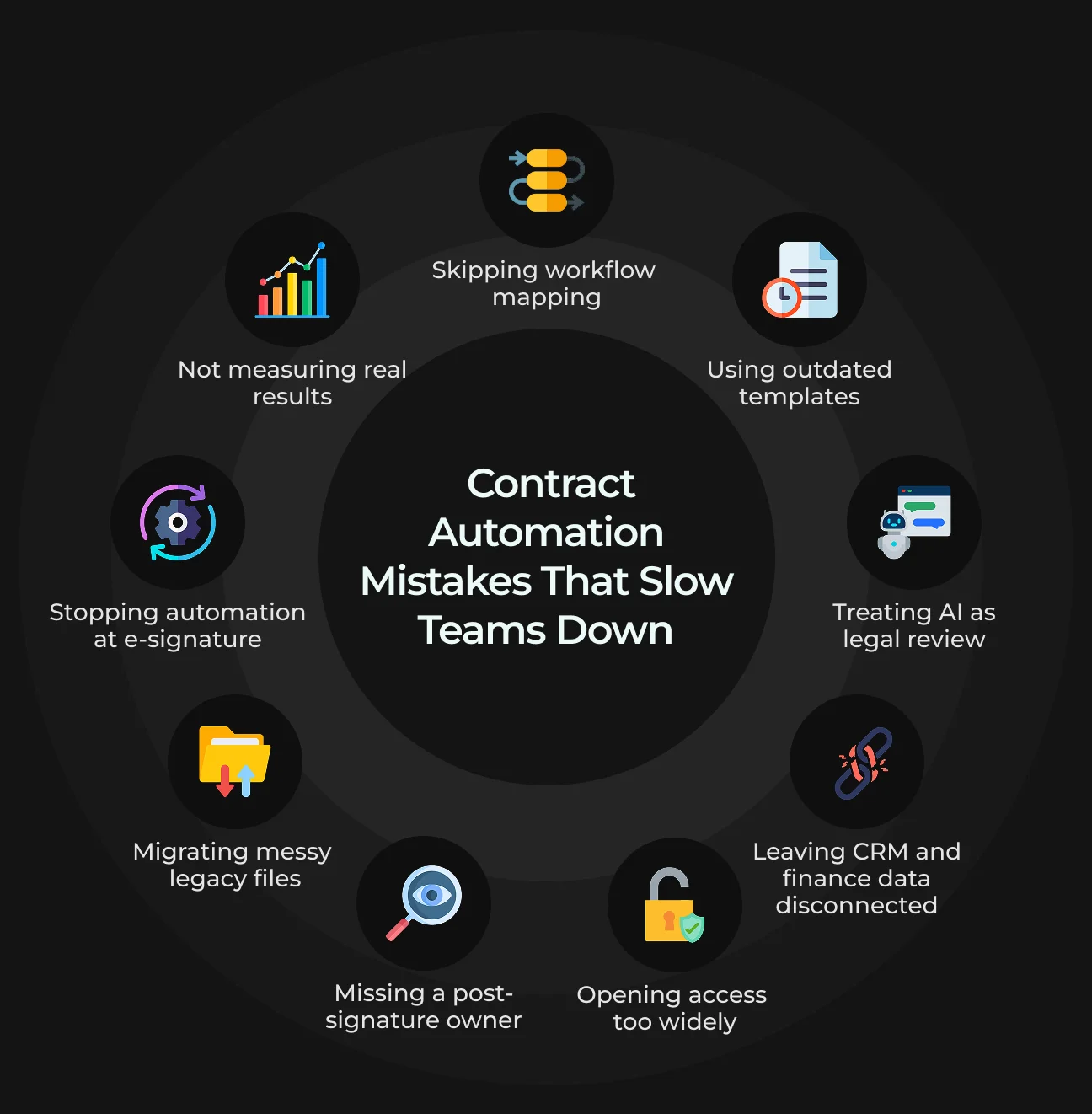
Contract management automation often fails because of unclear ownership, old templates, or vague intake forms. The points below cover the mistakes that create extra work after launch and need attention before the rollout grows.
Skipping the Workflow Map
Teams often start with tool settings before they understand how contracts move today. The tool may look new, but the delays stay the same. Review a few recent contracts first and check where people waited, chased approvals, or moved work back to emails or chats.
Uploading Old Templates
Old templates bring old problems into the new system. Check standard agreements and clause wording before upload. A contract tool can create drafts faster, but it cannot know that a clause is outdated unless legal updates it first.
Letting AI Replace Legal Review
AI can summarize drafts and flag risky wording. It cannot understand the full business context behind a deal. Keep legal review in place for contracts with liability, data protection, or other non-standard terms.
Leaving Business Systems Out
A contract workflow breaks when the CLM tool stays separate from CRM, ERP, or finance systems. Deal data and billing terms still move by hand, so teams keep checking spreadsheets after automation goes live.
Connect the automated contract review software to the systems that already hold contract data, then remove the manual tracker once the sync works reliably.
Opening Access Too Widely
Broad access creates risk quickly. A user who works with customer agreements does not need every employment file or acquisition document. Set permissions around real roles and contract types from the start.
Forgetting the Owner After Signature
A contract still needs attention after signing. Someone has to track renewals, obligations, amendments, and notice periods. Without a named owner, the signed agreement becomes easy to ignore until a notice deadline is already close.
Migrating Messy Legacy Data
Legacy contracts often come with duplicate files, weak metadata, or unclear versions. Clean active agreements first. Start with contracts that still affect revenue or open obligations.
Stopping at E-Signature
Signature is only one part of the lifecycle. A signed contract still has payment terms, service commitments, reporting duties, and renewal rules. Track those details in the system, or automation can stop right when the real follow-up begins.
Measuring Only the Tool Rollout
A launch date does not prove that automation works. Track what changed after the rollout. Approval time and renewal control say much more than the number of users added to the platform.
How SapientPro Automates SDS Processing with AI
SapientPro's SDS automation project shows how AI can handle document-heavy work under strict compliance rules. The client needed a web platform for the Swiss market to manage safety data sheets across suppliers, languages, and document versions.
The hard part wasn't storage. SDS files came in different formats, and many products had no barcodes for quick lookup. SapientPro built a system that turns uploaded SDS files into structured and searchable records to:
- Look up chemicals by name or product code instead of digging through folders;
- Track document versions and get notified when a newer SDS is available;
- Limit access by role, so each user sees only the SDS records they're cleared to work with.
AI handles the parts of SDS review that eat the most manual time.
It extracts key data from each file, matches documents across languages, builds hazard labels from pictograms and warning statements, and flags files that are out of date. The result is a platform teams can rely on for current, accurate SDS records, not just a document archive.
Why Choose SapientPro for Contract Management and Automation
SapientPro is a tech partner for AI contract management solutions, with 9+ years of hands-on experience turning messy document workflows into ones that actually run themselves.
We start by mapping the part of contract work that generates the most manual follow-up, then fix that path before anything else. That usually includes:
- Tracing where signatures, approvals, or redlines get stuck waiting on someone's inbox;
- Clarifying who owns each step and how data should move between systems;
- Adding AI only where it cuts review time, without pulling control away from legal.
The result is contract workflows automated in stages, not a new system nobody wants to touch.
Contact us to map out where AI contract automation would save your legal team the most time.
Cut Contract Review Time With AI
Talk to SapientPro about adding AI review where it actually saves your legal team hours.