All
How AI Contact Center Automation Reduces Costs
May 20, 202610 min read


The economics of customer support shifted fast.
Economic pressure, rising labor costs, and a sudden leap in AI capability have made the traditional contact center model expensive to justify. By 2026, the question for most C-suite leaders and investors is no longer whether to automate — it's how fast to move and where to start.
This article covers contact center automation benefits, real-world use cases, and the contact center automation trends shaping 2026.
What is Contact Center Automation?
Contact center automation is the application of advanced technologies to speed up, augment, or replace human effort in customer service operations. It covers the entire lifecycle of a customer interaction — from the moment a query comes in (routing and triage) through to resolution and post-interaction analysis.
It's worth separating contact center automation from simple digitization. Digitization moves a process from analog to digital: using a CRM instead of a Rolodex. Automation has the system do the work itself. For example, the CRM automatically updates a customer's address based on a voice command.
Core Components of Contact Center Automation
A well-built automated contact center draws on several technologies working together:
- Conversational AI interfaces. Intelligent virtual agents (IVAs), voice bots, and chatbots that handle natural language interactions.
- Workflow orchestration engines. The logic layer of the contact center — it determines how tasks move between AI agents, human agents, and backend systems.
- Integration layers. APIs and connectors that let contact center automation software talk to CRMs (Salesforce, HubSpot), ERPs (SAP, Oracle), ticketing platforms (Zendesk, Jira), and other enterprise systems.
- Analytics and intelligence. Monitoring tools that track sentiment, compliance, and operational metrics in real time.
Contact Center vs. Call Center: Key Differences
The table below shows what separates a traditional call center from an AI-powered contact center.
Feature | Traditional Call Center | AI-Powered Contact Center |
| Primary Channels | Voice (Phone) Only | Omnichannel (Voice, Email, Chat, SMS, Social) |
| Routing Logic | Queue-based (First-In-First-Out) | AI-Driven Predictive & Skills-Based Routing |
| Customer Context | Siloed; Agents lack history | Unified 360° View via CRM Integration |
| Availability | Limited Business Hours | 24/7/365 via Automated Agents |
| Agent Role | Reactive Script Reading | Proactive Problem Solving & Empathy |
| Technology Base | On-Premise Hardware (PBX) | Cloud-Native Software (CCaaS) |
| Scalability | Linear (Hire to Scale) | Exponential (Cloud Compute Scaling) |
| Data Utilization | Historical Reporting | Real-Time Sentiment & Predictive Analytics |
| Cost Structure | High OpEx (Labor Intensive) | Balanced OpEx (Tech Efficient) |
| Primary Metric | Average Handling Time (AHT) | Customer Lifetime Value (CLV) & FCR |
How AI Call Centers Work: Tech Stack
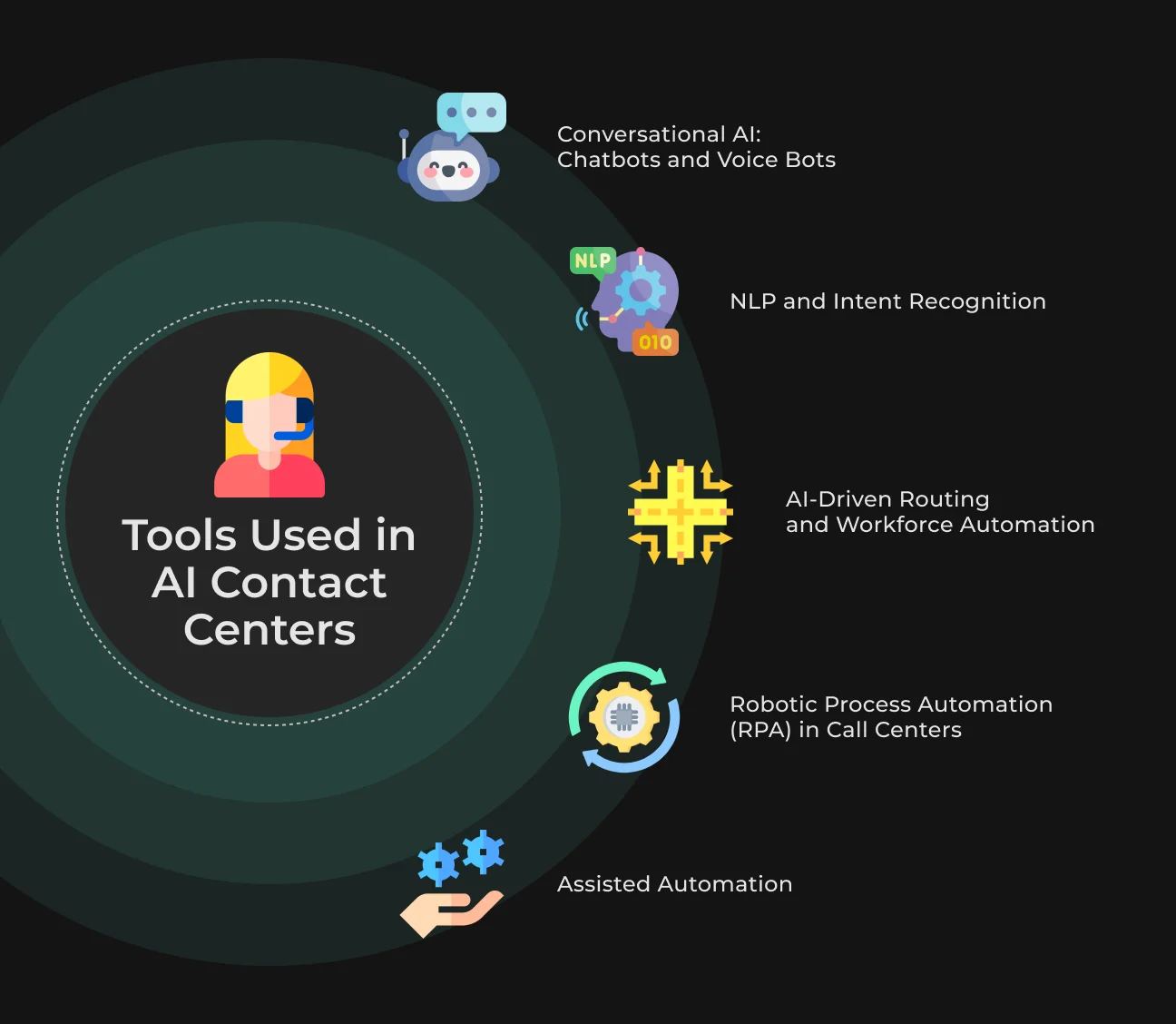
The technology stack determines how well an automated contact center actually performs. For CTOs, choosing the right mix of contact center automation software is the most consequential decision in any modernization project.
Conversational AI: Chatbots and Voice Bots
At the front end sits Conversational AI — technology that has moved well past simple keyword matching. Modern bots use Large Language Models (like GPT-5 or specialized enterprise models) to generate dynamic responses.
They can summarize complex policies, explain billing details, and walk users through technical troubleshooting by pulling from the company's knowledge base.
Top contact center automation tools also maintain context across channels. If a user starts on web chat and switches to voice, the voice bot already has the chat transcript. The customer doesn't have to repeat themselves.
NLP and Intent Recognition
Natural Language Processing (NLP) is the brain that interprets raw customer input:
- Intent recognition maps what a user says (My internet is down," "No connection," "Router red light") to a specific business intent like Technical_Support_Outage. Accurate intent recognition is what makes effective routing possible;
- Entity extraction automatically pulls variables out of the conversation: dates, order numbers, locations, product names. That structured data goes straight to backend systems, which cuts the cognitive load on human agents significantly.
AI-Driven Routing and Workforce Automation
Legacy Automatic Call Distributors (ACD) are being replaced by Intelligent Call Routing (ICR).
Predictive behavioral routing matches customers to agents based on personality models. By analyzing historical data, the AI predicts which agent is most likely to build rapport with a specific caller — not just which one is available.
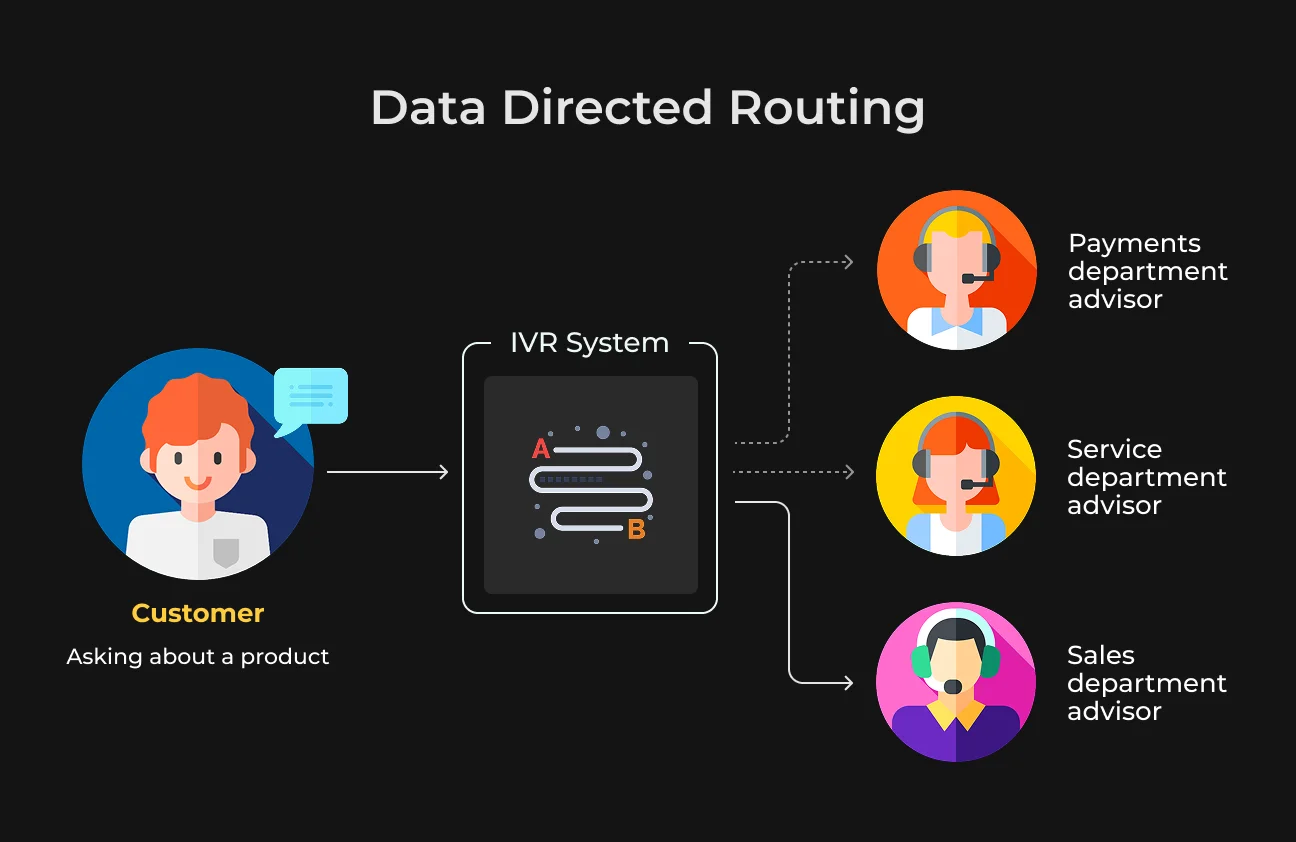
Workforce Management (WFM) works alongside routing. AI algorithms analyze historical volume patterns to forecast demand, then generate automated schedules ensuring the right agents with the right skills are available when needed. Idle time drops. So does burnout.
Robotic Process Automation (RPA) in Call Centers
While AI handles the conversational side, Robotic Process Automation (RPA) handles the mechanical execution:
- The "Swivel Chair" problem. In many contact centers, agents jump between multiple legacy applications to resolve a single query. RPA bots bridge those systems automatically.
- Automated execution. When a customer requests an address change, the AI captures the new data. An RPA bot then logs into the mainframe, updates the record, validates the change, and sends a confirmation email — in milliseconds, invisible to both agent and customer.
Assisted Automation Use Cases
Automation isn't binary. Assisted automation, or "Agent Assist," sits in the middle: call center automation AI supports the human agent in real time without replacing them.
- Real-time transcription and suggestions. As the conversation unfolds, the AI transcribes it and surfaces relevant knowledge base articles as "Next Best Action" prompts.
- Compliance monitoring. The AI listens for required disclosures ("This call is recorded for quality purposes"). If the agent misses one, a visual alert fires immediately.
- Sentiment nudging. If the AI detects rising customer frustration, it prompts the agent to adjust tone or offer a specific concession.
When is human-in-the-loop required?
Despite the gains from automation, "Human-in-the-Loop" (HITL) stays essential in specific situations:
- Low confidence scenarios. If the AI's confidence score drops below a set threshold, it hands off to a human agent — with a summary — before it can hallucinate or make an error.
- High-empathy situations. Bereavement support, fraud victimization, severe complaints: these require human judgment and genuine empathy that no model reliably replicates.
- Complex negotiations. Situations requiring judgment calls outside of policy — high-value retention offers, for example — generally need human authorization.
Benefits of AI Contact Center Automation
The adoption of contact center automation benefits the enterprise by directly attacking the inefficiencies inherent in the manual support model.
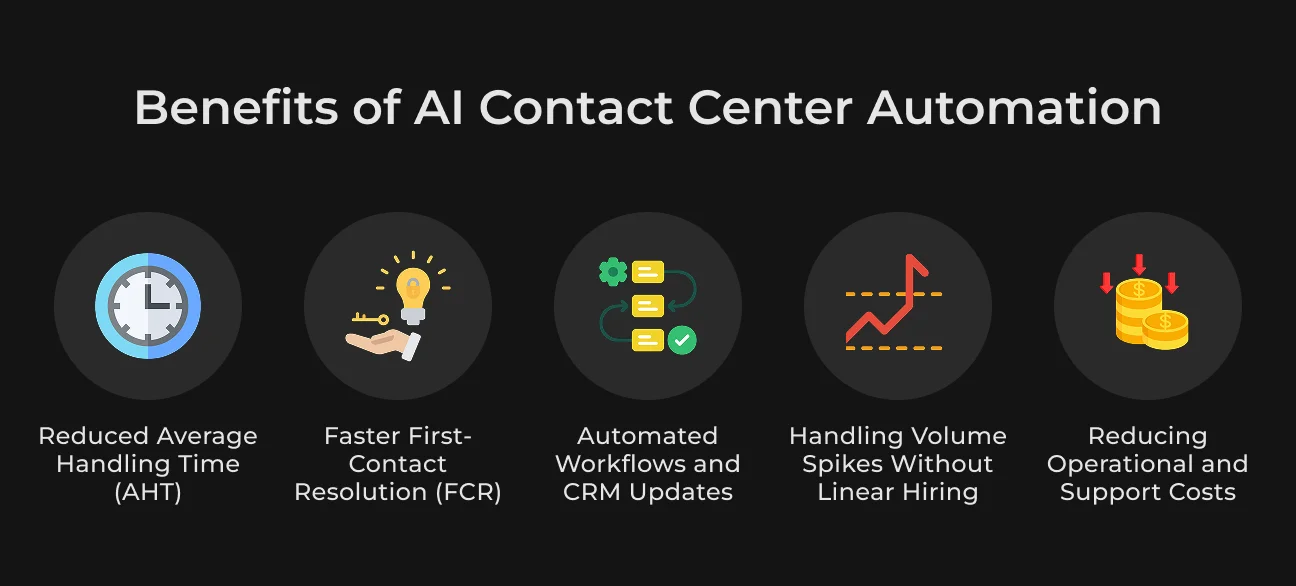
Reduced Average Handling Time (AHT)
AHT is a composite metric of talk time, hold time, and after-call work.
Contact center automation software impacts all three:
- Talk Time. By presenting the agent with customer history and solutions instantly (Agent Assist), the diagnosis phase is shortened.
- Hold Time. AI routing eliminates transfers, reducing the time customers spend on hold.
- After-Call Work (ACW). Generative AI can automatically summarize the call and update the CRM, reducing ACW from minutes to seconds.
AI-powered real-time agent assistance has been shown to reduce AHT by approximately 16%.
Faster First-Contact Resolution (FCR)
FCR is the metric that matters most in contact center customer experience. When a customer's issue gets resolved on the first interaction, satisfaction improves and costs fall. AI skills-based routing pairs the customer with the agent best suited for their specific problem — not just whoever's available next.
Wyze Labs was fielding upwards of 300 phone calls a day and missing a significant portion due to an inefficient routing setup. After switching to an intelligent routing system, first call resolution improved by 98%.
Automated Workflows and CRM Updates
One of the clearest contact center automation benefits is data accuracy. Automated systems log every interaction completely and consistently. When a ticket closes in the helpdesk, the status syncs automatically to the CRM and the ERP. The sales team knows the support issue is resolved before they attempt an upsell.
Handling Volume Spikes Without Linear Hiring
Scalability is where automation creates the most structural advantage. In an automated contact center, capacity for Tier-1 inquiries is effectively unlimited — capped only by server bandwidth.
During a product launch, an AI bot handles 10,000 concurrent chats as easily as it handles 10. Human agents stay focused on complex escalations. The cycle of hiring and cutting temporary staff disappears.
Reducing Operational and Support Costs
The cumulative effect of these efficiencies is a dramatic reduction in operational costs:
- Cost per interaction. Shifting volume from voice ($6–$15 per contact) to automated self-service ($0.25–$0.50) produces savings at scale.
- Labor efficiency. With AI handling repetitive tasks, agents spend more time on complex work — higher value output per dollar of salary.
SapientPro has reduced agent costs from $15/hour to roughly $1/hour through advanced automation.
For business sready to pursue these gains, our guide on how to develop cloud-based call center software walks through the full development roadmap.
Contact Center Automation Use Cases
Let’s take a look at the 5 use cases of contact center automation.
Intelligent Call Routing
The era of "Press 1 for Sales" is over.
Intelligent Call Routing (ICR) uses NLU to understand why someone is calling.
- Scenario. A customer says, "I'm worried about a charge on my credit card".
- Action. The system detects the intent Dispute_Transaction and the sentiment Anxiety. It bypasses the general support queue and routes the call directly to a Fraud Specialist.
- Benefit. This cuts call transfers by up to 45% and signals competence immediately — which is itself a meaningful improvement to contact center customer experience.
Automated Ticket Creation and CRM synchronization
In manual environments, the "ticket" is often an afterthought, created hurriedly after the call.
Contact center automation tools make ticket creation easier:
- Scenario. A customer initiates a chat about a defective product.
- Action. The AI analyzes the image uploaded by the customer, confirms the defect using computer vision, creates a return merchandise authorization (RMA) ticket in the ERP, and schedules a courier pickup. The entire ticket lifecycle is initiated without human intervention.
- Benefit. This ensures 100% compliance with logging procedures and speeds up resolution times.
AI-Powered FAQ and Self-Service
Modern self-service is conversational, not a PDF link:
- Scenario. A user asks, "How do I install the firmware update?"
- Action. Instead of sending a link to a PDF, the call center automation AI walks the user through the process step-by-step in the chat, waiting for confirmation at each stage.
- Benefit. This approach can deflect up to 80% of routine inquiries, significantly lowering the load on human agents.
AI-Powered Sales Acceleration
Automation is a revenue tool, not just a cost-cutting one.
SapientPro's AI sales case study shows what this looks like in practice:
- Use case. A company needed to scale outbound sales campaigns but was limited by the cost and time of hiring agents.
- Solution. An AI Consultant capable of natural, voice-based negotiation was deployed.
- Result. The AI agent could handle objections, book meetings, and update the CRM. It reduced the cost per hour of "agent" work from $15 to $1 and reduced onboarding time for new campaigns from 2 weeks to 1 day.
Healthcare and Compliance
In healthcare, automated contact center solutions play a critical role in managing patient privacy and appointment scheduling.
- Scenario. A patient calls a healthcare contact center describing their symptoms.
- Action. An AI voice bot screens patients for symptoms, prioritizes urgent cases for immediate nurse callbacks, and schedules routine appointments automatically.
- Compliance. The system automatically redacts sensitive health information (PHI) from recordings to ensure HIPAA compliance.
Challenges in Automated Contact Centers
Implementing contact center automation software is a complex undertaking. Strategic leaders must anticipate and mitigate the following challenges.
Lack of Human Touch
Challenge. Over-reliance on automation leads to a sterile experience that alienates customers, especially during emotional distress.
Mitigation. Implement "Sentiment-Based Escape Hatches." If the AI detects negative sentiment (anger, frustration), it should immediately transfer the interaction to a human agent with a summary of the issue. Maintain a "Copilot" approach where AI assists humans rather than replacing them entirely.
Technical Complexity and Integration
Challenge. Integrating modern AI with legacy mainframes and on-premise PBX systems is difficult. Data silos can lead to fragmented customer views.
Mitigation. Use middleware and API layers to abstract legacy complexity. Partner with SapientPro—an experienced call center development firm. We specialize in bridging cloud and legacy infrastructure.
Employee Resistance
Challenge. Agents may fear that contact center automation trends threaten their job security, leading to low morale and sabotage.
Mitigation. Focus on Change Management. Reframe AI as an "Assistant" that handles the boring tasks (data entry), allowing agents to focus on the interesting work (problem-solving). Involve agents in the training of the AI models to give them ownership.
High Initial Investment
Challenge. The upfront costs for contact center automation tools, licensing, and implementation can be substantial.
Mitigation. Adopt a phased rollout. Start with high-volume, low-complexity use cases (e.g., password resets) to generate a quick ROI. Use cloud-based (SaaS) models to shift costs from CapEx to OpEx.
AI "Hallucinations" and Accuracy
Challenge. Generative AI can sometimes confidently provide incorrect information.
Mitigation. Implement Retrieval-Augmented Generation (RAG). Restrict the AI to answer only based on the company's verified knowledge base. Use strict testing and human-in-the-loop verification for sensitive workflows.
Contact Center Automation Trends in 2026
Several shifts are brining new automated contact center trends right now.
By 2026, Generative AI will be embedded in 80% of conversational AI offerings, up from 20% in 2023. That gap drove years of stilted, scripted bot interactions. Closing it means conversations that actually feel natural.
By 2030, guardian agent technologies will account for 10–15% of the agentic AI market. Gartner projects that 70% of AI applications will use multi-agent systems by 2028 — a significant structural change in how automated contact centers are built.
The industry is moving from reactive service ("How can I help you?") to proactive service ("Your shipment is delayed — here's a discount code"). AI will flag issues before the customer even notices them.
Generic scripts are going away. AI will generate responses dynamically, drawing on each customer's history, tone, and stated preferences. Also, autonomous voice agents are getting more capable.
By 2026, an estimated 10% of agent interactions will be fully automated end-to-end. One energy company has already cut billing call volume by around 20% and shaved up to 60 seconds off customer authentication by integrating an AI voice assistant into its back-end call workflow.
The global contact center software market is projected to reach $17.12 billion by 2030 — driven largely by the efficiency gains that automation makes possible.
How SapientPro Developed an AI Sales Tool
To show what contact center automation tools can do in practice, here's a look at our AI-powered sales expansion case study. The client needed to handle high call volumes and launch campaigns fast.
Three problems stood in the way: human agents cost $15/hour; training a new cohort took two weeks and $5,000; and they needed a system with natural conversation flow (pause and hesitation detection) and response latency under one second.
SapientPro built a modular AI Consultant.
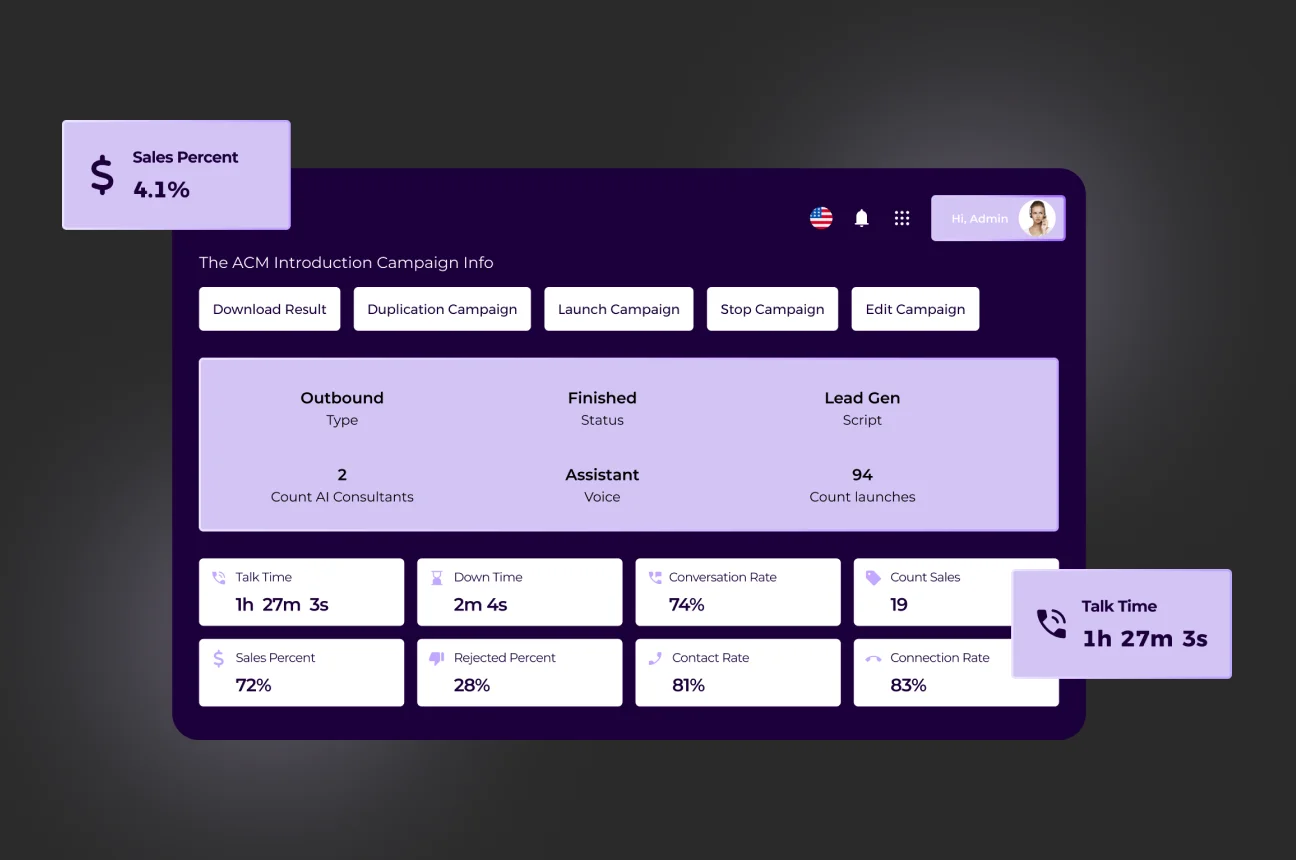
The solution evolved from a Rasa-driven decision tree (Version 1) to an advanced Generative AI/LLM model (Version 2) capable of complex, non-linear dialogue.
Response latency hit 700ms using a custom low-latency algorithm that mimics natural speech patterns. The system runs on Kubernetes for auto-scaling and integrates with SIP for telephony reliability.
The results:
- Cost. Agent costs dropped from $15/hour to $1/hour.
- Speed. Campaign launch time fell from two weeks to one day.
- Onboarding. Training costs dropped from $5,000 to $100.
- Scale. The system supports an unlimited number of concurrent "agents."
Partner with SapientPro to Automate Your Contact Center
SapientPro provides call center software development services for businesses that need more than an off-the-shelf tool. With 9+ years of experience in providing customers with reliable AI-powered solutions, our engineering team can build anything you need:
- Intelligent voice agent that handles inbound calls, detects intent, and routes to the right specialist — no menu prompts needed;
- Outbound sales caller that runs campaigns, handles objections, books meetings, and logs everything to your CRM at a fraction of human agent cost;
- Agent Assist layer that surfaces the right knowledge base article or compliance reminder while the agent is still on the call;
- Automated ticket pipeline that classifies issues, creates tickets, and syncs status across your helpdesk and ERP without manual entry;
- Self-service troubleshooting bot that walks users through technical steps one at a time and only escalates when they're genuinely stuck;
- Post-call automation layer that transcribes, summarizes, and updates your CRM the moment a call ends — turning after-call work from minutes into seconds.
It’s time to improve your call center. Let’s team up today!
Ready to Cut Support Costs?
Let's build your contact center automation roadmap together.