All
How to Connect AI to Your Existing Software Stack
July 15, 20265 min read


An AI pilot is easy to approve while it stays small. It can summarize documents, answer basic questions, or test a faster way to handle routine work. The harder part begins when AI has to work with the company’s real systems.
Before production, the team needs to understand how AI will move through the workflow.
This guide focuses on that practical step. It explains how to look at your current stack before integration starts, what usually blocks AI from moving beyond a pilot, and how to choose AI integration strategies that are realistic for production.
What is AI Integration in a Software Stack
AI integration does not start with a new system. It starts when AI is added to a process the company already runs. For most established businesses, the first useful step is small.
AI can take over one narrow part of the work, like preparing a support draft, pulling together account notes, or checking a document. The existing software still carries the process. AI only helps with the part where people lose time.
The stack already holds the context. Customer records, orders, approvals, reports, user roles, and internal rules are not background details. They help the model produce an answer that fits the business.
The product stays in control and decides which data the model receives. The model runs one defined task in that process, which is the core of AI system integration. And AI adoption is already large enough to affect architecture decisions.
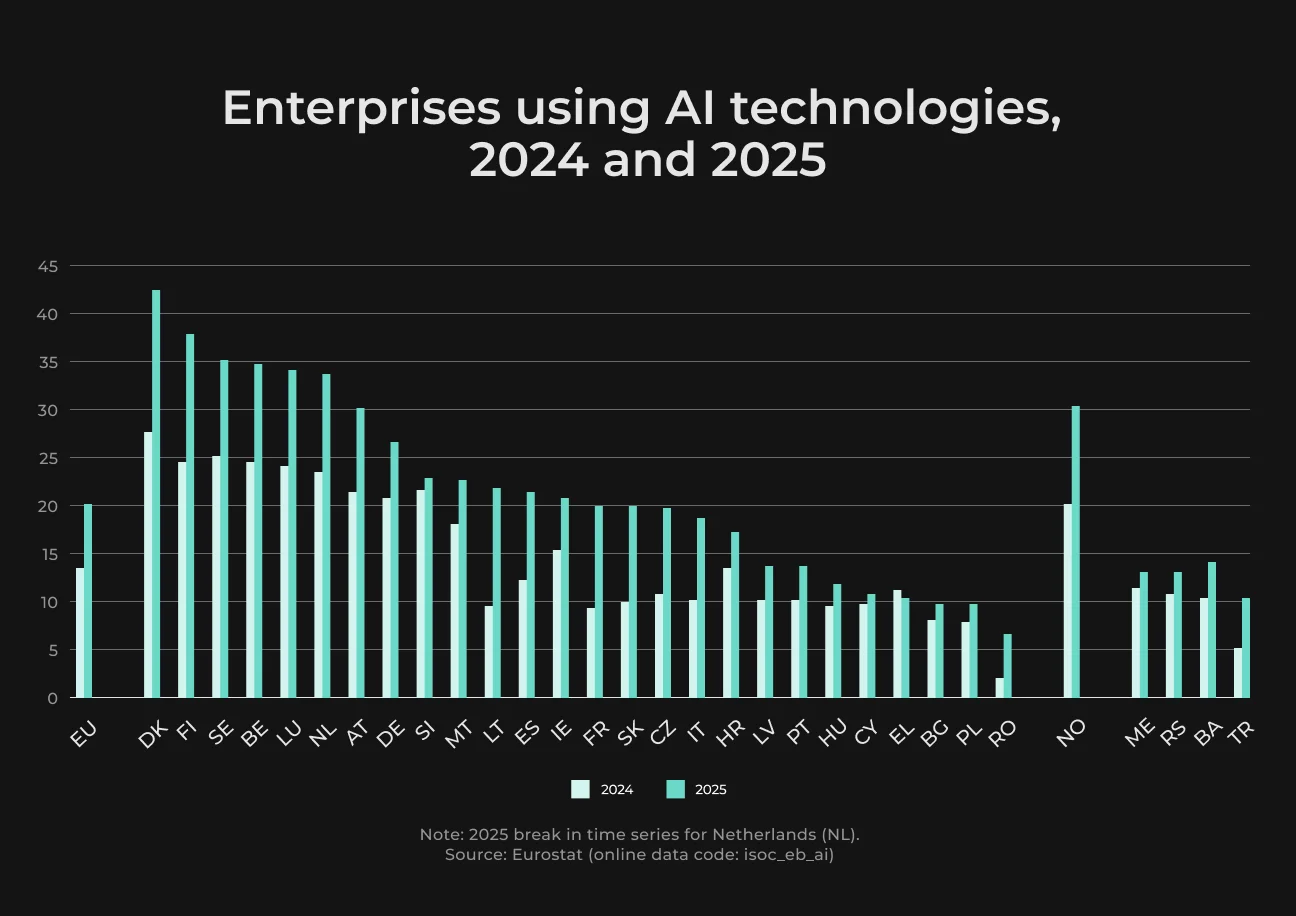
In 2025, Eurostat recorded AI use among 55.03% of large enterprises, 30.36% of medium-sized companies, and 17% of small businesses. Text analysis was the leading use case at 11.75%. Eurostat also recorded 9.55% for image, video, or audio generation and 8.76% for text, speech, or code generation.
Support is a simple example.
A basic AI tool can generate a reply from a pasted customer message. A proper integration works directly in the helpdesk. It uses the ticket history, customer status, and approved policy notes, then prepares a draft for the agent. The agent checks it and sends the final reply.
It is also worth keeping the terms clean:
- AI integration is the technical connection between the model and the existing product;
- AI implementation is the wider work around the use case, data, rollout, security, and adoption;
- AI-native rebuild is a full redesign around AI, which is rarely the first move for an established product.
Most AI value starts with one controlled capability added to the current stack.
Before You Integrate: How to Build an AI Implementation Strategy
The team needs to choose a workflow where AI can make a visible difference and where the business can judge the result. That usually means a small, concrete process with real friction.
For example, a support reply that takes too long or a document review that slows down a team every week. When the problem is this clear, the technical plan becomes easier to shape.
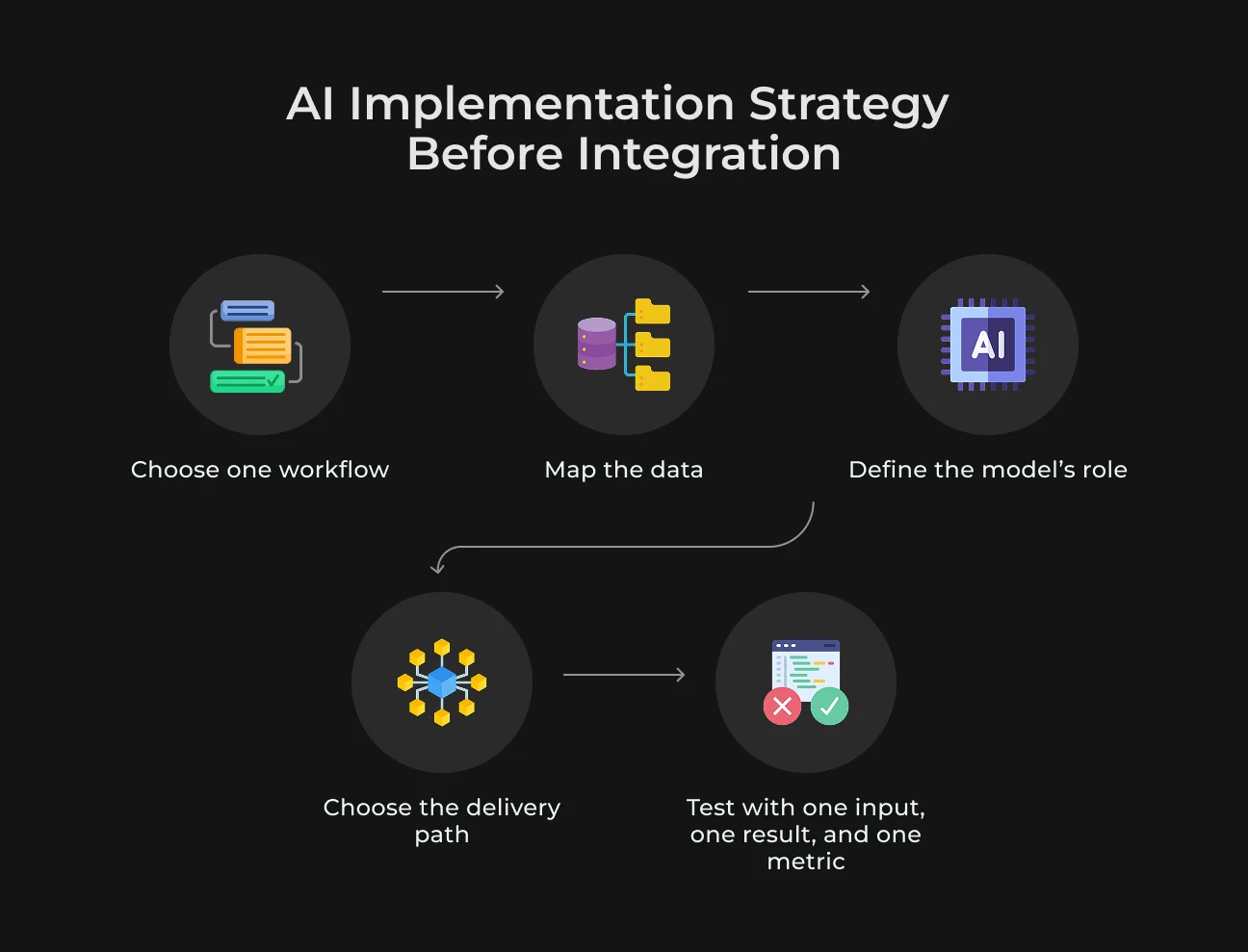
Start With the Workflow
Simply embedding AI into the product is too broad for a release plan. A better use case names the task: reduce time spent on first support replies, prepare account summaries before renewal calls, classify incoming requests, review documents faster, etc..
If nobody can name what becomes faster, cheaper, clearer, or easier to control, the project is too vague for integration.
Check Where the Data Really Lives
Many AI projects slow down before the model becomes the main issue.
The right information may sit across a CRM, ERP, helpdesk, warehouse, shared drive, or custom tools. Before integrating AI, the team needs a simple data map. It has to show where the information comes from and who owns it.
For a support assistant, ticket text alone is rarely enough. The model may also need customer tier, product version, open incidents, or previous complaints. If that context is incomplete, the answer can sound polished and still be wrong.
Define What the Model Can Do
The model needs a clear job. It may draft a reply, tag a request, summarize a document, or suggest the next step.
Each task carries a different level of risk. A draft can go to a person for review. A CRM update, payment-related action, or legal decision requires tighter limits, logging, and approval.
If the model lacks context or gives an unreliable answer, the system has to stop, ask for review, or use a safer default action.
Choose the Delivery Path
Once the workflow and data are clear, the technical route becomes easier to choose.
There are usually three options:
- Custom model. For a narrow task with strong proprietary data and a team that can support the model after release.
- Ready-made AI product. For standard workflows like meeting notes, document search, support drafts, or sales enablement.
- Pre-built model via API. For cases where the company wants control over context, rules, review flow, or user experience without training a model from zero.
For many first integrations, the API route is the most realistic. The model is already available, so the team can focus on how AI fits the workflow and what controls sit around it.
Keep the First Release Narrow
The first release does not need to cover a full department. One workflow is enough, as long as it is easy to judge. Pick one input, one result, and one metric (like time saved or fewer manual checks). A narrow release also shows where the data, user trust, or controls break first.
If the first workflow works, the team now has a reusable setup for data access, review, logging, and quality checks.
Assessing Your Stack’s Readiness for Enterprise AI Integration
Before connecting AI, the team needs to understand how the current stack behaves under real product conditions. The question is whether the system can provide the right data, accept the model’s output, and keep the workflow stable if something fails.
For the first integration, it is enough to check the API layer, data quality, and infrastructure around one clear use case.
Check the API Surface Area
Start with the systems the AI feature will touch. Some products might rely on old modules, admin-only exports, private scripts, or undocumented AI implementation services that only one engineer understands. And that matters more than the model choice at this stage.
If the needed data can be pulled through stable endpoints, the integration has a workable base. If it takes manual exports or undocumented workarounds, the team is dealing with an infrastructure task first.
A ready API layer usually has a few basic traits:
- Clear endpoints for the data the model needs;
- Predictable response formats;
- Authentication and permission checks;
- Rate limits that match the planned usage;
- Logs for requests, errors, and changes.
See more
Read our guide on assessing AI systems for regulatory compliance to see what needs to be checked before AI starts processing sensitive information.
Read NowReview Data Quality and Availability
Data is often the first real blocker. The model may receive duplicate records, old documents, inconsistent tags, or fields that look important but are empty. It will not clean this up during the request. Before integration, test the model on real records from the target workflow.
For example, a renewal assistant needs enough account context to see contract terms, support issues, or billing status. If these sources disagree, the team has to decide which one wins before AI enters the workflow.
Look at Infrastructure Compatibility
The stack has to handle AI in daily product use. A lightweight integration may only send a prompt to an external model API. More complex setups can require a vector database, background jobs, document processing, event queues, monitoring, and stricter security controls.
The infrastructure review has to cover latency, retries, audit logs, and output quality. These checks show whether the product can run AI as a live dependency.
AI also adds operational risks. The product may depend on model availability, token limits, and model behavior that changes over time.
Readiness Is About the First Failure
The first release requires a plan for missing data, slow API responses, timeout errors, weak answers, and cases where the model cannot complete the task. If the system can stop safely or send the result to review, the integration is much easier to trust.
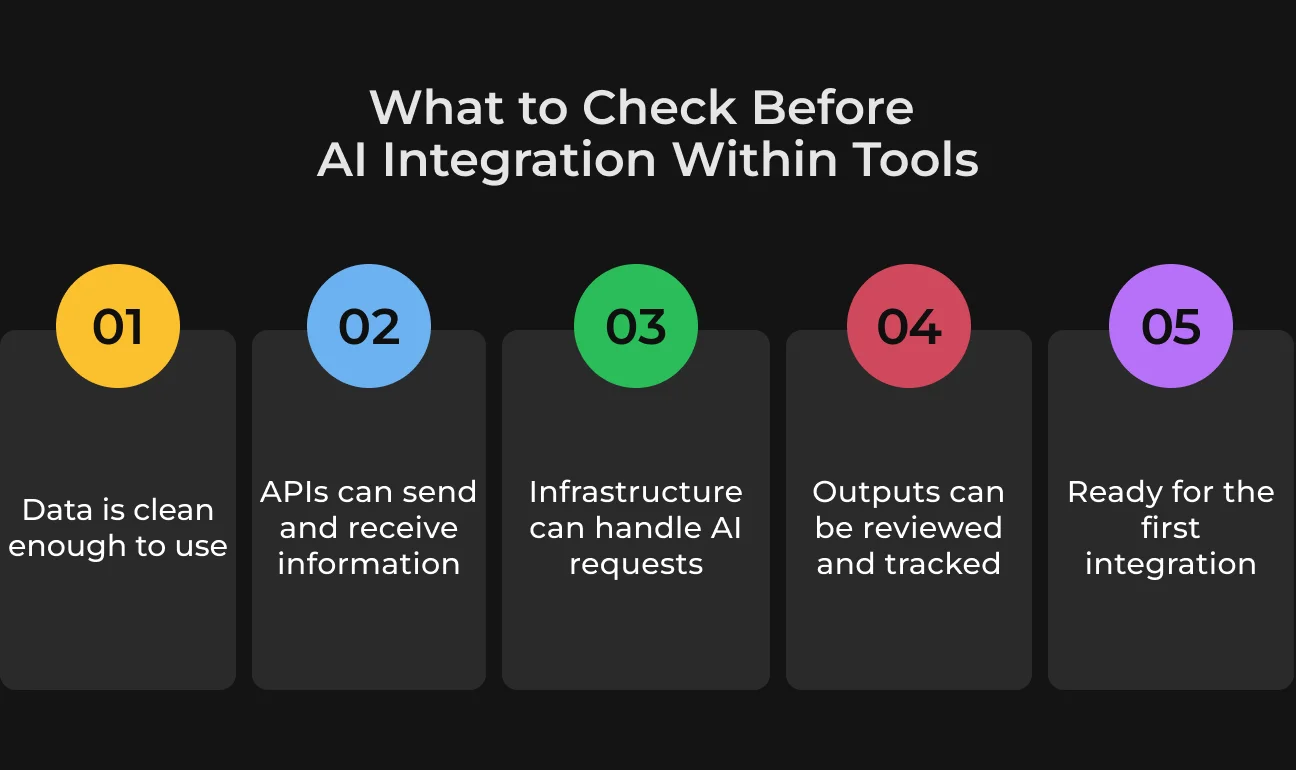
Take one real workflow and run it through failure cases before launch. Then check whether the product still gives users a safe next step. If the answer is yes, the stack is ready for a narrow first integration.
Ready to Connect AI to Your Stack?
Our engineers can map your data, APIs, and workflows before you write a line of integration code.
Integration Patterns: How to Connect AI to Your Stack
The right pattern depends on what AI has to read and how much control the product needs before that result is used. Basically, a simple task may work through one API call.
A workflow tied to company knowledge, business rules, or background events needs a stronger setup. The first architecture choice only has to fit the first release.
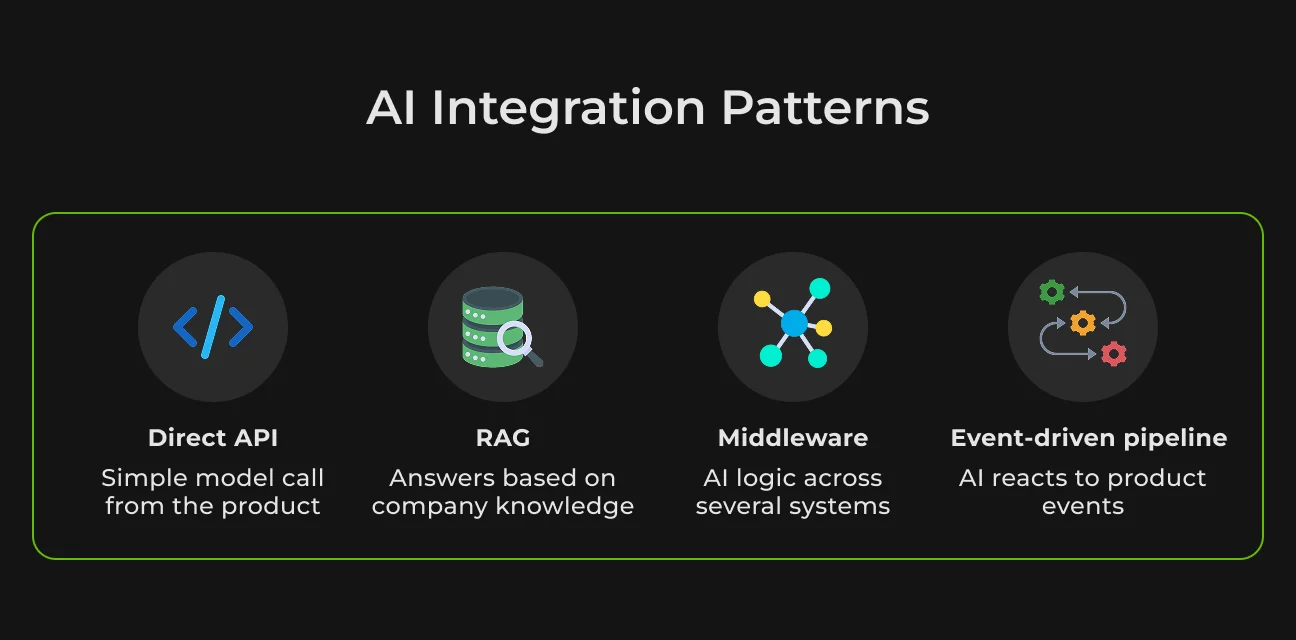
Pattern 1: Direct API Integration
Direct AI API integration is the lightest option. The product sends a request to the model and receives a result it can show, save, or send to a user for review.
It works for narrow tasks where the input is already complete enough. For example, the product can summarize a short ticket thread, rewrite a message, classify a request, or generate a description from existing fields.
Problems start when the answer depends on account history, pricing rules, policy notes, or earlier decisions. In that case, the product has to bring that context together first, or the model will answer from a partial picture.
Pattern 2: RAG for Knowledge-Heavy Tasks
RAG works best when the answer has to come from company materials. It first finds the relevant policy, support article, contract section, or technical note, and only then sends that context to the model.
Old documents, poor tagging, or messy permissions can lead to a confident but wrong answer. For RAG to work well, the source library has to stay clean, current, and easy to verify through links or citations.
Pattern 3: Middleware and Orchestration Layer
Middleware works better when the AI step depends on several systems or has to follow business rules before the product can use the result. Middleware keeps the AI logic out of the main product code and gives the team one controlled place to change it.
Pattern 4: AI-Augmented Webhooks and Event-Driven Pipelines
This pattern works when AI runs after a product event. A new support ticket, for example, can trigger an AI summary before an agent opens it, or a failed payment can create a short note for customer success. The team gets the result at the right moment without adding another manual step.
The main thing to watch is visibility. Background AI needs monitoring for delayed jobs, duplicate events, failed requests, and low-confidence outputs.
Choosing the Right Pattern
Choose the pattern that keeps the first release clear for the team and safe for users. For example, a small task with ready context can start with a direct API call. Retrieval would be better when the answer depends on internal knowledge.
The pattern can change later. A support assistant might begin as a simple reply draft, then add policy retrieval, and later move review rules or routing logic into middleware. That works when each step solves a real workflow problem.
Generative AI Integration: What's Different
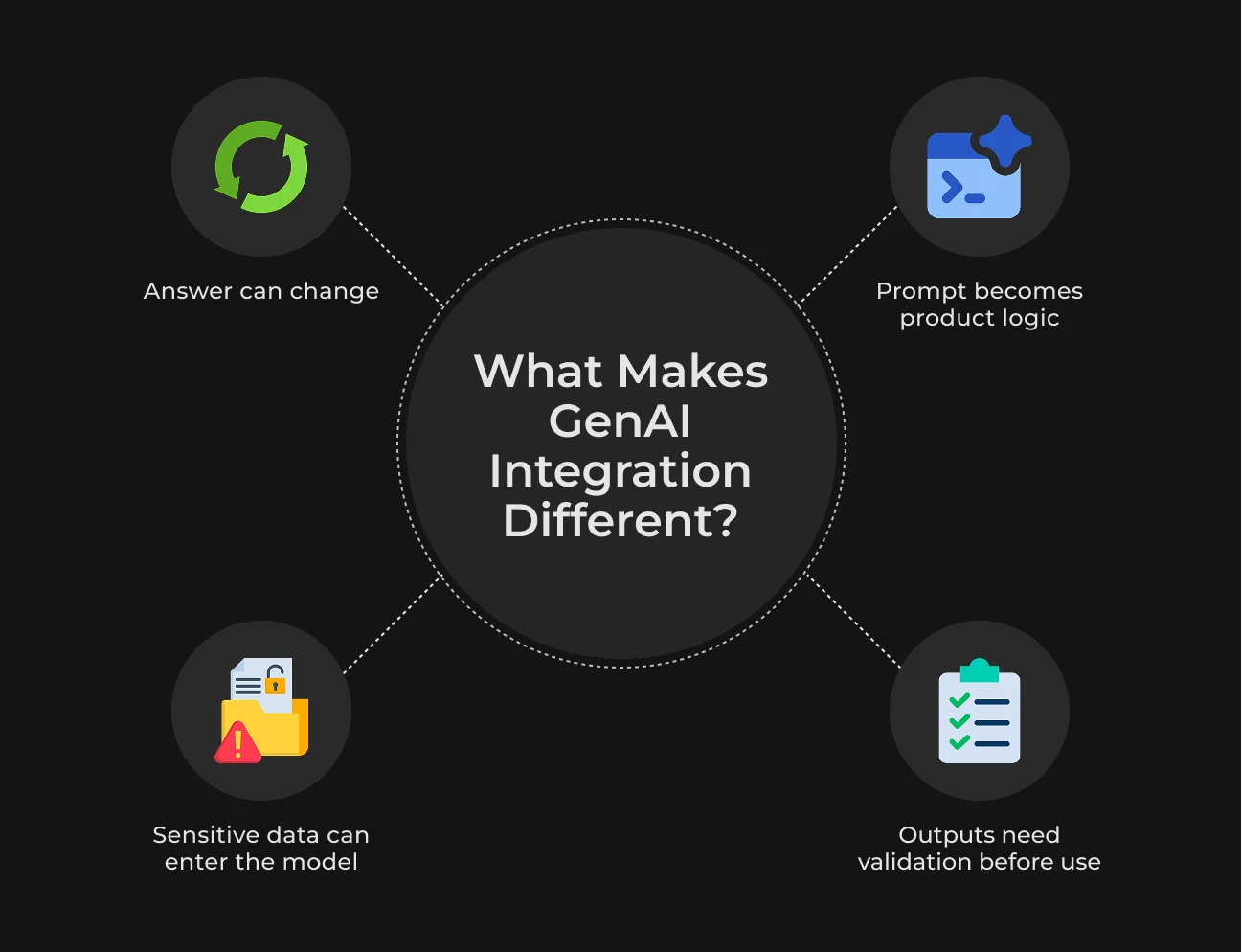
A classic prediction model returns something predictable (like a score, a label, or a probability), and the app knows what to do with it. LLM integration is different because the answer can come back as JSON, a draft, a refusal, or a polished response that still misses context. That flexibility puts more control work on engineering.
Prompts quietly become part of the product logic. Even a small wording change can affect quality, so teams need prompt versions, test cases, and a way to trace which prompt produced which result.
Governance needs to enter the project early. LLMs often process real business data, like tickets, contracts, HR records, or legal files. These materials can include personal or regulated information.
One careless API call can expose more than intended, so data and vendor rules need to be settled before the integration uses production data. Give the model only the data it needs, and mask anything sensitive before it gets there.
How to Roll Out AI Integration Without Disrupting Production
Our engineers prepared a short checklist with the main things to check before AI reaches production users.
Rollout setup | What to check |
| Define the first workflow | The use case is measurable and tied to one business process |
| Confirm the data sources | Data is available, current, and approved for model use |
| Check API readiness | Product can send context and receive model output through stable endpoints |
| Set access rules | The model only receives data allowed for the user, role, or workflow |
| Define output rules | The team knows what a valid response looks like before launch |
| Add review points | High-risk outputs go to a person before any final action |
| Prepare fallback behavior | The system has a safe response when the model fails, times out, or lacks context |
| Log model activity | Prompts, responses, errors, user actions, and model versions are traceable |
| Test with real examples | The feature is tested on real workflow cases, not only clean demo data |
| Monitor latency and cost | The team tracks response time, API usage, token spend, and failure rates |
| Run a limited release | The feature starts with one team, one workflow, or one user segment |
| Collect user feedback | Users can flag bad outputs, missing context, or confusing behavior |
| Review errors weekly | The team checks failed requests, low-quality outputs, and edge cases after launch |
| Expand only after proof | The next workflow is added only after the first one is stable and measurable |
Case Study: Connecting AI-Ready Workflows Across Disconnected Real Estate Systems
An example is SapientPro’s real estate management and insurance platform for the rental market. The client needed more than a website or a simple landlord portal. The product had to cover the main rental steps, from tenant onboarding and property setup to payments, identity checks, data sync, and insurance workflows.
SapientPro built the system around one shared operational flow.
Landlords could add properties, register tenants, set up transactions, track payments, and move applicants through verification. Tenants could complete onboarding through a guided process. The client’s internal team received a clearer view of tenant status, risk checks, payment data, and property records.
The important part was the AI data integration layer:
- CreditGuard for rent payments;
- Scanovate for identity verification and compliance checks;
- Origami for property, financial, and scheduling data synchronization;
- Third-party APIs for reliability scoring.
This turned several disconnected operations into one ecosystem.
AI works better when the product already has clean workflow states, connected data sources, and clear rules for what happens next. Without that foundation, the model receives fragments.
Why Choose SapientPro as Your Tech Partner
SapientPro is a reliable tech partner for companies that need to connect complex systems without slowing product delivery. We help turn scattered tools, legacy modules, APIs, and business workflows into software that works as one system.
For AI integration services, this matters from the start. The model can only bring value when data moves correctly and every output has a safe place in the workflow.
If your team is planning AI integration or needs to prepare the current stack first, contact our experts. We’ll help you map the right path and build it without adding unnecessary complexity.
Request a Free AI Integration Consultation
Bring us your current stack and we'll tell you what's realistic for your first release.