All AI Agent Onboarding: Connect Your Agent to Company Systems and Workflows
October 27, 202610 min read


A vendor's demo won't tell an agent who can authorize refunds at your company. It won't settle conflicting internal policies either. AI agent onboarding addresses these business-specific details before the selected product begins working with actual requests.
Perhaps your chosen agent already works with Slack and Salesforce.
And that’s great. An internal pricing database could still require a custom API connection. Depending on the platform, developers may be able to add that connection without replacing the agent. Let's look at what remains before the agent goes live.
What Is AI Agent Onboarding?
Your support agent may already have the refund policy in its knowledge base.
But a customer asking for their money back needs an actual refund. First, the agent needs to find the purchase and check whether it's eligible. Issuing the refund also requires access to the payment system. Anything outside its approval limit goes to an employee.
AI agent onboarding defines that scope before deployment.
Someone in the business must take responsibility for the agent's tasks. IT teams can then configure access to approved records and the applications involved. Submitting trial refunds above maximum limits verifies whether managerial handover triggers correctly.
These limitations also appear in agent performance tests. Stanford’s 2026 AI Index notes a 70.2% pass@1 score for Claude Opus 4.5 on τ-bench. It measures agent performance across retail and airline workflows involving policy enforcement and database modifications.
Setup Area | What You Need to Decide |
| Task ownership | Which requests the agent can accept and who oversees its work |
| Company knowledge | Current policies and approved information sources |
| System access | Applications the agent can read or update |
| Human oversight | Approval limits and requests sent to employees |
| Launch checks | Which tests must pass before the agent goes live |
The similar term AI onboarding agent refers to a different use case: helping new employees or customers complete their onboarding.
Make Your AI Agent Work for You
Connect your chosen AI agent to business systems with SapientPro's implementation services.

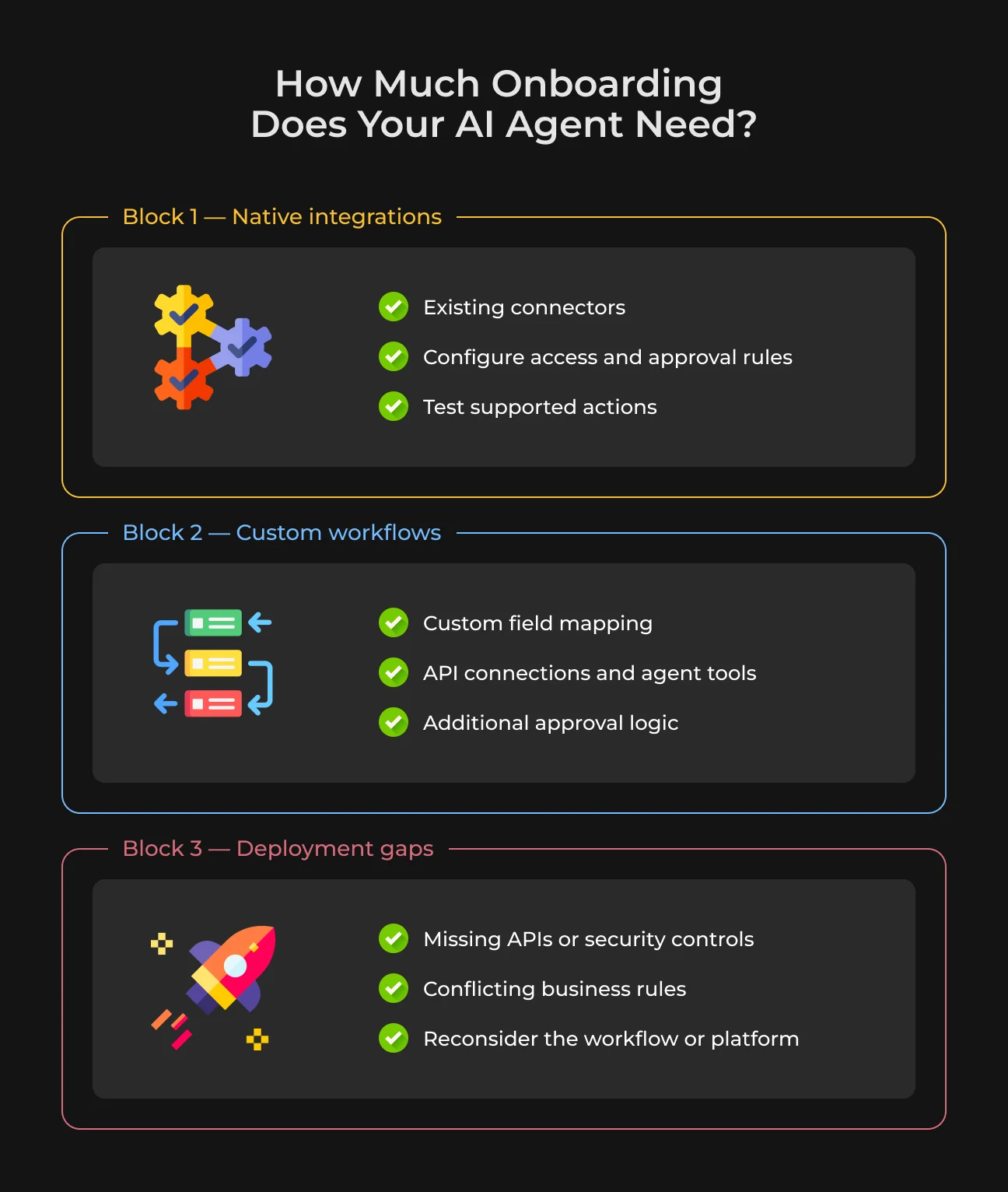
How Much Onboarding Does Your Agent Need?
An agent may retrieve customer records without being able to update a delivery address. If an update drops, confirm whether the integration lacks write support or if the agent simply missing permissions. Verify both configuration issues before starting software updates.
Configuring Native Integrations
When standard integrations cover your required actions, engineering work stays minimal—the real task is setting rules. Setting up a support agent mostly comes down to supplying current policy documentation and defining accessible customer profiles.
High-impact actions still require human sign-off, meaning system access rules must strictly hold those boundaries. Not all listed integrations support the exact write commands your workflow needs.
A Salesforce integration could easily read existing account details without having necessary write access for updating opportunities. Executing a test payload in a sandbox account proves whether write functionality actually goes through. Reviewing execution logs afterward shows how failed or blocked attempts appear.
Fitting the Agent to Custom Workflows
Your CRM may use internal codes to identify different contract stages. The agent can retrieve those fields correctly and still misread their meaning. Mapping those codes to known contract stages may solve the problem.
Internal approval systems often lack immediate agent access.
In these cases, developers analyze system endpoints before constructing integration bridges. Sensitive actions may also need custom approval rules. SapientPro links these existing business tools together so companies avoid rebuilding their tech stack.
You can keep your current agent setup intact as long as the underlying framework supports custom API calls.
Catching Gaps Before Going Live
Not every requirement works with existing tech. Legacy tools often lack endpoints for write actions, while some agent platforms request broader system access than security policies allow.
Sales and finance may disagree about who can approve a discount. Developers can't implement that rule until the business settles it. Someone also needs to take responsibility for correcting outdated documents in the agent's knowledge base.
Sometimes a smaller role is enough. Your agent might prepare a customer account update and pass it to the support team for completion.
If the software gives it more access than your security policy permits, another platform may be necessary. A simple script could cover tasks that follow fixed rules. Custom development should address a confirmed technical gap with a clear business benefit.
AI Agent Onboarding Process: What Gets Delivered
Engineers need real conversation history before configuring anything.
Building an order bot requires past tickets, live policy sheets, and a test profile full of sample orders. You decide which task comes first. A support manager can clarify the rules whenever developers find conflicting instructions.
1. Turn Company Knowledge Into Usable Instructions
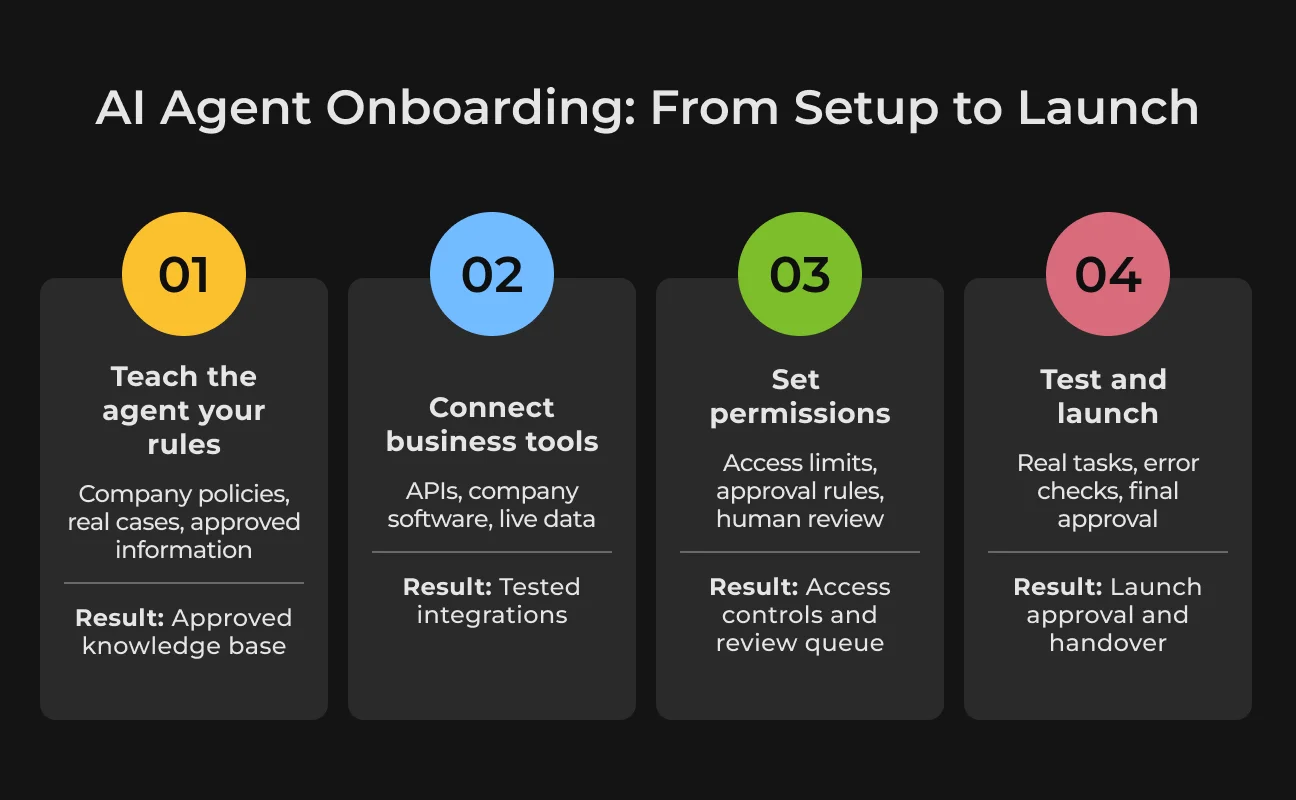
First, developers review the actual files staff rely on every day. Refund sheets, internal phrasing, and ticket logs reveal edge cases that demos miss. If instructions contradict each other, your team lead confirms the active rule.
Setting up the data requires three components. Prompts describe allowed actions and required sign-offs. An AI knowledge base stores policy documents and worked cases. Core software systems supply live order details. A bot requires every layer to complete refund requests accurately.
You walk away with approved prompt files, an indexed reference list, and a named update owner. Testing means comparing generated outputs directly against confirmed company rules.
2. Connect Software for Real Tasks
Take a routine late-package issue: processing it means querying dispatch dates in your database, cross-referencing tracking status, or updating the support portal.
Connecting these actions depends on functional application connections. Engineering teams check whether current software exposes the right data fields for external edits. If there's no order number, the agent can look for the purchase using other verified customer details.
A timeout can be misleading.
The ticket may have changed even though no confirmation came back. The agent shouldn't confirm a change it cannot verify. Before another attempt, it needs to check the saved ticket. If an internal application has no suitable connector, engineers can assess whether API development and integration is needed to support the missing action.
The client receives connections tested against the agreed workflow. Run a sample request in staging and compare the saved ticket with the requested update. Error logs should contain enough detail for developers to investigate failed calls.
3. Set Permissions, Approvals, and Human Handoffs
The agent finds an eligible refund, but the amount exceeds its limit.
What happens next is a business decision. Finance might want a manager to approve the payment first. Developers need to apply that rule in the connected system, since instructions in a prompt cannot prevent an API from accepting an unauthorized request.
An employee reviewing the case needs more than a ticket marked “approval required.” They need the order details and the reason the agent stopped. The review queue also needs an assigned owner, particularly for cases involving missing information or exceptions to company policy.
The client receives a permissions table and a working approval queue. A test refund above the limit can confirm whether the agent stops before payment and sends the request to the right employee.
4. Validate Real Tasks and Hand Over Operations
The agent says it updated a support ticket. Look for the corresponding change in the connected application. A successful chat response means little if the record remains untouched.
Testing should include failed operations alongside normal requests. An expired refund, unavailable API, or blocked record update can reveal problems that routine cases miss. Check the system logs to confirm what happened and whether the agent respected its permissions.
Compare completion rates and errors with the existing process, then calculate employee review time and cost per completed task. SapientPro examines related risks in its article on AI failures in production.
The client receives test results and instructions for operating the agent after launch. Assigned leads take over log reviews, incident checks, and prompt adjustments. A working pause control must be available if automated actions begin failing. Deployment follows formal acceptance of the tested workflow.
What Determines AI Agent Onboarding Cost and Timeline?
That initial onboarding agent estimate can change quickly when a critical CRM integration turns out to be read-only or policy documents are out of date. Four main factors shape the final timeline: integration compatibility, the quality of company knowledge, agent permissions, and the acceptance tests required before launch.
Product Setup vs. Integration Work
The amount of work depends on what your selected agent needs to do within existing workflows:
- Answering queries from approved knowledge bases. Setup mainly involves document selection, access configuration, or checking answers against company policies. If reference files are obsolete, content cleanup comes first;
- Gathering data from multiple apps to draft updates. When an agent reads across several systems and prepares changes for manager approval, setup time grows. Mismatched account IDs and custom approval routes may require additional development;
- Executing approved tasks in legacy or custom systems. Updating records in older applications may require new API connections, error handling, and safeguards against duplicate transactions. Each automated action needs testing with representative data, followed by checks in the connected system.
Timeline risk extends beyond engineering capacity. Teams frequently face bottlenecks waiting on system permissions or resolving business rule disputes. Process managers also need time to audit system decisions and approve trial outcomes.
Budget for Launch and Ongoing Operation
The initial project budget covers product configuration, software integrations, testing, and handover. Running the agent brings additional expenses. Model calls, platform subscriptions, and hosting can be billed regularly. Human approvals and software maintenance also take time and money.
A quote needs more detail than a total price. Never rely on a flat price estimate alone.
Proper scope documentation specifies project inclusions alongside tasks assigned to your internal developers. Make sure the contract details sign-off conditions and includes explicit post-launch maintenance terms. Any extra development needs its own estimate and approval.
You can compare the wider expenses in SapientPro's article on AI implementation cost factors. The costs of developing a complete AI solution shouldn't be confused with onboarding an existing agent.
Who Should Handle AI Agent Onboarding?
Your own staff or the software vendor might take care of deployment without external support.
If the existing connectors support your workflow and your team can manage testing, outside engineering may be unnecessary. Outside engineering support may be needed if your team lacks the time or expertise to build custom integrations or implement complex security and approval rules.
Handling Setup In-House or Via Vendors
Basic setups are easy to handle internally. When an agent simply answers queries from internal guides, an IT admin paired with a support supervisor can manage deployment directly. Their main job is organizing documents, configuring user access, and testing output quality.
When relying on vendor support, remember that "onboarding AI agent" means different things across suppliers. Some vendors just set up accounts and activate standard connectors. Others build out business rules, set up review loops, or test entire operational flows.
Always check contract boundaries beforehand. Getting a system login is useless if client data isn't updating correctly. Request a demo using representative test records and confirm who's responsible for pre-launch testing.
When You Need an Implementation Partner
Connecting a support agent to a standard ticketing platform may be easy enough for your IT team. Adding your company's billing database is another matter, particularly if the software has a proprietary API or restrictions on financial updates. These requirements can call for outside engineering support, particularly when your developers have little time available.
Before signing a contract, request:
- Relevant integration project examples;
- A QA plan covering failures and approval rules;
- Defined API deliverables and technical documentation;
- Post-launch defect fixes and maintenance terms.
SapientPro offers API development and integration services for businesses that need additional connections or custom functionality.
Scope Your AI Agent Onboarding With SapientPro
Your AI agent can find a customer record in the CRM. But can it update that record, and who approves the change? SapientPro can examine questions like these using your selected agent and one existing business workflow.
Some problems can be fixed through configuration. Others require new API connections or custom tools. SapientPro's AI implementation services can cover the additional development.
Contact our team with your chosen product and a task you'd like it to complete. You can discuss the missing functions and agree on what the first pilot needs to prove.
Need More Than Standard AI Integrations?
Our engineers build custom connections and functionality around your existing AI tools.