
All What is a POS System and How Does it Work?
April 13, 202510 min read

If you’re launching a business, you’ll have to get a Point-of-Sale system to accept payments and manage inventory. It’s a must-have solution for retail stores, e-commerce businesses, restaurants, and many other categories. This article will explain the features, types, costs, and benefits of a POS system. Read now!
What is a POS Terminal?
A Point-of-Sale terminal is a device used to process payments in stores, cafés, restaurants, and other locations. It typically reads customer payment information, specifically credit and debit cards, to transmit transaction data to a payment processor. Then it completes the purchase by updating records and generating a receipt or any other form of confirmation.
What is a POS System?
A Point-of-Sale system is a bit more complex. It supports sales transactions by combining hardware and software at retail locations. It typically includes payment processing, inventory management, and sales data recording.
In most cases, POS systems involve:
- Cash registers;
- Card readers;
- Payment terminals;
- Barcode scanners;
- Receipt printers;
- Management software.
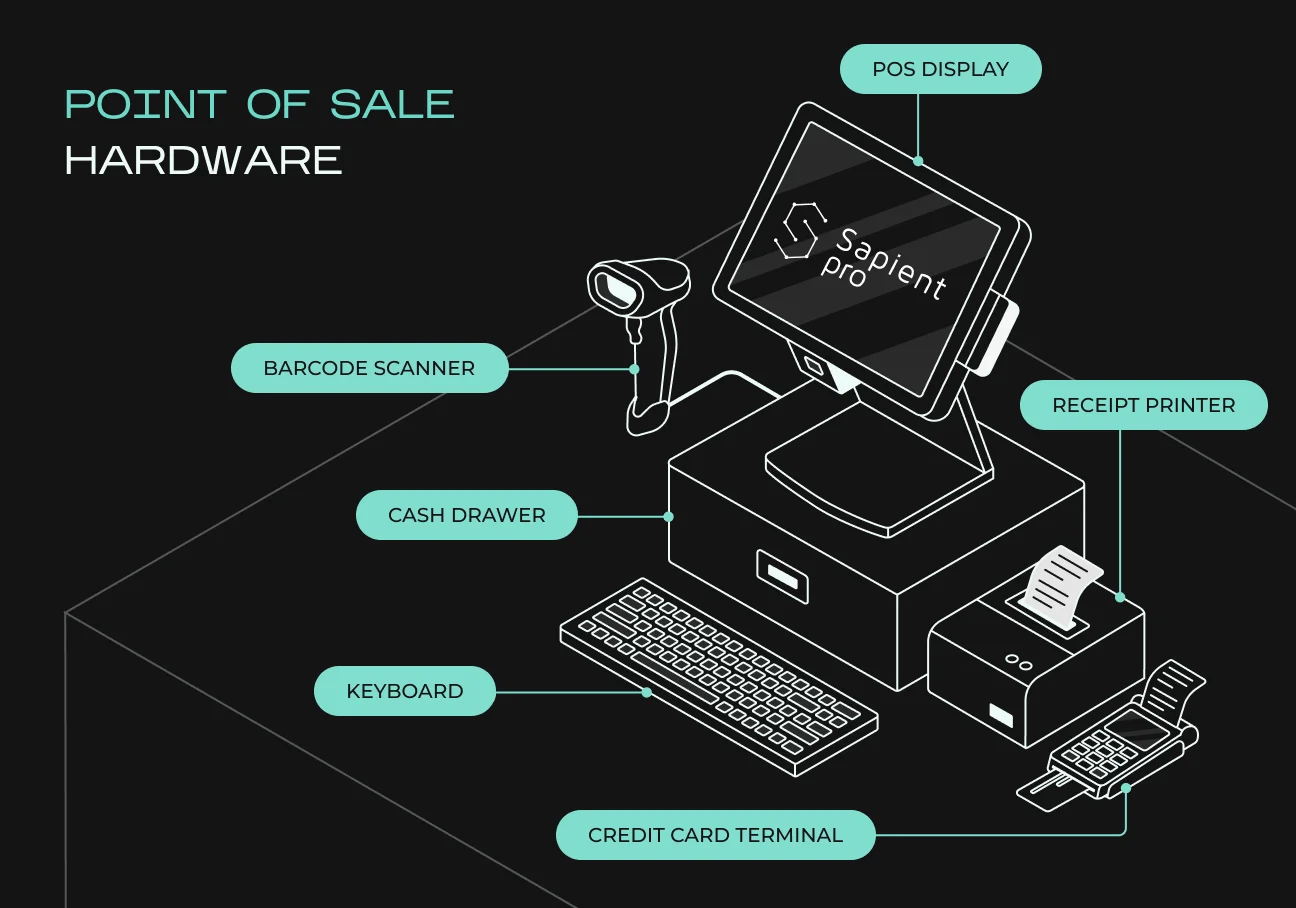
They are used both in physical and digital stores, as they’re essential tools for any transactions. Some countries even require merchants to use POS terminals by law to protect customers and ensure proper tax calculations.
Difference Between a POS System and a POS Terminal
When comparing POS systems with POS terminals, it’s essential to understand the key differences:
- A POS terminal is a physical device for payment processing;
- A POS system is all the hardware and software to manage sales and related operations.
Let’s take a closer look at all the parameters in a detailed comparison sheet.
Feature | POS System | POS Terminal |
| Definition | A complete software and hardware solution for managing sales, inventory, and customer interactions. | A physical device used to process transactions and accept payments. |
| Functionality | Handles sales, payments, inventory, reporting, and customer data. | Primarily processes payments. |
| Components | Includes software, cash register, barcode scanner, receipt printer, and payment terminal. | Typically includes a card reader, keypad, and touchscreen display. |
| Usage | Used in retail, hospitality, and e-commerce for managing business operations. | Used at checkout points for accepting customer payments. |
| Connectivity | Can be cloud-based or on-premise, integrating with other business tools. | Often connects to a POS system or operates as a standalone payment processor. |
| Scalability | Easily expandable with additional features and integrations. | Limited to payment functions, requiring a full POS system for advanced features. |
If you work with e-commerce, you might want to integrate blockchain technologies for faster and more secure transactions. Learn more about how blockchain helps your e-commerce business grow.
How Does a POS System Benefit Business?
There are many advantages of using a POS system in your business. While this generally means faster and more efficient transactions, you also get many other benefits. Let’s take a deeper look.
Faster and More Efficient Transactions
A modern POS system improves the checkout process by automatically:
- Calculating prices automatically;
- Applying discounts;
- Accepting various payment options.
This reduces wait times and increases customer satisfaction. With SapientPro’s POS extension for Magento 2, businesses can process in-store and online transactions in real time, ensuring top-tier service for all customers.
Accurate Inventory Management
Real-time inventory tracking helps businesses:
- Maintain optimal inventory levels;
- Automatically trigger reorder alerts;
- Reduce the risk of running out of popular products or overstocking items.
By synchronizing inventory across all channels, SapientPro’s solution ensures that your online and in-store stock remain consistently updated, saving time and preventing costly mistakes.
Sales Reporting & Business Insights
An effective POS system collects and analyzes sales data, helping managers identify top-selling products, high-traffic periods, and emerging customer behaviors. With SapientPro’s reporting tools, business owners can:
- Sport trends quickly;
- Adapt pricing strategies;
- Optimize marketing initiatives;
- Strengthen loyalty programs.
All these features help your business make better decisions that lead to an increase in income.
Improved Customer Experience & Loyalty
Most POS platforms now support loyalty programs, offering exclusive rewards, discounts, and personalized deals. Working with multiple payment types (credit/debit cards, mobile payments, digital wallets) helps businesses improve customer convenience.
SapientPro’s POS extension simplifies loyalty tracking by unifying all customer profiles under one system. Whether purchases happen online or in-store, everything is recorded. This makes it easier to implement and manage incentive programs.
Reduced Errors & Fraud Protection
Automated price calculations, tax configurations, and payment processing features minimize the risk of human error that can lead to bookkeeping miscalculations. SapientPro’s POS system further improves security through features like role-based access controls and data encryption, effectively backing up your business against fraud and unauthorized transactions.
Seamless Integration with Other Business Tools
Today’s best POS solutions integrate effortlessly with accounting software, e-commerce platforms, and marketing applications to ensure synchronized data and reduce manual input. SapientPro’s Magento 2 POS module offers native compatibility with the Magento ecosystem and other key business tools. This provides a single reliable platform for managing inventory, orders, and marketing campaigns in one place.
Monitoring Employee Performance
A good POS solution can track individual sales metrics, manage schedules, and control access levels for each employee. These insights make it easier to organize performance-based incentives and optimize staff deployment. SapientPro’s POS system for Magento 2 also logs detailed sales data per cashier, further enhancing transparency and accountability.
Multi-Location and Remote Management
Cloud-based POS solutions allow centralized control over pricing, inventory, and reporting across multiple store locations. Managers can access real-time data from anywhere using a mobile or web-based dashboard. SapientPro’s POS extension ensures that all in-store transactions, regardless of location, sync seamlessly with Magento, eliminating data silos and making remote oversight easy and reliable.
What are the Most Popular POS System Types?
Different types of businesses require various kinds of POS systems. Let’s take a look at their capabilities, features, and benefits for your company.
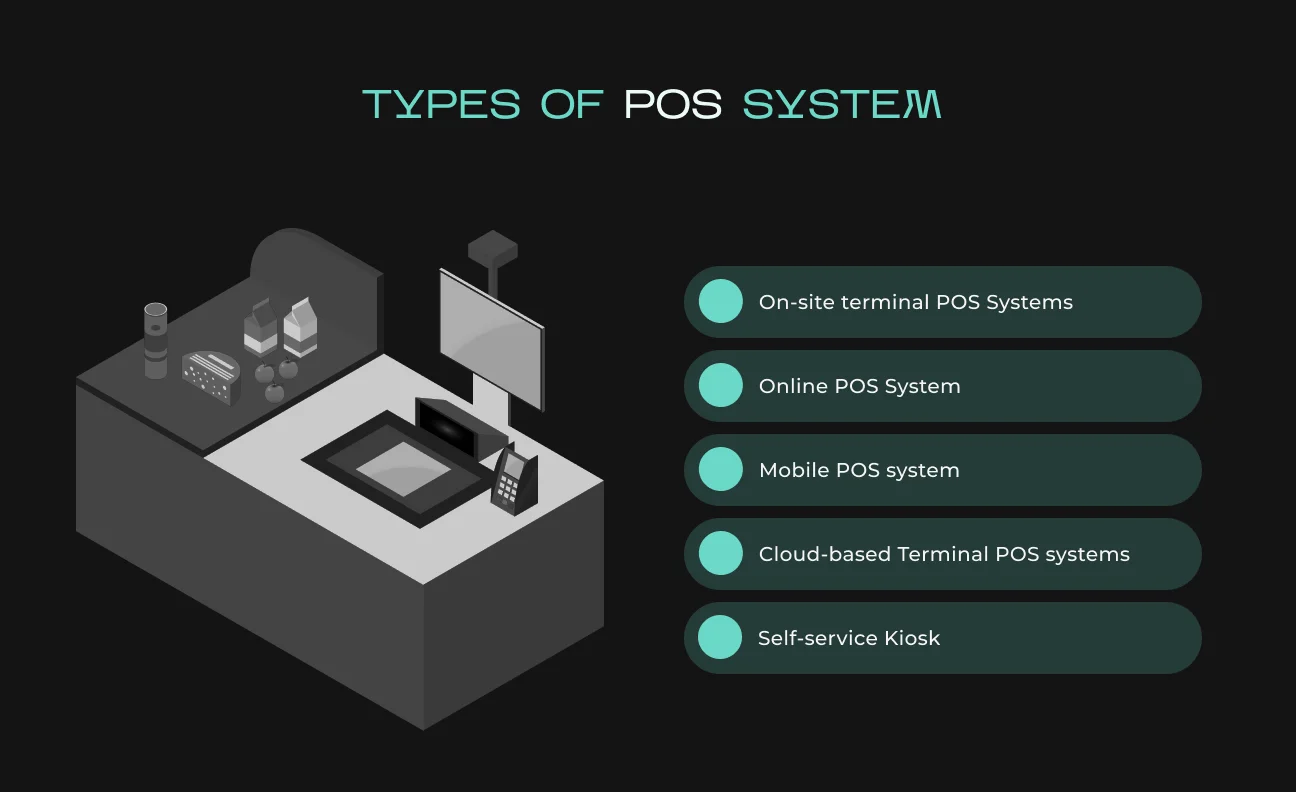
Traditional POS Systems (On-Premise POS)
Traditional POS systems operate through on-site terminals and often use dedicated hardware such as touchscreens and cash registers. They store data locally, making them a reliable choice for busy retail and hospitality locations that prefer in-house data control.
Key features:
- Trustworthy and fast processing with offline capabilities;
- Needs local storage on a server, meaning that information is available only on-site;
- Usually, it comes equipped with barcode scanners, receipt printers, and cash drawers;
- Needs manual updating and regular maintenance.
Best for:
- Brick-and-mortar stores with a consistent customer flow;
- High-volume restaurants needing quick, stable transactions;
- Businesses that want complete control over data storage and security.
Cloud-Based POS Systems
Cloud-based POS systems keep transactional data on remote servers, enabling real-time access to sales, stock levels, and reports from any internet-connected device. They’re an excellent choice for businesses seeking flexibility and scalability.
Key features:
- Real-time data synchronization across multiple locations;
- Accessibility via web browsers, tablets, and smartphones;
- Automatic backups and software updates;
- Easy integration with e-commerce platforms, accounting tools, and marketing software.
Best for:
- Multi-outlet retailers requiring unified inventory management;
- Small to medium businesses looking for a low-maintenance solution;
- Restaurants and retail stores needing remote access to real-time sales data.
Mobile POS (mPOS) Systems
mPOS solutions use tablets and smartphones to accept payments on the go. Lightweight and flexible, they’re ideal for businesses that operate outside traditional store settings, like pop-up shops and mobile services.
Key features:
- Wireless card readers supporting Apple Pay, Google Pay, and more;
- Cloud-based operations with live inventory tracking and analytics;
- Lower initial costs than conventional POS hardware;
- Simple, portable setup for rapid deployment.
Best for:
- Small and startup businesses seeking an affordable entry point;
- Food trucks, vendor stalls, and temporary retail events;
- Service-based operations like salons, home repair services, and mobile professionals.
Self-Service Kiosk POS
Self-service kiosk POS systems allow customers to order and pay on their own. It's widely applied in fast food chains, movie theaters, and retail stores.
Key features:
- Touchscreen interface for easy navigation;
- Kitchen display system support for order entry;
- Cashless payment and loyalty program support;
- Reduces staffing needs and increases the speed of service.
Best For:
- Quick-service restaurants (QSRs) and coffee houses;
- Cinemas, airports, and event venues with high customer turnover;
- Retail stores that offer self-checkout services.
Multichannel POS Systems
Multichannel POS systems unify sales and inventory data from brick-and-mortar stores, online marketplaces, and e-commerce websites into a single platform. This prevents overselling and simplifies business operations across various channels.
Key features:
- Real-time inventory management across online and offline channels;
- Omnichannel merging of customer data for precise marketing;
- Integration with online payment gateways and shipping carriers;
- Prevents overselling and stocking out for businesses.
Best for:
- Physical and online stores;
- Sellers on more than one marketplace (Amazon, Shopify, Etsy);
- Subscription business and online service providers.
Restaurant & Hospitality POS Systems
These POS systems carry industry-specific functionality. These can be table management, order tracking, and compatibility with kitchen display systems (KDS).
Key features:
- Digital menu and tableside ordering for faster, more accurate service;
- KDS integration for streamlined communication with kitchen staff;
- Reservation tracking, bill splitting, and tip handling;
- Integrations with third-party delivery and takeout platforms.
Suitable for:
- Hotels and resorts providing in-room dining facilities;
- Restaurants, cafés, and bars;
- Catering businesses and event centers.
SapientPro’s Magento 2 POS Solution
If your business needs a scalable system that smoothly merges online and offline operations, SapientPro’s Magento 2 POS extension offers a reliable solution. Why choose SapientPro:
- Combines real-time inventory syncing with streamlined checkout processes;
- Works with barcode scanners and multiple payment methods: cash, credit/debit, and mobile wallets;
- Incorporates advanced security measures, role-based access, and offline functionality;
- Provides consolidated sales reporting, loyalty program integration, and easy customization.
With SapientPro’s POS module for Magento 2, businesses can manage everything from in-store purchases to online orders in one place. You’ll remove the need for costly data synchronization and manual updates. It’s a universal approach for retailers, restaurateurs, and multi-location enterprises looking to optimize efficiency, consistency, and overall profitability.
Must-Have POS System Features
Regardless of whether your business is a physical store, a restaurant, or an online shop, your POS system should include core functionalities that improve efficiency, enhance the customer experience, and support long-term growth. Below are key features explained with real-world examples.
Scalability & Customization
As a business expands, its POS system must accommodate additional locations, payment options, and integrations without disrupting performance.
Essential features:
- Flexible expansion: easily add terminals and physical locations as your operations grow;
- Custom pricing and workflows: adjust pricing rules, discounts, and organizational processes as needed;
- Support for new payment methods: integrate emerging payment solutions and third-party applications with ease.
Example: the SapientPro POS system is built on Magento 2, an open-source platform that offers businesses complete control over customization and scalability. This open-source nature allows businesses with existing Magento stores to easily integrate the POS system and scale it according to their needs.
Sales Processing & Payment Flexibility
Your POS system should rapidly and securely handle multiple payment methods, ensuring smooth transactions for customers.
Essential features:
- Multiple payment methods: accept cash, credit/debit cards, and mobile payments (Apple Pay, Google Pay);
- Advanced security: support EMV chip cards, NFC contactless payments, and data encryption;
- Customer convenience: enable split payments, refunds, and tipping features.
Example. A retail store using SapientPro POS allows customers to pay in their preferred method, including tap-to-pay. This saves time at the checkout and boosts customer satisfaction.
Inventory Control
Real-time inventory tracking prevents both overstocking and running out of popular items, which is key for uninterrupted operations.
Essential features:
- Automatic updates: synchronize stock levels across channels in real time;
- Low-stock alerts: receive notifications to reorder top-selling products;
- Barcode integration: simplify product identification and restocking.
Example. A store with SapientPro POS can monitor the levels of inventory across various locations and get notified when bestsellers are running low. The system can even order new stock automatically when inventory levels reach a set point.
Employee Management
Effectively managing staff schedules and performance data is crucial for smooth daily operations.
Essential features:
- Role-based permissions: restrict certain administrative functions to authorized personnel;
- Time tracking: log clock-in/out data to ensure accurate payroll;
- Performance reporting: review individual sales metrics for informed decision-making.
Example. The SapientPro POS system in a restaurant allows different levels of access to staff members. Managers can make refunds or give discounts alone.
Customer Management & Loyalty Programs
A good POS system should store customer information, track purchase history, and reward loyal buyers to encourage repeat business.
Essential features:
- Customer profiles: maintain contact details and transaction records;
- Targeted loyalty rewards: offer personalized discounts based on buying patterns;
- Marketing integrations: sync with email tools and loyalty software for seamless outreach.
Example. The SapientPro POS system integrates both online and offline customer data into one place. This means whether a customer registers online or in-store, they are tracked in the same database. It is easy to implement loyalty programs and discounts across both channels if you use this method.
Reporting & Analytics
Good reporting functionality provides owners with visibility into sales trends, busiest periods, and inventory turns so that they can make smart decisions.
Essential features:
- Real-time dashboards: track sales and performance metrics as they happen;
- Customizable reports: deep-dive into revenue, taxes, and stock levels;
- Predictive forecasting: identify emerging trends to plan future purchases and promotions.
Example. A multi-unit store using SapientPro POS goes through sales reports to identify what the best-selling items are and stocks up or refills accordingly.
Integration with Other Business Tools
Modern POS platforms must seamlessly connect with accounting, e-commerce, and marketing applications to unify data across your entire business.
Essential features:
- Automatic bookkeeping: sync transactions with QuickBooks or Xero;
- E-commerce compatibility: coordinate offline & online sales through Magento;
- Marketing outreach: link with platforms like Mailchimp for targeted campaigns.
Example. SapientPro’s POS provides a fully developed Magento module rather than a basic CRM link. Data from online and offline sales stays consistent in real time, reducing the need for manual exports or imports and eliminating delays.
Security & Compliance
A secure POS system protects sensitive customer data and mitigates fraud risks.
Essential features:
- PCI DSS certification: uphold rigorous standards for credit card processing;
- End-to-end encryption: secure payment data from capture to final settlement;
- Access controls: prevent unauthorized use with strict permission settings.
Example. SapientPro’s POS ensures compliant and secure transaction processing. Unlike many subscription-based systems, SapientPro allows businesses to self-host, providing greater control over data security and access permissions.
How much does a POS system cost?
The costs of a POS system vary depending on your provider, features, requirements, and many other factors. You’ll have to calculate all the associated costs as well to get a full understanding of the involved budgets. Let’s take a look at SapientPro’s offer.
Adobe Commerce (Cloud / On-Prem):
- First-Year License: $1,000;
- Annual Renewal: $500;
- Optional Installation Fee: $400.
Magento Open Source:
- First-Year License: $500;
- Annual Renewal: $250;
- Optional Installation Fee: $150.
SapientPro’s POS module for Magento 2 is the perfect solution for retailers to unify online and in-store operations. You get real-time inventory updates, multiple payment methods, and an open-source solution for complete customization & scalability.
The best part: SapientPro’s engineers can implement any feature for your business on-demand. This allows you to get lifetime support with a product fully dedicated to your business. Interested? Let’s get in touch!
Partner with a Reliable POS System Provider
POS systems are an inseparable part of modern business. However, the true benefit lies in the customization and scalability of modern solutions. SapientPro’s POS system is the ideal solution with custom features, designs, and everything needed for your operations.
Contact our team today to learn more about our product’s benefits for your business!

