
All Telegram Mini Apps: Real Use Cases, Final Costs, and Timelines
October 26, 20265 min read


Telegram Mini Apps open directly inside chat. They connect a standard web page to a bot, which then talks to company servers. Imagine a store selling goods through messages. A visual catalog with direct checkout lets customers order instantly instead of messaging staff back and forth.
Still, exact technical requirements matter most in Telegram Mini Apps development. A basic screen takes little effort. Pulling live warehouse stock, setting individual client prices, or linking an ERP changes everything. Those specific choices drive your final bill and delivery schedule.
What Is a Telegram Mini App?
Telegram Mini Apps function as web tools running directly inside the chat interface. Nobody has to install external store files to open them.
Developers construct these interfaces using basic web stack technologies: JavaScript, HTML, and CSS styling. Launching one happens via a bot menu, account bio, or direct chat link. Security stays tight because Telegram passes signed data to your server.
Once verified, the system recognizes who logged in and pulls their profile info instantly.
Standard chat bots handle short queries well, like sending business hours. Harder workflows require visual elements. Chatting back and forth just to select a schedule time wastes effort. Putting interactive calendar widgets right in front of visitors cuts out endless messaging.
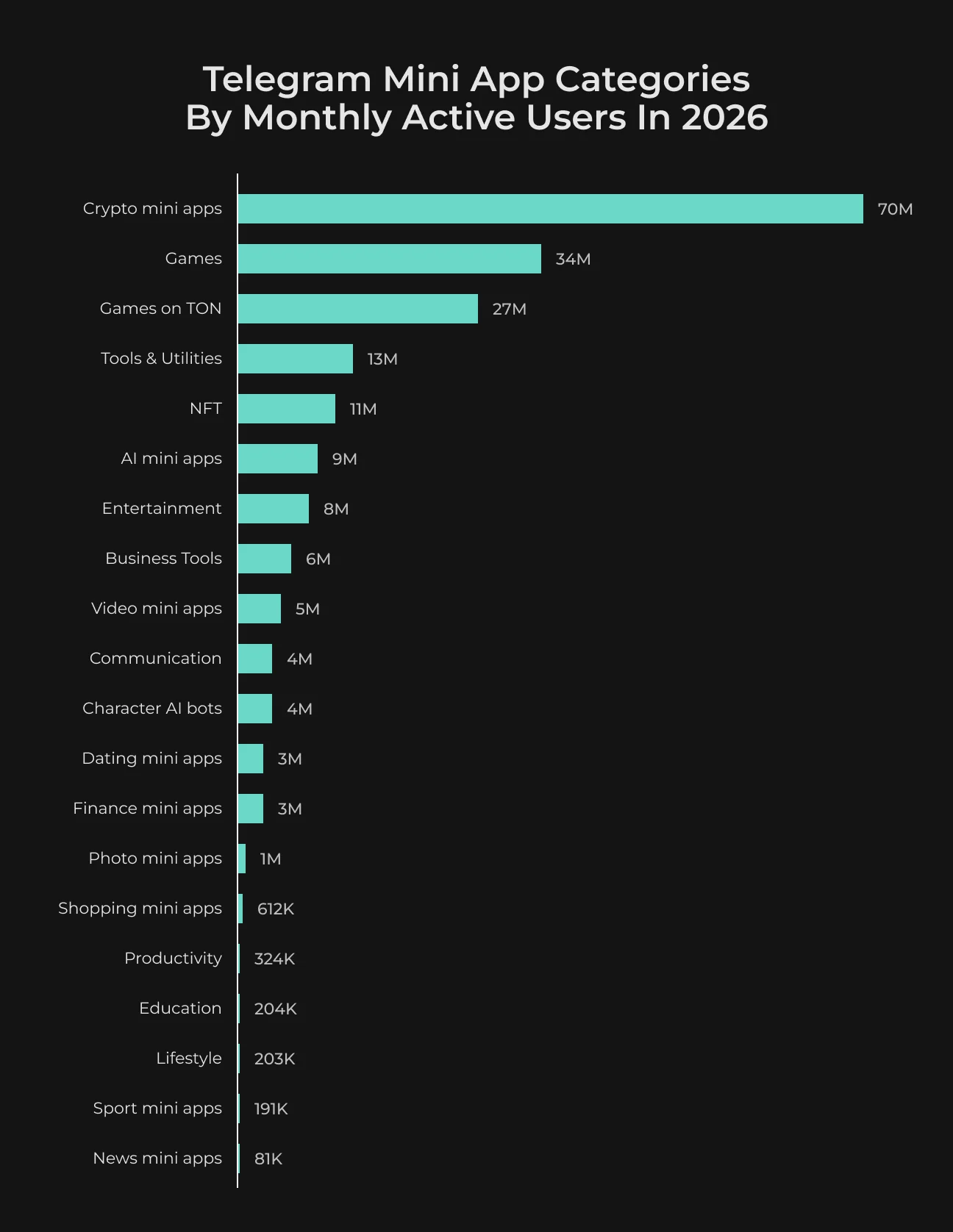
Traditional websites rank on Google and open anywhere on the web.
Native mobile applications get deeper phone hardware access, though they force users through App Store installations. Mini Apps suit brands aiming to offer smooth interactive features right where their Telegram audience stays.
Mind the technical constraints too. Telegram's internal webview renders these interfaces, so cross-device checks are mandatory. A layout created for big desktop screens often fails on small mobile displays without manual tweaks.
Build Your Telegram Mini App With Us
Tell SapientPro what you need, and we'll discuss the development scope and costs.

Is a Telegram Mini App Right for Your Business?
A huge subscriber count looks promising, though chat members rarely translate directly into paying clients or active account users. Take the UK market.
Ofcom data shows Telegram reached 4.3 million adults by May 2025—a 26% jump from 2024. Still, overall national web adoption stayed under ten percent.
Total app downloads hide real user intent. When buyers regularly place orders right inside your existing Telegram group, setting up a Mini App makes sense. Platform market size matters far less than your own audience habits.
Wholesalers and online stores make sense here since buyers message them repeatedly. Channel creators running live events can handle ticket sales inside chat. Training centers can let students log in for course files. Local restaurants can take food orders directly.
Check what your staff spends time answering every morning.
Look for repetitive order steps that drain team hours. If clients constantly ask for catalogs and submit purchase requests in messages, automating that workflow helps immediately. But if your channel only posts free content to casual readers, an app won't pay off.
Think about how new clients discover you. Google search visitors need a regular web page. Mini Apps serve existing clients who already hang out in your Telegram channel.
Telegram Mini App Use Cases and the Systems Behind Them
Two Mini Apps can look almost identical to customers and require completely different amounts of engineering work. A product catalog containing 50 manually updated items is relatively simple.
The same catalog connected to warehouse stock and individual customer contracts takes much more work. The distinction becomes clearer across the following business applications.
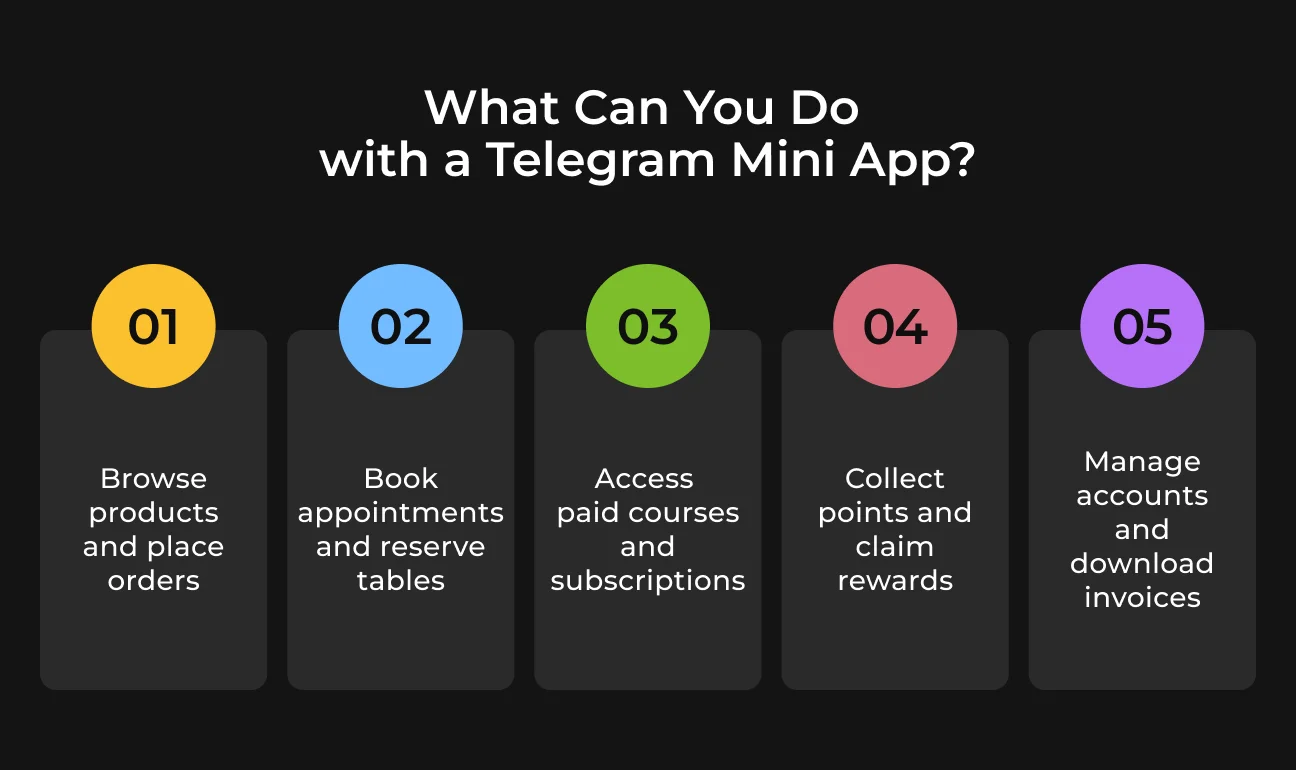
Shopping and Repeat Orders
Wholesale clients need fast reorders above catalog browsing.
An office admin ordering monthly paper supplies needs identical items each trip. Opening a previous cart directly in Telegram saves them plenty of time. They can quickly edit quantities, delete extra items, and hit submit. New visitors simply browse the store and check out normally.
Price accuracy is critical here. B2B suppliers usually set individual volume rates or personal account discounts. Your app must pull actual prices from the database before charging the client.
Stock updates need strict tracking too. A product available in the morning might run out by lunch. Running a live check right at checkout avoids taking orders for missing items. For physical goods, Telegram links directly with standard external payment gateways.
Total revenue numbers don't show the full story. If buyers try the app once and then go back to messaging your manager manually, something in the checkout process is getting in their way.
Service Appointments and Table Bookings
Running phone reservations and chat bookings on separate tools causes double-booking errors. A Telegram Mini App solves this by syncing directly with main calendar databases. When staff add a table or appointment manually, those times hide from chat users immediately.
Clients view available hours and update reservations right on screen without messaging support. The setup runs availability checks before confirming, syncs history to CRM profiles, and processes upfront deposits when required.
For salons and private tutors, the immediate benefit may simply be fewer messages about available times. Look at how many bookings customers complete without staff assistance. Changes in attendance will take longer to assess.
Paid Courses and Community Subscriptions
Searching through old channel posts for paid content annoys most students. Mini Apps store these courses on a simple dashboard. Students click their unlocked module and pick up right where they left off.
Short video teasers allow buyers to sample content prior to checkout. Your current LMS software connects to Telegram through standard APIs. This keeps existing lesson hierarchies intact while syncing user progress in the background.
Digital sales follow strict platform rules, as Telegram enforces Stars payments for courses, downloads, and private group access.
System permissions sync directly with user payments—purchasing a course unlocks content immediately, while lapsed subscriptions restrict access automatically. Alignment between Telegram’s recurring Stars billing and your custom pricing tiers is critical here.
Loyalty Programs and Customer Rewards
Shoppers often check accumulated points right on their phones while standing in line. Telegram Mini Apps display those balances inside chat so clients apply active discounts prior to payment. Instant database updates stop double spending across branches. If a user claims points at one store, every other location sees that updated total right away.
Look at how loyalty features tie into online spending habits. In a 2025 New Zealand Commerce Commission report, Woolworths and New World recorded loyalty cards attached to nearly 90% of their digital orders.
Initial discount claims only track short-term usage. The key metric is whether discount users turn into recurring customers down the line.
Customer Self-Service and Account Management
Support teams waste hours handling basic invoice requests.
Connecting accounting software to Telegram allows clients to pull their own billing records directly inside chat. Users can also view return schedules or request contract extensions from that same menu. The ERP provides the records, while requests requiring approval go to the support team.
Access gets more complicated with B2B customers. Several employees may use the same company account, but they shouldn't all see identical information.
A site supervisor might need equipment return dates, with invoices available only to the finance department. Telegram provides signed user data that the backend verifies before checking account permissions.
Try opening a restricted invoice from another customer's account during testing. A copied document link or direct API request must fail the permission check too.
After release, review how often customers still contact support for information they can access through Telegram. Frequent requests for invoice copies, for instance, may indicate that people can't find the download option or don't have the correct permissions.
How Much Does Telegram Mini App Development Cost?
Two companies can order identical Mini Apps and get different price tags. One might run a booking tool with a working API. The other tracks clients in spreadsheets and needs a full backend before taking the first booking.
There's no fixed Telegram Mini App development cost.
To get a realistic estimate, you must check the software and features involved. Small apps with basic screens cost far less than enterprise portals connected to ERPs. Connecting systems takes up most budgets, especially when older setups cannot share data easily.
Payments need special attention. Developers have to set up checks for transactions, handle errors, and clear refunds. Digital goods also require full compliance with Telegram Stars rules.
Testing and ongoing maintenance require continuous budget. Someone needs to check mobile screens, handle unexpected bugs, and update code when external software changes. Server hosting and external services add ongoing bills as well.
Ask for a clear work plan before sign-off. It should map out launch features, connection points, and test scenarios covered by the fee. Make sure to clarify if launch setup and future support are included.
Starting small keeps expenses down. A wholesale business can launch quick reorders first and leave loyalty setups for later. This approach lets you watch real user habits before spending more.
Technical Roadmap for Building Telegram Mini Apps
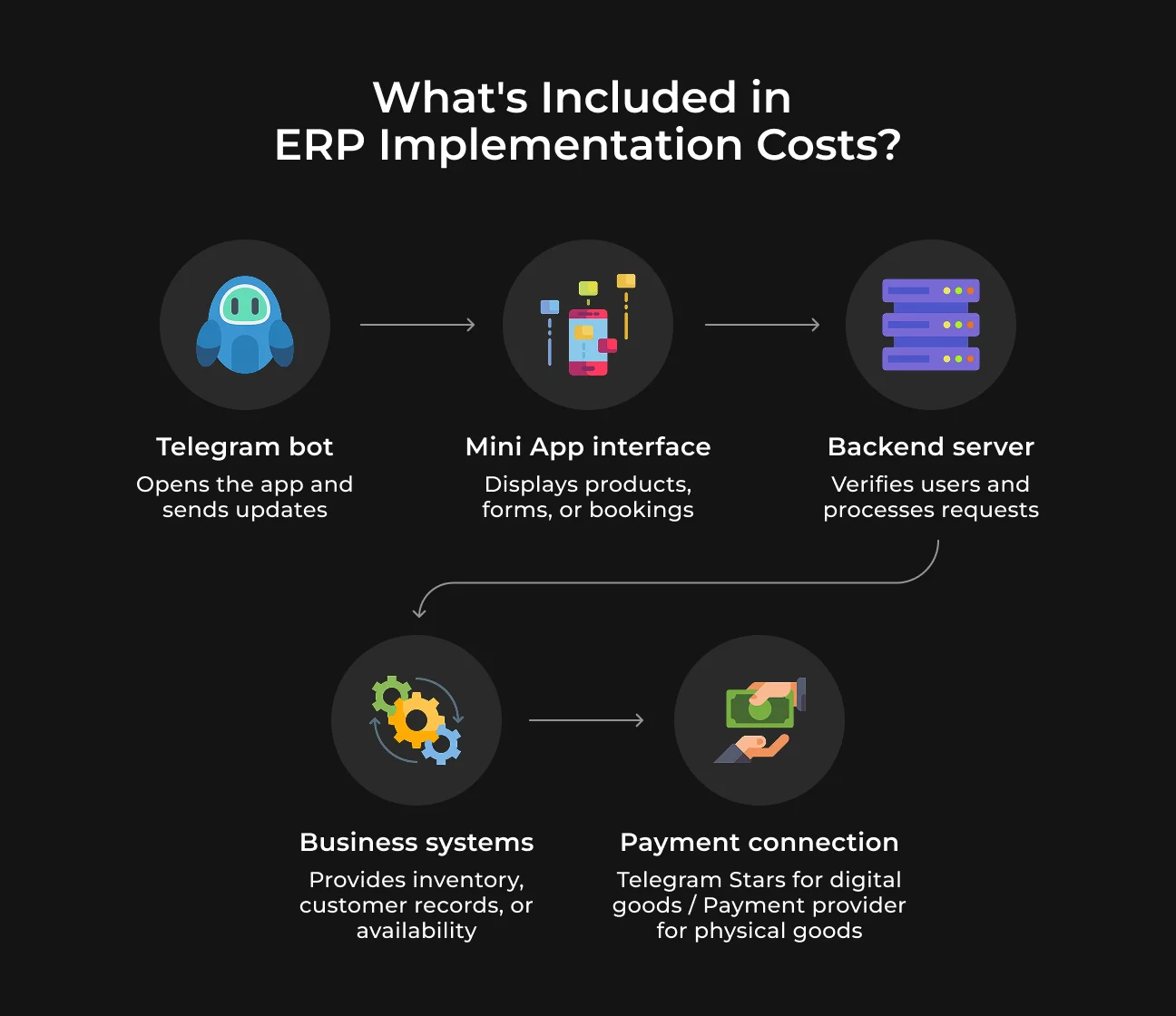
A Telegram Mini App tutorial can show how to open a basic web page from a bot. For a business project, the next question is where that page gets its data. A booking calendar, for example, needs current appointment availability.
Phase 1: Architecture and Bot Setup
Before you develop Telegram Mini App features, choose what belongs in the first release and identify the API endpoints each feature needs. Register a bot through BotFather and configure the Mini App's HTTPS URL.
Phase 2: Interface Work and Data Flow
UI teams design responsive screens using standard Telegram Mini App API protocols. Adapt interface elements for phone screens alongside desktop windows. Backend devs wire these views to company ERP databases while adding server verification for login tokens and account permissions.
Phase 3: Payment Links and Launch
Choose payment channels according to offer types: digital products need Telegram Stars, whereas physical items require external checkout gateways. Run cross-device tests on payment flows and server errors prior to live deployment.
Telegram Mini App QA and Launch Preparation
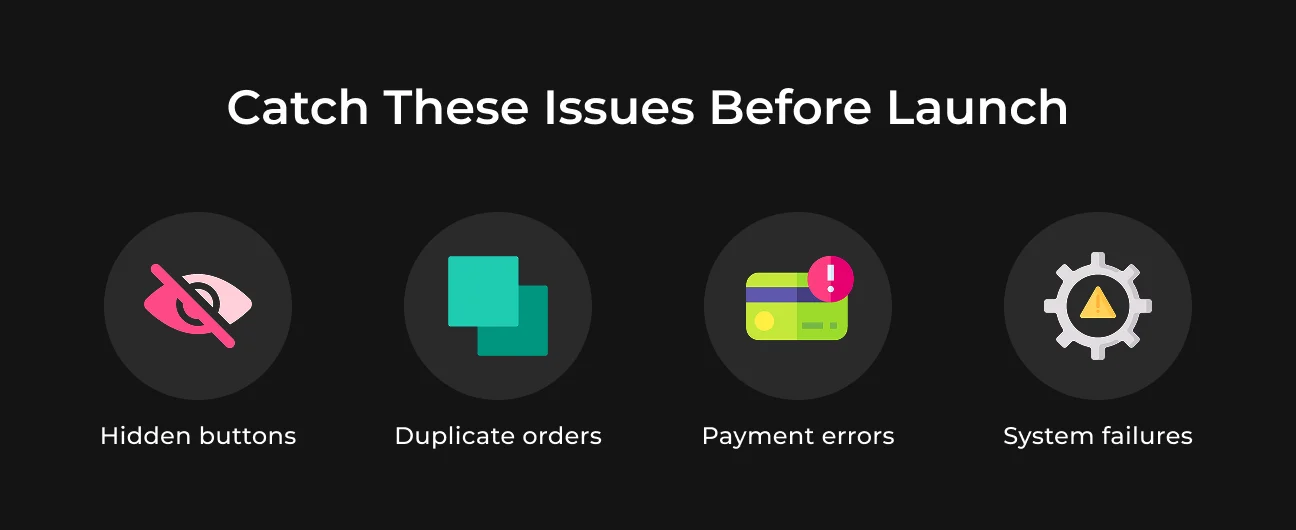
Standard browser testing misses many Telegram-specific bugs. Keyboards often block interactive screen elements, while transaction lags lead to unrecorded sales. QA work must reflect real user tapping behavior.
Compatibility and User Experience
QA teams need hands-on checks inside native iOS, Android, and desktop builds. Mobile screens often distort desktop-first interface designs. Key test areas include compact viewports, theme switches (light or dark mode), soft keyboard triggers, tap spacing, and backward navigation.
Slow connection scenarios need testing as well. Dropping connection mid-order should keep filled inputs intact and prevent buyer confusion. Official Telegram documentation sets clear standards for viewports.
Security and Transaction Reliability
Security checks require breaking things on purpose. Expired sessions must immediately force a reload prompt, while unauthorized page visits should hit strict access blocks without leaking private data.
Rapid double taps need backend filters to stop duplicate orders. Failed or pending payments should display clear error screens, and processed refunds must immediately revoke product access.
If CRMs fail, the app displays an error alert instead of saving broken records. Digital items stay locked until Stars payment updates confirm on the server.
Monitoring, Support, and User Acquisition
Public release is just step one. Before launch, set up incident alerts, clear bug-tracking channels, and fast rollback options. Support staff need direct workflows to fix payment errors or missing user access.
Focus analytics on real conversion events: completed sales, booked visits, or membership renewals. Traffic spikes mean little on their own—user retention shows if the app actually delivers value.
Plan Your Telegram Mini-app Development with SapientPro
Building a Telegram mini app raises many technical questions.
SapientPro helps clear up those uncertainties before development starts. We examine your core business needs together with your existing software tools to choose the best features for an initial release. The planning stage outlines realistic budgets alongside target delivery timelines.
Reach out to discuss your project directly with the SapientPro team.
Connect Telegram With Your Business Systems
Ask our developers about integrating Telegram with your CRM, ERP, or payment systems and get a detailed estimate.