All
How to Build Your Own E-Learning Platform with AI Capabilities
Updated:April 29, 20265 min read


The global population without formal education will decrease to 5% by 2050 from its current 10%. While the global population with secondary education will raise from 21% to 29%, and those with higher education from 11% to 18.5%.
Such an increasing demand for quality education might create difficulties for schools to expand with their current facilities. Building new additions and resources is often too costly for many schools. E-learning has become a crucial solution for this issue.
But how can we develop a solution that facilitates learning management and automates tasks for tutors? In this article, we’ll talk about the key features of an e learning platform development.
Key Takeaways
- An e-learning platform is an online website designed for learning and education purposes;
- Organizations can benefit from custom platforms because they help address specific needs and foster success;
- The cost to create an e-learning website depends on factors like technology, complexity level, and development team fees.
What is an E-Learning Platform?
An e-learning platform allows for distance education. It provides educational tools and resources that enable both students and teachers to engage in remote and structured learning activities. Users can interact online through discussion boards, live chat, video calls, online quizzes, interactive resources, or digital tests on this platform.
In fact, 40% of Fortune 500 companies use e-learning for employee development, and over 72% of American businesses think it gives them a competitive advantage.

Students can learn from any location and at any moment through the e-learning system. This lets them study at their own speed and choose their own study times.
Reasons to Build a Custom E-Learning Platform
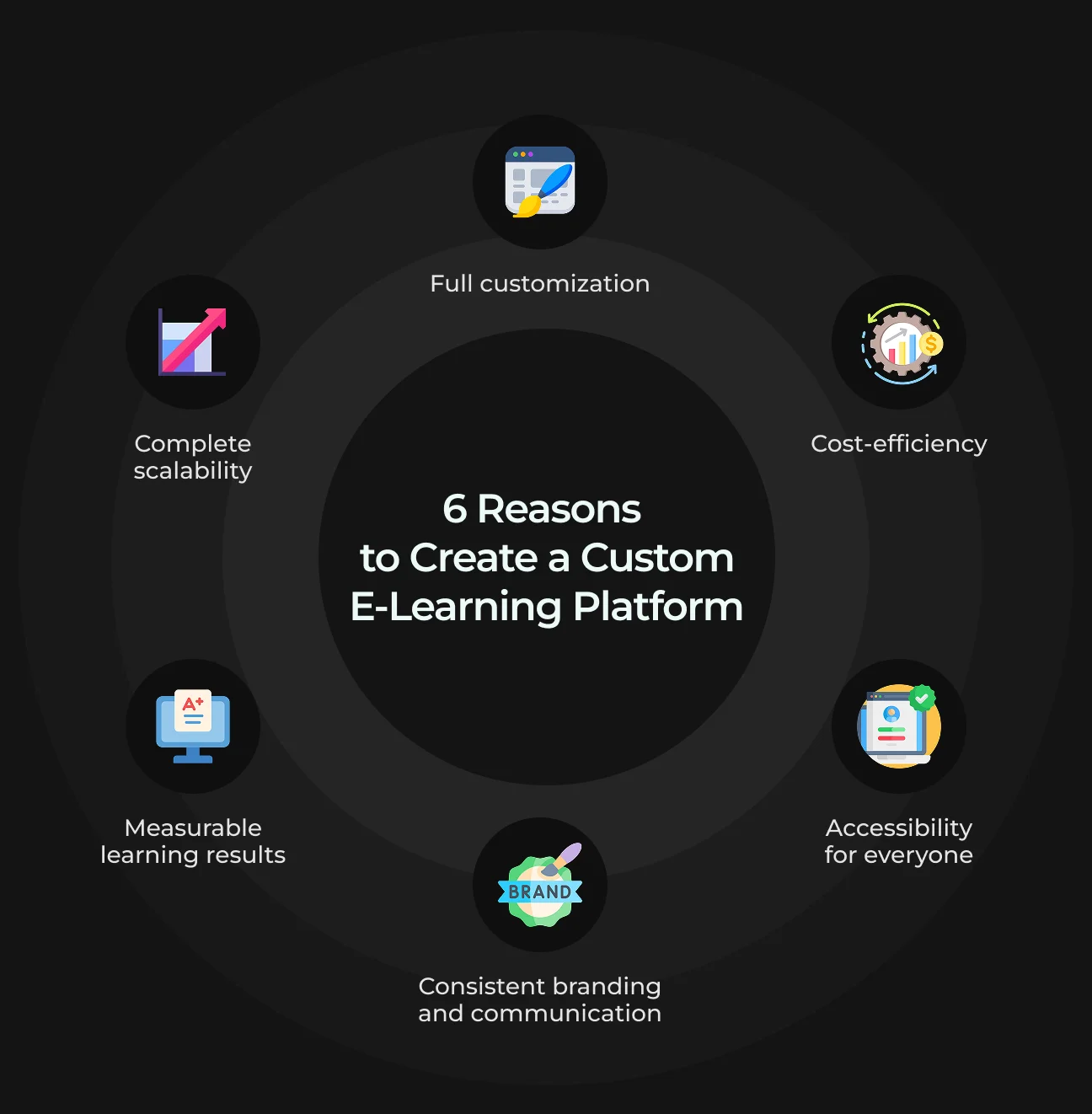
Below, we'll explain why businesses across all sizes and industries should choose custom e-learning as their perfect solution.
1. Full Customization
No one knows your business as you do, so your learning system should reflect your company's brand.
Custom course content is essential in many situations, like employee onboarding, because standard e-learning can't match your organization’s unique structure and processes.
Customizable online courses are also crucial for compliance training, as companies in the same industry might face different requirements.
2. Complete Scalability
Organizations that grow need quickly adapt their training requirements. The training system of custom e-learning courses allows companies to manage growing numbers of learners without compromising the quality of their programs. The flexible nature of this system makes training stay effective, even during times of fast growth.
3. Cost-Efficiency
A lot of people think custom e-learning costs too much, but this belief is not always true. Indeed, the first investment in custom e-learning might exceed off-the-shelf solutions, but it delivers substantial advantages in the future.
Custom e-learning provides scalability features, enables resource reuse, shortens training duration, etc. All these eventually result in long-term cost savings.
4. Consistent Branding and Communication
Organizations can use custom e-learning design to include their branding, style guides, and core values in training materials. This consistent design helps learners connect with the organization's values and culture.
5. Accessibility For Everyone
All employees at any remote workplace can access training opportunities using custom e-learning tools. The business can train all them equally through this method and provide the same level of support to each worker.
6. Measurable Learning Results
Organizations get access to robust analytics and tracking tools using a custom e-learning system. This allows them to evaluate training effectiveness, monitor a learner's progress, and detect any gaps in knowledge.
Types of E-Learning Platforms
When designing online learning experiences (like programs, courses, or certifications ), choosing the right type of technology is a key factor. It could be really easy to select one if you understand the platforms available and their capabilities to support your goals.
1. Online Course Marketplaces
Online course marketplaces are platforms that allow instructors to market their courses to multiple students. Learners from all over the globe can browse and join different educational programs.
Open source marketplaces usually feature two primary user groups: instructors who upload courses and learners who enroll in those courses to access educational materials.
Listing your course on a marketplace platform gives you access to excellent marketing support, which could drive your sales. These platforms earn money from student enrollments, so they typically invest in SEO and paid advertising to improve their marketing.
2. Open-Source Online E-Learning Platforms
Open-source online e-learning platforms are learning management systems with source code that's available to the public. The platform allows users to modify its codebase according to their specific requirements.
The platforms, like Moodle, Canvas or Open edX, work as excellent tools to develop customized online learning spaces for educational programs, employee training, and online courses. For example, in 2023, Canvas was the leader in the North American LMS market with a 41% share.
An open-source LMS also provides complete customization for all elements like logo and visual design to match your brand's identity.

3. Virtual Classrooms
Virtual classrooms are basically digital learning environments where teachers and students can collaborate and learn together in real time.
Virtual classrooms typically differ from pre-recorded online courses because they enable immediate communication between teachers and students.
They significantly help students trying to balance work, family, or financial challenges, as they provide an accessible way for those seeking new skills and knowledge.
E-Learning Platform Development Features Checklist
Choosing the appropriate online learning platform for your educational or training institution can be challenging because of the numerous available options.
We prepared this checklist for you with the 10 most essential features and 10 extra ones to help you decide.
10 Must-Have Features
1. User registration and profiles
This feature lets learners and instructors easily and securely create and manage their accounts. It includes secure logins with email verification and password protection. Users can also personalize their profiles by updating personal and educational details.
2. Course management
The platform enables instructors to develop and arrange their course materials via video, PDF, and slide formats. Users can organize their educational content into modules or lessons, which simplifies both navigation and content management.
3. User-friendly interface
The platform needs to have an easy-to-use interface, which makes it simple for all users to navigate. An e-learning platform should also have a responsive design that functions properly on all devices.
4. Content delivery
This feature enables both video streaming for online learning and the ability to download materials offline. The system supports multiple content formats, which creates a diverse learning environment.
5. Assessment and testing
The platform enables users to develop quizzes and assignments to evaluate student comprehension. The automated grading system delivers immediate feedback, allowing for continuous assessment and progress monitoring.
6. Progress tracking
Through dashboards, learners can track their progress by viewing completed courses, ongoing lessons, and their achievements. Learners receive completion certificates after meeting course requirements, which they can share or print.
7. Communication tools
With the help of discussion forums and message boards, learners and instructors can interact with each other. The direct messaging system serves as a private communication tool with individualized support.
8. Payment gateway
The payment gateway integration provides secure financial transactions that accept various payment options (credit cards, PayPal, etc.).
9. Analytics and reporting
The platform provides analytics tools to monitor learner performance as well as course engagement and platform usage statistics. Instructors get performance data to improve their course content and make decisions based on facts.
10. Technical support and helpdesk
The helpdesk helps users resolve technical issues. The feature provides immediate support to users, which helps them continuously learn
10 Nice-to-Have Features
1. Gamification elements
Badges or leaderboards with point systems can be great motivators for learners because they provide rewards for engagement and achievement.
2. Social learning
Students can use social media to share their achievements with others while participating in broader discussions.
3. Advanced personalization
This feature tailors learning experiences based on user behavior and preferences, creating customized learning paths. Adaptive learning technology adjusts difficulty levels and suggests content to meet individual learner needs.
4. Virtual classroom
Live streaming together with interactive whiteboards enable real-time teaching sessions, a similar experience to traditional classrooms.
5. Integration with third-party tools
The platform can connect with CRM, CMS, and LMS systems and allow for data sharing between them. APIs also enable more customization and the addition of new features.
6. Multilingual support
Through its multilingual interface, users can choose their native language when using the platform. Content translation features can make course materials accessible worldwide and increase its reach.
7. Mobile app
The platform provides separate mobile applications for iOS and Android devices. Learners can also download materials offline without internet connectivity.
8. E-commerce features
An e-learning platform lets users offer courses with discounts and create affiliate programs to drive more enrollments. Instructors can sell their courses and reward users who help promote them by using commission systems.
9. AI-driven recommendations
The platform uses artificial intelligence to study user data and recommend courses and content based on past interactions and personal preferences.
10. Feedback and surveys
The platform includes survey tools that let educators collect feedback from learners during and after the course.
How to Create an E-Learning Platform: 6 Steps
E-learning portal development requires strategic planning and technical expertise, together with user-centered design. Let's cover the key steps for creating your own elearning platform.
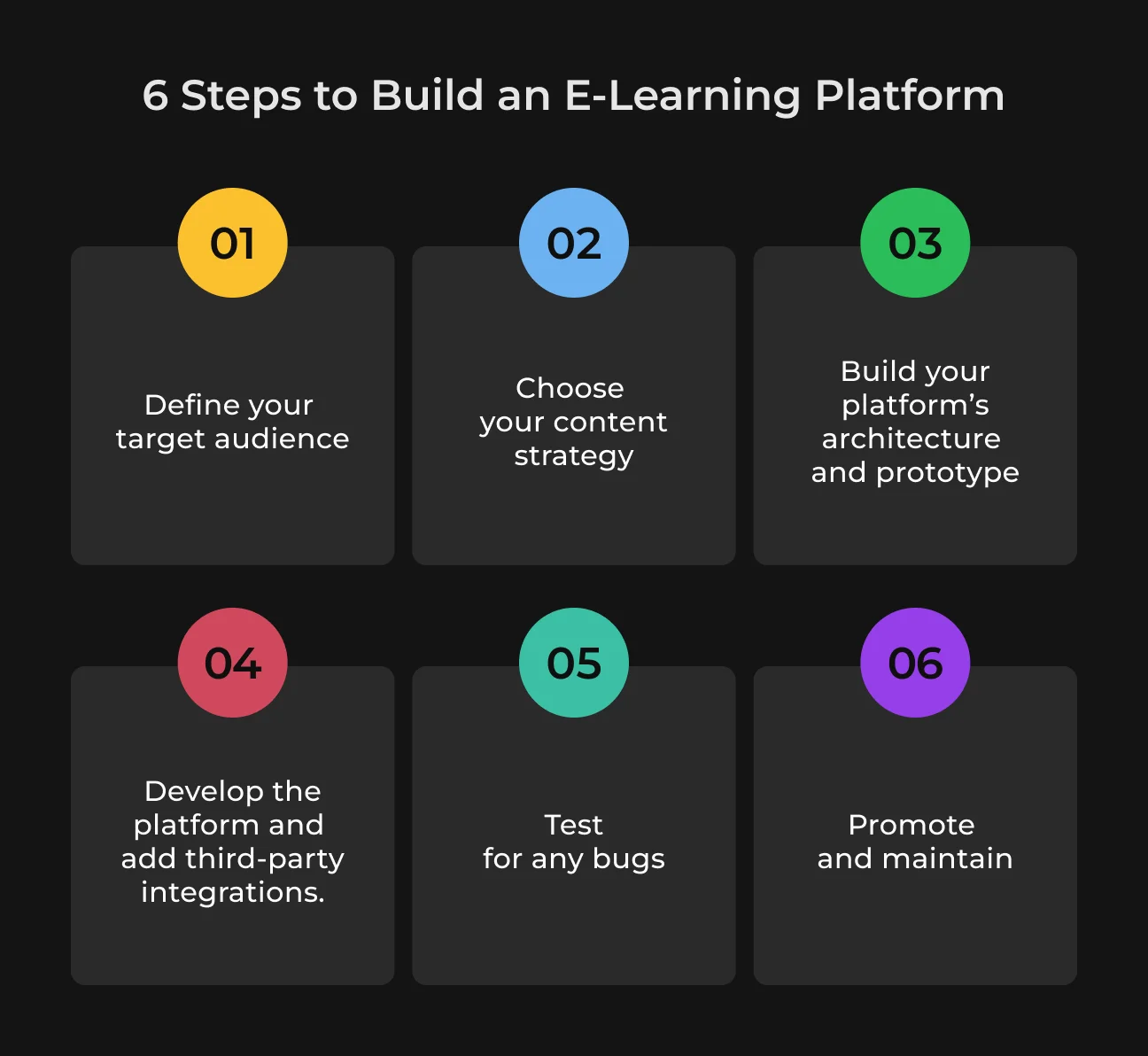
1. Define Your Target Audience
Begin by explaining the main goals of your e-learning solution and identifying who your target users will be. Ask yourself these questions first:
- What are your main learning objectives? For example, these could be employee training, online college courses, customer education, or ongoing professional development;
- What are the features required to reach your objectives? Your system might need to include online courses, quizzes, discussion forums, gamification elements, or a mobile application;
- What is the technical knowledge level of the main audience? You need to understand the characteristics of your learners and their digital competency level;
- What integrations do you need? Your learning management system may need to connect with existing systems like HR software, student information systems, or payment gateways;
2. Choose Your Content Strategy
Next, you need to create a content strategy that fits your target audience. Your curriculum planning should start with defining the essential topics and modules to include in your program.
And remember, quality is key. Even the best corporate e-learning platform cannot guarantee success when the content quality remains poor. Invest in skilled creators, ensure accuracy, and keep it updated to stay relevant.
3. Build Your Platform’s Architecture & Prototype
At this stage, you need to define roles in your e-learning system to determine how users will interact with it. The system requires five main user roles for its operation, but you can choose any number of participants. The roles are:
- Managers
- Administrators
- Teachers
- Assistants
- Students
Development e learning software requires knowledge about user interactions with both content and other users to determine essential system features. In your evaluation process, you should specify participant communication methods, like forums. Q&A boards, or real-time chat.
Your system design needs complete specifications about software components, system interactions, database requirements, and functional elements. The Design Specification Document (DSD) serves as the standard format to document this design. It includes visual elements like flowcharts, ER diagrams, UML diagrams, and mockups, along with Figma prototypes of the platform.
Also, make sure that your platform uses consistent fonts, icons, and colors to look professional.
Besides, developing an LMS e-learning platform requires planning future integrations to make all the operations run efficiently:
Integration | Description |
| Customer Relationship Management (CRM) | tracks user interactions and controls communication processes |
| Payment gateways | enables secure financial transactions through payment systems like PayPal and Stripe |
| Content management system | lets users organize and manage content |
| Social media platforms | facilitate social learning through integration with networks like Facebook and LinkedIn. |
4. Development and Third-Party Integration
Elearning development process begins once the e-learning website requirements and design are approved. At this point, you should:
- Concentrate on server-side logic, database setup, user management, and course management features;
- Choose a trustworthy technology stack (e.g., Node.js, Django, or Ruby on Rails) that matches your platform requirements;
- Use modern frameworks like React, Angular, or Vue.js to create a dynamic and responsive user interface;
- Make the platform mobile-friendly or develop separate mobile applications for iOS and Android platforms.
Also, set up all necessary third-party connections, including secure payment solutions (e.g., PayPal or Stripe) for students to buy courses, and video conferencing tools for virtual classes.
5. Quality Assurance
Your e-learning website needs to work without issues to prevent any disruption of the user experience. Thorough testing is key here. You should test each feature across various devices and search for any coding errors. This is to verify that new features do not impact existing functionality.
6. Maintenance, Marketing, and Growth
Set up robust user and technical support systems to resolve issues and create a system for users to report bugs to your development team.
The launch phase also requires effective marketing strategies for future growth, like SEO and social media marketing, to reach potential learners and tutors. Plus, try to provide promotions, discounts, and free trials to attract new users.
What are the Costs for Creating an Online Learning Platform
Your full price of building a custom e-learning platform depends on multiple expenses, like its complexity, tech stack, the development team's fees, etc. Here’s an approximate cost analysis for each development phase.
Development phase | Estimated cost ($) |
Research Industry research, competitors’ analysis, and project planning. | $5,000 - $15,000 |
UI/UX design Wireframing and prototyping. | $10,000 - $25,000 |
Architecture and prototype The platform's architecture and a basic prototype to test functionality. | $15,000 - $30,000 |
Full-scale development Frontend, backend, and database setup. | $50,000 - $150,000 |
Third-party integrations Payment gateways, analytics, communication tools, etc. | $10,000 - $30,000 |
Quality assurance Testing (functional, usability, security, and load). | $5,000 - $15,000 |
Deployment Setting up hosting, the domain, and launching the platform. | $5,000 - $10,00 |
Updates and maintenance Costs to fix bugs, update software, and manage servers. | $2,000 - $10,000/monthly |
Marketing and growth SEO, content marketing, and social media campaigns. | $10,000 - $50,000/yearly |
Case Study #1: How SapientPro Built an AI-Powered Language Tutor
The client turned to SapientPro in December 2024 to develop an educational language learning platform specifically for instructors. The main goal of our AI teacher was to provide students with real control over their learning approach and learning partners. The advanced assistant we developed perfectly matched both the educational curriculum and teaching approach.
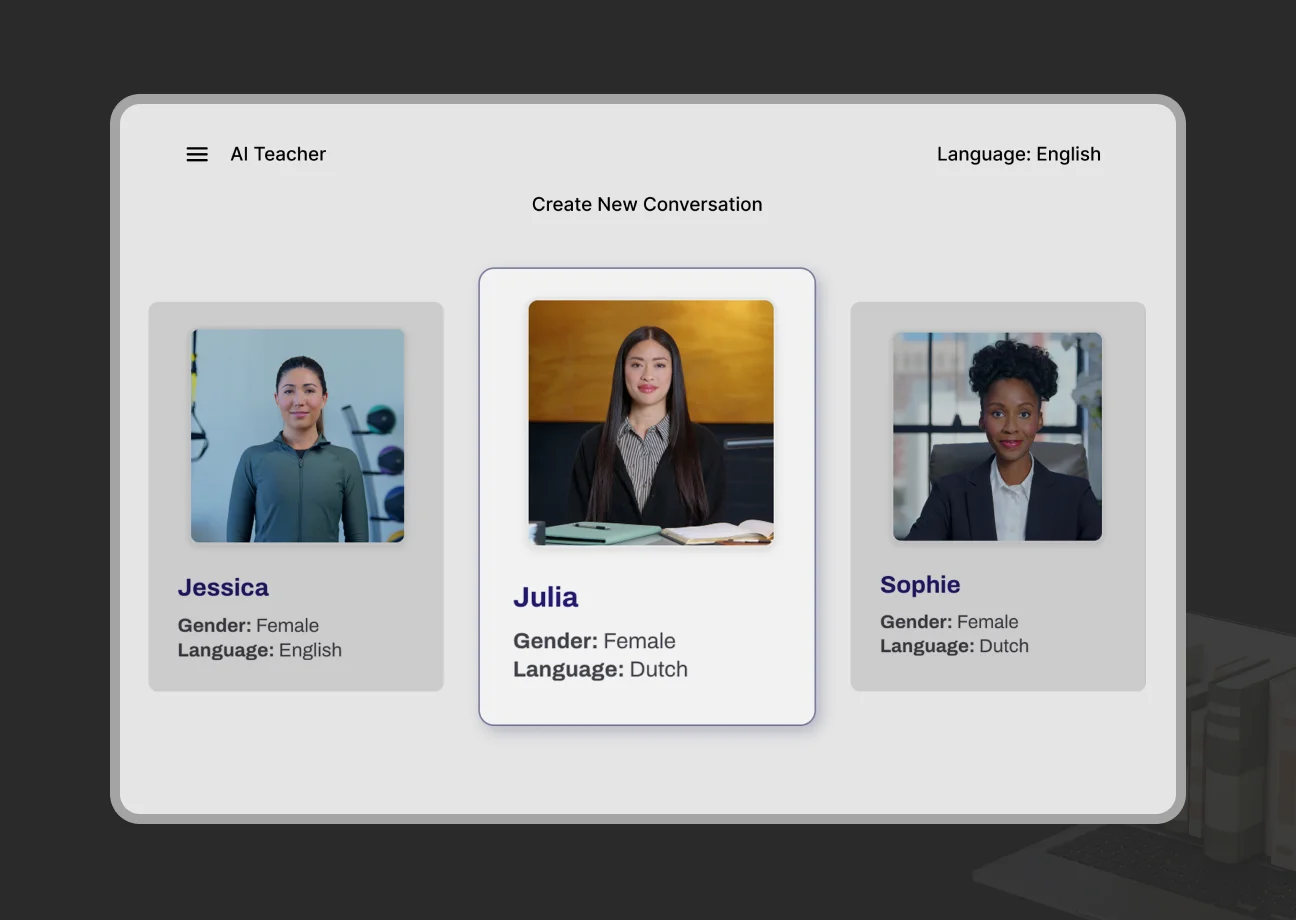
Let's look at the solutions we implemented for language learners:
- The system uses real-time reacting avatars with matching facial expressions and speech to provide students with a more natural conversation experience;
- The assistant perfectly works with high activity levels. That means multiple students can interact with avatars at the same time without performance issues;
- SapientPro’s voice-enabled AI teacher delivers instant feedback to students about their grammar and pronunciation. Students can learn through this system without interrupting the natural flow of conversation.
Case Study #2: AI-Powered Voice Assistant for Arabic-Speaking Audiences
SapientPro delivered a sophisticated AI voice assistant designed to navigate the linguistic and cultural complexity of Arabic-speaking markets.
The solution enables real-time understanding of dialects, intent, and emotional tone, allowing conversations to adapt dynamically and feel natural to end users.
The project required overcoming several technical and contextual challenges:
- Handling multiple Arabic dialects alongside frequent switching to French and English;
- Ensuring low-latency responses for seamless, real-time interaction;
- Generating speech with accurate pronunciation, tone, and emotional nuance;
- Maintaining contextual awareness throughout the conversation.
Despite these complexities, the final solution delivers measurable business value. It improves user engagement through personalized communication, enhances accessibility across diverse audiences, and reduces friction in voice-based interactions.
The assistant’s ability to accurately interpret dialects and respond contextually positions it as a powerful tool for companies targeting multilingual and regionally diverse markets.
Partner with SapientPro to Redesign Your E-Learning Solution
SapientPro has more than 9 years of experience in developing custom AI solutions. We provide comprehensive platforms that have all the necessary features for effective learning.
Our engineers help educational organizations and businesses design and redesign their e-learning systems and ensure they have the software they need.
Reach out to our team to schedule a meeting with our experts.
Build Your Learning App Today
SapientPro's team will provide a detailed estimate for your needs.