Creating the PropJump Service Search Experience
Smart Vendor Find
Key+Cat+Loc
Material UI Stack
Reusable UI
SEO-Ready Build
Quick Index
PropJump is a research platform built for commercial real estate investors. It pulls together scattered ownership data, market activity, and property insights into one clean interface. By cutting out the grunt work of cross-referencing sources and digging through public records, PropJump helps investors uncover off-market opportunities and make faster, better-informed decisions with context that matters.
Our Collaboration Story
PropJump approached us with a clear product vision: a platform to help users connect with commercial real estate (CRE) service providers. With the concept and design in place, they partnered with us to build both the frontend and backend — including a public-facing website and an admin panel for easy content updates.
We worked closely with their team to integrate and test the full application. The platform now allows users to find experienced CRE professionals quickly and without unnecessary friction. The collaboration continues, with our team focused on expanding features, refining performance, and improving the platform’s visibility across search engines.
Challenges
Complex Search Logic Implementation
Building a search system that supports text, category, subcategory, and location filters, while maintaining performance and SEO readiness, required careful architecture and conditional rendering.
Strict Design and Component Constraints
The project called for extensive use of Material UI components with minimal customization. This limited visual flexibility and demanded extra precision in translating Figma files to working code across desktop, tablet, and mobile views.
SEO and Analytics Integration
Each page required dynamic SEO metadata, indexation logic, and event tracking connected to Google Analytics and Search Console. This added layers of conditional behavior tied to content structure and user interactions.
Asynchronous Coordination with Backend and Admin Tools
The frontend had to accommodate features like listing submission, vendor reporting, and admin tools, while backend implementation and integration responsibilities were shared and evolving during development.
Platform Features for CRE Vendor Discovery
Service Search With Filters
Users can search for commercial real estate service providers using keyword, category, subcategory, and location filters, helping them find relevant vendors quickly.
Templated Vendor Pages
Each vendor has a dedicated profile page that displays contact details, business information, categories, and service areas: all pulled dynamically from structured data.
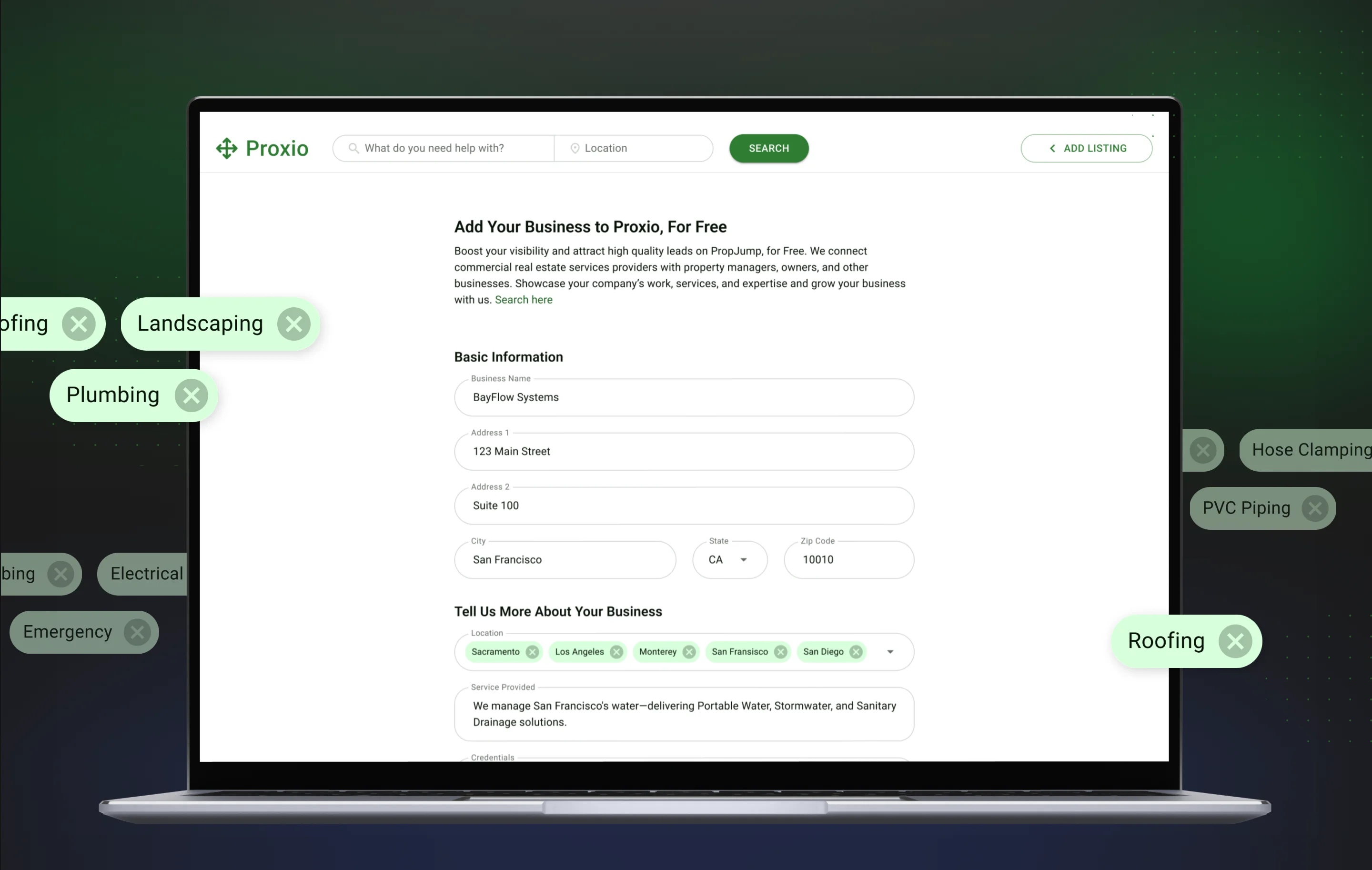
Add Listing Functionality
New vendors can submit their business through a public form, which sends their details directly to the admin team for review and inclusion.
Admin Dashboard and Mass Upload
An internal portal allows admins to view, edit, delete, or add vendor listings manually or via CSV uploads using a built-in preview and upload tool.
Lead Form & Admin Integration
“Request Quote” buttons on vendor pages open a multi-step form capturing lead data. Submissions are tracked and displayed in the admin panel for follow-up.
SEO-Friendly Architecture
Search and vendor pages are structured for Google indexing, with dynamic metadata, breadcrumb markup, and a sitemap that updates as new listings are added.
Analytics and Event Tracking
User activity — such as listing submissions, searches, and page interactions — is tracked with Google Analytics, providing insights for future product growth.
Solutions
01
Modular Search System
We implemented a flexible search module that supports text queries with structured filters, including location-aware filters. Dynamic query handling respects Google indexing rules and keeps vendor discovery fast for commercial real estate users.
02
Material UI-Centered Development
The interface uses Material UI components, with system elements reused across pages and layouts matched carefully to Figma. Spacing and breakpoints were tuned for desktop and touch screens without heavy custom styling.
03
SEO and Analytics Setup
For SEO and analytics, we added dynamic meta tags, open graph data, and page-specific index rules. Key pages send custom events to Google Analytics, which helps the team see how users search, open vendor profiles, and submit their listings.
04
Vendor and Admin Interfaces
We designed a vendor submission flow with a clear listing form, then paired it with compact admin tools for reviewing and editing entries. Admins can update records individually or rely on CSV uploads when they need to introduce larger data sets.
05
Lead Form Development
To turn vendor visits into leads, we added a multistep Request Quote form that collects contact details with job context. Submissions land in a dedicated admin tab with live updates, email notices, and tracking events for every key interaction.
PLANNING A NEW PRODUCT?


Max Tatarchenko
CTO with 14 years of experience in solution architecture and engineering, specializing in blockchain and smart contracts. His broad expertise drives innovation across diverse technology projects.
CTO with 14 years of experience in solution architecture and engineering, specializing in blockchain and smart contracts. His broad expertise drives innovation across diverse technology projects.
PLANNING A NEW PRODUCT?